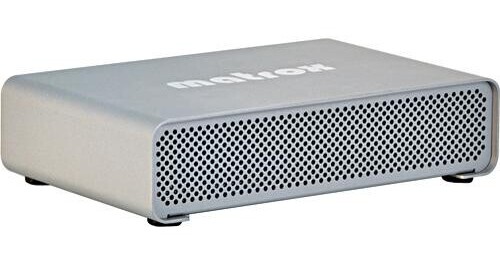
Matrox MXO2 Mini Max for Laptops

  • Free Item Included:
  • Class on Demand Black Card ($99.95 Value)
  • Free Item Included:
  • Class on Demand Black Card ($99.95 Value)
  • B&H # MAMXO2MML
  • Mfr# MXO2MINIMAX/L

Product Highlights

  • Mac & PC
  • Use with Laptops
  • Max H.264 Encoding
  • Breakout Box
  • I/O Device
  • Multiple Audio/Video Inputs & Outputs
  • Small Footprint
  • Video Capture, Playback & Conversion
  • Use with Industry-Standard Applications

Protect Your Purchase


What item is right for you?

Ask our Experts!

800.259.5450
Live Chat
Matrox MXO2 Mini Max for Laptops
Some Accessories/Components not shown

The MXO2 Mini Max for Laptops from Matrox is a device that combines the functionality of an HDMI & Analog I/O card in the form factor of a miniature breakout box. It will capture, convert, and play multiple video formats. This model features an adapter that is specifically designed for use with laptops, although a separate MXO2 PCI-E Host Card Adapter can be used to make the unit compatible with desktops. This model additionally features Matrox MAX technology for faster than real-time H.264 encoding.

The Mini Max's small footprint makes it easy to transport. It is compatible with both Mac and PC systems, as well as most industry-standard applications, such as Final Cut Pro, Adobe Premiere Pro, and Photoshop, among others. Moreover, its color-calibration tool can be used to turn your HDMI monitor into a professional-grade video monitor.

Note! Adobe Premiere Pro CS5 support for Mac OSX to be available in early November 2010.

This model is designed for use with laptops
This model features Matrox MAX technology for faster than real-time H.264 encoding
This device works with Mac and PC platforms
It features a small footprint and is easy to connect to cameras and monitors
Capture and play back high-definition video in multiple formats
Turn your HDMI screen into a professional-grade video monitor with color-calibration tools, including blue-only
A 10-bit hardware, scaling engine allows for real-time up-scaling, down-scaling, and cross-conversion on capture and playback
This unit supports 5.1 and 7.1 surround-sound monitoring on the HDMI output
Edit AVCHD footage by capturing into an edit-friendly compressed or uncompressed format
It is compatible with your applications such Final Cut Pro, Adobe Premiere Pro, and Adobe Photoshop, among others
Inputs Video:
HDMI HD 10-bit
Component HD/SD 10-bit
Y/C (S-Video) 10-bit
Composite 10-bit

Audio:
(2) RCA stereo pair (unbalanced)
HDMI embedded up to 8 channels
24-bit 48kHz

Outputs Video:
HDMI HD/SD 10-bit
Component HD/SD 12-bit
Y/C (S-Video) 10-bit
Composite 10-bit

Audio:
(2) RCA stereo pair (unbalanced)
HDMI embedded up to 8 channels

System Requirements Mac Pro and Intel-based MacBook Pro running Mac OS X Leopard 10.5.6 or higher
PC desktops and laptops running Windows XP (32-bit), Windows Vista (32- and 64-bit), Windows 7 (64-bit)
Dimensions (HxWxD) 6.5 x 4.6 x 1.5" (166 x 110 x 40mm)
Weight 9.9 oz (280g)

REVIEW SNAPSHOT®

by PowerReviews
Matrox MXO2 Mini Max for Laptops
 
3.8

(based on 6 reviews)

Ratings Distribution

  • 5 Stars


    (4)

  • 4 Stars


    (0)

  • 3 Stars


    (0)

  • 2 Stars


    (1)

  • 1 Stars


    (1)

67%

of respondents would recommend this to a friend.

Pros

  • Compact (5)
  • Professional quality (4)
  • Easy to use (3)
  • Improves performance (3)

Cons

    Best Uses

    • Independent films (3)
      • Reviewer Profile:
      • Business owner (4), Professional artist (3)
      • Was this a gift?:
      • No (6)

    REVIEWS

    Reviewed by 6 customers

    Sort by

    Displaying reviews 1-6

    Back to top

    (1 of 1 customers found this review helpful)

     
    5.0

    Great Product!

    By Burrdude

    from Detroit, MI

    About Me Business Owner

    Verified Buyer

    Pros

    • Compact Design
    • Easy To Use
    • Highly Compatible
    • Professional Quality

    Cons

      Best Uses

      • Home Movies
      • Independent Films
      • In The Studio

      Comments about Matrox MXO2 Mini Max for Laptops:

      Great Product! Have been looking at this item for some time. Using with Avid Media Composer on a PC. (Also works with After Effects even while MC is running - at the same time!) Installation was easy, and product worked perfectly on the first project without a hitch. Have not used MAX option yet, but intend to soon.

      • Was this a gift?:
      • No

      Comment on this review

      (1 of 1 customers found this review helpful)

       
      5.0

      Absolutely works as advertised

      By Temeculan

      from So Cal

      About Me Hobbyist, Professional Artist

      Verified Buyer

      Pros

      • Compact Design
      • Easy To Use
      • Highly Compatible
      • Improves Performance
      • Lightweight
      • Professional Quality

      Cons

        Best Uses

        • Complex Projects
        • Independent Films
        • In The Studio

        Comments about Matrox MXO2 Mini Max for Laptops:

        Can't think of anything negative against it. The MXO2 mini works flawlessly thus far. The Max technology truly gives faster than real time encoding to high quality h.264 files.

        • Was this a gift?:
        • No

        Comment on this review

        (1 of 1 customers found this review helpful)

         
        1.0

        Watch out! No color correction over HDMI

        By Curt

        from Boston, MA

        About Me Business Owner

        Pros

        • Compact Design

        Cons

        • Lacks Functionality
        • Limited Compatibility
        • Poor Performance

        Best Uses

          Comments about Matrox MXO2 Mini Max for Laptops:

          I bought this for color correction only to learn that it does not work as advertised. This is from the MXO2 manual: "...turns your HDMI monitor into a true-color video display...adjust and control your HDMI monitor exactly as you would a broadcast HD/SD video monitor ..." It's just incorrect. You cannot calibrate correctly to HDMI with the product. If you go to Creative Cow and search "Matrox MXO2 Mini Calibration Issues" you will find more details.

          It's been almost a year since Matrox (who admit this problem) said they were working to fix it and nothing has come of it.

          • Was this a gift?:
          • No

          Comment on this review

          (1 of 2 customers found this review helpful)

           
          2.0

          Doesn't work with my laptop

          By 3dandvfx

          from Aliso Viejo, CA

          About Me Professional Artist

          Verified Buyer

          Pros

            Cons

              Best Uses

                Comments about Matrox MXO2 Mini Max for Laptops:

                Matrox mini doesn't work with my Toshiba P505-S8946. Every time when I started Premiere CS5 it just locked up. I sent it back and hope to receive my many soon.

                • Was this a gift?:
                • No

                Comment on this review

                 
                5.0

                Awesome, awesome!

                By Petross

                from Greenville, SC

                About Me Business Owner, Independent Filmmaker, Professional Artist

                Verified Buyer

                Pros

                • Compact Design
                • Easy To Use
                • Improves Performance
                • Professional Quality

                Cons

                • Sits backwards for access

                Best Uses

                • Critical monitoring
                • Easy IO

                Comments about Matrox MXO2 Mini Max for Laptops:

                Got the MX02 to use with Final Cut and (yea!!) Avid Media Composer 5 on my new MacBook Pro. Works flawlessly! Set-up was a dream, and integration with both applications is rock solid. (I wish Avid would open this box up for something other than monitoring, but that's another story.) With its internal setup controls my inexpensive 32" HD LED-LCD television can be set up for critical monitoring. I'm very happy with this product!

                • Was this a gift?:
                • No

                Comment on this review

                 
                5.0

                Just Excellent

                By Rcobos

                from São Paulo, Brazil

                About Me Business Owner

                Verified Buyer

                Pros

                • Compact Design
                • Improves Performance
                • Professional Quality

                Cons

                  Best Uses

                  • Independent Films

                  Comments about Matrox MXO2 Mini Max for Laptops:

                  Great to export H264 faster than real time. Excellent to create Bluray Disc.

                  • Was this a gift?:
                  • No

                  Comment on this review

                  Displaying reviews 1-6

                  Back to top

                  Hardware Expansion

                  Matrox -  MXO2 PCIe Host Adapter
                  • Price: $99.00
                   

                  Cables & Cable Management

                  Comprehensive -  Standard Series HDMI 30 AWG 1.3a Cat 2 Cable (6')
                  • Price: $10.39
                   

                  Power Accessories

                  Matrox -  MXO2 Battery Power Cable
                  • Price: $67.99
                   

                  What's in the Box

                  Matrox MXO2 Mini Max for Laptops
                  • MXO2 PCI-E Express Card 34 Adapter
                  • 3' PCIe Cable
                  • External Power Supply
                  • 2 x S-Video Adapters
                  • Three-Year Hardware Warranty & Complimentary Telephone Support
                  Included Free
                   
                   
                  See any errors on this page? Let us know.

                  Close

                  Close