Search results for: tips solutions Audio feed
About 33 filtered results
by Zack Young · Posted
Whether you're outfitting a tiny conference room or a massive ballroom, PTZ cameras can help you pan, tilt, and zoom your way to the best angles and most effective ways to communicate your message during a video conference. With PTZ camera setups varying wildly in size, price, and configuration, we're breaking down possible workflows for different kinds of scenarios.
1. Home Office
If you're just outfitting a setup for yourself, a single

by Mathew Malwitz · Posted
If there’s one area of wildlife photography that challenges even some of the most consummate artists, it’s birds in flight. A dynamic flight shot shows action, and a bit of technical prowess. As you can imagine, capturing birds in flight is no easy feat.
To consistently capture these shots, one must be proficient with their gear and have a knowledge of animal behavior. We’d go as far as to say you need a bit of luck too, but what is luck if not preparedness meeting opportunity. In order to make the most of the opportunities that present

by Steven Esposito · Posted
So, you have taken the first steps into the wild world of livestreaming. You’ve gathered the necessary tools, found the right computer for the job, and now you are ready to create interesting content. But you might be wondering how to do the livestreaming part. It can feel a bit overbearing and complicated, but it is actually quite easy. Today we are going to go over how to get started with a world-renowned, free-to-download program called Open Broadcaster

by Rebecca Melville · Posted
If you have found yourself moving, downsizing, or going away to school, you might be dealt a desk area that is drastically smaller than that to which you are accustomed. If this is you, or will be you sometime soon, a small workspace is no reason to panic. With some intention and a bit of finessing, you can cultivate a sleek and functional small desk setup without compromising on quality. I am going to share some helpful pointers with supplementary products to consider while you transition into a new, smaller workspace.
Lose the Monitor Base

by Zack Young · Posted
While it may be tempting to prop your phone against a book, shoot one long clip of your podcast, and send that clip straight to the interwebs, that strategy probably won’t rocket you to the top of the charts. By taking a more thoughtful approach to editing and posting your video podcast, you can unlock the full potential of the form and grow a dedicated, engaged audience. Today, we’re going over four of the most important considerations when it comes to editing your video podcast.
Multi-Camera vs. Single Camera
Shooting with one camera (or
by Jennifer Hahn · Posted
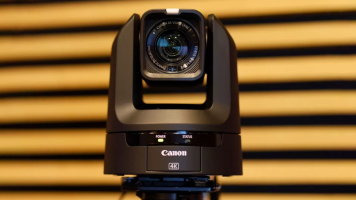
For multi-camera environments—such as house of worship, conference centers, product demos, remote education environments, or even multi-camera video podcasts—PTZ (pan-tilt-zoom) cameras are a great choice as they are easy to control remotely with small crews. One of the easiest ways to get your cameras up and live streaming quickly is with the Blackmagic Design

by Trevor Collins · Posted
These days it often seems like everyone has a podcast. With so much competition and so many options for podcasting-centric equipment, it can be daunting to dive in headfirst without knowing the ropes. That’s where B&H comes in, with another all-encompassing guide to set you up for success and help you get your content off the ground as painlessly as possible. Let’s begin.
Why Make a Podcast?
The first topic couldn’t be simpler: Why even start a podcast? The answer is simple−because it’s the best way to get your content to the masses

by Gabby Bloch · Posted
If you’re just starting out on your podcasting journey, it may be helpful to refer to our podcasting glossary. It provides common terminology pertaining to everything podcast related, from equipment to recording and mixing, distribution and more. We have also divided the terms into various categories to simplify your search.
Table of Contents:
Audio Terms
Podcast Equipment
Podcast Recording & Production

by Darrell Holdaway · Posted
There is a first time for everything, and if you have your mind set on producing a wedding video, you will encounter plenty of “firsts” during that initial wedding weekend. There is a first kiss, a first dance, and a first slice of cake. Where will you have your cameras set up for each of these memorable moments? Will you need lights for every shot? How will you manage the audio? When the bride says “I do,” you will want everything in place to ensure that you capture every word and angle. This guide will address equipment needs, event

by Gabby Bloch · Posted
While there is a ton of information about DI boxes for electric and bass guitars out there, keyboardists are often overlooked. In this article, we’ll explore whether you need a DI box for your keyboard setup and give you a better idea of the kind of DI box that’s suitable for your particular instrument. We’ll also provide you with some product examples to make your search easier.
Do I Need a DI Box for My Keyboard?
In many cases, you may not

by Freddy Gerngross · Posted
In-ear monitors, or IEMs, are an integral part of any professional live performance. They sound better and are much smaller than stage wedges, offering musicians a far more effective monitoring solution by delivering consistent sound no matter where they are on stage. Depending on your budget and intention, adding IEMs to your workflow can be either a modest upgrade to your setup or serious evolution of your production value. In this guide, we'll be going over the advantages (and disadvantages) of IEMs as well as some of the intricacies and

by Shawn C. Steiner · Posted
Wedding season is upon us! Whether you are a wedding photographer, videographer, or the one getting married, the question of livestreaming the event has probably come up. Keeping in touch with distant relatives via video calls is now much easier and sometimes you want to invite people to the big day who just can’t make the trip. If you want to learn how to livestream a wedding using Sony cameras, follow along for a few different options, ranging from simple to professional.
The Core Accessories
Before we get started, we are assuming you want

by Shawn C. Steiner · Posted
By this point, I'm sure nearly everyone has joined more video calls or meetings than they can count. For better or worse, it seems that even if our lives start to return to "normal," the idea of video conferencing and livestreaming will remain just as strong. Now, you might be wondering how to use a current camera (or future one) for streaming or even just how to upgrade from your device's built-in webcam. You have come to the right place to learn how to stream from just about any modern camera.
Option 1 (Best Quality): Clean HDMI or SDI

by Shawn C. Steiner · Posted
Whether you want a professional look for your livestreams or simply to look better on your next video chat, one of the best options is to use a dedicated camera with excellent video specs—such as your Canon EOS DSLR, mirrorless, or PowerShot camera. To help facilitate the process Canon has introduced the EOS Webcam Utility for connecting the

by Shawn C. Steiner · Posted
Whether you want a professional look for your livestreams or simply to look better on your next video chat, one of the best options is to use a dedicated camera with excellent video specs—such as your Sony Alpha mirrorless or Cyber-shot point-and-shoot camera. You will need a few key accessories to make it happen, but the benefit is well worth it.
Why Use a Sony Camera Instead of a Webcam?
The main reason you want to use a Sony camera over a webcam is for the