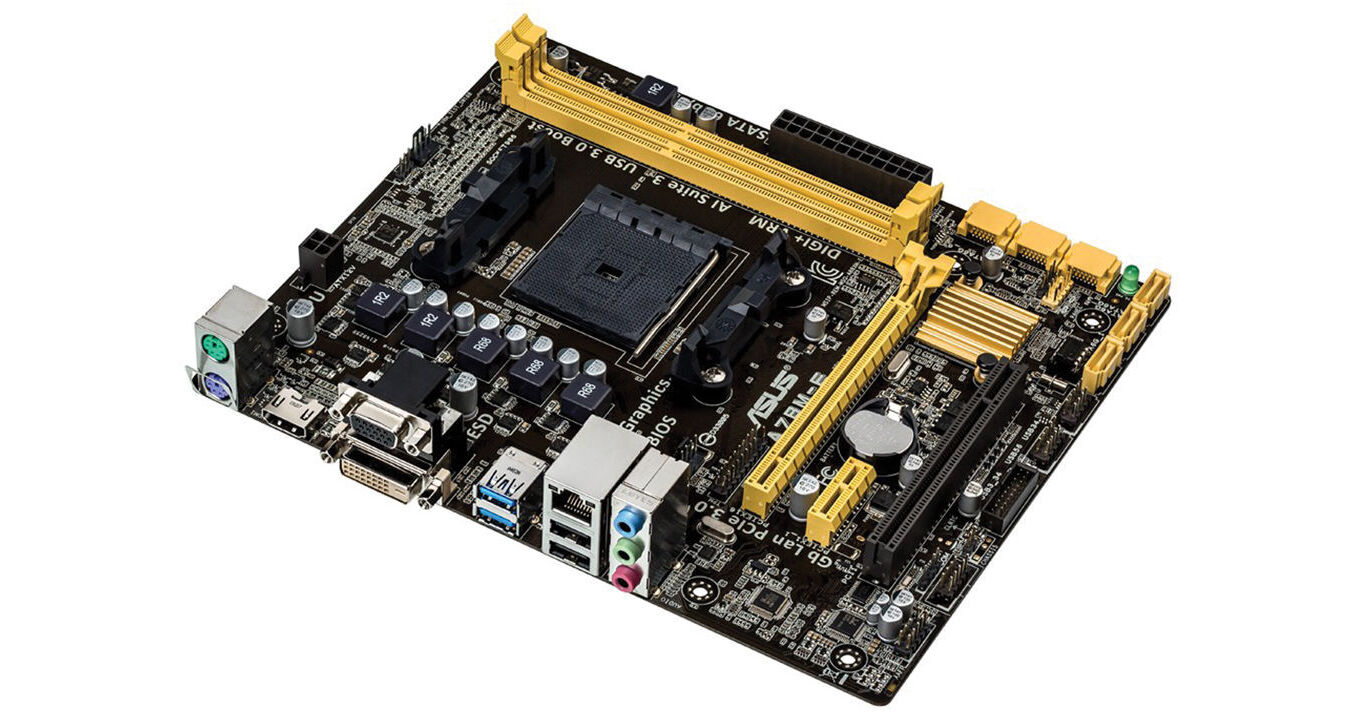
The A78M-E Micro-ATX Motherboard from ASUS features a micro-ATX form factor to fit in smaller towers. With an FM2+ socket, the A78M-E supports AMD A-Series and Athlon processors. The UEFI BIOS features a user-friendly interface with more accessibility, thanks to EZ Mode, My Favorites, Shortcut, and more. The A78M-E also has 5X protection, which uses quality components, such as DIGI+ VRM digital power design for precise APU power on demand, ESD units tested to strict standards that eliminate electrostatic interference, and fuses that can be reset around DRAM slots to prevent overcurrent and short-circuit damage. There is even a corrosion-resistant back I/O shield for reliability and durability.
5X Protection
DIGI+ VRM
Voltage regulator modules (VRMs) are among the most essential motherboard components. A good VRM intelligently delivers APU power based on actual needs at any given time. ASUS provides a digital power design featuring fast sensing and response to deliver precise APU power on demand. The accuracy reduces energy waste and improves system stability thanks to more consistent delivery.
Enhanced DRAM Overcurrent Protection
Onboard fuses can be reset to prevent overcurrent and short-circuit damage. This extends beyond I/O ports to DRAM to safeguard system and device lifespan.
ESD Guards
Electrostatic discharges (ESD) can happen suddenly, and their damaging effects are often underestimated. ASUS ESD Guards offer an active protective circuit design that ensures electrostatic discharges are properly grounded, providing component longevity.
5K-Hour Solid State Capacitors
ASUS high-quality solid state capacitors assure a 5,000-hour lifespan, equivalent to 2.5 times longer than traditional capacitors. All capacitors pass testing under temperatures as high as 105 degrees Celsius and meet Japanese industrial standards to provide durability and enhanced thermal capacity.
Stainless Steel Back I/O
ASUS motherboard back I/O panels are made from strong and corrosion-resistant stainless steel, which is bonded with a thin layer of chromium oxide to enhance anti-corrosive properties. Passing 72-hour spray salt endurance tests, ASUS stainless steel back I/O panels have a usage life three times longer compared to ordinary panels.
UEFI BIOS
EZ Mode
Fast clock adjustment allows you to change the time and date in EZ Mode using the mouse. Quickly apply D.O.C.P settings in UEFI BIOS EZ Mode, achieving DRAM performance. Detailed fan controls come to EZ Mode so you can switch fan profiles for quick cooling and noise-level supervision. Displays each SATA port details for you to recognize each device.
My Favorites
F4 or right click to add settings to My Favorites under Advanced Mode, which cuts time spent on searching and further speeds up system tuning.
Shortcut
Now you can customize your own shortcut log by pressing F4 or right clicking to create shortcuts to frequently-used settings. Instantly access them by simply hitting the F3 hotkey.
Quick Note
Quick Note works inside the BIOS so you can just type remarks and ideas to help you remember important settings info and save time on trial and error.
Last Modified
The Last Modified function creates a tuning log to track your BIOS settings history, which can be saved onto a USB drive.
SATA Port Renaming
You can rename your SATA ports for better identification, including by usage scenario. Spend less time on finding the right devices when you want to change settings.
Performance Optimization
USB 3.0 Boost
ASUS USB 3.0 Boost technology supports UASP (USB Attached SCSI Protocol) in Windows 8. With USB 3.0 Boost technology, a USB device's transmission speed is significantly increased up to 170%, adding to already fast USB 3.0 performance. ASUS software automatically accelerates data rates for compatible USB 3.0 peripherals without any user interaction.
Network iControl
One click to prioritize network traffic for applications you're currently using, or set up favorite profiles to run at specific times. Avoid network congestion, speed up downloading, and make sure online gaming runs optimized, all through an intuitive user interface.
PCI Express 3.0
PCI Express 3.0 uses improved encoding that provides twice the performance of PCI Express 2.0. Total bandwidth for an x16 link reaches 32GB/s, delivering high data speeds combined with the convenience and seamless transition offered by complete backward compatibility. Please note that only FM2+ processors can support PCIe 3.0.
Complete USB 3.0 Integration
ASUS facilitates USB 3.0 accessibility for both the front and rear panel. Experience Plug-and-Play connectivity at speeds up to 10 times faster than USB 2.0.
SATA 6 Gb/s
ASUS provides SATA 6 Gb/s ports with enhanced scalability, faster data retrieval, and double the bandwidth of SATA 3 Gb/s.
Q-Slot
Press the Q-Slot clip lightly, and graphics cards just pop out. The large winged clip is easy to reach so you don't have to struggle with installing or removing even the biggest graphics cards.
AMD A-Series Accelerated CPU with AMD Radeon R Series Graphics
This motherboard fully supports AMD Socket FM2+ Kaveri APUs with AMD Radeon R series graphics, and retains compatibility with AMD Socket FM2 (Richland and Trinity) APUs. AMD Socket FM2+ APUs support Microsoft DirectX 11.1 for fast and smooth graphics, native PCI Express 3.0 for full-speed expansion, and 4K resolutions via HDMI and DisplayPort connections.
AMD A78 FCH(Bolton D3)
AMD A78 FCH (Bolton D3) is designed to support up to 5 GT/s interface speed and PCI Express 2.0 graphics. It natively supports six SATA 6 Gb/s ports and four USB 3.0 ports.
Included Software
AI Suite 3
ASUS AI Suite 3 offers a user-friendly interface with support for larger monitors. It consolidates all exclusive ASUS features into one simple-to-use package, allowing you to supervise overclocking, energy consumption, fan speeds, voltages, and more. This all-in-one app offers diverse and easy-to-use functionality, with no need to switch back and forth between different utilities.
EPU
Get total system-wide energy optimization by automatically detecting current PC loads and intelligently moderating power consumption. It can manually switch to Away Mode, so that you can download and stream content or back up data when away from your PC, which minimizes power draw, creating a more efficient PC.
Fan Xpert
ASUS Fan Xpert intelligently allows you to adjust CPU and case fan speeds according to different ambient temperatures in diverse climate conditions and locations, as well as actual PC loading. Various preset fan performance profiles offer flexible fan speed controls to achieve a quiet and cool environment.
CrashFree BIOS 3
ASUS CrashFree BIOS 3 allows users to restore corrupted BIOS data from a USB flash drive or support CD containing a BIOS file. This utility saves you the cost and hassle of buying a replacement BIOS chip.
EZ Flash 2
Quickly update your BIOS from a USB flash drive before entering the OS. It only takes a few clicks with no need for an OS-based flash utility.
Multi-Monitor Support
AMD Dual Graphics Technology
AMD Radeon Dual Graphics is an exclusive technology only available to AMD platforms. It allows AMD APUs and selected AMD Radeon HD 6000 series graphics cards to work together, delivering immersive 3D gaming graphics and performance. By combining both the discrete and integrated graphics processors, gamers can now enjoy faster and smoother frame rates on their favorite PC games.
AMD Eyefinity Technology
Supporting multiple independent display outputs simultaneously, AMD Eyefinity technology delivers innovative graphics display capabilities enabling massive desktop workspaces and ultra-immersive visual environments for an immersive panoramic experience.
Work on up to 3 Displays
Connect up to three independent monitors at once using video outputs such as HDMI, DVI, or VGA. Choose your outputs and set displays to either mirror mode or extended mode.
Eco-Friendly
GreenASUS
Motherboards are EU Energy-related Products (ErP) ready, which requires products meet high efficiency standards with regards to energy consumption. This is in line with the ASUS vision of creating environmentally-friendly and energy-efficient products through design and innovation that reduce the carbon footprint of products and thus mitigate ecological impact.
Windows 8 Exclusive
ASUS Boot Setting
Thanks to ASUS Windows 8 hardware optimization, ASUS Boot Setting provides flexibility in customizing your PC's startup process. You can shorten system boot-up time to 2 seconds for a smooth user experience under Windows 8 and even previous versions of Windows. Also, you can enter the BIOS directly with one click through a user-friendly interface, and quickly select your preferred system boot up method: either get to the OS in seconds or opt for regular boot up. Whatever your choice, settings are saved and persistent, with no need to choose every time you power on.