From Manufacturer
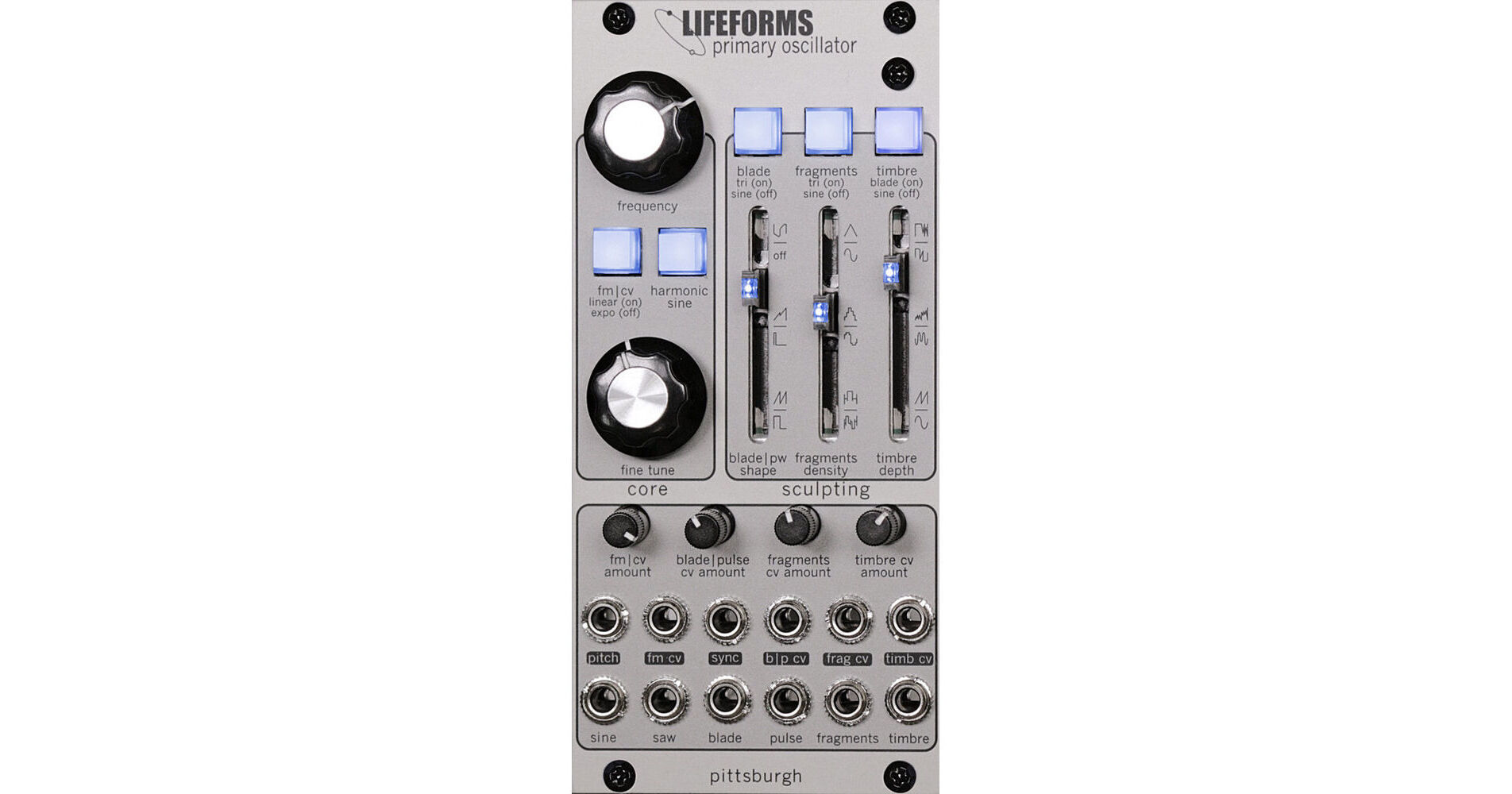
The Pittsburgh Modular Lifeforms Primary Oscillator is an analog oscillator that allows for a uniquely musical approach to experimenting with an array of infinitely variable waveforms for your Eurorack modular system. It uses a unique cascading waveform processing, which through the use of multiple interwoven waveshapers can quickly mutate a simple waveform into deeply dynamic and harmonically rich sounds.
Custom waveshapers include a harmonic sine wave that's processed to add just enough harmonics to give your resonant filter something more to dig into. The blade wave processor is an evolution of the company's custom modulation circuit for creating modulable ramps and pulse waves.
The fragments generator is an analog downsampler capable of crushing waveforms without sounding thin or cold. The timbre wavefolder enables deep spectral changes by repeatedly folding the waveform in on itself until the original waveform is unrecognizable.
- Frequency knob: Frequency control sweeps from LFO through the full audio range.
- Fine Tune knob: limited range frequency control.
- FM CV button: Switch the destination of the FM input jack between linear FM (on) and exponential (off) modulation.
- Harmonic Sine button: Switch between sine wave (off) and harmonic sine wave (on). Harmonic sine wave adds a minimal number of harmonics to a sine, allowing for a new set of timbres to emerge.
- FM CV amount trimmer: FM input attenuator control.
- Pitch input: 1V/octave pitch-tracking CV input.
- FM input: linear FM or exponential CV input.
- Sync input: hard-sync oscillator reset input.
- Sine Wave output: Sine wave or harmonic sine wave output.
- Saw Wave output: Saw wave output.
- Blade core wave source button: Select the waveform used as the core wave for the blade wave. Triangle (on) or sine (off). If sine is selected, the harmonic sine button affects the blade wave shape.
- Blade pulse-width slider: Manual blade wave shape and pulse width control. This slider acts as an offset when modulation is used.
- Blade pulse CV trimmer: Blade wave shape and pulse-width CV input attenuator.
- Blade pulse CV input: Blade wave shape and pulse-width CV input.
- Blade Wave output: Blade wave output.
- Pulse Wave output: Pulse wave output.
- Fragments Wave source button: Select the waveform used as the core wave for the fragments wave. Triangle (on) or sine (off). If sine is selected, the harmonic sine button affects the fragments wave shape.
- Fragments Density slider: manual fragments density control. This slider acts as an offset when modulation is used.
- Fragments CV amount trimmer: fragments wave periodic voltage sample timing CV input attenuator.
- Fragments CV input: fragments wave periodic voltage sample timing CV input.
- Fragments Wave output: fragments wave output.
- Timbre Wave Source button: Select the waveform used as the core wave for the timbre wave—Blade (on) or sine (off). If Blade is selected, all of the modulation and modifications made to the Blade wave cascade into the wavefolder. If sine is selected, the harmonic sine button affects the fragments wave core.
- Timbre Depth slider: Manual wave folder control—this slider acts as an offset when modulation is used.
- Timbre CV amount trimmer: wavefolder depth CV input attenuator.
- Timbre CV input: wavefolder depth CV input.
- Timbre Wave output: wavefolder output.