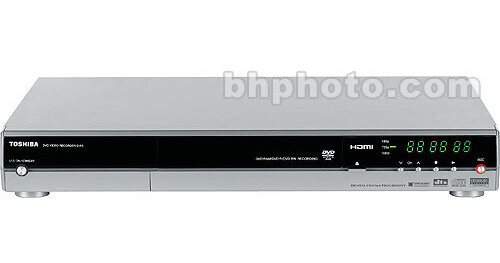
Toshiba's D-R5 Multidrive Multiformat DVD Recorder allows you to record to DVD-RAM, DVD-R or DVD-RW discs. It also plays for DVD-RAM, DVD-R and DVD-RW as well as CD-R and CD-RW discs with recorded MP3 and WMA files. The D-R5 comes with several outstanding features such Auto-Title/Chapter/Thumbnail creation and Time Slip Recording and Playback. You can now watch a recording that is already in progress or pause Live TV at a certain moment and then watch it later, as if there were no pause. In addition to five levels of recording options, you have access to EASY NAVI menu that updates you with the status of the DVD recorder. For your convenience, this recorder has several front-panel input terminals, such as RCA, A/V and S-Video.
Recordable DVD Media
Record your favorite video content to DVD-RAM, DVD-R and DVD-RW discs. Use MPEG-2 digital video format for stunning quality.
Media Playback
Plays video content from DVD-RAM, DVD-R and DVD-RW discs. You can also enjoy recorded compact disc with MP3 or WMA playback. D-R4 also allows you to enjoy JPEG source.
Time Slip Recording and Playback
Allows you to record programs ahead of your availability. It then allows you to play back the missed part while recording the next segment of the program. You can also pause live TV at a certain moment and come back later to watch from the same moment. Instant replay of TV programming is also possible.
Progressive Scan Component Video Output
Use D-R5's component-video output to feed high-quality video signal to your TV. If your TV supports the more stable and flicker-free progressive scan, image quality is further enhanced due to higher resolution (compared to interlaced video).
3-2 Pulldown
Your TV can now display video programs originally shot on 24 frames per second, which includes most film-based content.
Auto Title/Chapter/Thumbnail Creation
Manage your video content with the help of a menu that is created when you record. The menu displays the channel and date, as well as a thumbnail of your video content. In addition to assigning a 64-character title, you can also create chapters, either at predetermined intervals or at specific points you determine within your recording.
Preset Recording Modes
Provides you five preset recording quality setting with your choice of bit rates. Depending on your choice, this feature allows you to choose different recording time (1 hr, 2 hr, 3 hr, 4 hr and 6 hr) for DVD discs.
Front Panel A/V and S-Video Input Terminals
For your convenience, this recorder has several input terminals on the front panel. Use these terminals to connect a camcorder or other audio or video input.