Canon VK-16 Network Video Recording Software (v1.3)

BH #CAVK16NVR • MFR #9513A029
Print
Canon VK-16 Network Video Recording Software (v1.3)
No Longer Available
No Store Display
Ask an Expert
800-952-1815

Canon VK-16 Overview

The VK-16 is Canon's network software program for the VB-C300 Wide Angle PTZ network camera. Presented as a cost effective alternative to the VK-64, this program offers some additional features and improved usability over the 1.1 version, and at the same time retains backwards compatibility with the VB-C50i, VB-C50iR, VB-C50Fi and VB-C50FSi network cameras.

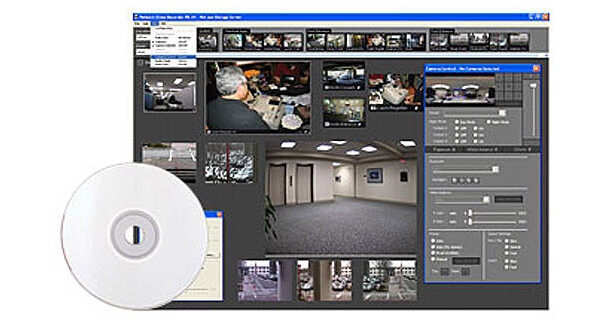
Incorporating an intuitively designed GUI, this software provides a user with fingertip control over all camera functions. Working from a remote networked PC, a user can select any camera to view its images as well as to operate its full range of PTZ functions. A user can also select any video material and record it to a server over the network for archival purposes.

These and other features make it an indispensable tool for applications looking to realize the full potential of a VB-C300 camera.

Supports Up to 160 Network Cameras
VK-16 is designed to allow multiple cameras to be managed for viewing and control from a single PC workstation loaded with a powerful yet easy to use software program. As a company's surveillance needs grow, it will need to add more and more cameras as well as additional servers to support those cameras. VK-16 supports up to 16 Canon cameras per server, 10 simultaneous viewers per server and up to 10 servers per PC workstation. In this way, VK-16 has the ability to handle up to 160 network cameras without suffering any degradation in quality or performance.
Backwards Compatible
Although developed for the VB-C300 camera, this program fully supports Canon's older model PTZ network cameras. This allows an administrator to take advantage of everything this program has to offer without having to replace older cameras.
Operator-Friendly GUI
Canon designed the VK-16 so that even a new user will master its operation in as little time as possible. Intuitively arranged icons and menus along with drop-down scroll bars and drag and drop functions, allow an operator to quickly locate an appropriate tool to perform a desired operation. VCR-style controls provide effortless play, rewind and FF operations, with additional buttons available for frame by frame picture advancement.
Multiple Recording Modes
An operator can select any camera to record its images to a video server over the network. Recording can be continuous or programmed to begin at a date and time, when motion is detected or when triggered by external sensor devices. This saves valuable storage space and also makes it easy to locate a particular footage by doing a search based on those factors.
Customizable Viewing Area
Video viewing windows can be arranged in many different ways. For example, an operator can have a single large viewing window with a bunch of smaller video frames surrounding it, move windows around at will or grab the edge of any window to expand or shrink it. Videos can also be viewed in full screen with the icons temporarily disappearing from view for maximum screen coverage. A Layout Sequence Function allows an operator to store window arrangements into memory. An operator can then with the click of the mouse quickly bring up a window layout that best suits a particular application.
Advanced Picture Control
Each video frame is accompanied by a range of icons, giving an operator fingertip control over all of the video properties. If a picture appears too dark or washed out, an operator needs only to click on the appropriate icon and immediately correct it. An operator can also apply IR illumination to any camera even if that camera's IR function happens to be in the off position.
Adjustable Frame Rates and Resolution
A camera's frame rates and resolution can be fully adjusted to satisfy a particular need. An operator for example, can choose a higher resolution when viewing and recording new footage and a lower resolution when archiving to a video server. Similarly, an operator can choose to lower a camera's frame rates to suit a particular network bandwidth or to allow more clients to access the same camera simultaneously.

Canon VK-16 Specs

Canon VK-16 Reviews

See any errors on this page?
Whatever You Need, We've Got It