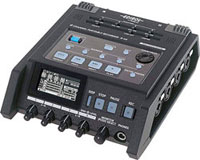
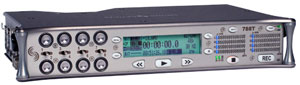
How to Use a Portable Audio Recorder in Field ProductionBy Sam MalleryA portable field recorder is one of the most commonly used tools in electronic field production, but how it connects to other field equipment (such as video cameras, portable field mixers, wireless microphones, etc.) isn't terribly obvious. There are so many different models available with varying capabilities (some have time code, and others do not, some have multi-tracking, and others do not, and so on) that it can be confusing as to which recorder would best suit your needs. This article will hopefully show you some of the ways you can use a portable audio recorder, and to explain its various controls and features. A Basic OverviewA portable digital recorder is a compact device that runs on batteries and allows you to create high-quality audio recordings on removable digital media and/or internal drives. Portable digital recorders can be used to make recordings on their own, or you can connect them to other equipment and record audio from outside sources. Many models feature USB or FireWire ports that allow you to connect them to a computer in order to transfer the recordings you create onto the connected computer's hard drive. Most models allow you to select the quality of file you want to record in (WAV files, MP3 files, etc.).
Portable recorders are commonly used in conjunction with other field production equipment. They are often placed in an audio bag alongside portable field mixers, wireless microphone receivers, IFB systems, etc. Field mixers usually have multiple outputs. Their multiple outputs make it possible to send the same audio to more than one device. It's a common practice to send one output of the mixer to a portable audio recorder, and another output to the audio inputs of a video camera. Doing so creates two copies of the audio, one on the portable recorder and the other on the video camera:
The audio recorded into the portable recorder typically sounds better than the audio recorded into the camera. The audio circuitry built into the video camera isn't nearly as elegant as the guts of a portable audio recorder. Video cameras also compress audio as they record, which further decreases the quality of the sound. So why should you bother patching audio cables over to the video camera if it doesn't sound as good? In a production you never know when a piece of electronic equipment is going to malfunction. If the audio fails on either end, you will have a second copy to cover you. When you're shooting extensive amounts of footage, it can get increasingly taxing to keep track of what audio files are supposed to accompany what video files or video tapes. Syncing the externally-recorded audio with the video in post production can be very time consuming. This is where time code really comes in handy. Time CodeThe very mention of the term "time code" tends to strike fear in the hearts of those unaccustomed to working with it. Time code is simply a protocol that gets encoded into audio and video footage that allows you to sync and lock the recorded audio with the video in post production. For a deeper understanding of the subject be sure to check out this informative B&H educational article. Portable recorders with built-in time code generators capable of syncing with other devices are expensive. To keep costs down, most portable field recorders do not include internal time-code generators. However, some portable audio recorders will feature inputs that enable them to sync with external time code generators. The Tascam HD-P2 is a good example of this kind of recorder. It's a nice option for someone who doesn't need time code currently, but may need to sync with it in the future.
Many higher end professional video cameras feature internal time-code generators with outputs to sync external devices. Common devices that will often be synced with cameras and portable recorders are time code slates. These peculiar-looking tools should be familiar if you've ever seen footage of a professional production crew at work. The digital screen on the face of the slate displays the time code. This is useful for editors in post production to be able to visually check if the time code of the footage is synced properly.
Some of the more professional portable audio recorders will feature internal time code generators with the ability to sync external devices. Devices with built-in time code generators often also have the ability to sync to external time code generators. There are never two time code generators operating at once. One generator will be the master, and the other devices will slave to it. All time-code generators are not created equal. The generator in may not be as accurate as the generator in the portable recorder, or vice versa. External time code generators (also referred to as Sync Boxes) like the Denecke SB-T are generally considered to be more accurate.
Since audio is such an important element of video and film production, there are often production scenarios that call for more than two tracks of recorded sound. Reality programs are among the most popular shows on television. These shows will regularly have numerous people wandering around, all of them wearing wireless microphones. Since their actions are unscripted, the challenge of mixing all of those separate wireless microphones down to two tracks is often too risky. One solution is to use a portable audio recorder with multi-track capabilities.
Multi-Track Portable RecordersA standard audio recorder typically has two tracks. The two tracks are most commonly used for recording left and right of the stereo spectrum. Multi-track recorders have the ability to record separate tracks beyond just left and right. Portable multi-track recorders feature separate inputs for each separate track. In a reality television shoot where you have four contestants scrambling around a parking lot, you can have each of their wireless microphones recorded onto its own audio track. It's a smart way to work in a production environment when using multiple microphones because you're a lot less likely to miss important dialog or sounds.
Special purpose portable audio recordersThere are a couple of portable audio recorders that have been designed to act as both the portable audio mixer and recorder built into one. The Fostex PD-606 and the PD-204 are both integrated field mixers/recorders with built-in time-code generators. The difference between the two models is that the 606 is also a multi-track recorder. The 204 has four inputs and allows you to mix them down and record them to two tracks, while the 606 has six inputs and records onto six separate tracks.
The Zaxcom ZFR100 is a small beltpack-sized device that records high-quality audio with time code. You can plug a lavalier microphone directly into it, or keep one in your bag and send the audio to it for a failsafe copy. The addition of the STA-100 accessory expands the device into a two track line input recorder, and gives it time code and audio outputs. What about all those buttons and controls? Portable audio recorders tend to be fairly simple machines, they just don't always look that way. Some models enable you to edit the audio directly inside the recorder, so navigation and editing buttons are needed. Most recorders give you some way to name the files you create to keep things organized, and more buttons are needed for these functions. It's not uncommon for portable recorders with microphone inputs to have basic controls like preamp gain knobs, phantom power buttons, and mic/line switches. Below we have created a chart with some of the popular portable audio recorders sold at B&H. If you're interested in smaller, handheld portable recorders that are capable of making high-quality recordings, check out the B&H Handheld Digital Audio Recorders Buyer's Guide. Portable audio recorders without time code:
Portable audio recorders with time code:
If you'd like to learn more about electronic field production, be sure to check out these other B&H educational articles: The B&H Guide to Portable Wireless Systems The B&H Guide to Portable Field Mixers The B&H Handheld Digital Audio Recorders Buyer's Guide The B&H Guide to Choosing a Shotgun Microphone How-to Minimize Wind Noise When Using a Shotgun Microphone The B&H Guide to Choosing a Shockmount for a Shotgun Microphone The B&H Guide to Alternative Microphones for use on Boompoles The B&H Guide to Lavalier Microphones How-to Use a Plug On Transmitter with a Portable Wireless System Thanks for reading this Pro Audio Insight article! Naturally, if you have any further questions about portable audio recorders, electronic field production, or any questions about professional audio in general, don't hesitate to contact us at 1-800-416-5090 For a list of all products highlighted in this article, click here. | |||||||||||||||||||||||||||||||||||||||||||||||||||||||||||||||||||||||||||||||||||||||||||||||||||||||||||||||||||||||||||||||||||||||||||||||||
Please email feedback on this article, or suggestions for future topics, to [email protected].Top Pro Audio categories:Recording | Desktop Audio | Keyboards & Synths | ENG, EFP & Broadcast | Live Sound & PA Accessories |