We are not accepting orders at this time. Online ordering will resume Monday, May 28th at 9:45PM EDT. Our SuperStore and offices are currently closed and will reopen on Tuesday, May 29th at 9:00AM EDT.
We apologize for any inconvenience and appreciate your patronage.
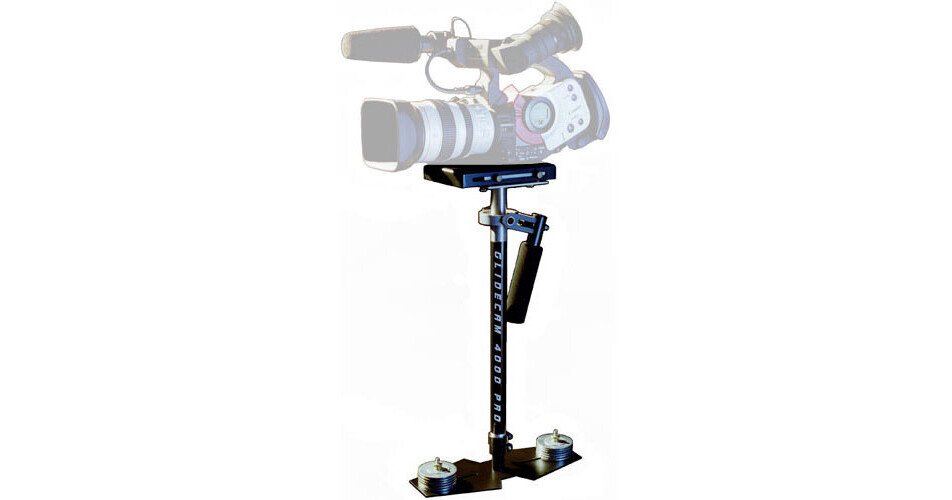
Imagine a world in balance. Imagine smoothness, freedom and grace. With the Glidecam 4000 PRO your camcorder floats, always balanced, isolated from your hand's undesirable motions. Now you are free to move with your camera panning, tilting, booming or running without any camera instability or shake. Lightweight, hand-held camcorder stabilizing systems allows you to shoot incredibly smooth and graceful shots, even while running up and down stairs or traveling over rugged terrain. And when it comes to normal shooting, like walking or moving the camera slowly around someone, the results are equally magical. Shot after shot, move after move, it delivers beautifully smooth and professional results. With the Glidecam 4000 Pro you no longer need a tripod or a dolly. All you need is your imagination!
| Construction | Aluminum |
| Load Capacity | 4.0 to 10.0 lbs |
| Vest | Optional Body-Pod |
| Arm | Optional Forearm Support Brace |
| Head Assembly/Top Stage | Adjustable |
| Quick Release | No |
| Docking Bracket | No |
| Dovetail Plate | No |
| Gimbal | Free floating, precision Gimbal |
| Dynamic Spin | 360-degree panning and tilting |
| Post | Telescoping (no tools required) |
| Monitor | No (optional monitor could be mounted on Base) |
| Battery | No |
| Battery Mount | No |
| Optional Accessories | Low Mode Kit |
| Weight | 3.1 lbs (without counterbalance disks) |
REVIEW SNAPSHOT®
by PowerReviewsPros
Cons
Best Uses
A month or less | 57% (4 reviews) | |
One-to-three months | ||
Three-to-six months | ||
More than six months |
Most Liked Positive Review
Nice product
I got this for my EX1 and I can tell you that it works just great. It's a handy piece, and it's well built.
A few things to be aware of...Read complete review
I got this for my EX1 and I can tell you that it works just great. It's a handy piece, and it's well built.
A few things to be aware of though:
- The balancing is an art in itself, it takes a while to get it right. At least in my case, even pivoting the viewfinder will put the system off balance with the need to readjust. It's not hard to do the finetuning, I'm guessing it's just the laws of physics at work here. I wonder how the more expensive systems solves the finetuning though, I sure hope they have come up with easier ways to achieve it. The manual that comes with the 4000 Pro is pretty decent though.
- I also got a Manfrotto 577 Quick Release Adapter Assembly, it's definitely a good thing to have. Otherwise the rebalansing is more difficult, because the upper plate of the 4000 Pro needs to be completely loosened to get the camera off of it. So get the quick release adapter as well, you'll thank me later.
- Lastly, the 4000 Pro with the camera attached weighs quite a lot, and longer shots or repeats will quickly make your hand tired, making it impossible to keep shooting. I'm thinking of getting the Glidecam Smooth Shooter. I think it's a must for someone who really wants to use this thing. But I wanted to try it out without the added cost first.
That's all folks, enjoy!
VS
Most Liked Negative Review
Good First Time Flyer & Not High End
I picked up the Glidecam 4000 this past month because I wanted to add some extra shots into my bag of tricks for weddings (and for some other productions I have in mind). I...Read complete review
I picked up the Glidecam 4000 this past month because I wanted to add some extra shots into my bag of tricks for weddings (and for some other productions I have in mind). I bought the forearm brace sight unseen because I figured I would need it. I'm shooting with a GL2 and wanted the extra weight capacity to stick a light on top for reception footage so I went with the 4000 over the 2000 (I weighed the camera & light at a tad over 7 pounds).
The build quality is decent (for the money) but shortsighted in design (more later). Balancing is a royal PITA since there is no single point to screw / unscrew to change the balance. Four thumbscrews (per axis) are required to change balancing making slight adjustments or quick adjustments nearly impossible.
The over all look is .... clunky & cheap (though I suppose that is the point of a budget device such as this). If you had $4K to spend, you would be heading over to Steadicam, and not the knock off Glidecam. Steel washers with nuts & bolts hanging out? You better have either one of the following in order to pull this off:
1) great footage and clients that know they are getting a good deal on their productions or
2) a relatively clueless client (ie not someone in the industry) that is happy to get such "professional" equipment.
3) be an amateur shooter so it is all for fun and looks don't matter.
The gimble is unfortunately positioned too close to the camera base mounts to allow the offset handle to provide your camera with much downward movement below the plane of your chest. This means your hand movement is concentrated below the gimble (meaning shots at or above waist / chest angle at the lowest) to avoid knocking the base plate with the handle.
The second major problem I noticed was that the provided mounting screws for a camera only provide one point of contact. There is no spring loaded video pin to fit into the camera base and prevent the camera from rotating around the screw. And since the camera mounting base is slick black metal, the camera WILL rotate around on the base if you bump it or of you make sudden moves. This is one of the 4000s weaker points and something for which I swore at it when balancing and while shooting. If there were just a few strips of dense rubber on the top (running the length of the top bracket) then cameras might stick to the mounting plate and not swivel around if bumped. I applied a line of cork dots usually used for kitchen cabinet door padding as a DIY fix.
The forearm brace is necessary if you aren't going to spring (pun!) for the arm & vest ($1500 here on B&H). Unfortunately, the arm brace holds in sweat like you cannot possibly imagine, and requires taking a few of the velcro straps off to get in and out. Don't do this during a wedding ceremony or in an environment where loud velcro noises are not welcome. You will not stay discrete. A fix is to adjust the brace so it is loose enough to get in & out with out touching the velcro, but this puts more of the weight of your camera & glidecam on your wrist instead of the forearm brace.
Now to my uses of the system. I spent the usual several hours balancing (good static and passable dynamic) and a few more flying through the house / yard before the wedding shoot this weekend. The first thing I noticed when balancing the rig is that mounting a camera absolutely positively requires a QR plate receiver and QR plate on the camera (I purchased these from B&H just this week). There is NO way to remove the camera with out destroying any balance you had for the unit. Expect any camera changes to be at a minimum 30 seconds to get it off and another 5 minutes or so to re balance when returning the camera to the Glidecam. Also, you have to securely stow the camera mount screw & washer as well as the four plate adjustment screws because they are not attached in any way to the rig.
I attached my Panasonic GS320 (entirely too light weight for the 4000) with some weights attached under the black camera mount frame to make up for the slight weight of the camera. No weights were used on the bottom and the post was almost retracted the entire way up. Drop time was around 1.5 seconds. This provided a good frame of reference and clear proof that the Glidecam 4000 is NOT meant for light weight cameras with out goign to the hardware store to buy some extra bolts & washers, etc.
My use of the Glidecam at a wedding (I'm a videographer) highlighted a few wedding specific problems...
1) With the lack of any quick way to mount the camera, the 4000 is useless for weddings unless you have a dedicated camera on it or a QR plate on the camera and a QR receiver on the Glidecam. And even then, slight adjustments might be needed which take far too long with the 4000.
2) The mounting screw lacks the offset spring loaded peg so anything you mount might swivel around if it gets bumped. Not exactly durable for rough shooting environments.
3) Vertical movement is NOT easy because the gimble is mounted too close to the bottom of the camera mounting plates and will knock up against the plates when trying to hold the rig low in order to shoot low to high angle reveals.
4) and this goes practically with out saying, the rig is very heavy when held at arms length and torquing on your wrist. I could not use it any longer than about 20 seconds at a time.
Having said all that, I think the experience shooting with one of these devices was valuable. It will help me expand what shots I think of, and certainly has a niche to fill beyond the MultiRigPro which is pretty lousy for smooth walking shots, even when held with the side handles tilted up and the camera "under-slung". I'm not sure it was worth the price, given the construction materials and what I think are pretty shortsighted (and trivial to fix) design flaws. The only part that seemed well machined was the gimble. Everything else looked like painted stamped metal that is trivial to make in bulk, but probably hard to make as a one off.
If it says anything though Mark & Trish of Tulsa Weddings / aka Von Training use both the MultiRigPro and the Glidecam, so professional results can be achieved with much practice and in the hands of skilled shooters.
If you are trying to decide between the Glidecam and the Steadicam Merlin, then budget and your potential uses will dictate the choice. If you can go for it, the Merlin is far superior (from what I have read). If you will be shooting in windy conditions, he Merlin is useless because it is too light weight. The Glidecam will be about your only hand held option. If you need to maintain a professional look, skip all Glidecam products and go directly to the Steadicam Merlin or Pilot. If you want real results but have a tight budget, run away from the U-Fly and all other knock offs and give the Glidecam a try.
It may not be sleek and professional looking like the Merlin, but it gets results and in some cases is better than the Merlin.
REVIEWS
Reviewed by 49 customers
Sort by
Displaying reviews 1-20
Previous | Next »
Pros
Cons
Best Uses
Comments about Glidecam 4000 PRO Camcorder Stabilizing System:
I've been following the instructions and the online tutorials for hours. I've also actually graduated college and find it extremely difficult to balance this glidecam. ;)
Pros
Cons
Best Uses
Comments about Glidecam 4000 PRO Camcorder Stabilizing System:
It's a bit cumbersome and hard to balance the first couple of times, but once you get it down the results are very nice. The rig really does create a smooth motion by isolating jerky hand motions. It is a wise investment for any film maker as well as wedding and event video work.
Pros
Cons
Best Uses
Comments about Glidecam 4000 PRO Camcorder Stabilizing System:
Takes A while to balance depending on your camera... but after an hour I had it out the box, built, set up and balanced...
Use it for filming on a DSLR... definitely buy a base plate adapter to save time.
Really happy with mine :)
Pros
Cons
Best Uses
Comments about Glidecam 4000 PRO Camcorder Stabilizing System:
I purchased the Glidecam 4000 pro only a few weeks ago and I can't keep my hands off it. It works perfectly.
I take to my tafe i go to to use on all my student films, which no one has ever used these types of shots at this tafe before until now.
Smooth, Professional design and all-round awsomeness.
Pros
Cons
Best Uses
Comments about Glidecam 4000 PRO Camcorder Stabilizing System:
A little tricky at first to get used to and to figure out how to balance correctly, but once you do, it will become one of your favorite additions to your video equipment! I used it while filming a wedding and it was a huge hit in the video!
Pros
Cons
Best Uses
Comments about Glidecam 4000 PRO Camcorder Stabilizing System:
This items is lacking good instructions in the box and is very sensitive to rig configuration changes. WWW offers many tutorials for setup and correct balancing.
Pros
Cons
Best Uses
Comments about Glidecam 4000 PRO Camcorder Stabilizing System:
am shootin a feature film and am using the glidecam to shoot the making of the movie which is going to aired in te local satellite television..its great with no shakes and vibrations ,its very light weight to handle and to carry....
Pros
Cons
Best Uses
Comments about Glidecam 4000 PRO Camcorder Stabilizing System:
As soon as I got this, I knew it was a great buy. I use a canon xl1s and it works great. I bought the arm brace and it helps A LOT. takes a little while to balance but you can find videos online teaching you the best way to balance it, once you have it balanced just practice practice practice. its a great buy and for the money can't be beat. it has added a professional look to our weddings.
Pros
Cons
Best Uses
Comments about Glidecam 4000 PRO Camcorder Stabilizing System:
I'm using canon 5d mark II and this glidecam is a bit overkill consider the weight of the camera, but this is a good product for my Canon XH A1s
Pros
Cons
Best Uses
Comments about Glidecam 4000 PRO Camcorder Stabilizing System:
A very helpful product to have with anyone using a cannon 7d. Improved the quality of my shots tremendiously. I was very satisfied with the learning curve and the ease in use.
A must buy for any filmmaker.
Pros
Cons
Best Uses
Comments about Glidecam 4000 PRO Camcorder Stabilizing System:
Over all very basic. The construction is not quite what I was expecting. But it works. And that is really why I give if four stars instead of just three. For the price, it is definitely worth getting to improve the professionalism of your shots.
Pros
Cons
Best Uses
Comments about Glidecam 4000 PRO Camcorder Stabilizing System:
Finally purchased a Glidecam after wanting one for so long. I purchased this particular Glidecam for my Canon 7D and will primarily be using it for that camera as well. I found that you really don't need too many counter weights with the 7D. There are plenty to spare.
Even though you can almost instantly get smoother shots once you do your initial balance, one must still practice as much as possible with the Glidecam to get it perfect.
The initial balance takes some time, especially with the DSLRs due to the nature of distributed weight in a DSLR, but once that is set rebalancing is relatively simple.
The one thing about this Glidecam is that it does not have a quick release plate like the next gen version, the 4000HD. That is probably my only gripe about it. Other than that, just keep practicing with it and you'll love the results.
Pros
Cons
Best Uses
Comments about Glidecam 4000 PRO Camcorder Stabilizing System:
bought this Glidecam 4000 Pro for doing wedding video. I tried one wedding without it and there was nothing much that was useful out of that. Then I bought this and all the videos were nice and smooth. I even did some video by chasing my kids around the backyard with is and it looked like the camera was on rails. I use a 5D MarkII and the balancing was wonderful.
Pros
Cons
Best Uses
Comments about Glidecam 4000 PRO Camcorder Stabilizing System:
There is a lot of set up time involved with this product. However, if your looking for professional steady shots and are willing to practice a little - this could work for you. It has for me so far
Pros
Cons
Best Uses
Comments about Glidecam 4000 PRO Camcorder Stabilizing System:
I heard so many good and bad about the glidecam, but decide to buy one and try it, at first glance kinda disappointed, the camera just tilted from side to side, back and forth, went online and follow a really good tutorial, and got really close within 2 hrs of putting it together, Got to tell that once you get it stabilized or close enough its REALLY exiting, furthermore the footage looks amazing!!! Just a quick tut! start the right amount of weighs, then drop time, front to back than side to side, be patient and you will get it at least 95% right. with time you'll get it to 99% even 100%.
Pros
Cons
Best Uses
Comments about Glidecam 4000 PRO Camcorder Stabilizing System:
Look, I thought I could handle the weight (I have a Sony HD1000u - 6lbs), but after getting this thing put together and balanced, my arm/shoulder was already shaking. The beauty of the Glidecam design lies in the precision gimble. If you aren't able to comfortably hold this away from your body using only the gimble handle, then you defeat the purpose of the product and compromise your stabilization. If your throwing something like a 5D on here, it works beautifully. But, any camera over 5 lbs, I would recommend against it.
Pros
Cons
Best Uses
Comments about Glidecam 4000 PRO Camcorder Stabilizing System:
Bought this to help stabilize moving shots with my Canon 5D Mark II. I'm definitely glad I made the purchase. The assembly was fairly straight forward (if you read the instructions properly!). Don't let the packaging fool you - packing paper taped around the pieces like steak from the butcher - this is a very solid, professional product. You will need quite a bit of practice, though, so don't expect to go shooting a paid gig right out of the box. Give yourself time. If you're using it with a dSLR and thus are removing the camera from the base plate after every use, allocate at least 15-20 minutes before use for balancing the unit again (every time you put the camera back onto the Glidecam you need to follow the procedure to balance it). If you don't balance it carefully, you definitely won't have the best results. But if you put the time, get used to it, and balance before use, you will have incredible, smooth, professional results! The model comes with at least a dozen weight rings, but if you're shooting with a Canon 5D Mark II, you'll generally only need 2. Also get the forearm brace to balance the weight on arm, because the rig w/ the camera is heavy. I'd even recommend starting to workout your forearms - sounds like a joke, but you'll need all the arm endurance you can muster to maximize shoot lengths.
Pros
Cons
Best Uses
Comments about Glidecam 4000 PRO Camcorder Stabilizing System:
Price is a huge factor for me, and this Glidecam fit the bill. I tell people how much it's going for these days and people reply with shock. At first I looked at one of those DIY kits, but for the price of manufacturing this can't be beat!
Can be a bit tricky with lighter cameras and HDSLRs that have no rails. It may be a bit more difficult to setup balance than other stabilizers, but once the gimbal is mastered I believe it out-performs the others. Plus, this model will support a great range of different sized cameras.
Once you get this gimbal setup, be prepared for great flexibility later on, with the addition of Arm/Vest setups, the monitor mounting point, compatibility with other manufacturer's materials, and so on.
Pros
Cons
Best Uses
Comments about Glidecam 4000 PRO Camcorder Stabilizing System:
I was video taping my brother in law's wedding and felt it was the time to enhance production value of my wedding video taping and decided to purchase the Glidecam4000. It truly gave me an edge up on glossy, steady shots. However, don't even think about using without a support vest, your arm will fall off in a few minutes without the help of a vest and arm.
Pros
Cons
Best Uses
Comments about Glidecam 4000 PRO Camcorder Stabilizing System:
I had no trouble getting the Glide Cam to balance. 45 minutes after opening the box I was in my back yard gliding away. I went to youtube and watched a few videos on it before it arrived and simply read the instructions and it worked as well as it was supposed too. It does take practice with the pan and tilt and without the forearm brace it's hard on your wrist, but it makes for the most amazing footage. I also bought a quick release plate and screwed it on the the main plate to that I could take it from the glide cam to a tripod in seconds. HIGHLY RECOMMEND THE QUICK RELEASE PLATE. My demo reels using the glade cam have secured more work for me due to the level of professional quality it adds to the productions. I use it on weddings and events like bike races and walks. Best investment I've made to date.
Displaying reviews 1-20
Previous | Next »