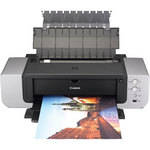
Canon Pixma Pro9000, Photo Quality, Tabloid Size, Inkjet Printer

  • Discontinued

    Availabillty Details

    Close

    This item has been discontinued by the manufacturer and is no longer available.

     - View a similar item
  • B&H # CAPP9000
  • Mfr# 9995A001

Protect Your Purchase


What item is right for you?

Ask our Experts!

800.606.6969
Live Chat

The Canon PIXMA Pro9000 Printer uses long-lasting, dye-based inks and produces brilliant, gallery quality prints up to 13 x 19 inches on a variety of specialty media and fine art papers. It uses Canon's high-performance, high-density 6,144 nozzle FINE print head to deposit precise and constant 2-picoliter ink droplets, delivering approximately 11-million droplets per square inch, to produce impressively detailed prints with remarkable quality and speed. The ChromaLife100 ink system combines the benefits of dye-based ink, Canon photo paper and FINE print head technology to produce long-lasting, beautiful prints. With an 8-color dye ink system, the Pro9000 produces a wide color space that rivals positive film and delivers vivid coloration and high glossiness. Indeed, the combination of the individually packaged inks (Cyan, Magenta, Yellow, Photo Cyan, Photo Magenta, Black, Red, and Green) and Canon Photo Paper Pro glossy stock creates beautiful finished images.

While the PIXMA Pro9000 printer borrows design elements from Canon's digital SLR line: curved edges reminiscent of the lines on Canon digital SLRs and 'pro-black' pebble finish, the Canon-to Canon synergy is not limited to style, color and curves. The EOS 30D Digital SLR connects directly with this printer via a PictBridge connection powering its advanced camera direct capabilities. This feature permits manual adjustment of color or black and white images from the camera's LCD screen all without the need of a computer connection or additional image management software. Professional users can now adjust contrast, color tone, saturation, color balance, and even add shooting information directly on to their prints. The Canon-to-Canon direct connection simplifies the professional photographers' workflow.

Furthermore, it is bundled with Canon Easy-PhotoPrint Pro software - a plug-in software program for Adobe applications Photoshop CS and Photoshop CS2, and Canon Digital Photo Pro (DPP) version 2.1, which permits one-click image transfer; offers simple settings for color management and allows users to configure printer settings once for images on multiple sheets. Among its myriad other features, the Easy-PhotoPrint Pro software facilitates the printing of RAW images (as a high quality TIFF or JPEG) without having to save from DPP software, and also creates pattern prints that demonstrates different color balance, brightness, and contrast than the original image and prints them on a sheet of paper for easy comparison.

High Quality Results
With a print resolution of up to 4800 x 1200 color dpi and Canon's advanced MicroFine Droplet Technology which uses a revolutionary nozzle system that ejects consistent prescribed-volume droplets as small as 2 picoliters - you'll get photo prints with remarkable detail that rival professional photo lab prints and text that is laser sharp.
8 Color ChromaPLUS Ink System
The 8 color ChromaPLUS ink system is designed to extend your color reproduction range significantly and reproduce colors that before now could only be printed professionally.
Fast Printing
Produce a photo lab quality 11" x 14" color photo in approximately 1 minute 23 seconds.
8 Individual Ink Tanks
The Canon Think Tank System featuring individual ink tanks combined with an intelligent ink management system lets you replace only the color that runs out, rather than an entire multi-ink cartridge containing unused ink, helping to reduce waste and save you money. A unique low-ink sensor alerts you when ink levels are low, so you can drop in a new tank and avoid running out of ink unexpectedly.
Long Life Prints
The ChromaLife100 ink system provides beautiful photos that can last up to 100 years - without fading or color shift - even when displayed.
Supports an Extensive Range of Fine Art Papers
Besides being able to print on all of the canon photo papers, the printer produces unsurpassed results with a full range of fine art paper products including PCM DEEP PV "hakou" papers, ARCHES Pure White Soft papers, CANSON Mi-Teintes and Canvas papers, and Hahnemule Torchon, and William Turner papers.
Advanced Drivers and Software Included
You have a range of professional printer features available when using the included Easy-PhotoPrint Pro Plug-in software for Adobe Photoshop CS/CS2, and there is an updated Canon print driver that provides advanced color controls, to get the most vibrant and accurate color in your prints.
Direct Photo Printing From PictBridge-Compatible Digital Cameras
Just plug in a select Canon Direct-Print digital camera or PictBridge supported digital camera, and you'll instantly have complete control of the Printers' customized functions including automatic printing using DPOF, index printing, partial image printing, multiple copy printing, exact size printing and more. It's amazingly simple because you operate it all straight from your camera. You can even add a date stamp - All without ever touching a computer. There is also expanded editing capability when using the Canon EOS D30 Digital SLR.
Printing Method
Printing Technology BubbleJet inkjet printing method with advanced MicroFine Droplet Technology
Maximum Resolution 4800 x 2400 dpi
Minimum Ink Droplet Size 2 picoliters
Ink Type ChromaLife100
Ink Palette Cyan, Magenta, Yellow, Photo Cyan, Photo Magenta, Black, Red, Green
Ink Cartridge Configuration 8 individual ink cartridges
Performance
Print Speed 4" x 6" Photo: 30 seconds
8" x 10" Photo: 51 seconds
11" x 14" Photo: 83 seconds
Input Buffer 42KB
Printer Duty Cycle Not Specified
Print Archival Life Up to 100 Years
Paper Handling
Maximum Paper Width 13.7"
Maximum Printable Area 13 x 23" (borderless)
Paper Sizes Letter, Legal, 4"x 6", 4"x 8", 5"x 7", 8"x 10", 13"x 19", U.S. #10 Envelopes, Custom Sizes (3.5 x 4.75" - 12.95 x 23")
Borderless Photo Sizes All sizes from 4" x 6" - 13" x 23"
Paper Types Most inkjet compatible paper products including canon photo papers and fine art papers
Maximum Paper Thickness 1.2mm (47 mil)
Paper Capacity 150 sheets (Plain paper) in auto sheet feeder
Single Sheet for Photo and Fine Art paper
Special Media Support Fine Art papers
Connectivity
Computer Interface USB 2.0 (Hi-Speed)
Compatible Memory Cards No
Direct Print Capable Yes (PictBridge)
Network Capable No
PostScript Support No
System & Software Requirements Windows System
  • Pentium II 300MHz Processor or better
  • Windows 98/98SE, Me, 2000 (SP4), XP
  • 128MB RAM
  • 400MB Available Hard Drive Space
  • USB Port
  • CD-ROM Drive
  • Color Display (800x600, 16-Bit color)
  • Microsoft Internet Explorer 5.0 or later

Macintosh System

  • PowerPC G3/G4/G5
  • Mac OS X (10.2.8 - 10.4.x)
  • 128MB RAM (256MB recommended)
  • 250MB Available Hard Drive Space
  • USB Port
  • CD-ROM Drive
  • Color Display (800x600, thousands of colors)
  • Current Web Browser
Physical
Status Display Indicator LEDs
Image Preview Display No
Front Panel Controls Power, Paper feed, Resume/Cancel
Power Requirements 110-240V AC, 50/60Hz
Dimensions (WxHxD) 26.0 x 7.6 x 13.9" (660 x 191 x 354mm)
Weight 30.8 lb (14.0kg)

REVIEW SNAPSHOT®

by PowerReviews
Canon Pixma Pro9000 Inkjet Printer
 
4.6

(based on 52 reviews)

Ratings Distribution

  • 5 Stars


    (36)

  • 4 Stars


    (12)

  • 3 Stars


    (2)

  • 2 Stars


    (1)

  • 1 Stars


    (1)

97%

of respondents would recommend this to a friend.

Pros

  • Easy to setup (30)
  • Easy to use (29)
  • Reliable (23)
  • Durable construction (19)
  • Fast print time (15)

Cons

  • Large footprint (20)

Best Uses

  • Photos (34)
  • Graphics & charts (10)
  • Professional documents (10)
  • Black & white documents (6)
    • Reviewer Profile:
    • Frequent user (29), Heavy duty user (5)
    • Primary use:
    • Personal (23), Business (10)

Most Liked Positive Review


Excellent value

I've owned the Pixma Pro 9000 for about 7 months now. I use it exclusively for photographic reproduction. My load is not heavy - I use it about once every 3 days.This is easily ...Read complete review

I've owned the Pixma Pro 9000 for about 7 months now. I use it exclusively for photographic reproduction. My load is not heavy - I use it about once every 3 days.This is easily the finest photoprinter I have owned, but then again my last one (an Epson) dated from about 4 years ago. It is easy to set up and use and flexible in terms of usable printing software. Reproduction is consistent with a properly calibrated monitor and multiple prints are internally consistent.Although there are a couple of plug-in printing programs supplied with the software, one of which is Photoshop compatible, I get my best results printing directly out of Canon Digital Photo Professional using the print with detailed settings. If I need to process the image in Photoshop, I save my final image as a tiff and open that in the Canon imaging program for printing. My primary print size is 13 x 19. I use Canon and InkPress paper ranging from Fiber Gloss to Photo Rag and have got excellent results on all types. The front loading tray option enables me to print on heavy (300 gm +) paper without any problems.Although paper size is somewhat restricted by the Canon presets, I have been able to successfully print the non-standard 11 x 14 size by 'fooling' the printer with an 11 x 17 setting.

Expertise: Above average

Problems Encountered: I have encountered two minor problems with this printer. First, about 3 of my prints showed banding. This occurred when I printed after a lengthy period of nonuse. I was able to fix this using the print head alignment utility that is part of the printer software. This failure rate is trivial compared with similar problems I have had with older photo printers.The second problem was a lock-up in the printer requiring a power down, unplugging, and restart after several minutes. This occurred randomly about 4 times and happened when I had left the printer 'on' all the time. I have since configured the unit to go into 'sleep' mode when not in active use and seem to have eliminated this issue by doing so.

VS

Most Liked Negative Review


Nice Printer, Bad Service

Printer produces very fine prints though not truly archival, good for preview and short term viewing. The software has glitches in the thick media use and overall is limited for expert level printing (some...Read complete review

Printer produces very fine prints though not truly archival, good for preview and short term viewing. The software has glitches in the thick media use and overall is limited for expert level printing (some compensation can be done in photoshop, though not the prefered method). For the person using epson matte paper.. you can get a richer black and better DMax with some other papers..Lexjet has some good ones though more expensive. For the money this is a good machine though this is my main concern- I had a faulty Canon cartridge which stopped the machine all together and the service was slow, the cartridge never reached my place and though it was their carriers' fault they dumped it in my lap. Never got the cartridge and still have the faulty one. Bought a new one. This says a great deal about a company to me. I have Epson and Hp large and small format printers and they are both excellent companies to deal with. There are a lot of excellent printers out there and in the end it's not the drums it's the drummer. True it was only a $15 cartridge but on a professional level I won't purchase canon again. I'm giving it 3 stars for value due to the expensive in cartidges- $1.20 per cc. Star ratings are on a pro level. Companies should think before they put PRO in front of a name.

Expertise: Professional for 25 years

Problems Encountered: Defective Canon cartridge.

Previous Equivalent Item Owned: Epson, HP

REVIEWS

Reviewed by 52 customers

Sort by

Displaying reviews 1-20

Back to top

Previous | Next »

 
5.0

simply stunning

By clickman

from Lincoln City, OR

About Me Frequent User

Verified Buyer

Pros

  • Durable construction
  • Easy Setup
  • Easy To Use
  • Reliable

Cons

  • Large Footprint

Best Uses

  • Photos

Comments about Canon Pixma Pro9000 Inkjet Printer:

As an enthusiastic amateur, I photograph a very wide range of subjects and for my very best work, I like having the ability to make beautiful prints in larger formats suitable for framing and gifting. The Canon Pro9000 is quite amazing. Color and detail are lab quality and for thicker art papers, the straight thru paper path provides trouble-free transport.

I believe the 9000 is a little larger than similar competitors, but the results are well worth rearranging a room to accomodate it. If you want to make larger prints but don't need them poster size, get this printer!

  • Primary use:
  • Personal

Comment on this review

(1 of 1 customers found this review helpful)

 
5.0

Amazing printer!

By pxlfreq

from California

About Me Frequent User

Verified Reviewer

Pros

  • Easy Setup
  • Easy To Use
  • Reliable

Cons

    Best Uses

    • Photos

    Comments about Canon Pixma Pro9000 Inkjet Printer:

    use: hobbyist level photography & prints

    Top notch quality! I use only Canon products all the way down to my shutter release cable. My EOS 450d produces amazing pics and this printer backs em up on the hard copy end with amazing prints!

    Anyone with the desire to control their own output and not rely on preset amateur settings will want to invest in a wide-format printer like this.

    I would've checked 'too much ink used', but the bottom line is, when you're printing huge full color photographs in super high resolution and detail, umm...yea..gonna use a lot of ink. It's not fair to list that as a con. That's the nature of large format printing folks...deal with it. It's not a design or engineering flaw. Oh yea, the same goes for 'large footprint'. Yea, it's a wide-format printer...hahaha...not a con people.

    • Primary use:
    • Personal

    Comment on this review

     
    5.0

    A high quality, reliable machine

    By SV Designs

    from Pebble Beach, CA

    About Me Frequent User

    Verified Buyer

    Pros

    • Easy To Use
    • Reliable

    Cons

      Best Uses

      • Graphics & Charts
      • Photos
      • Professional Documents

      Comments about Canon Pixma Pro9000 Inkjet Printer:

      The Canon line provides excellent print quality for demanding graphic arts projects. The Pro9000 handles poster sized paper in addition to legal, letter, and card sizes. Heavy paper stock is handled without a hitch.

      I've used tiled color printing to produce a large map with very precise matching at the edges.

      The latest Vista driver should be downloaded from Canon.

      • Primary use:
      • Personal

      Comment on this review

      (1 of 1 customers found this review helpful)

       
      1.0

      Not impressed

      By LSman

      from United States

      About Me Frequent User

      Verified Reviewer

      Pros

        Cons

        • Unreliable

        Best Uses

          Comments about Canon Pixma Pro9000 Inkjet Printer:

          I have had nothing but problems with this printer.
          The original one I purchased was faulty. Canon then sent me a replacement which has proven to be just as hopeless.
          Every single black and white print larger than 8x10 inches has shown consistent banding which occurs randomly across the print area.
          I had the print head replaced by a certified Canon dealer which failed to resolved the problem.
          Now, I have had to send off samples of prints to Canon so they can "review the problem".
          I wish I had never purchased this printer as it has proven to be greatly unreliable.

          Would I recommend this product?, Absolutely not.

          • Primary use:
          • Business

          Comment on this review

           
          4.0

          Super printer

          By tinwhistle

          from Wisconsin

          About Me Heavy Duty User

          Verified Reviewer

          Pros

          • Durable construction
          • Easy Setup
          • Easy To Use
          • Fast Print Time

          Cons

          • Large Footprint
          • Too much ink used

          Best Uses

          • Photos

          Comments about Canon Pixma Pro9000 Inkjet Printer:

          I am a semi pro and up-graded from my old S900 printer, it wore out after 5 or 6 years. I've had the pro 9000 for about 6 months and have printed hundreds of photos, dozens of them at 13x19.I watch the print settings very closely. If I get a poor print it's my fault. My customers have nothing but praise for the product I provide. It is heavy and has a large foot print but I have a large studio so no problem for me. My only complaint is that it soaks up ink at a horrific rate, but hey, the prints I get are indistinguishable from even the best of labs. I recomend this machine to anyone who can afford to operate it.

          • Primary use:
          • Business

          Comment on this review

           
          5.0

          It prints a great picture

          By wheeler

          from Maine

          About Me Heavy Duty User

          Verified Buyer

          Pros

          • Durable construction
          • Easy Setup
          • Easy To Use
          • Reliable

          Cons

            Best Uses

            • Photos

            Comments about Canon Pixma Pro9000 Inkjet Printer:

            I like my Cannon printers. The pro9000 allows me to work in a larger format for more dramatic effects. Compared to other printers it may use more ink but the flip side is you get an excellent print if you use good quality paper instead of just an OK print

            • Primary use:
            • Business

            Comment on this review

             
            4.0

            Great printer

            By Mike

            from Seattle

            About Me Infrequent User

            Verified Buyer

            Pros

            • Easy Setup
            • Easy To Use

            Cons

            • Large Footprint

            Best Uses

            • Photos

            Comments about Canon Pixma Pro9000 Inkjet Printer:

            great quality for the price, but wait for the Canon rebates to make it even more economical...

            • Primary use:
            • Personal

            Comment on this review

             
            5.0

            Great for all manner of printing

            By jodaboda

            from sacramento, ca

            About Me Frequent User

            Verified Buyer

            Pros

            • Easy Setup
            • Easy To Use
            • Fast Print Time

            Cons

            • Large Footprint

            Best Uses

            • Black & white Documents
            • Graphics & Charts
            • Photos
            • Professional Documents

            Comments about Canon Pixma Pro9000 Inkjet Printer:

            I've had this a couple weeks and love it so far. prints are detailed and print fast (for me-- I'm sure there are faster printers out there). Color as well as black-and-white prints look great. No installation problems. I'll soon be picking up the cd-print tray (tray "E") from [...] so I can print custom CDs for my customers.Only bad thing is that I can't find the largest paper size the printer accepts at any retailer or online.Large footprint but collapses quite a bit and is a reasonable size for the size of paper you can print on.

            • Primary use:
            • Business

            Comment on this review

            (1 of 1 customers found this review helpful)

             
            5.0

            Superb Photo Printer

            By JCJ

            from Doylestown, PA

            About Me Frequent User

            Verified Buyer

            Pros

            • Durable construction
            • Easy Setup
            • Easy To Use
            • Fast Print Time
            • High Quality Output
            • Reliable

            Cons

              Best Uses

              • Graphics & Charts
              • Photos
              • Professional Documents

              Comments about Canon Pixma Pro9000 Inkjet Printer:

              As an advanced photo enthusiast, I have been using professional grade photo printers for over 10 years. The output of the pro9000 is absolutely stunning and is by far the best printer investment I have made to date.

              The pro9000 is very fast, and one of the quietest printers.

              With this printer and a properly calibrated monitor, every print has matched my photoshop previews dead on, something that I rarely accomplished with competing printers. There is broad support for this printer, with Canon doing an excellent job of updating and maintaining drivers, and 3rd party paper manufacturers providing ICC profiles for their paper types.

              As a dye-based printer, unprotected photos do not have the archival longevity of pigment printing, but using the appropriate swellable inkjet paper and placing prints under glass or in protective sleeves will keep pictures from fading as long or longer than conventional lab-processed film which is also subject to fading. The dye inks do provide a greater color gamut and more vibrance than pigments.

              The printer is fairly large, but as it is a 13x19 printer, that should not be taken as a con.

              As other reviews pointed out, the ink cartridges are small, and with heavy use don't last long so you should keep spares on hand. It is great, though to not have to replace multiple colors in a cartridge when a single color runs out. The printer does not have a photo gray color, but in grayscale mode produces good black&white prints. If you do a lot of B&W photo printing, this is not the best choice for that task.

              I would strongly recommend this printer to anyone that does not sell prints profesionally.

              • Primary use:
              • Personal

              Comment on this review

              (1 of 1 customers found this review helpful)

               
              5.0

              SO FAR SO AMAZING!

              By trdr d

              from Oberlin, Ohio

              Comments about Canon Pixma Pro9000 Inkjet Printer:

              I've had this for over a month & have printed more than 100 pics. The print quality is outstanding. Looks just like the photos. If I receive the Canon Rebate the price is amazing!(I also bought the 40D camera) I upgraded from Canon's S820 photo printer. The pictures are much more crisp & detailed. Print speed is also good. I have yet to print a 13" wide pic but can't wait. If this holds up I have gotten an amazing deal.

              Comment on this review

              (1 of 1 customers found this review helpful)

               
              5.0

              Stellar Photo Printer

              By Lennie

              from Bonney Lake, WA

              About Me Frequent User

              Verified Buyer

              Pros

              • 13X19 capable
              • Easy Setup
              • Easy To Use
              • Fast Print Time
              • Reliable

              Cons

                Best Uses

                • Black & white Documents
                • Graphics & Charts
                • Photos
                • Professional Documents

                Comments about Canon Pixma Pro9000 Inkjet Printer:

                This is our second Canon printer and it just does a fantastic job. Our first is a normal size unit that just keeps on the job. But this beauty is a real gem. Lots of bright colors, speedy (except B&W), quiet, easy to replace ink cartridges. For you printer techies, read the specs; but for those that just want a printer to use and use, buy this one. We can now make 'real' photo prints that only ask to have matting, framing, and a place on the wall. I do recommend that you also find or make a cover for the unit as dust floating around the house will find it's way into the printer and it can spoil an otherwise perfect print.(same goes for all printers where perfection is a goal)
                Well done Canon! We couldn't be more pleased.

                • Primary use:
                • Personal

                Comment on this review

                (1 of 1 customers found this review helpful)

                 
                5.0

                Great Printer - Wonderful Images

                By Matt Lee

                from Lebanon, TN

                About Me Frequent User

                Verified Reviewer

                Pros

                • Lab Quality Prints
                • Low Ink Consumption
                • Reliable

                Cons

                • Large Footprint
                • Picky About Paper

                Best Uses

                • Photos

                Comments about Canon Pixma Pro9000 Inkjet Printer:

                This is great printer. It has wonderful print quality as long as you stick with Canon (or equivalent) papers. Its is wonderful to have actual prints again without having to wait for them to come back in the mail.

                • Primary use:
                • Business

                Comment on this review

                 
                5.0

                Excellent Quality Photo Printer

                By G. Wilkinson

                from Central Point, OR

                About Me Frequent User

                Verified Buyer

                Pros

                • Durable construction
                • Easy Setup
                • Easy To Use
                • Fast Print Time

                Cons

                • Large Footprint

                Best Uses

                • Photos

                Comments about Canon Pixma Pro9000 Inkjet Printer:

                I use the Pixma Pro9000 printer primarily for high-quality photo's. It produces the most vivid and detailed photo's I've ever seen that beats most other consumer photo printers.
                It is a very quiet machine, and once it starts the printing, it's much faster than any of my other type printers. The included software was easy to use and produces good results.
                I especially like the capability of printing 13" X 19" (A3+) larger media.

                • Primary use:
                • Personal

                Comment on this review

                (1 of 1 customers found this review helpful)

                 
                5.0

                Glad I bought it

                By Voyageur

                from St. Paul, MN

                About Me Frequent User

                Verified Buyer

                Pros

                • Easy Setup
                • Easy To Use
                • Reliable

                Cons

                • Large Footprint

                Best Uses

                • Photos

                Comments about Canon Pixma Pro9000 Inkjet Printer:

                I've tried several types and sizes of paper, and they have all fed flawlessly. Easy to adjust between different sizes of paper. I am also impressed with the accurate color reproduction, just beautiful.

                • Primary use:
                • Personal

                Comment on this review

                 
                5.0

                Great Printer

                By lina

                from Dewitt, MI

                About Me Heavy Duty User

                Verified Buyer

                Pros

                  Cons

                    Best Uses

                      Comments about Canon Pixma Pro9000 Inkjet Printer:

                      I use the printer for printing greeting cards and my personal photo's, great prints. I've not had it long so I'm not sure of all the ins and outs. I've not had a trouble with the printer. Would recommend it to anyone.

                      Comment on this review

                       
                      5.0

                      Pixma Pro9000 is a great printer

                      By D.C.

                      from Montana

                      About Me Frequent User

                      Verified Buyer

                      Pros

                      • Durable construction
                      • Easy Setup
                      • Easy To Use

                      Cons

                      • Large Footprint

                      Best Uses

                      • Photos

                      Comments about Canon Pixma Pro9000 Inkjet Printer:

                      Wanted the ability to print bigger glossy photo's and this printer does a great job. So far have printed using the Easy Print Pro plug-in for Photoshop and have gotten good results. Went with the 9000 for the glossy prints. It is were big. I use it only for photo's.

                      • Primary use:
                      • Personal

                      Comment on this review

                       
                      5.0

                      Excellent Quality

                      By Irish Tom

                      from So. Cal.

                      About Me Frequent User

                      Verified Buyer

                      Pros

                      • Durable construction
                      • Easy Setup
                      • Easy To Use
                      • Reliable

                      Cons

                        Best Uses

                        • Photos

                        Comments about Canon Pixma Pro9000 Inkjet Printer:

                        This is an exceptional printer that produces frame worthy photos with every little effort. It is easy to set up and since I use an iMAC the process was particularly quick. It is even simpler to use it directly w/ my 40D. Color was spot on after a few tweaks to sync it with computer.

                        • Primary use:
                        • Personal

                        Comment on this review

                         
                        5.0

                        Great Dye Printer.

                        By Milan

                        from North Arlington, NJ

                        About Me Frequent User

                        Verified Buyer

                        Pros

                        • Easy Setup
                        • Easy To Use
                        • Fast Print Time
                        • Low Ink Consumption
                        • Reliable

                        Cons

                          Best Uses

                          • Photos

                          Comments about Canon Pixma Pro9000 Inkjet Printer:

                          Easy to install and works great. From dye printer this is on the top for me. I can say only good things about this printer.

                          • Primary use:
                          • Personal

                          Comment on this review

                          (1 of 1 customers found this review helpful)

                           
                          5.0

                          Easy to use, and Beautiful Prints, too

                          By GH

                          from Oakland, CA

                          About Me Frequent User

                          Verified Buyer

                          Pros

                          • Easy Setup
                          • Easy To Use
                          • Fast Print Time

                          Cons

                          • Greenish skin tones

                          Best Uses

                          • Photos

                          Comments about Canon Pixma Pro9000 Inkjet Printer:

                          Having grown tired of on-line printing services, I invested in the Pixma Pro9000 two months ago. Set up was quite simple. The print quality is excellent-sharp at any reasonable viewing distance. Printing via the autofeed and the manual (front-load) is easy, with clear instructions provided. Calibration will be necessary, though; the flesh tones show a greenish cast on certain OBA-containing glossy papers.

                          • Primary use:
                          • Personal

                          Comment on this review

                          (1 of 1 customers found this review helpful)

                           
                          5.0

                          Professional Quality Printer

                          By Editors Choice

                          from Indiana

                          About Me Frequent User

                          Verified Reviewer

                          Pros

                          • Durable construction
                          • Easy Setup
                          • Easy To Use
                          • Fast Print Time
                          • Reliable
                          • Versatile Media Types
                          • Very Sharp Quality Prints

                          Cons

                          • Small ink cartridges
                          • Too much ink used

                          Best Uses

                          • Graphics & Charts
                          • Photos
                          • Professional Documents

                          Comments about Canon Pixma Pro9000 Inkjet Printer:

                          This is a great Professional Quality Printer. It produces fantastic Ultra Sharp Prints with great color and reproduction ability. I use this in my Video Editing Business to print Custom Designed DVD Covers. The only negative thing that I can say is that size of the ink cartridges are somewhat on the small side, and they don’t last long before you have to replace them. Overall I’m very satisfied with my purchase. Thumbs up (once again) to Canon Quality.

                          • Primary use:
                          • Business

                          Comment on this review

                          Displaying reviews 1-20

                          Back to top

                          Previous | Next »

                          Canon Pixma Pro9000, Photo Quality, Tabloid Size, Inkjet Printer
                          • Power Cord (type A)
                          • Pixma PRO9000 Print Head
                          • 1 Set of Ink Tanks
                            • CLI-8 Photo Black Ink Tank
                            • CLI-8 Cyan Ink Tank
                            • CLI-8 Magenta Ink Tank
                            • CLI-8 Yellow Ink Tank
                            • CLI-8 Photo Cyan Ink Tank
                            • CLI-8 Photo Magenta Ink Tank
                            • CLI-8 Red Ink Tank
                            • CLI-8 Green Ink Tank
                          • Setup Software & User's Guide CD-ROM
                          • Quick Start Guide
                          • Easy Setup Instructions
                          • Document Kit
                          • 1-Year Canon U.S.A. Limited Warranty
                           
                           
                          See any errors on this page? Let us know.

                          Close

                          Close