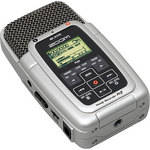
O H2 da Zoom é um versátil gravador de áudio digital estéreo que cabe na palma da sua mão. Perfeito para músicos, jornalistas, podcasters e outros, o H2 grava arquivos WAV e MP3 de alta qualidade para atender a qualquer necessidade profissional. O H2 possui quatro cápsulas de microfone integradas, cujos sinais são decodificados e combinados para criar uma imagem estéreo fantástica. Você pode gravar pela parte frontal a 90°, pela traseira da unidade a 120° ou gravar a 360° para criar um mix 5.1 do seu áudio.
O H2 grava o seu áudio nos cartões flash SD facilmente encontrados com capacidades de até 16GB. Um cartão de 1GB está incluído para que você possa começar a gravar imediatamente. Quando um cartão de 4Gb é inserido, você pode gravar até duas horas de áudio a 96kHz, seis horas a 44.1kHz ou até 138 horas no formato MP3. Esse dispositivo de bolso funciona com duas baterias AA comuns para oferecer até quatro horas de operação contínua.
Sua interface intuitiva permite gravar usando apenas um botão e oferece ainda as funções de ganho e início automático. Os controles incluem um cursor fácil de usar, menu, teclas de transporte, bem como um seletor de ganho de mic de três vias e um controle de aumento/redução de volume. Inclui duas entradas mini, uma de mic e uma de linha. Com a saída mini estéreo de headphone você pode ouvir suas gravações diretamente do H2. Usando a porta USB você pode transferir dados do/para o seu Mac ou PC ou usar o H2 como um microfone USB.
| Tipo | Gravador de Áudio Digital Estéreo de Mão |
| Métodos de Gravação/Leitura | Cartão SD (1GB incluído) e Conexão USB para PC/Mac |
| Taxa de Bits de Gravação |
WAV: 16 e 24 bits MP3: 48, 56, 64, 80, 96, 112, 128, 160, 192, 224, 256, 320 kbps, VBR |
| Frequência de Amostragem |
WAV: 44.1, 48 e 96kHz (Estéreo) e 44.1, 48kHz (4 Canais) MP3: 44.1kHz (Gravação) e 44.1, 48kHz (Reprodução) |
| Número de Canais | 2 ou 4, Dependendo do Modo |
| Resposta de Frequência | Não especificado pelo fabricante |
| Conversão A/D | Over-sampling de 24 bits, 128 vezes |
| Conversão A/D | Over-sampling de 24 bits, 128 vezes |
| Conectores |
1 Entrada de Alimentação AC 1 Entrada de Mic Externo de 3,5mm 1 Entrada de Nível de Linha de 3,5mm 1 Saída de Linha/Headphone de (3,5mm) 1 Porta USB 2.0 de Velocidade Total |
| Dimensões (LxPxA) | 2,5 x 4,3 x 1,25 polegada (64 x 110 x 32mm) |
| Peso | 3,8 onças (110g) |
| Especialidades |
Pode ser usado como microfone USB Grava pela Frente, Traseira ou no Modo Omnidirecional |
REVIEW SNAPSHOT®
by PowerReviewsPros
Cons
Best Uses
Most Liked Positive Review
Zoom H2 and iMovie
THE Zoom H2 personal recorder with its highest quality sound can be used advantageously with imovie or other software, to replace sound recorded by the camera or the sound provided by a wireless microphone, ...Read complete review
THE Zoom H2 personal recorder with its highest quality sound can be used advantageously with imovie or other software, to replace sound recorded by the camera or the sound provided by a wireless microphone, or even the small pocketable Nagra used by Hollywood.
This tutorial shows how to use the Zoom H2 for this matter. All you need is a camera, the H2, a clapstick and the Sound Studio software.
If you do not have an assistant for the shooting, use a tripod so that you will be able to photograph the clapstick.
First, connect a small electret microphone (or two for stereo) to the H2 and hide the recorder. Start recording on the H2 and also on your camera.
Now go to the front of the camera an use the clapstick. This gives you a visual and audio reference to the beginning.
When you are nearly finished shooting, having the camera and the Zoom H2 still running, go to the front of the camera and use once again the clapstick. This is the ending reference.
POSTPRODUCTION
First, remove all images and sound previous to the clap so that the sound now is at position zero on the timeline . Go to the end clapstick and remove all sound posterior to the end clapstick and take note of the length of the sound track.
You will now know that the imove track is for example 12 minutes, 07.220 secs. Take note of the information.
Now, do the same with the zoom H2 track on Sound Studio and you will find for example a 12minutes:07.261 secs. So, there is a difference of 41/100 sec. between the two if my mathematics are right.
Now comes the time to synchronize the H2 track to the imovie sound track.
Open imovie and load the Sound Studio H2 track on one of the two auxiliary sound tracks. Align the beginning of the H2 track with the beginning of the first frame of imovie. Now go to the end of your movie. You will clearly see that the H2 track length is different from the imovie track.
Remove the Zoom H2 track from imovie and copy it to Sound Studio.
Now go to the Sound Studio FILTER menu and click on Pitch and Tempo. Write the duration of the imovie track (not the one of the H2 track), and the pitch-tempo percentage will indicate 100.0248% for example on my experiment. Record the track at this tempo-pitch and transfer it again to the imovie auxiliary track and align it with the imovie track.
If everything went right, you should be able to listen to both tracks at the same time without any echo, which means exact synchronization. If needed, you may have to reevaluate slightly the percentage.
Now mute the imovie sound track and leave the H2 track pointed.
VS
Most Liked Negative Review
POOR SOUND, OBSOLETE BY SEVERAL YEARS
This is an obsolete recorder. Max memory is only 4gb which was the standard about 5 years ago. The audio quality is poor due to the background noise generated from the device. Only loud...Read complete review
This is an obsolete recorder. Max memory is only 4gb which was the standard about 5 years ago. The audio quality is poor due to the background noise generated from the device. Only loud pounding of drums or loud guitar and single instruments placed very close to the mic is this adequate for. It does not resolve any instruments like pianos violin, or any classical orchestra or music. The main problem also is the poor mic that is not sensitive to any sound softer than drums, etc. This is a voice recorder with bells and whistles to make it seem like a "music" recorder but the poor quality and hissing noise in background is a clear giveaway. They should have got rid of bells and whistles like 4 mics, etc. and made 2 mics of higher quality and reduce noise. There is no signal to noise spec. on this of course because it is very bad and you will find that all low quality recorders do not have this spec. There is no speaker which I thought was a big problem also but the bigger problem is the poor audio quality even at the highest resolution of wav and mp3. And these days having a recorder with no speaker is simply silly stupid. I do not expect $1000 audio quality but the quality of audio should be a little bit better than cheap digital voice recorders you can get for $25. Also, poor battery life due to obsolete electronics using much more power.
REVIEWS
Reviewed by 426 customers
Sort by
Displaying reviews 1-20
Previous | Next »
Pros
Cons
Best Uses
Comments about Zoom H2 Ultra-Portable Digital Audio Recorder:
We use the unit to record sermons at church. One click to set levels, then another click to start recording. SD card transfers easily to laptop for editing and writing to CD. On the downside, the menu displays are quite small to see.
Pros
Cons
Best Uses
Comments about Zoom H2 Ultra-Portable Digital Audio Recorder:
I'm using a Yamaha keyboard with built in 5-track recording to lay down instruments then recording that playback plus live vocals and it produces a pretty good demo. Used it in rehearsal yesterday, blues band, guitar, harmonica, keys, drums and vocals and was blown away by the quality of the recording. We laid down 6 new originals and I'm VERY pleased.
Pros
Cons
Best Uses
Comments about Zoom H2 Ultra-Portable Digital Audio Recorder:
I got this Zoom H2 audio recorder as a companion for my Flip Mino 720p video camera. The device has a lot of options that are easy to use through a simple interface and the resulting audio recordings are fantastic. My daughter has used it for school work, too.
Pros
Cons
Best Uses
Comments about Zoom H2 Ultra-Portable Digital Audio Recorder:
Easy to use and straightforward. We use it to record Sunday Sermons at church. Downloading to PC is also easy.I like the fact that you can select .wav or .mp3. Display is a little small and does not light up when turned on, only after you select a function. Good unit overall.
Pros
Cons
Best Uses
Comments about Zoom H2 Ultra-Portable Digital Audio Recorder:
This is a great product that is extremely portable, has a good reproduction of sound. The only problem was a broken piece on the bottom of the device.
Pros
Cons
Best Uses
Comments about Zoom H2 Ultra-Portable Digital Audio Recorder:
I use the recorder for practice and performance. Easy to use. Good sound quality. Very light and portable. I've only tried the 90 degree setting so far.
Pros
Cons
Best Uses
Comments about Zoom H2 Ultra-Portable Digital Audio Recorder:
I'm starting out as a low budget film maker and this is a great recorder, it's price is very good and well worth every penny, I definitely recommend buying this product.
Pros
Cons
Best Uses
Comments about Zoom H2 Ultra-Portable Digital Audio Recorder:
Used for Blog recording interviews.
Also for recording a musical instrument for reference in practice.
Pros
Cons
Best Uses
Comments about Zoom H2 Ultra-Portable Digital Audio Recorder:
I love my new H2 Ultra recorder. I use it to record myself and my guitar. I used to go to a studio to do my recording and make my CD's . Now I can use my H2 at home without going to the studio.I record with my H2 and run it through my PC at home and can mix the tracks and make my CD's at home now and it saves me the money I spend at the studio to get the same product.I recomend the H2 to anyone who does any kind of recording, for recording thmselves ,or their band ,or live recordings of any kind .It has been a very useful product.
Pros
Cons
Best Uses
Comments about Zoom H2 Ultra-Portable Digital Audio Recorder:
I will be using the device to practice stories and narrations primarily and to provide sound files for videos. Since I'm a blacksimith rather than a techno guy, i appreciate the straight forward set up an a manual that doesn't require an electronics expert to decipher. Sound quality is great.
Pros
Cons
Best Uses
Comments about Zoom H2 Ultra-Portable Digital Audio Recorder:
I bought this unit at BH 2 years ago and use it extensively, making several recordings a week. I carry it around all over the place.Audio quality is excellent. Note that I mean for a[$]- unit. I am aware that audio can be better but for the price, this is really good quality. Price and audio quality, that's what I was looking for.For my taste, I don't mind the cheapo plastic casing as long as the inside is good.But I have a problem with the buttons and the interface. And I am not saying that other designs are better, this is a general industry problem. The buttons on the side are not great. And the lettering saying what they are for have mostly rubbed off. The buttons on the front panel are a bit weird. Slow and a little hard to figure out on the run. You have to read the screen to know what you are pressing. The screen is small and I find it incredibly archaic. And the recording button, you have to press it twice. It has happened several times that I didn't press it the second time as I was in a hurry and lost sound. The machine is slow at start up as well. Sound with a few seconds lost may be lost sound altogether. Downloading to the PC is sort of an odd process. Maybe it's just the screen interface. But I like the sound quality for the price and that is my main concern. It comes with a lot of options, ext mike plug, stand, wind cover, but I don't use any of it. Built in mikes pick up a lot of sound and I don't notice any white noise or sound from the machine itself.
Pros
Cons
Best Uses
Comments about Zoom H2 Ultra-Portable Digital Audio Recorder:
I purchased the H2 to replace my Nikon D5100 on board sound and it has been an excellent choice. it can be used as a seperate sound unit or plug it in to the DSLR and use it as an external Mic. positives excellent sound inexpensive
Negatives a lttle cheap feeling but that doesnt affect the performance I wouold buy again in a heartbeat
Pros
Cons
Best Uses
Comments about Zoom H2 Ultra-Portable Digital Audio Recorder:
I gave the item as an early Christmas gift to my husband. He takes it to small clubs to see live music and he absoutely LOVES it!! He is very satisfied with the sound quality as well as the menu on the front. He has not yet found anything about the device that he does not like.
Pros
Cons
Best Uses
Comments about Zoom H2 Ultra-Portable Digital Audio Recorder:
Use the H2 for recording concerts in a large auditorium. Wow, it picked up so much. need to study how to block some of the ambient noise. We had harps, violin, piano, and flute. Very clear on all. Lost some quality on the voice - could have been the microphone they were using.
Pros
Cons
Best Uses
Comments about Zoom H2 Ultra-Portable Digital Audio Recorder:
Pros.
Quality unit, good feel and heft; bonus for using "normal" batteries. USB interface was intuitive and worked instantly in a Windows 7 64-bit PC environment (reason for purchase, old recorder limited to XP/32-bit drivers).
Does what it says it will do, screen's small but at close range displays everything you're likely to want to see. Direct MP3 at low kbps and with compression, "just talking" audio is superb and you'll get about 46 hours on the included 1Gb card.
The baby tripod and the USB would make it a fine PC-style microphone, tested briefly, but this unit was purchased as a simple voice recorder, potentially in-line with other A/V equipment. Testing was thus mostly standalone; sound quality was entirely acceptable for the intent. No pops (used foam "head" on it, but it was fine at close range without the foam also), and the easy selection of front or rear microphones is nice.
Cons.
It's fat for a personal voice recorder. Fine for sit-down meetings or events, it's not going in your pocket, especially with the rubbery texture of (recommended) the optional silicon protector.
Microphones are good, but increasing gain to be on par with a previous "old" personal recorder was not possible -- it's probably in the manual, didn't read it (a tribute to the overall ease of use).
The 1Gb card is shabby, even at the price point, without shopping around, quickly bought a 4Gb card for five bucks - and bought the (max supported) 4Gb card because a 32Gb card lying around was recognized as being tiny-sized, 100mb range. Doh! However, 46 hours of MP3 voice-quality recording per Gb is nice.
Settings are simple, but file sizes bloom based on mic selection, which is not necessarily intuitive - a conference call sounded like a good reason to use the full "surround" mic option, but this created a 200mb file in about 30 minutes - and without looking carefully at the small screen, it's not evident you've chosen to switch quality (size) in switching-around the mic settings with the tactile buttons.
Final con is in the retention of settings data when switching cards. Get it all set-up on your 1Gb card, then throw in your 4Gb card, right? No deal, instead of the unit dedicating a tiny amount of internal flash memory to retain settings, you get to do them all over again on the new card. Again, could be user error corrected by reading the instructions, but who wants to do that? :)
Build quality is good, not great, but for the price, ignore the majority of the cons (supplied here because it's the info I would have liked to know before purchasing this, which I would have then bought anyway) and enjoy a fairly lightweight if husky personal recorder, get the silicon protection as all primary buttons and lights are well-suited to it for a few bucks, and skip or at least recognize that the optional hard case, in terms of the form factor, does not appear to be dedicated to this unit in particular.
Summary:
I except years of workhorse service from the unit in indoor and non-inclement outdoor use, and overall am very pleased with it -- the tripod mount and "thought it would fall over" cheap-feel plastic base was a pleasant surprise, allowing the logical (and stable) positioning of the unit in a vertical position during longer sessions. The unit could be used on a traditional tripod near a fixed microphone at events, though we have not tested the quality much beyond low-rate voice.
For the money, one of the best mid-range, standalone (but accessory capable), semi-professional sound recorders currently on the market.
Pros
Cons
Best Uses
Comments about Zoom H2 Ultra-Portable Digital Audio Recorder:
I am a musician and I use my H2 to record me practicing, rehearsals, concerts, and use it to make audition tapes. It is easy to use and the overall quality is good for the money.
Pros
Cons
Best Uses
Comments about Zoom H2 Ultra-Portable Digital Audio Recorder:
This is great to record high quality sound on the go. The gain adjustments are key and the inputs and outputs are relative.The construction seems a bit light and fragile but for the price you can't beat it, just take care of it and don't drop it.
Pros
Cons
Best Uses
Comments about Zoom H2 Ultra-Portable Digital Audio Recorder:
How you use the product? Every Day.
Things that are great about it? It was a great price from B&H.
Things that aren't so great about it? Feels cheap and flimsy. Does not hold settings. The interface is not intuitive and poorly thought out.
Pros
Cons
Best Uses
Comments about Zoom H2 Ultra-Portable Digital Audio Recorder:
This is a good quality product. The price is very reasonable. I use it for recording karaoke songs and play back to have fun. I thought the recording levels are just set by changing the side switch to L, M or H. I set switch at H and recorded some songs with LINE input, but audio is somewhat clipped when played by Audacity on my PC. It took me a while to figure out that the recording levels can be adjusted more detail by pressing Fast Forward and Rewind icons too. So, the recording levels problem is solved. The level meter on screen is very useful. I use it to monitor the mixer output before the receiver amplifier and found the gain of mixer output was set too high and sometimes audio were clipped. The meter levels should move left and right much dynamically with input signals. If the meter levels do not move much, your input levels from other machine were set too high. After I use this machine for a few days, I told my co-worker the beauties of H2. She decided to buy one right away.
Pros
Cons
Best Uses
Comments about Zoom H2 Ultra-Portable Digital Audio Recorder:
The H2 Ultra-Portable Digital Audio Recorder is an important piece of equipment in my business. As a newspaper publisher, I use it almost daily for coverage of meetings and other news events. The clarity and range of audio recordings takes the guess work out of keeping notes and accurately presenting information that belongs within quotation marks. This is the third H2 Zoom Recorder I have purchased, having given two others to reporters on staff. The H2 has allowed us to permanently retire the old mini-cassette recorders that we once used. Amazing product. Suggest ordering an extra mini-tripod base when making a purchase. If it's used by more than one individual, invariably someone will lose or misplace the mini tripod.
Displaying reviews 1-20
Previous | Next »