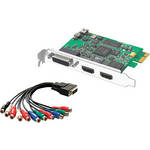
The Intensity Pro HDMI and Analog Editing Card from Blackmagic is an excellent choice for your digital and analog capture needs. The card fully supports NTSC, PAL and HD video via HDMI, component, composite or S-Video. It supports two channels of embedded, RCA or S/PDIF audio at television-standard sampling rates. The Intensity Pro supports 4:2:2 color sampling for superior chromakey performance. The card can work with both Windows and Macintosh computers, making it an excellent choice for your editing needs regardless of your operating platform.
| Type | HDMI and Analog Capture Card |
| Compatible with | Microsoft Windows 7, Apple Mac OS X, and Linux |
| Video System | NTSC/PAL, HD |
| Video Formats |
1080i50, 1080i59.94, 1080i60, 1080p23.98, 1080p24, 1080p25, 1080p29.97, 1080p30, 720p50, 720p59.94, 720p60, 625i 50 PAL, and 525i59.94 NTSC HDMI formats: 525 NTSC, 625 PAL, 720HD, and 1080HD switchable |
| Video Sampling | HDMI: 4:2:2 |
| Audio Sampling | HDMI: Television standard sample rate of 48 kHz and 24-bit |
| Color Precision | HDMI: 4:2:2 |
| Color Space | HDMI: YUV 4:2:2 |
| Copy Protection | For legal reasons HDMI input is unable to capture from copy protected HDMI sources. Always confirm copyright ownership before capture or distribution of content |
| Host Connection | 1x PCI Express slot, compatible with 1-, 4-, 8-, and 16-lane PCIe slots |
| Input and Output Connectors |
1x HDMI Input (2-channel audio) 1x HDMI Output (2-channel audio) 1x Breakout connection with RCA composite, RCA component, RCA stereo audio (24-bit), and S-Video input and output, plus stereo S/PDIF output (24-bit) |
| Conversion |
Colorspace conversion: Hardware-based real-time HD down conversion: Software-based down conversion during video playback HD up conversion: Real-time standard definition to 1080HD and 720HD during video capture |
| Hardware Real-Time Effects |
Avid Media Composer 6 internal effects in DNxHD, XDCAM, and uncompressed Apple Final Cut Pro internal effects in DV, DVCPRO HD, ProRes, and uncompressed on Intel Mac OS X Adobe Premiere Pro Mercury Playback Engine effects in DV, MJPEG, DVCPRO HD, DSLR, AVCHD, XDCAM, XDCAM HD, and uncompressed |
| Included Software | Media Express, Disk Speed Test, Blackmagic System Preferences, and Blackmagic driver |
| Firmware Upgrade | Firmware built into software driver. Loaded at system start, or via updater software |
| Minimum System Requirements |
Mac: Mac OS X 10.6.5, 10.7.x 2008 Intel Mac Pro (Mac Pro 3,1); 2009 Intel Mac Pro Mac Pro 4,1); 2010 Intel Mac Pro (Mac Pro 5,1) 4 GB system memory High-speed storage with plenty of capacity is required to capture and play back uncompressed digital video. Compressed video formats use less space and can usually be captured and played back with one hard disk Windows: Windows 7 64-bit Apple QuickTime needs to be installed for some applications to function with a Blackmagic capture card, e.g., Adobe After Effects, Autodesk Combustion In general, you should choose a CPU that meets or exceeds the system requirements of the software application you are planning on using The following workstations are certified: Hewlett Packard Z400; Hewlett Packard Z600; Hewlett Packard Z800; Hewlett Packard XW9300; Hewlett Packard XW8600 The following motherboards are recommended: Asus P5E; Asus P5B; Asus P5Q Pro Turbo; Asus P6X58D (Bios later than 12.04.2010); Asus P8P67 PRO (Rev 3.1); Gigabyte EP45-DS3; Gigabyte x48DQ6; Gigabyte GA-P67A-UD7-B3 (rev. 1.0); Intel D975XBX; XFX 790i Ultra Linux: Not Specified by Manufacturer |
| Dimensions (WxHxD) | Not Specified by Manufacturer |
| Weight | Not Specified by Manufacturer |
REVIEW SNAPSHOT®
by PowerReviewsPros
Cons
Best Uses
A month or less | 100% (3 reviews) | |
One-to-three months | ||
Three-to-six months | ||
More than six months |
Most Liked Positive Review
Competent HDMI/Component Solution
What I mean by "easy" is that the Intensity Pro does what it is supposed to do and it does it right without causing problems.I have needed an affordable High Definition video capt...Read complete review
What I mean by "easy" is that the Intensity Pro does what it is supposed to do and it does it right without causing problems.I have needed an affordable High Definition video capturing and processing solution for years. Every low-cost hardware product up till now was limited to 480i, or else was severely limited, compressed high definition. How sweet, now with the Intensity Pro, to see great color in perfect high resolution video simultaneously on both a PC monitor and on an HDTV using either in/out HDMI or in/out component video.Blackmagic is very confident in this product and I promise you that they have every reason to be proud.The installation and workflow are simple if you have a high level of PC expertise, but the hard disk speed demands are formidable. Download their manual. Be sure to read about the -high transfer rate- and high storage requirements for uncompressed HD video on a computer. I bought way too little storage (600GB comprised of two 320GB drives) and have had to order 2TB of four 500GB sata drives to run in RAID 0 (striping) -- and this is just for -maybe- four hours of reliable capturing. (Four hours is about the longest movie on TV, with commercials.)Although my 600GB is not wasted since it can be used for output when I convert the uncompressed data to some other usable compressed format. High speed RAID 0 striped disk output can be important to reduce I/O constriction.Don't be discouraged about hard drive size and speeds. You can use Blackmagic's software compression MJPEG codec in realtime during capture which significantly lowers both data transfer speeds and storage requirements, but you'll need a 3GHz (more or less) dual core processor to do it.Install. Simply put the PCIe x1 card into a fairly robust PC (or MAC) computer, but first download the latest drivers from Blackmagic to have them available rather than the ones on the CD. Don't let Windows install the drivers. Do it yourself with Blackmagic's installation procedure you downloaded.Capture Software. I have captured broadcast HDMI and HD component video using Blackmagic's Media Express and Sony Vegas and, best yet, VirtualDub. VideoStudio 11.5 Plus does not work for capture because of a problem they have with their DirectShow driver. But I still use VS for post-processing.One extremely quirky thing with this card is that you have to use Blackmagic's Intensity software to select the input and you must then also select the resolution in the other display/capture application you use, else all that is shown is a black screen. This isn't all bad since you can also set the card to upconvert 720p to 1080i, or down convert to SD in hardware realtime using Intensity setup. For me, all the installation and setup stuff was easy and flawless, but I have 48-years of experience, and I read a million web pages about how to do it. It only took a couple long, long days after a couple long hard weeks of research just to -ensure- that the Blackmagic Intensity Pro was the greatest, [...]
VS
Most Liked Negative Review
Good for the money
The card is good for the money and it does give you some options. Although if trying to use the card for seeing what you are getting out of your editing machine it can be...Read complete review
The card is good for the money and it does give you some options. Although if trying to use the card for seeing what you are getting out of your editing machine it can be a little difficult. For instance jitter, they do have an option in set up that allows you to select on field to help jitter but then it is pretty hard to see what you have color wise.
REVIEWS
Reviewed by 160 customers
Sort by
Displaying reviews 1-20
Previous | Next »
Pros
Cons
Best Uses
Comments about Blackmagic Design Intensity Pro HDMI and Analog Editing Card - PCI Express:
There are a lot of capture cards out on the market. I would recommend this over something like the HD PVR. This does HDMI and Component, rather than just HDMI. Want a capture card to put your home movies on your computer or to capture your video game systems, get this one.
Pros
Cons
Best Uses
Comments about Blackmagic Design Intensity Pro HDMI and Analog Editing Card - PCI Express:
I have used aja cards before and this one is pretty good for the price. I tried capturing HDMI and component from my HDV cameras and it worked well in Premiere. Not so much in Final Cut though. I used firewire to control the deck/camera and it was able to batch capture. With final cut, the HDV capture window can only capture via firewire if you are using firewire as device control. So if you are using premiere, it works well. And so useful to be able to monitor your editing out to an HDTV. That alone is worth the price. Capturing is just a nice bonus!
Pros
Cons
Best Uses
Comments about Blackmagic Design Intensity Pro HDMI and Analog Editing Card - PCI Express:
The product probably works but you need to have a very high-end PC or MAC for it to do so. That being said, I have tried to contact Blackmagig via e-mail and Phone several times. I have gotten no response. I ended up selling the card on online. Don't expect help from this Vendor.
Pros
Cons
Best Uses
Comments about Blackmagic Design Intensity Pro HDMI and Analog Editing Card - PCI Express:
After ordering this card and receiving it from B&H surprisingly quick, I was very excited to get it installed for immediate use! Installation and setup were painless and before too long my gaming team and I are now able to capture high quality replays of the video games that we professional compete in! This allows us to review our tactics and keep us on our toes in fantastic quality with ease! A+ Product.
Pros
Cons
Best Uses
Comments about Blackmagic Design Intensity Pro HDMI and Analog Editing Card - PCI Express:
This is my second card. Perfect if all you need HDMI out to a monitor. I'm currently using component out to my 10 yr old SD Sony 14". It down converts HD on the fly to letterbox SD. Great way to monitor HD if you don't have a big budget. Also good to plug into a high quality IPS HDMI computer LCD for inexpensive monitoring, like the Dell U2410.
Pros
Cons
Best Uses
Comments about Blackmagic Design Intensity Pro HDMI and Analog Editing Card - PCI Express:
I also own USB device, but card was easier to get work. Less demanding for PC then USB3 Shuttle.
Pros
Cons
Best Uses
Comments about Blackmagic Design Intensity Pro HDMI and Analog Editing Card - PCI Express:
I bought this card in order to monitor hd content from fcp. It works exceptionally well and is well priced vs AJA cards. I initially had a bug on outputting 24p, but a reset on FCP worked that kink out. I have worked on several projects with the card and the prores 422 output has been flawless. Clients have been happy as they can see what I am working on via a 32" Panasonic LCD. I have not tried capturing uncompressed through hdmi or component yet, but I am sure it will work as described.
Pros
Cons
Best Uses
Comments about Blackmagic Design Intensity Pro HDMI and Analog Editing Card - PCI Express:
I needed to output video to a big external monitor for clients when editing music videos and commercials. It does exactly that via an HDMI or component video cable. It works with FCP and a handful of other pro apps. The biggest disappointment is that it won't output video via quicktime, so I have to bring in my quicktimes to another program like FCP to output them to the monitor. They include a Blackmagic Media player but it only outputs quicktimes to my monitor in a handful of codecs (none of which I particularly use). That's my only complaint really.
Pros
Cons
Best Uses
Comments about Blackmagic Design Intensity Pro HDMI and Analog Editing Card - PCI Express:
Easy to set up, so far giving me a great simple monitoring tool for FCP.
Pros
Cons
Best Uses
Comments about Blackmagic Design Intensity Pro HDMI and Analog Editing Card - PCI Express:
I haven't used it for capture yet, but it's a good monitoring solution for Davinci Resolve.
Pros
Cons
Best Uses
Comments about Blackmagic Design Intensity Pro HDMI and Analog Editing Card - PCI Express:
Is a very good product!
Pros
Cons
Best Uses
Comments about Blackmagic Design Intensity Pro HDMI and Analog Editing Card - PCI Express:
We use the capture card to webcast our church services through Microsoft Expression Encoder Pro. We use the component input and the colors are just amazing. We liked that it had both the analog and HDMI inputs. When we make the switch to HD, all we need to do is upgrade our computer and move our Intensity Pro to it.
Pros
Cons
Best Uses
Comments about Blackmagic Design Intensity Pro HDMI and Analog Editing Card - PCI Express:
I would have given it a 5 star rating except blackmagic do not give the software anymore (On-Air 2.0)as it was advertised! On-Air 2.0 is for live malticam production. Other than that, It works great on my mac pro. I'm able to output HDV signal to my HD monitor when editing with Final Cut Pro. No need to have two intensity pro cards on your computer because you still can't do malticam live shoot without on-air 2.0. Maybe a 3rd party software may work! That is a BIG MAYBE!
Pros
Cons
Best Uses
Comments about Blackmagic Design Intensity Pro HDMI and Analog Editing Card - PCI Express:
I use the intensity to transfer analog video into my mac. I needed something internal, i used to use another external device, but that is not reliable. Plus i like to HDMI output that the intensity offers. I couldn't get Final Cut to see the audio, but the Blackmagic software include is good enough.
The setup is easy, cables are labeled correctly. I would recommend this to anyone with a Mac or PC looking for internal video/audio capture device. I had no
Pros
Cons
Best Uses
Comments about Blackmagic Design Intensity Pro HDMI and Analog Editing Card - PCI Express:
The Intensity Pro was SO simply to put in the computer, and with two HDMI hook ups I was able to see my video on my external monitor the way it should look.[...].HIGHLY recommend the Intensity Pro card.[...]
Pros
Cons
Best Uses
Comments about Blackmagic Design Intensity Pro HDMI and Analog Editing Card - PCI Express:
Excellent product. The only option for streaming HD video directly to a computer via HDMI.Price is good, and technology continues to improve.[...]
Pros
Cons
Best Uses
Comments about Blackmagic Design Intensity Pro HDMI and Analog Editing Card - PCI Express:
Works as advertised. Using this unit mainly for Web-streaming as it was recommended by my web streaming provider. Need some improvement on the labeling of the HDMI ports, but not difficult to figure out.
Pros
Cons
Best Uses
Comments about Blackmagic Design Intensity Pro HDMI and Analog Editing Card - PCI Express:
Using to capture analog footage for conversion.
Pros
Cons
Best Uses
Comments about Blackmagic Design Intensity Pro HDMI and Analog Editing Card - PCI Express:
I downloaded the newest drivers before I installed the hardware and I had no problems with setup on a Windows 7, 64Bit system (AMD 3GHz Quad Core with 8Gigs RAM). Premiere fully recognized it for capture and playback and Photoshop was able to export frames directly to device for preview. As far as price and features go, you really can't beat this unit for editing in both SD and HD. I was editing using DV and an analog to firewire converter and was looking to add the Intensity as an HD option. I'm now thinking of just removing the DV setup and use the intensity for both SD and HD.
This unit doesn't heavily compress (a good thing)so you will need a fast drive array for HD capture and export. Also, if you are using any S-Video sources for in and out, this only comes with one adapter. You will have to get a second. to use both in and out. It would be nice to have dedicated S-Video and composite pigtails. Instead it shares the component connections. Since the S-Video format is on it's way out (or dead already) it's not a major downside. Dedicated composite would be nice to properly view interlaced video to avoid field problems. In my case, this wasn't a problem. Since I was using HDMI for HD, it left the component available for other uses.
Pros
Cons
Best Uses
Comments about Blackmagic Design Intensity Pro HDMI and Analog Editing Card - PCI Express:
Analog capture a bit problematic. Especially the old type of camera (Hi8), the problem most likely. If you are getting for analog capture, before buying I suggest you read forums, and problems encountered. No problem, such as the digital side. Capture high quality and gives value for money.
Displaying reviews 1-20
Previous | Next »