The Professional's Source 866.276.1435 / 212.502.6357

Wacom Bamboo Fun Tablet (Medium, Black)

  • No Longer Available
  • B&H # WABFTMB
  • Mfr# CTE650K

Product Highlights

  • 8.5" x 5.3" Active Area
  • Pressure Sensitive
  • Supports Widescreen Displays
  • Finger-sensitive Touch Ring
  • Battery-free Pen and Mouse
  • Ergonomic Design
  • Includes Valuable Software

Protect Your Purchase

International Pricing Disclaimer
 

What item is right for you?

Ask our Experts!

866.276.1435
Live Chat

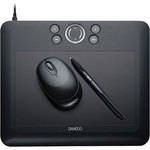
The Wacom Bamboo Fun Tablet sports an elegant design with increased functionality and ease of use a top priority. Plus the rugged and elegant pen tablet is designed specifically for the mainstream home or office computer user. Bamboo Fun makes it easy for users to personalize their workflow and collaborate with others by providing navigation and communication capabilities not available with typical input devices. Users can select a pen or highlighter tool to mark-up documents, spreadsheets, presentation slides and e-mail messages; or gain precise control when creating or editing artwork, photographs or other graphics applications.

Four programmable ExpressKeys are situated on the tablet surface to customize commonly used commands, such as undo or copy, and a finger-sensitive Touch Ring has been positioned to allow for quick and easy zooming and scrolling. The textured work surface of the tablet provides an intuitive pen-on-paper feel, while the stylish and ergonomically designed pens allow users to experience seemingly unlimited levels of pressure sensitivity, to create variations of pen strokes, from fine lines to bold brush marks. Additionally, Bamboo Fun works in both Mac and PC environments.

Bamboo Fun includes full editions of valuable creative software to help get your creative juices flowing. Edit photos with Adobe Photoshop Elements, create artwork with Corel Painter Essentials, and apply photo effects with Nik Color Efex Pro.

Works with handwriting recognition, inking and pen features in Windows Vista and Apple operating systems (OS X)
Supports widescreen displays
Textured work surface for a natural pen-on-paper feel
High resolution and report rate for outstanding accuracy
Precise control and 512 levels of pressure sensitivity on the pen
Quick access to user-defined shortcuts with four Express Keys
Easy scrolling and zooming with finger-sensitive Touch Ring
Patented, battery-free pen and mouse with customizable buttons
Detachable USB cable unplugs from your computer and your tablet for easy storage and transport
Ergonomic design provides a comfortable supplement to mouse and keyboard input
Includes valuable software applications (Adobe Photoshop Elements, Corel Painter Essentials, Nik Color Efex Pro) that embrace pen support and deliver greater control when editing photos or creating works of art
Free US-based technical support available
Active Area 8.5" x 5.3"
Pressure Levels 512
Accuracy Not Specified by Manufacturer
Resolution 2540 lines per inch
Interface USB
System Requirements Windows System
  • Pentium II Processor or better
  • Windows 98, Me, 2000, XP
  • 128 MB of RAM
  • Available USB port
  • CD-ROM drive
  • Color monitor

Macintosh System

  • Power PC Processor System (iMac, iBook, PowerBook, G3, G4)
  • Mac OS X (10.2.8 or later)
  • 128MB of RAM
  • Built-in USB port
  • CD-ROM drive
  • Color monitor
Tablet Dimensions 11.0" x 9.3" x 0.3"

REVIEW SNAPSHOT®

by PowerReviews
Wacom Bamboo Fun Tablet (Medium, Black)
 
4.9

(based on 8 reviews)

Ratings Distribution

  • 5 Stars


    (7)

  • 4 Stars


    (1)

  • 3 Stars


    (0)

  • 2 Stars


    (0)

  • 1 Stars


    (0)

100%

of respondents would recommend this to a friend.

Pros

  • Good control (6)
  • Lightweight (5)
  • Natural feel (5)
  • Increased productivity (4)

Cons

    Best Uses

    • Graphic artists (4)
    • Home office (4)
      • Reviewer Profile:
      • Novice (4)

    REVIEWS

    Reviewed by 8 customers

    Sort by

    Displaying reviews 1-8

    Back to top

     
    4.0

    Nice entry level tablet

    By Zphoto

    from Melville NY

    About Me Novice

    Verified Buyer

    Pros

    • Lightweight
    • Natural Feel

    Cons

      Best Uses

      • Home Office

      Comments about Wacom Bamboo Fun Tablet (Medium, Black):

      I wanted to get more serious with photoshop and editing my photos. After searching products and brands I chose to go with Wacom, there really was not comparison. They have solid products and designs; the pen feels completely natural and has no wires!

      I chose the medium size because I was unsure how I would be using the tablet. For photo editing the medium is large enough, perhaps too large for some people depending on how you will use it. Some people may prefer just wrist movements or others may prefer larger arm movements. Either way you can always crop the active area on the tablet so getting a larger than needed tablet isn't a problem.

      The only issue I find worth mentioning was that the driver disc would not load on my mac. I have a 2 year old mac pro laptop and don't have issues with other discs. However, every time I attempted to load the instal disc it would not read it. Luckily I was able to download from the website, but it would have been nice to avoid the headache.

      All in all I am satisfied with this tablet and would certainly recommend it for those looking for their first tablet.

      Comment on this review

       
      5.0

      Fun Tablet

      By Mikey

      from Virgin Islands

      About Me Novice

      Verified Buyer

      Pros

      • Good Control
      • Increased Productivity
      • Lightweight
      • Natural Feel

      Cons

        Best Uses

        • Graphic Artists
        • Home Office

        Comments about Wacom Bamboo Fun Tablet (Medium, Black):

        Currently doing some courses in drawing and just wanted that technical edge. This product was recommended by a friend and it proves to be an excellent choice.

        Very easy to use and it really makes things simpler with producing my art work for electronic handling.

        B and H rocks with the price.

        Comment on this review

         
        5.0

        Good Precision, Slim and great value

        By afshalders

        from Rio, Brazil

        About Me Professional

        Verified Buyer

        Pros

        • Good Control
        • Lightweight

        Cons

          Best Uses

          • Graphic Artists

          Comments about Wacom Bamboo Fun Tablet (Medium, Black):

          This tablet from Wacom is a good entry level choice. It's very precise, well built , very thin and also good looking. I bought it for my mother, she's a plastic artist.

          Comment on this review

           
          5.0

          Great Tool

          By John

          from Ronkonkoma, NY

          About Me Novice

          Verified Buyer

          Pros

          • Good Control
          • Increased Productivity

          Cons

            Best Uses

            • Home Office

            Comments about Wacom Bamboo Fun Tablet (Medium, Black):

            Alot more control when editing a photo then using the mouse

            Comment on this review

            (2 of 2 customers found this review helpful)

             
            5.0

            Bamboo Fun Medium and Photoshop

            By MirekE

            from WA

            About Me Novice

            Verified Buyer

            Pros

            • Good Control
            • Increased Productivity
            • Natural Feel

            Cons

              Best Uses

                Comments about Wacom Bamboo Fun Tablet (Medium, Black):

                I purchased Bamboo Fun Medium for my Photoshop photo retouching work. This is my first tablet and therefore I was not sure what size or type to get.

                Now, after some experience I think that particularly for Photoshop retouching smaller tablet would be sufficient and perhaps better.

                I think the Bamboo Fun is good enough for this type of work and I do not regret not buying more expensive type. The only issue I have is that the pen requires a little bit more pressure than I use for handwriting (think of it as pencil vs. pen).

                Comment on this review

                (1 of 2 customers found this review helpful)

                 
                5.0

                Absolutely excelent!!!!!

                By scottd1120

                from Berkley MI

                About Me Experienced

                Verified Buyer

                Pros

                • Good Control
                • Increased Productivity
                • Lightweight
                • Natural Feel

                Cons

                  Best Uses

                  • Graphic Artists
                  • Home Office
                  • Travel

                  Comments about Wacom Bamboo Fun Tablet (Medium, Black):

                  Everything.

                  Comment on this review

                  (1 of 1 customers found this review helpful)

                   
                  5.0

                  User Friendly, Easy to Use

                  By emac

                  from Tyler, Texas

                  About Me Experienced

                  Verified Buyer

                  Pros

                  • Good Control
                  • Lightweight
                  • Natural Feel

                  Cons

                    Best Uses

                    • Graphic Artists

                    Comments about Wacom Bamboo Fun Tablet (Medium, Black):

                    I am not a professional graphic artist but I do use photoshop quite a bit. I found the tablet very easy to install and use. The pen is easy to learn. My primary uses are (1) quick masks, (2) burn and dodge, and (3) paintbrush. I found with the paintbrush tool you make nice "grundge" frames, the current rage in GA. I think I may have to replace the nib on the pen someday, but to me the medium tablet was a very good buy, especially at B&H.

                    Comment on this review

                    (1 of 1 customers found this review helpful)

                     
                    5.0

                    Not only Fun but Productive !

                    By Bill P.

                    from Jefferson, NJ

                    About Me Quality Oriented

                    Verified Buyer

                    Pros

                    • Easy To Set Up
                    • Easy To Use
                    • Fast
                    • Powerful
                    • Professional Results

                    Cons

                    • No Extra Pen Tips

                    Best Uses

                    • Enhance Experience
                    • Post Production Work

                    Comments about Wacom Bamboo Fun Tablet (Medium, Black):

                    As a Professional Photographer using a tablet is a necessity, the Bamboo Fun model not only handles my work without skipping a beat but for less then [$] it didn't break the budget either !Very comfortable, precise and not too big for my desktop work space, the Bamboo Fun has just been a great addition to my work flow tools and I highly recommend it to anyone looking for a tablet on a budget. Professional results can be had from this tool and you don't have to spend a fortune doing it ! I only wish it had come with a few extra replacement tips for the pen and as for the mouse I don't really like using it because of the lack of extra buttons/wheels that my own mouse has. Other then that it's a great tool, built well and makes doing precise work on your photos a snap ! It takes a bit of getting used to over the mouse but after a few hours it becomes second nature and I would NEVER go back to doing post production work with a mouse ever again! I would however recommend getting the 4x6 model as I did, anything less would be too small. Bravo WACOM!

                    • Primary use:
                    • Business

                    Comment on this review

                    Displaying reviews 1-8

                    Back to top

                    Wacom Bamboo Fun Tablet (Medium, Black)
                    • Bamboo Fun Pen Tablet
                    • Bamboo Fun Mouse
                    • Bamboo Fun Pen
                    • Pen Stand
                    • Replacement Pen Nibs (3-pack)
                    • USB Cable
                    • Installation CD-ROM (includes tablet driver and electronic user manual)
                    • Software Bundle DVD-ROM (Photoshop Elements 6.0 (4.0 for Mac), Nik Color Efex Pro 3, Painter Essentials 3)
                    • Quick Start Guide
                    • 1-Year Limited Warranty
                     
                     
                    See any errors on this page? Let us know.

                    Close

                    Close