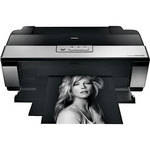
Make sure you have all necessary cables. A USB Cable is not included.
The Epson Stylus Photo R2880 Inkjet Printer is the choice for professional and fine art photographers who want to produce exhibition quality prints with unprecedented control. It always delivers professional performance with its one-inch wide, permanent print head that is treated with a special ink repellent coating to minimize nozzle clogging, In addition Automatic Nozzle Check technology along with an innovative mist collection system further ensures greater reliability. Plus, if you use more than one printer, you'll always get consistent output from printer to printer with Epson PreciseColor, which assures accurate colorimetric calibration of the printer during the manufacturing process with no user calibration required.
The innovative Epson UltraChrome K3 ink set with Vivid Magenta provides astounding color gamut for brilliant reds, blues, and purples, and utilizes Radiance technology to maximize the color gamut while simultaneously optimizing print quality. Your images will exhibit reduced graininess and smoother color transitions with better consistency when displayed under virtually any lighting condition. The three-level black inks produce black & white prints with exceptional gray balance and outstanding tonal range, and the Advanced Black-and-White Photo Mode ensures precision control for neutral or toned black-and-white prints.
This powerful, wide-format printer offers incredible print media versatility with the ability to print up to 13" wide and up to 44" long, and prints on a wide variety of media types including glossy, luster, matte, canvas and fine art papers. It can even print on 1.3 mm poster board for & inkjet receivable CD & DVD disks so you can produce professional looking slide show and movie discs.
| Printing Method | |
|---|---|
| Printing Technology | Advanced MicroPiezo AMC print head with ink repellent coating & Radiance Technology |
| Maximum Resolution | 5760 x 1440 optimized dpi |
| Minimum Ink Droplet Size | 3 picoliters |
| Ink Type | Epson UltraChrome K3 with Vivid Magenta pigment ink |
| Ink Palette | 8-color (Cyan, Light Cyan, Vivid Magenta, Vivid Light Magenta, Yellow, Light Black, Light Light Black, and Matte or Photo Black) |
| Ink Cartridge Configuration | 8 individual ink cartridges (1 x set included) |
| Ink Cartridges |
Photo Black UltraChrome K3 ink cartridge (T096120) Cyan UltraChrome K3 ink cartridge (T096220) Vivid Magenta UltraChrome K3 ink cartridge (T096320) Yellow UltraChrome K3 ink cartridge (T096420) Light Cyan UltraChrome K3 ink cartridge (T096520) Vivid Light Magenta UltraChrome K3 ink cartridge (T096620) Light Black UltraChrome K3 ink cartridge (T096720) Matte Black UltraChrome K3 ink cartridge (T096820) Light Light Black UltraChrome K3 ink cartridge (T096920) |
| Performance | |
|---|---|
| Print Speed |
8 x 10" photo: 58 seconds 11 x 14" photo: 1 minute 32 seconds |
| Input Buffer | 64 KB |
| Printer Duty Cycle | Up to 16,000 letter-size pages lifetime |
| Print Archival Life | 100 to 200 years (on Epson premium papers) |
| Paper Handling | |
| Maximum Paper Width | 13" |
| Maximum Printable Area | 13 x 44" BorderFree |
| Paper Sizes | 4 x 6", 5 x 7", 8 x 10", A4 (8.3 x 11.7"), Letter (8.5 x 11"), Legal (8.5 x 14"), 11 x 14", 12 x 12", B (11 x 17"), A3 (11.7 x 16.5"), Super B (13 x 19"), user definable, 8.3 and 13" wide Panoramic Roll Papers |
| Borderless Photo Sizes | 4 x 6", 5 x 7", 8 x 10", A4 (8.3 x 11.7"), letter (8.5 x 11"), 11 x 14", 12 x 12", B (11 x 17"), A3 (11.7 x 16.5"), Super B (13 x 19") |
| Paper Types | Plain paper, Epson Bright White Paper, Presentation Paper Matte, Premium Presentation Paper Matte, Premium Presentation Paper Matte Double-sided, Ultra Premium Presentation Paper Matte, Photo Paper Glossy, Premium Photo Paper Glossy, Ultra Premium Photo Paper Glossy, Premium Photo Paper Semi-gloss, Ultra Premium Photo Paper Luster, Watercolor Paper Radiant White, Velvet Fine Art Paper, UltraSmooth Fine Art Paper, PremierArt Water Resistant Canvas for Epson, Piezo Pro Matte Canvas for Epson, PremierArt Matte Scrapbook Photo Paper, Inkjet printable CDs/DVDs. |
| Maximum Paper Thickness |
19 mil (350 gsm) 1.3 mm using Manual/Front Feed paper path |
| Paper Capacity |
Auto Sheet Feeder: 120 sheets (plain paper)/30 sheets (photo paper Manual/Roll Feed: 1 Sheet/1 Roll (up to 6" diameter) Manual/Front Feed: 1 sheet (poster board) CD/DVD Tray: 1 ink jet printable CD/DVD |
| Special Media Support |
Roll Media (4 - 13" wide) Rigid Poster Board (up to 1.3mm thick) Inkjet Printable CDs or DVDs |
| Connectivity | |
|---|---|
| Computer Interface | Hi-Speed USB 2.0 (2 ports) |
| Compatible Memory Cards | No |
| Direct Print Capable | Yes (PictBridge) |
| Network Capable | No |
| PostScript Support | No |
| System & Software Requirements |
Windows System
Macintosh System
|
| Physical | |
|---|---|
| Status Display | Indicator LEDs |
| Image Preview Display | No |
| Front Panel Controls | Power, Paper (load/eject), Ink (check/change), Roll Paper Feed |
| Power Requirements | 120 VAC, 50 to 60 Hz |
| Dimensions | 24.3 x 8.4 x 12.7" (618 x 214 x 323 mm) |
| Weight | 26.9 lb (12.2 kg) |
REVIEW SNAPSHOT®
by PowerReviewsPros
Cons
Best Uses
Most Liked Positive Review
Superb BW Printer
Before commenting on the print quality of the Epson 2880, which is astounding, I want to say a few words about moving from a letter size printer to a wider format printer (in this...Read complete review
Before commenting on the print quality of the Epson 2880, which is astounding, I want to say a few words about moving from a letter size printer to a wider format printer (in this case to a 13"x19" cut sheet or 44" long panorama). Having owned several letter size printers, I can report it is very much like graduating from a one touch digital camera to a D-SLR and the multitude of lenses available for it. Sure, the one touch digital camera can make very high quality images, but since it's the lenses that make the photo, your creative potential is greatly enhanced by moving to a D-SLR. Similarly, a letter size printer is very capable of making superb photographic prints, but when you move to a wider format printer you also move into the realm of photographic prints more suitable for display and sale. There is just something about that larger print size that says "art" as opposed to snapshot. The Epson 2880 claims it is capable of making "Exhibition Quality Prints", the implication of which is that prints from the 2880 are worthy of being hung in a gallery or museum, not simply my refrigerator (which still, technically, qualifies as "exhibition"). Quite a high bar to set, but one, I am happy to report, the Epson 2880 met with flying colors!
When I see the words "Exhibition Quality" used with ink-jet printers, my first thoughts turn to black and white printing. By now, most of us are familiar with the excellent color prints today's ink-jet printers can generate. The Achilles Heel of most ink-jet printers is trying to approach the quality of traditional black and white darkroom printing. Whether it is banding, metamarism (the shift in color that prints show under different lighting) or the inability to correctly render tinted B&W images using the color ink set, affordable ink-jet printers capable of producing prints as good as or better than a darkroom have been more of a concept than a reality.
The Epson 2880 is the first printer I have used that makes me comfortable with my decision to decommission my darkroom. The black and white prints I have been generating are nothing short of breathtaking. The "Advanced B&W" option in the print dialog is something photographers have been waiting for for years. Previously, you would have had to purchase after market driver software and ink sets to achieve the level of control that Epson has incorporated into the standard ink set and print driver right out of the box with the 2880. I no longer have to make multiple duplicate images in Photoshop (or multi-layered images with a range of tints) in order to generate a tinted B&W print. Now I can do it right through the print dialog and with a level of flexibility and precision that has never been available in a printer at this price point. I can adjust from warm to cool tone BW (or neutral, of course), as well as make the BW conversion from the color file all through the print preferences. And the prints I am getting, particularly on the Epson Fine Art papers, are truly exhibition quality. With the ability to print at the SuperPhoto setting of 5760 dpi, I defy someone to tell the difference between a darkroom print and the prints from the 2880.
The color prints are no less impressive. Epson has clearly hit on the correct subtleties of ink color and combination to achieve color reminiscent of the best Type R or Cibachrome prints I used to get from pro photo labs. In many ways the prints are better because my control is immeasurably better by using image editing software and a printer that can accurately deliver the image I see on my monitor. The variety of Epson papers available and the free downloadable print profiles on the Epson website make getting great results on the first print a reality. The "cost per print" always advertised as a reason to do your own printing was sometimes not so cost effective if it took multiple prints to get good results. This problem, along with my darkroom, are happily a thing of the past thanks to the 2880. It's a great feeling to "nail it" with the first print.
If you have invested the time to increase your photography skills, you really owe it to yourself to try large format prints or large panoramas on the 2880.
VS
Most Liked Negative Review
Good mid-level printer
I'm a fine art landscape photographer that makes and sells exhibition-quality archival prints. I use Epson large format professional printers, primarily my trusty 7800 for the majority of my output. However, I needed ...Read complete review
I'm a fine art landscape photographer that makes and sells exhibition-quality archival prints. I use Epson large format professional printers, primarily my trusty 7800 for the majority of my output. However, I needed to replace an aging Epson 1280 that I still use to do small output like business cards up to 8x12s. The 2880 fit the bill for its ability to produce quality that appears to meet or exceed that of my 7800, will take roll-paper unlike the next step up, and is not quite as expensive to run for smaller, infrequent jobs. What is not so good is that I'm having a hard time finding profiles that will be a close-to-perfect match for my 7800 output in terms of color and density and may need to have a custom profile built. There doesn't seem to be a consistency in profile quality across the Epson line. The same apparent profiles do not render the same results, but I'm still working at it. The other niggle is one I knew going in - the size of the ink cartridges are very inadequate for a printer that uses this much ink. Finally, I do not see a significant difference between the results with the "vivid" magenta compared to the older version.
REVIEWS
Reviewed by 266 customers
Sort by
Displaying reviews 1-20
Previous | Next »
Pros
Cons
Best Uses
Comments about Epson Stylus Photo R2880 Inkjet Printer:
I was at first concerned about having to switch between photo black and matte black, but this will not be a problem as I usually make matte prints. The black and white prints from the R2880 are incredible. The ink is less than $10 more (for the set without the photo black)than the ink for my old Epson R300 printer. The $100 rebate was a deal sealer.
Pros
Cons
Best Uses
Comments about Epson Stylus Photo R2880 Inkjet Printer:
I've had this printer for a couple of weeks. Here are my early impressions.
Setup on a Mac was very easy as expected.
I shoot black and white film and the B&W prints I've been getting from this printer have been fabulous.
I just started trying third-party paper. I've had to do some research because the Epson documentation didn't help. Paper manufacturers supply ICC profiles and instructions for using them, but don't have detailed information for specific printers. Specifically, things like when to use the multiple sheet feeder vs. using one of the two different single sheet feeding options.
Print speed has been pretty fast.
Pros
Cons
Best Uses
Comments about Epson Stylus Photo R2880 Inkjet Printer:
I love this printer. It was super simple to set up and I have had great results.
Epson printers are top of the line. You can't go wrong with buying one.
Pros
Cons
Best Uses
Comments about Epson Stylus Photo R2880 Inkjet Printer:
Exactly what I was looking for as Im not trying to make prints that will wow a high end gallery but they certainly blew me away. Perfect for making print portfolios (for the few who still do that). A little bit of a learning curve to use other paper brands but with a little bit of research its super easy to figure out.
Pros
Cons
Best Uses
Comments about Epson Stylus Photo R2880 Inkjet Printer:
I use the printer for photos. Find it easy to use. Highly recommend it.
Pros
Cons
Best Uses
Comments about Epson Stylus Photo R2880 Inkjet Printer:
Easy set up
Pros
Cons
Best Uses
Comments about Epson Stylus Photo R2880 Inkjet Printer:
Printing photos for my professional portfolio. Excellent colors and (most importantly) great black and white. 3 black inks (Photo/matte black, light black, light light black), this printer renders colors and gray tones very accurately.
One disadvantage - fast use of ink, esp. printing very large formats (13x19)
Pros
Cons
Best Uses
Comments about Epson Stylus Photo R2880 Inkjet Printer:
I use this printer for my greeting cards as they are printed on heavy matte paper, It works, but it doesn't work all the time.
Pros
Cons
Best Uses
Comments about Epson Stylus Photo R2880 Inkjet Printer:
Can print on a professional level with ICC profiles wihich are available on Epson's web site. Quiet and fast. A very good deal with the current rebate program.
Pros
Cons
Best Uses
Comments about Epson Stylus Photo R2880 Inkjet Printer:
I was anxious about a new printer after using my Epson 1280 for many years..
The r2880 was easy to set up and I ran into not one problem.
The prints are colorful and very detailed and water resistant.
This printer does use a considerable amount of ink when printing so be aware.
Pros
Cons
Best Uses
Comments about Epson Stylus Photo R2880 Inkjet Printer:
I liked this printer. I did not expect so much. It deserves 4-5 stars.
Pros
Cons
Best Uses
Comments about Epson Stylus Photo R2880 Inkjet Printer:
Im surprise of the quality and the price!!! my teacher recommended to me and I'm so glad i bought it; you get great quality photos for your family album or presentations. you need to have a little bit of understanding of how to print so you get true colors but it is really easy to set up and it also prints pictures on your cps (for those like me that still using them use in a while)
Pros
Cons
Best Uses
Comments about Epson Stylus Photo R2880 Inkjet Printer:
This printer is easy to set up - easy to use and prints are beautiful. The easy of use is very important to me as a very busy person. I don't have time to mess with complicated printers - I just want one to plug in a go. I am going to not only use this printer at home, but I have the same printer at work AND I am going to use my home printer on the road at art shows to make prints on the go!
Pros
Cons
Best Uses
Comments about Epson Stylus Photo R2880 Inkjet Printer:
This printer actually lives up to it's promise. The colors are vibrant. who knew that a printer to offer so many colors!
Pros
Cons
Best Uses
Comments about Epson Stylus Photo R2880 Inkjet Printer:
I'm a photographer and have just upgraded to the Epson Stylus Photo R2880 printer. The color images are fantastic and so are the B&W photos. The printer is much quieter than my Epson 2200 and the image quality is significantly better as well. I also like that the price was reasonable too.
Pros
Cons
Best Uses
Comments about Epson Stylus Photo R2880 Inkjet Printer:
I use the printer primarily for printing photographs. Set-up was quick and easy - no problems. Downloaded the Epson Premium ICC color profiles and did a couple of test prints following Epson's color guidelines. Print quality was poor and the prints were darker than that shown on my calibrated monitor. Epson makes it easy to customize the printer settings. After "tweaking" the settings, the resulting prints matched that shown on the monitor - colors were saturated, and matched the brightness level.
Pros
Cons
Best Uses
Comments about Epson Stylus Photo R2880 Inkjet Printer:
This replaced an Epson 2440 photo printer that had reached the end of it's servicable life. It is very similar in color balance.
The 2880 was very easy to set up on my Windows XP SP1 system. Photos are of high quality. We have produced 4 x 6 through 13 x 19 borderless photos as well as regular printing.
The black and white prints are excellent as well.
I can reccommend this printer for anyone wishing to make high quality prints for sale.
At the current price it is a steal.
Pros
Cons
Best Uses
Comments about Epson Stylus Photo R2880 Inkjet Printer:
Intended for photo and art reproduction. Very slow and can be difficult to set up. User guide not adiquate for some operations and getting info on line very difficult with dialup speeds. reproductions done so far have been very good. Ink seems to go fast tho. I would not recomend this to some one. I intend to get a different printer.
Pros
Cons
Best Uses
Comments about Epson Stylus Photo R2880 Inkjet Printer:
I use the Epson R2880 Printer strickly for my photo work.It outputs perfect prints up to 13 x 19 in bright vibrant colors.The black and white prints are astonishing too.Did I mention that it's fast?I don't have time to run to the kitchen for something to drink before my prints are ready.
The only thing I don't like about this printer is it doesn't cook dinner!!
Pros
Cons
Best Uses
Comments about Epson Stylus Photo R2880 Inkjet Printer:
I bought this printer to replace my deceased Epson 960 which served me well for eight years. It's doing a great job. Straight out of the box, default settings with no tweaking, it produced color prints (on Epson Heavyweight Matte paper) which matched nearly perfectly those from the 960, and B&Ws which took me back to the days of the old chemical darkroom. It appears to be well constructed, runs quietly, prints quickly, and fits well on the small printer stand next to my desk.I am more than pleased.
I have read that this printer is an ink hog, and am hoping that will not be a problem because of the relatively small amount of printing I do.
Displaying reviews 1-20
Previous | Next »