We are not accepting orders at this time. Online ordering will resume Monday, May 28th at 9:45PM EDT. Our SuperStore and offices are currently closed and will reopen on Tuesday, May 29th at 9:00AM EDT.
We apologize for any inconvenience and appreciate your patronage.
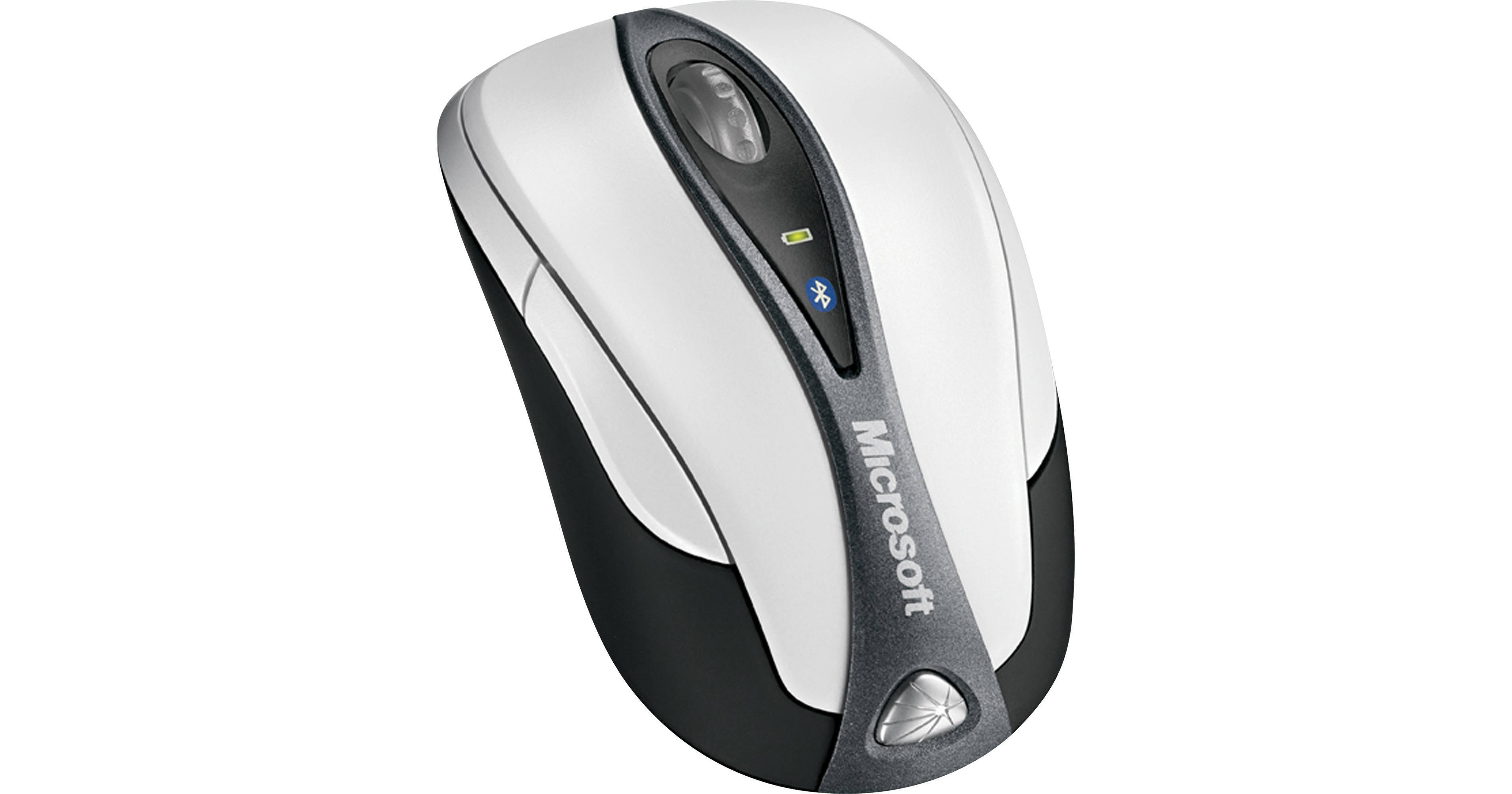
The Microsoft Bluetooth Notebook Mouse 5000 is a portable wireless mouse that can communicate with your computer via the wireless Bluetooth interface. Featuring 4 button control, scroll wheel, battery life indicator, and integrated grips for enhanced comfort. Its High Definition Laser Technology offers the ultimate control when using your mouse. With 1000dpi for more responsiveness, 6000fps for optimum tracking precision, this mouse is a powerful wireless option for your laptop computer.
| Type | Wireless Mouse |
| Interface | Bluetooth |
| Wireless Support | Bluetooth |
| Buttons | 4 |
| Scroll Wheel | Yes |
| Hand Orientation | Ambidextrous |
| Battery Level Indicator | Yes |
| Power Requirements | 2x AAA Batteries |
| Battery Life (approx.) | 3 Months |
| System Requirements | Windows XP SP2, Vista, 7; Mac OS X v.10.2.6-10.4.x |
REVIEW SNAPSHOT®
by PowerReviewsPros
Cons
Best Uses
Most Liked Positive Review
Great bluetooth mouse
I had previously used a Targus BT mouse with my Thinkpad T40, but when I upgraded to a VAIO, they didn't play well together. The Targus would go to "sleep" an...Read complete review
I had previously used a Targus BT mouse with my Thinkpad T40, but when I upgraded to a VAIO, they didn't play well together. The Targus would go to "sleep" and just not wake up. After much research, I tried the MS BT mouse and after about a month of solid continuous use, only had dropout issues two - maybe three - times. Accurate, compact, smart-looking, nice case, plus BH had a great price. [...]Only issue is that at one point it stopped staying connected and that turned out to be a low battery issue - changing to fresh batteries resolved it completely. But the low batt indicator on the mouse never seemed to activate.Wishlist item for this mouse would have been a USB cord option for both power and recharge; the Targus had that feature and it was one reason I was so adamant about trying to keep it working. No other manufacturer seems to offer that in a BT mouse, but at least the battery life is respectable.
VS
Most Liked Negative Review
Bluetooth Notebook Mouse 5000
I could give zero star to this product. The product packaging only shows it is for Mac but the online information says Windows compatible. This product should be compatible to both platform since it ...Read complete review
I could give zero star to this product. The product packaging only shows it is for Mac but the online information says Windows compatible. This product should be compatible to both platform since it a Bluetooth. But in Windows 7, it constantly get disconnected and once it is disconnected, your only option is to search for Bluetooth enabled device and reconnect. What a pain! Unfortunely, I can not return this to BH because I thrown away the packaging.
Reviewed by 30 customers
Sort by
Displaying reviews 1-20
Previous | Next »
Pros
Cons
Best Uses
Comments about Microsoft Bluetooth Notebook Mouse 5000 (Retail Packaging):
Better than Logitech, a little slow at first, but very precise and easy to adjust
Pros
Cons
Best Uses
Comments about Microsoft Bluetooth Notebook Mouse 5000 (Retail Packaging):
I have one of these for my mac book and one for a new hp laptop. Both work very well only rarely become disconnected. Startup can be delayed (maybe up to 30 sec) Don't know if this is on computer or mouse end. Package label says for mac and no mention of pc or windows compatability but works fine with both platforms.
Pros
Cons
Best Uses
Comments about Microsoft Bluetooth Notebook Mouse 5000 (Retail Packaging):
I bought a new laptop that is almost a netbook. I had difficulty using the mouse-pad to read e-mails and internet articles, especially when I needed to scroll up and down. The bluetooth mouse works perfectly in these situations. Being a laser mouse I can operate it on almost anything like the arm of a recliner, pant leg, bedspread, etc. It connected easily and reconnects upon startup.
Pros
Cons
Best Uses
Comments about Microsoft Bluetooth Notebook Mouse 5000 (Retail Packaging):
.I use the mouse on my Motorola Zoom tablet.
.I like the small foot print and works very well.
.I would like to see it made a bit more solid. So far so good.
Pros
Cons
Best Uses
Comments about Microsoft Bluetooth Notebook Mouse 5000 (Retail Packaging):
I could give zero star to this product. The product packaging only shows it is for Mac but the online information says Windows compatible. This product should be compatible to both platform since it a Bluetooth. But in Windows 7, it constantly get disconnected and once it is disconnected, your only option is to search for Bluetooth enabled device and reconnect. What a pain! Unfortunely, I can not return this to BH because I thrown away the packaging.
Pros
Cons
Best Uses
Comments about Microsoft Bluetooth Notebook Mouse 5000 (Retail Packaging):
Works on any surface. Very rarely loses connection
Pros
Cons
Best Uses
Comments about Microsoft Bluetooth Notebook Mouse 5000 (Retail Packaging):
I use the mouse daily with an HP laptop... on a variety of surfaces. I have been very satisfied. I like that I don't have to use one of my USB ports. I am not sure if I like the way it fits my hand yet or not because it's been only a short time. Like all notebook mice, it is smaller and so not as comfortable as a regular sized mouse. But, it works as it should and I am happy with it so far.
Pros
Cons
Best Uses
Comments about Microsoft Bluetooth Notebook Mouse 5000 (Retail Packaging):
I use it every day and its characteristics are very useful.
Pros
Cons
Best Uses
Comments about Microsoft Bluetooth Notebook Mouse 5000 (Retail Packaging):
I have an HP dv7t laptop w/Windows 7. This is a fab mouse. very compact. comes with a little case. It was very easy to install. Just put in the 2AAA batteries. Turned it on. Turned on the Bluetooth on the computer and seconds later it said the device was found. It's very fast. So fast I had to re-adjust the mouse settings. Works great on your lap (thigh) believe it or not! When you view this item on B&H's website it says compatible with both PC & MAC, but when you receive it, it may say MAC, but it works for both I found out with help from B&H. Once in a while it may loose connection. Press the little button for Bluetooth on the bottom and It's up & running. This has happened only twice. It wasn't that big of a deal. I tried other brands and didn't like them.
Pros
Cons
Best Uses
Comments about Microsoft Bluetooth Notebook Mouse 5000 (Retail Packaging):
I had previously used a Targus BT mouse with my Thinkpad T40, but when I upgraded to a VAIO, they didn't play well together. The Targus would go to "sleep" and just not wake up. After much research, I tried the MS BT mouse and after about a month of solid continuous use, only had dropout issues two - maybe three - times. Accurate, compact, smart-looking, nice case, plus BH had a great price. [...]Only issue is that at one point it stopped staying connected and that turned out to be a low battery issue - changing to fresh batteries resolved it completely. But the low batt indicator on the mouse never seemed to activate.Wishlist item for this mouse would have been a USB cord option for both power and recharge; the Targus had that feature and it was one reason I was so adamant about trying to keep it working. No other manufacturer seems to offer that in a BT mouse, but at least the battery life is respectable.
Pros
Cons
Best Uses
Comments about Microsoft Bluetooth Notebook Mouse 5000 (Retail Packaging):
I had another bluetooth mouse before this one, and it would drop the connection to my laptop and wouldn't reconnect until I reset the mouse. This one hasn't had that problem, and has been working great.
Pros
Cons
Best Uses
Comments about Microsoft Bluetooth Notebook Mouse 5000 (Retail Packaging):
very easy.
Pros
Cons
Best Uses
Comments about Microsoft Bluetooth Notebook Mouse 5000 (Retail Packaging):
I have been searching for a travel mouse that did not require a transceiver and I finally found the best one available. With a Macbook Pro only having two USB ports, I was constantly having to decide which device I had to unplug when it came time to use the ports to recharge my iPhone and anything else. Now I don't have that problem at all.
The OS picks up the mouse immediately with no hassles whatsoever!
This is the only travel mouse you will need to buy for years to come.
Pros
Cons
Best Uses
Comments about Microsoft Bluetooth Notebook Mouse 5000 (Retail Packaging):
This mouse has everything a person would need in a mouse for a Notebook. The Bluetooth connects flawlessly and the only real cons I have with it are its size and once in awhile it seems like it looses connection, but 99.9% of the time it works great. If you have large hands this mouse is not for you.
Pros
Cons
Best Uses
Comments about Microsoft Bluetooth Notebook Mouse 5000 (Retail Packaging):
It works perfectly, with a good price for value.
Pros
Cons
Best Uses
Comments about Microsoft Bluetooth Notebook Mouse 5000 (Retail Packaging):
Bluetooth works as described. Nice size and fit for hand.
Pros
Cons
Best Uses
Comments about Microsoft Bluetooth Notebook Mouse 5000 (Retail Packaging):
Used for work and personal use. Has a great scroller. Easy to set up and carry around.
Pros: Very well designed, comfortable, small
Pros
Cons
Best Uses
Comments about Microsoft Bluetooth Notebook Mouse 5000 (Retail Packaging):
convenient to use... not restrictive because it's wireless
Pros
Cons
Best Uses
Comments about Microsoft Bluetooth Notebook Mouse 5000 (Retail Packaging):
I started looking for a portable mouse after the touchpad on my new laptop started acting up. I really wanted something small with bluetooth that wasn't too pricey.
I LOVE this mouse! It's comfortable, despite it's size and responds very well. The bluetooth set up perfectly on my Lenovo Idea Pad (I have 64-bit Windows 7). The whole process took about 2 minutes.
I had read some reviews about trouble synching to Windows 7 64-bit but I had no such problem.
I've only had the mouse for about 2 weeks so I don't know how the battery will hold up (but I make sure to turn off the mouse when not in use). I had read some reviews that it had limited battery life.
So far I love it and it came with a case- a nice bonus!
Pros
Cons
Best Uses
Comments about Microsoft Bluetooth Notebook Mouse 5000 (Retail Packaging):
Tried other blur tooth mouses' and returned to this one. My 2-year-old likes to think he can play with this mouse and still stands to the abuse.
Displaying reviews 1-20
Previous | Next »