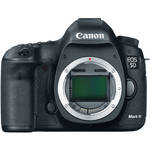
A lens and memory card are not included with the camera.
Get the type of lens for the shot you need, and a high-capacity memory card so you don't get caught without memory.
The Canon EOS 5D Mark II (Body Only) improves upon the EOS 5D by increasing the resolution by about 40% to 21.1 megapixels and adds a Live View feature that allows users to preview shots on the camera's high resolution 3.0" LCD display. It even incorporates the ability to record full motion HD Video with sound, so you can capture the action as well as superb images.
The camera's 21.1MP, full-frame 35mm-format (24x36mm) CMOS sensor captures image files with incredible image quality and color accuracy, as either JPEG, RAW and RAW+JPEG files. The camera also incorporates Canon's acclaimed DIGIC 4 imaging processor that works in concert with a high-speed DDR-SDRAM buffer to ensure quick performance and fast image processing times. Performance enhancements enabled by the DIGIC 4 processor include an incredibly fast full-resolution frame rate of up to 3.9 fps, improved battery life, noticeably improved image quality at all ISO sensitivities, fast start-up and reaction times, and improved noise suppression at ISO sensitivities ranging from ISO 100 to ISO 6400, plus the camera's sensitivity is further expandable to a range of ISO 50 to ISO 25600.
The Canon EOS 5D Mark II incorporates a high-fidelity (920,000 dot) 3" LCD screen and includes a 'Live View' feature that permits the user to frame their shots on the LCD display, and adds framing functions that are not possible with a traditional SLR viewfinder, including the ability to zoom in and navigate the preview image to ensure proper focus, and a grid overlay to assist in proper composition. The Live View focusing system also enables focus modes such as Quick mode, Live mode and Face Detection Live mode. Furthermore, the Live View Feature enables HD video recording that can capture true HD-quality (1080p) video at a frame rate of 30 fps with Face Detection and sound.
The magnesium-alloy chassis of the EOS 5D Mark II ensures the durability of the camera so users can take it on safari or to a press junket and be assured that the camera can take it. In addition the camera body incorporates extensive dust and weatherproofing features including seals and gaskets where body panels and/or camera controls meet. To further keep the imaging sensor free from dust, Canon's EOS Integrated Cleaning System uses ultrasonic vibrations to shake dust particles off of the sensor's low-pass filter each time you power up (or manually when needed). This ensures that your images will be spot free and reduces time needed for image retouching.
Other professional quality features found on the Canon EOS 5D Mark II include 14-bit A/D conversion, a bright viewfinder (with 98% image coverage), Auto Light Optimizer, Lens Peripheral Illumination Correction, 9-point AF plus 6-point assist AF, 25 Custom Functions with 71 settings, and 5 metering modes (35-Zone EV, 8% Partial Spot, 3.5% Spot, Center-Weighted, and Pre-Flash E-TTL II). Altogether, the Canon EOS 5D Mark II has been designed to serve the needs and interests of serious enthusiasts as well as professional photographers who are in pursuit of the perfect image.
|
| Imaging | |
|---|---|
| Camera Type | Digital SLR with Interchangeable lenses |
| Lens Mount | Canon EF |
| Camera Format | Full-Frame |
| Resolution |
Effective Pixels: 22.0 Megapixels |
| Sensor Type / Size | CMOS, 36 x 24 mm |
| File Formats |
Still Images: JPEG, RAW Movies: MOV |
| Bit Depth | 14-bit |
| Memory Card Type | CompactFlash |
| AV Recording | |
|---|---|
| Video Recording | Yes, NTSC/PAL |
| Aspect Ratio | 3:2, 16:9 |
| Video Clip Length | Up to 12 Minutes |
| Audio Recording | With Video |
| Focus Control | |
|---|---|
| Focus Type | Auto & Manual |
| Viewfinder/Display | |
|---|---|
| Viewfinder Type | Pentaprism |
| Viewfinder Coverage | 98% |
| Display Screen | 3" Rear Screen LCD (920000) |
| Exposure Control | |
|---|---|
| ISO Sensitivity | 100-6400 (High Sensitivity Mode: 50-25600) |
| Shutter |
Type: Electronic & Mechanical Speed: 30 - 1/8000 sec |
| Remote Control | N3-type remote (Optional) |
| Mirror Lock-Up | Yes |
| Metering Method | Spot metering, Center-weighted average metering, null |
| Exposure Modes | Modes: Aperture Priority, Auto, Manual, Program, Shutter Priority |
| White Balance Modes | Auto, Cloudy, Daylight, Flash, Fluorescent, Kelvin, Manual, Shade, Tungsten |
| Flash | |
|---|---|
| Max Sync Speed | 1 / 200 sec |
| Continuous Shooting | Up to 3.9 fps |
| External Flash Connection | Hot Shoe, PC Terminal |
| Performance | |
|---|---|
| Self Timer | 2 sec, 10 sec |
| Interval Recording | No |
| Connectivity | AV Output, HDMI C (Mini), USB 2.0 |
| Wi-Fi Capable (With Optional Transmitter) | Yes |
| Software Requirements |
Windows: 2000, XP, Vista Mac: OS X 10.3 or later |
| Power | |
|---|---|
| Battery | 1x LP-E6 Rechargeable Lithium-Ion Battery Pack |
| AC Power Adapter | AC Adapter Kit ACK-E6 (Optional) |
| Operating/Storage Temperature |
Operating 32 to 104 °F (0 to 40 °C) Humidity: 0 - 85% |
| Physical | |
|---|---|
| Dimensions (WxHxD) | 6.0 x 4.5 x 3.0" / 15.24 x 11.43 x 7.62 cm |
| Weight | 28.6 oz / 811 g |
REVIEW SNAPSHOT®
by PowerReviewsPros
Cons
Best Uses
Most Liked Positive Review
Mixed Feelings about the 5D MkII
First the good...
If you're looking for an excellent, full-frame DSLR, the 5D Mk2 is very, very good. It's at least 1 full F-stop more sensitive to light than...Read complete review
First the good...
If you're looking for an excellent, full-frame DSLR, the 5D Mk2 is very, very good. It's at least 1 full F-stop more sensitive to light than my Canon 1DS Mk2. A setting of ASA 800 or 1000 yields about the same noise level as my older camera at ASA 400. It's autofocus system is very fast and accurate on single shot mode. (I don't think EF-L series lenses are capable of faster focus action.)
The new LCD screen is gorgeous. 3" diagonal with 900,000+ pixels. It's possibly the best quality LCD screen ever put on a DSLR. The menus are easier to understand and navigate than the 1DS Mk2's menus. "Live View" is an excellent way to do critical focusing. If you've never used a DSLR with live view, you'll love it. The only negative of live-view is that it really drains your battery and it can only be used for a certain length of time before the CMOS imager circuitry heats up, adding noise to the image. (In real-life typical shooting, overheating is not a problem and besides the camera will auto cancel live-view if it senses an over temperature condition.)
The huge 21 mega-pixel RAW images are excellent. The camera uses an updated variant on Canon's .CR2 RAW format so if you use an older version of Adobe's Lightroom or Photoshop for image processing, you'll need the latest Lightroom 2.2 or Photoshop CS4 to get the proper RAW converter. I've personally never liked the included software for RAW image processing, but many people are happy with it.
The auto-exposure system seems very accurate... more accurate than my 1DS Mk2.
I never experienced any "black dot" phenomenon. But I've only shot RAW images at less than 1200 ASA.
I ordered the camera with the optional BG-E6 battery grip. This grip makes the camera taller and easier to hold. It allows simultaneous use of 2 Canon lithium batteries or 6- AA alkaline or rechargeables. It's a very valuable accessory to consider.
Now the bad...
I primarily purchased the camera for its ability to shoot great looking 1080P HD video for commercial TV projects. I thought it would be a great source for "B-Roll" cutaways and inserts.
The biggest single problem in the video mode is that you have no control over iris, ISO setting, or shutter speed. There's an exposure lock button that will lock the exposure variables to whatever the LCD displays at the time you press the button. There are no on-screen indicators that show the settings that the camera has chosen for you. The only control you have is the color temperature setting. Basically, you pan the camera around in the scene and let the brightness float up and down. When you see what you think is a good exposure on the rear LCD screen, you press the lock button. Since the exposure lock resets after each scene or take, chances are you won't have consistent exposures over multiple takes of a particular scene.
Working with the auto exposure system can sometimes be difficult. I was shooting with my 85mm F1.2 lens. By looking at the iris, it appeared the camera had decided to only open the lens to about an F2.8 and use a much higher ISO setting than necessary to achieve proper exposure. By pointing the camera to some very dark shadows, the iris fully opened. I then panned back to my original scene which appeared to be much cleaner and free of noise. You really need to be able to manually set the ISO & F-stop when shooting video.
I adjusted the camera's custom settings to lower the detail enhancement and contrast. These controls effect the quality of jpeg stills but seem to have no effect on a video recording.
The camera only records at 30.00fps, not 29.97fps. This tiny .03fps difference means that you have to alter each file's header, using a program such as Apple Cinema Tools, before you can edit 5D footage into a normal, broadcast 1080P/1080i, 29.97fps timeline. Failure to do this header alteration requires setting up a 30.00fps timeline or rendering every 5D scene on your 29.97fps timeline which yields periodic skipped frames.
There is no 24P (23.98) setting. As far as I'm concerned, there is no logical reason that Canon chose 30.00fps instead of 29.97fps. No broadcast TV or film standard operates at 30.00fps. Maybe Canon will correct this with a future firmware update. Please note that if you're only shooting high quality videos for web release, the 30.00fps speed won't present a problem.
To simulate the film-like cadence of a movie camera's 180 degree shutter at 30.00fps, the 5D Mk2's shutter should be set to 1/60 of a second exposure time. There is no way to tell what shutter setting the camera is using during a scene. My gut feeling from looking at camera video is that the 5D Mk2 often uses 1/30 of a second.
The camera's LCD screen is blanked whenever an HDMI monitor is plugged in. If you're doing a commercial shoot with clients, this means that either the cameraman or the clients can see what's being shot, but not both at the same time... You could add an external HDMI active splitter, but this would also require adding and using an external monitor at the camera. If you only plan to shoot by yourself, this shouldn't present a problem.
To do manual follow-focusing using the rear LCD screen, consider purchasing Hoodman's 3" LCD viewer. It's available from B&H and other retailers and it works very well. Of course, you'll have to figure a custom way to attach it to the back of the 5D Mk2 using rubber bands or Velcro.
The 5D Mk2 records what I would call "memo quality" audio with it's internal, mono microphone. You really notice the AGC raising and lowering the recording volume. If someone claps their hands, coughs, or makes a loud sound, the audio level and background sound dives down, then very noticeably fades back up. There is no headphone output or on-screen audio display so there's no way to confirm the level of your audio. If you plug an external mic into the camera, there is no indication to confirm even the presence of an audio signal. The only thing you can do is record a scene, then playback and carefully listen to the recorded file. If you plan to use this camera on a professional sync-sound project, you'd really have to consider double system sound recording. Recoding the audio on a separate recorder adds a major level of increased hassle but it's the only way to insure excellent audio. The audio from the camera's recording can be used as a post-production sync reference.
Another audio question is why Canon chose to record audio at a sample rate of 44.1kz instead of the industry standard 48kz. Apple's Final Cut Pro can handle almost any sample rate but other NLE's can't. Once again, if you're only shooting video for web release, the CD sample rate of 44.1kz shouldn't present a problem.
In certain low light or low contrast scenes, the H.264 encoding block artifacts are noticeable. In my opinion, the 5D Mk2 artifacts are more noticeable than the H.264 encoding used in Canon's own HF10, 1080 video camera even though the 5D's recorded bit rate is higher.
The camera's signal-to-noise ratio is very good and very clean. It's a more noise-free video picture than my $80,000 Sony F900R HDCam... except for the color red. Red objects are noisy. Most colors in a scene seem noise free, except red. This is especially true with low brightness red objects such as those in shadow areas.
The 5D Mk2 exhibits no "rolling shutter" characteristics that are associated with Nikon's D90.
The 5D Mk2 has the characteristic of clipping to "flat-line" black very low-light or shadow details in an image. This yields a "gutsy" rich, excellent, "film-like" quality for many scenes, but you can't do any post-production recovery of lost low-light details. The camera does a pretty good job of rolling scene highlights off to a hard clip at 100 units of video.
Possibly, some of the video problems I've detailed here are related to the specific 5D Mk2 that I purchased (serial#0320105XXX) but I don't think this is the case. Hopefully, Canon will issue a firmware update to address the camera's video problems. New firmware could possibly add manual control to the video capture functions and slightly lower the frame rate to the standard 29.97fps.
All cameras at any price level have positives and negatives. I've never found or used the "perfect" camera. The Canon 5d Mk2 is an excellent still camera and in my opinion, "a not quite ready for prime time" HDTV video camera. Possibly the camera was rushed to market to compete (or cancel out) the much hyped video features of Nikon's "rolling shutter" D90. It is an excellent glimpse into the future of "hybrid" still & video DSLR cameras.
VS
Most Liked Negative Review
Major Image Sensor Quality Problems
Right up front you should be aware that if you shoot a lot of photos in low light conditions like in dark wedding ceremony or reception venues, you're going to have "hot pixels...Read complete review
Right up front you should be aware that if you shoot a lot of photos in low light conditions like in dark wedding ceremony or reception venues, you're going to have "hot pixels" and some to many random blank pixels show up in the blacks as white squares. I shot such a wedding this past Sunday 3/8/09 at ISO 1600 and am now taking a break from "fixing" over 1200 images. My 5D Mk2 body is currently at the Jamesburg reair facility along with the "masses" (Canon technician's term)of its brothers being repaired. Based on research I've done on the web this really is a common problem, and I believe that as summer approaches in North America it will get worse for us. This is because many of the photographers that reported these problems already are in warm climates, Australia for example. Secondly, the problem in my camera became progressively worse as the night went on, and the camera warmed up, but then dimimished the next day after the cool down period. By the way, I shot with Live View off, and 2 second (short) review set.
On the plus, ISO 1600 in the Mk2 is as noise free as ISO 800 in my two 5D bodies, so Canon delivered on this promise. This is the reason I wanted the camera in the first place. All of the other virtues of the 5D are there, and the images are smoother, and it seems to handle highlights much better even with highlight tone turned off. But with this pixel problem that's kind of like saying, well, yes Mrs. Lincoln, but it was a good play.
Reviewed by 1465 customers
Sort by
Displaying reviews 1-20
Previous | Next »
Pros
Cons
Best Uses
Comments about Canon EOS 5D Mark II Digital Camera (Body Only):
I´m a very active enthusiast. So I´ve migred from a 7D Canon to 5DmkII because of the full frame improvement and I realized that is much more than that, the 5D is a very professional equipament and my images are now way ahead that before. The low grain with high ISO values is my favorite note of this beautiful camera.
Pros
Cons
Best Uses
Comments about Canon EOS 5D Mark II Digital Camera (Body Only):
I am still getting to know the camera... but so far! I LOVE it!
I am a young professional photographer, who shoots everything from corporate jobs to weddings.
This camera really allows you to capture what you are seeing, or what you want to see. It works beautifully in low light. (ISO of 1600 and up don't fall apart like in other cameras) The quality and size of the images it produces is much higher, mostly because it is a full frame camera. Bigger sensor!
If you like to shoot using natural light, i recommend this for you. It is easy to use if you know your stuff, not for just anyone, this camera is made for professionals.
Pros
Cons
Best Uses
Comments about Canon EOS 5D Mark II Digital Camera (Body Only):
I just received my 5D Mark II and right out of the box I was happy with what I saw. The improvements in body design and layout of the menu were fantastic. Upgrading from the first generation 5D was well worth the money.
I haven't run the camera through all the paces yet but from what I have already seen - color spectrum/new ISO options/ etc. - I have no doubt it will be able to handle all that I can throw at it. I'm also really excited to test out the video options but for now I'm just sticking to stills and seeing just how far I can take the new model.
Pros
Cons
Best Uses
Comments about Canon EOS 5D Mark II Digital Camera (Body Only):
A little over a year ago I decided I wanted a nice camera to use for shooting paintings (I'm a painter). I bought the 7d. I began to enjoy just using the camera and making photos on their own terms but the noise on the 7d is terrible beyond iso 800 and not great below it. I returned the 7d and bought this camera. Holy Cow...the images were amazing..I could pull 100% crops and use them as finals...I could toggle to 400% in PS and still clearly see an image....I could shoot low light at f4 iso 2000 in CR and they'd come out looking tack sharp in post..On a whim I started to look for a little side work doing photography. Now, just over a year later I own 2 of these and a small pile of L lenses and I'm busy...be careful...this camera can change your life! semi-kidding aside it is a remarkable piece of equipment and yields remarkable images. I've considered bumping up to the 1ds mk iii but in the end I simply can't imagine the image quality could be any better. (I do miss great AF on the 7d...come on 5D mkIII???).
Anyway...I Highly recommend this camera..The only downside, and it is a downside if speed is important to you...is the AF..Beyond that - WOW!!
Pros
Cons
Best Uses
Comments about Canon EOS 5D Mark II Digital Camera (Body Only):
I use the 5D for stock, commercial and fine art. I rented this camera enough to know it's what I wanted for my budget. I am not disappointed.
Pros
Cons
Best Uses
Comments about Canon EOS 5D Mark II Digital Camera (Body Only):
This is my third 5d MarkII. That should let ya know the camera is phenomanel. I will continue to use these bodies until the new 1d X is released. The files are amazing.
Pros
Cons
Best Uses
Comments about Canon EOS 5D Mark II Digital Camera (Body Only):
One of the best cameras on the market... But everybody already knows that.
Pros
Cons
Best Uses
Comments about Canon EOS 5D Mark II Digital Camera (Body Only):
I'm a mostly fashion and wedding photographer. I moved from a T1i to the 5D M II and couldn't be happier. The low-light abilities alone almost make the purchase with it. I keep the my 24 - 70L on it almost all of the time - it's beautiful pair.
Pros
Cons
Best Uses
Comments about Canon EOS 5D Mark II Digital Camera (Body Only):
The canon 5d mark II has become the industry standard for low-budget filmmaking. at a bargain price near 2k the only cameras that may outshine this are the RED! and talk about a price jump.
Pros
Cons
Best Uses
Comments about Canon EOS 5D Mark II Digital Camera (Body Only):
I am using on my job and it is exactly what I tought it was.
I have nothing to tell against what I bought.
Pros
Cons
Best Uses
Comments about Canon EOS 5D Mark II Digital Camera (Body Only):
I use ROW! Now "full frame"! What a joy!-What more a photographer should ask?
Pros
Cons
Best Uses
Comments about Canon EOS 5D Mark II Digital Camera (Body Only):
We bought this camera to shoot video using the Nikon prime lenses we accumulated over the years as Nikon users. Since we are using this strictly for video, much of the still photo attributes are not used. We have gotten very good results on our HD footage and feel the camera lives up to its reputation. I have used it for sync and non-sync narrative filmmaking in relatively controlled situations. I also used the camera attached to my Mac laptop in order to use the intervalometer function of the accompanying software. I do miss the built-in intervalometer of the Nikons, but this is acceptable.
Pros
Cons
Best Uses
Comments about Canon EOS 5D Mark II Digital Camera (Body Only):
The Canon EOS 5D Mark II is the best digital SLR. Even it is very light weight but its technical performance is great! Good for outdoor; easy carrying. High ISO setting makes indoor shooting more fun!
Pros
Cons
Best Uses
Comments about Canon EOS 5D Mark II Digital Camera (Body Only):
I received this camera as a gift. Very easy transition from my other Canon camera in terms of how the functions work and where they are located. Might be a little bit of overkill though on the multiple ways you can access the menu screen. It is my first full frame camera, so I can't compare it to any others. But I do have a friend that shoots primarily Sony and she is very impressed with my reports of the 5D.
Pros
Cons
Best Uses
Comments about Canon EOS 5D Mark II Digital Camera (Body Only):
If you are a person who loves to take landscape photos and portraits then look no further. the 5D2 has amazing image quality!! not to menion it performs really well at Hi ISO's. paired with good quality glass this camera will stick with you for a while.
Pros
Cons
Best Uses
Comments about Canon EOS 5D Mark II Digital Camera (Body Only):
I am mainly a newborn photographer, and really wanted this camera for its high sensor capabilities. Really love the quality feel the 5D MII has, and the images are SO sharp! Love this camera and can see this one lasting me for years to come. Very happy with my purchase, would highly recommend this camera to any professional.
Pros
Cons
Best Uses
Comments about Canon EOS 5D Mark II Digital Camera (Body Only):
This camera is a joy to use. This was a well-earned upgrade from a 20D and it was worth the wait and the price! I'm extremely pleased. Works seamlessly with my L lenses, 580EX, etc. Unfortunately, I couldn't use the batteries, charger, grip or a couple other accessories from the 20D on the 5D MkII. That's okay, though.
Pros
Cons
Best Uses
Comments about Canon EOS 5D Mark II Digital Camera (Body Only):
I am a photo major about to graduate so I figured it was time for a real camera. So far this camera has been nothing but great. Even pictures taken with an ISO of 6400 have a better quality than my Canon Rebel XTI took at 1600 ISO. I haven't had it for very long, but all in all I have no complaints so far.
Pros
Cons
Best Uses
Comments about Canon EOS 5D Mark II Digital Camera (Body Only):
This is my first DSLR and everytime I use this camera I am stunned that I was able to afford this quality. It is easy to use and in my opinion, intuitive. The LCD screen is gorgeous quality. I will be using this for still photography and video. I would say that you can see the decrease in quality when shooting video in low light, but I expected that.
Pros
Cons
Best Uses
Comments about Canon EOS 5D Mark II Digital Camera (Body Only):
Excellent resolution of minute details
Viewing screen excellent
Superb color recording
Menu easy to use
Displaying reviews 1-20
Previous | Next »