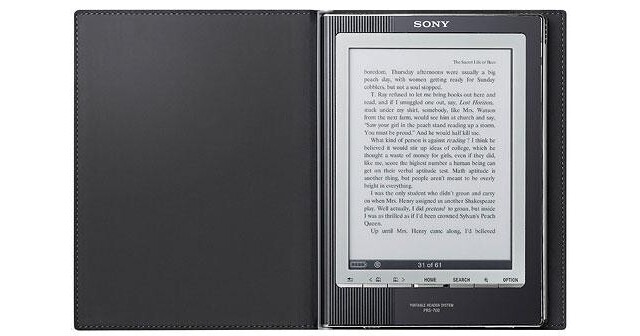
The PRS-700BC Reader Digital Book from Sony is an ultra-portable e-Book reader, perfectly suited for travelers, commuters, and bookworms. The Reader can store approximately 350 books in its internal memory; storage capacity can be expanded via SD and Memory Stick Duo memory cards.
The Reader's 6" touchscreen display is designed with text in mind. It can display 8 levels of gray scale, at an impressive 170ppi resolution. This makes reading prose on the display as comfortable to the human eye as traditional paper media.
The included software for Windows allows you to convert PDF, Microsoft Word, and BBeB documents for use with the reader. In addition to electronic books the Reader can also play music in MP3 and AAC format.
| Display Type | E Ink "Electronic Paper" display |
| Display Size | 6" |
| Resolution | SVGA (800x600 pixels) |
| Digital Interface | USB |
| Video In/Out | None |
| Card Slot | Memory Stick Duo, Secure Digital |
| Internal Memory | Approximately 350 eBook capacity |
| Power Requirements |
Built-in Rechargeable Lithium-ion Battery Charge via USB or via optional AC adapter |
| System Requirements |
Computer: 800MHz Intel Celeron Operating System: Windows XP, Vista Memory: 128MB Hard Drive: 20MB Optical: CD-ROM |
| File Support |
DRM Text: BBeB Book (Marlin), ePub Image: JPEG, GIF, PNG, and BMP Unsecured Audio: MP3 and AAC7 Unsecured Text: BBeB, ePub, TXT, RTF, Adobe PDF10, Microsoft Word (Conversion to the Reader requires Word installed on your PC) |
| Dimensions | 5.1 x 6.8 x 0.4" (12.8 x 17.4 x 0.97cm) |
| Weight | 0.625 lb (0.28kg) |
REVIEW SNAPSHOT®
by PowerReviewsPros
Cons
Best Uses
Most Liked Positive Review
A solid offering and easy to read
I use this product for reading e-books and some PDF's.Pro's:Compatibility: I've used it with epub, lrf and Sony bookstore books. Calibre will convert Microsoft .LIT, MobiPocket and more for use with the...Read complete review
I use this product for reading e-books and some PDF's.Pro's:Compatibility: I've used it with epub, lrf and Sony bookstore books. Calibre will convert Microsoft .LIT, MobiPocket and more for use with the PRS-700. It works on Windows, Mac OSX and Linux using the easy to use free software, "Calibre" [@]Book prices: Inexpensive books are available if you look around a bit. There are MANY websites out there with excellent e-book prices. You are not at all limited by the Sony book store.Ease of Use: It is fast and easy to setup / use. When I received my PRS-700, I plugged it into my computer and copied my books over and was reading in less than 5 minutes. The battery had a 75% charge when I received it.It's readable in ALL lighting conditions. There's a lot of talk about reflections and contrast with this unit. I read with it both indoors and out and in all lighting conditions from full sun to pitch black. (When pitch black, the side light comes in mighty handy!) Sometimes you need to angle it a bit to reduce reflections, but I've never found a situation where I couldn't comfortably read with it.Note taking: I love the ability to add notes to my books. When I see a word of phrase I'm not 100% sure of, I note it and look it up later at my leisure without losing the theme of the book.Battery Life:I've never been able to dent the battery by reading without the side light. With the side light on "low", I've read for several hours and lost no more than 25% battery.CONS:The physical next page buttons could be better placed / larger, but as you can flip pages with a swipe of the touch screen, that's largely irrelevant. It doesn't bother me, but I figured I should have at least one "Con".Bottom Line:I won't compare this to any other readers out there, but I will say that it stands on it's own as an excellent, well thought out, easy to use e-book reader.I'd buy it again and I do recommend it to my friends.
VS
Most Liked Negative Review
Sony PRS-700: Wait for another revision
Pros: Sony durability; touch-screen, lightweight, SDHC memory slot; good battery life if you don’t use the built-in lighting; decent audio player; good ergonomics and asthetics.Cons: Very poor contrast; expen...Read complete review
Pros: Sony durability; touch-screen, lightweight, SDHC memory slot; good battery life if you don’t use the built-in lighting; decent audio player; good ergonomics and asthetics.Cons: Very poor contrast; expensive; zoom function clutters the screen and is not sticky from page to page; lighting is uneven side-light LEDs, using them drastically reduces battery life.Have you seen those proof-of-concept cars? They demonstrate some really neat feature, but aren’t practical for the road? That’s essentially the new Sony PRS-700.I have had the Sony PRS-700 in hand for a few weeks. It has several nice features, but does not earn my recommendation for purchase.The Sony recently accompanied me on several overseas trips that were tailor-made for an eBook: long & boring.I anticipated filling that time with a good book, but was soon disappointed. First, the actual screen is only 3.5 inches wide by 4.75 inches tall. Not exactly book-sized. A PDF file that is not scaleable will be almost impossible to read. The reader does have a zoom capability, but it clutters the screen with arrows and a slider… and zoom is not ‘sticky’ from page to page! Second, although the touch-screen makes it easy to select a book from the menu, actually reading with it gave me a head-ache. Apparently the touch-screen added another layer over the display, so the contrast is very weak. Turning on the side-lighting helps, but it is comes from led’s spaced down the sides. You get uneven light & dark areas on the screen. Also, the lights eat the battery time up quickly.Finally, at about [$]street price, it is more expensive than the wireless Amazon Kindle.My recommendation: buy the Sony PRS-505, the Amazon Kindle, or wait for Sony to come out with ‘fixed’ version.Wishes: With today’s technology: what about a color screen, higher picture resolution, page finder/jumping, hot-link indexing? As tablet computers come down in price, the eBook readers are looking like an endangered species.
REVIEWS
Reviewed by 14 customers
Sort by
Displaying reviews 1-14
Pros
Cons
Best Uses
Comments about Sony PRS-700BC Reader Digital Book (Black):
I spent a great deal of time reading reviews of the most popular eReaders (actually amounting to hours). Unfortunately due to the location of my residence I was not able to actually test the readers in a store. The Sony 700 is sleek, stylish, looks and operates like a 21st Century device. It is easy to use, easy to load and overall an excellent piece of equipment.It is overpriced! I was particularly concerned with all of the reports of glare from the screen. I was right to be concerned which is why my headline refers to vision problems. The print is simply not crisp because of the touch screen. So you either go for crisper print with another model that does not have a touch screen or you go with a fuzzier screen and get touch screen capability. I opted for the touch screen and I am glad that I did.The software that Sony puts out for the eReader is weak, real weak which is surprising considering the sophistication of the Sony company and the number of years they have been manufacturing computer devices. The [*] of the software in no way reduces the quality of the machine.Other than the software and the drawbacks of clarity of vision as a result of the touchscreen, the eReader is a great product although significantly overpriced at [$].
Pros
Cons
Best Uses
Comments about Sony PRS-700BC Reader Digital Book (Black):
I use this product for reading e-books and some PDF's.Pro's:Compatibility: I've used it with epub, lrf and Sony bookstore books. Calibre will convert Microsoft .LIT, MobiPocket and more for use with the PRS-700. It works on Windows, Mac OSX and Linux using the easy to use free software, "Calibre" [@]Book prices: Inexpensive books are available if you look around a bit. There are MANY websites out there with excellent e-book prices. You are not at all limited by the Sony book store.Ease of Use: It is fast and easy to setup / use. When I received my PRS-700, I plugged it into my computer and copied my books over and was reading in less than 5 minutes. The battery had a 75% charge when I received it.It's readable in ALL lighting conditions. There's a lot of talk about reflections and contrast with this unit. I read with it both indoors and out and in all lighting conditions from full sun to pitch black. (When pitch black, the side light comes in mighty handy!) Sometimes you need to angle it a bit to reduce reflections, but I've never found a situation where I couldn't comfortably read with it.Note taking: I love the ability to add notes to my books. When I see a word of phrase I'm not 100% sure of, I note it and look it up later at my leisure without losing the theme of the book.Battery Life:I've never been able to dent the battery by reading without the side light. With the side light on "low", I've read for several hours and lost no more than 25% battery.CONS:The physical next page buttons could be better placed / larger, but as you can flip pages with a swipe of the touch screen, that's largely irrelevant. It doesn't bother me, but I figured I should have at least one "Con".Bottom Line:I won't compare this to any other readers out there, but I will say that it stands on it's own as an excellent, well thought out, easy to use e-book reader.I'd buy it again and I do recommend it to my friends.
Pros
Cons
Best Uses
Comments about Sony PRS-700BC Reader Digital Book (Black):
[...] Nice package. Really lovely and sturdy in my hand, weight feels good too. I have bought it for the courtesy light cause i like to read at dark in bed but it reduces battery a lot. The only complaint i have is for the contrast that is too low in some light indirect situations. I prefer calibre as software. It comes with the usb charger only, which is pretty slow in charging and really stupid if you travel a lot without laptop, but you can buy the psp charger (or official sony prs700) which is compatible.
Pros
Cons
Best Uses
Comments about Sony PRS-700BC Reader Digital Book (Black):
You have to know how to handle a computer and the www in order to download and install ebooks on the reader.
Takes a while to start it.
Pros
Cons
Best Uses
Comments about Sony PRS-700BC Reader Digital Book (Black):
When you are away from home and fond of reading books, an ebook reader is the perfect companion. You can carry around as many books as you want without the weight,download and listen to music og sound-books, news etc wherever you are in the world.
I got my PRS-700BC Sony Digital Book Reader just a month ago. Since then I have spent hours reading (litterature in Norwegian) outside and inside house, in bed and everywhere. I soon forgot it was a digital reader, it's so close to the real thing. The screen could be a little brighter, thus reducing the need of reading light, in special settings, glare can be a little irritating.If you need one - go get one, I am happy to recommend this product. In my opinion it gives excellent value for money!
Pros
Cons
Best Uses
Comments about Sony PRS-700BC Reader Digital Book (Black):
Just came back from holiday and the ebook served beautifully on the beach and on the pool. Never had any problems. I love it not having to carry heavy books anymore!
Pros
Cons
Best Uses
Comments about Sony PRS-700BC Reader Digital Book (Black):
I use the ebook privat instead hard cover.
It´s easy to handle.
Pros
Cons
Best Uses
Comments about Sony PRS-700BC Reader Digital Book (Black):
Before to make a choice of Digital Book, I was collecting lots and lots of information through internet. Seems like the two kings of the hill are this Sony PRS-700 and Kindle2. They're simmilar but with some differences (internet connection, touch screen, nightlight...) but what makes me decide for sony was the agreement with Google of 500.000 free books. Furthermore, they give you another extra 100 free classics on sony ebookstore.
There is an issue of glare with its screen, but not enough for me to decide to give a chance to his brother PRS-500. I'm happy with the product, happy with the supplier and very happy not having tons of papers and shelves at home.
Pros
Cons
Best Uses
Comments about Sony PRS-700BC Reader Digital Book (Black):
i bought it to read pdf files.
And for that is good. The reflow works nice
Also the page turn is fast
the annoying thing is the glare on the screen
people says that after a while you get used to, i've used it not enough to say this.
no direct chm file support.
if you have a psp, you can use the charger of psp
Pros
Cons
Best Uses
Comments about Sony PRS-700BC Reader Digital Book (Black):
OK, I bought this item together with Sony PRS-505, and I must say, that reading in Sony PRS-700BC is not as comfortable as in PRS-505. You just need a special lamp to do it. If you have a single point of light, the screen will be glossy or it will be too dark to see. OK, your eyes can adjust to that, but i don't think it's good for them.
Anyway, touch screen is a nice advantage, possibility to add comments to lines of text or pages is remarkable.
Pros
Cons
Best Uses
Comments about Sony PRS-700BC Reader Digital Book (Black):
I love the reader as I am a very keen reader, and before while travelling i had to take an extra bag of books with me, now I just down load the books and take 70 books in my hand bag.
Pros
Cons
Best Uses
Comments about Sony PRS-700BC Reader Digital Book (Black):
Basically, I've used the 505 and the 700 and for what it's worth go with the 505. I think the person from Oregon is right for the most part. However, the resolution and black and white aspect are like that for a specific reason...so it will look like an actual book, which it does a pretty good job of mimicking. Sure not all books are plain text but most of the one's us grown ups read are, unless perhaps your reading medical texts but any images are still viewable just not in color, I don't think it's possible to have your cake and eat it too on this issue. I recommend this for the avid and voratious reader who wants a large selection of books on hand and easily accessible. A person who is interested in using a digital reader to actually read text and not view pictures, listen to music or whatever else because all other functions available in this device certainly are secondary to reading.
Pros
Cons
Best Uses
Comments about Sony PRS-700BC Reader Digital Book (Black):
Pros: Sony durability; touch-screen, lightweight, SDHC memory slot; good battery life if you don’t use the built-in lighting; decent audio player; good ergonomics and asthetics.Cons: Very poor contrast; expensive; zoom function clutters the screen and is not sticky from page to page; lighting is uneven side-light LEDs, using them drastically reduces battery life.Have you seen those proof-of-concept cars? They demonstrate some really neat feature, but aren’t practical for the road? That’s essentially the new Sony PRS-700.I have had the Sony PRS-700 in hand for a few weeks. It has several nice features, but does not earn my recommendation for purchase.The Sony recently accompanied me on several overseas trips that were tailor-made for an eBook: long & boring.I anticipated filling that time with a good book, but was soon disappointed. First, the actual screen is only 3.5 inches wide by 4.75 inches tall. Not exactly book-sized. A PDF file that is not scaleable will be almost impossible to read. The reader does have a zoom capability, but it clutters the screen with arrows and a slider… and zoom is not ‘sticky’ from page to page! Second, although the touch-screen makes it easy to select a book from the menu, actually reading with it gave me a head-ache. Apparently the touch-screen added another layer over the display, so the contrast is very weak. Turning on the side-lighting helps, but it is comes from led’s spaced down the sides. You get uneven light & dark areas on the screen. Also, the lights eat the battery time up quickly.Finally, at about [$]street price, it is more expensive than the wireless Amazon Kindle.My recommendation: buy the Sony PRS-505, the Amazon Kindle, or wait for Sony to come out with ‘fixed’ version.Wishes: With today’s technology: what about a color screen, higher picture resolution, page finder/jumping, hot-link indexing? As tablet computers come down in price, the eBook readers are looking like an endangered species.
Pros
Cons
Best Uses
Comments about Sony PRS-700BC Reader Digital Book (Black):
Is a great way to read a book, and has also a nice and intuitive interface.
The touch screen is not so sensitive as the one on iPhone and i had some problems to get used to it.
The biggest problem is the glare, the screen reflects a lot of light and sometimes i have to switch on the background light in order to avoid this.
Another thing that must be there is the screen contrast change option, it would be great to be able to change this.
Overall is a good product,and a must have for avid readers.This is the future of books.
Displaying reviews 1-14