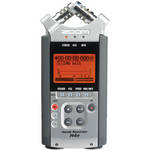
The Zoom H4n Handy Recorder picks up where the H4 left off and adds additional features to an already popular audio recorder. Ideal for recording interviews, lectures, rehearsals, meetings, and more, this palm-sized unit packs the ability to record up to 4 channels of audio at greater than CD quality.
The H4n features onboard true X/Y stereo microphones to pick up clear, natural sound without phase shifting. The mics can be rotated to select a 90° or 120° recording pattern for terrific versatility. The digitally-controlled preamp, combined with the high-quality microphones, allows you to capture Linear PCM audio at rates up to 24-bit/96kHz. The recorder captures audio to SD or SDHC cards with capacities up to 32GB. A USB 2.0 port allows you to quickly transfer files to a Mac or PC, or use the H4n as a live audio interface.
For connecting your own microphones or instruments, the H4n features XLR/TRS combo input jacks with phantom capability. A 3.5mm line output is provided, and a reference speaker is built-in for quickly reviewing your recordings. The unit operates on a pair of standard AA batteries, and features a Stamina mode to provide up to 11 hours of continuous recording at 16-bit/44.1kHz.
Other useful features of the H4n include variable playback speed, automatic and pre-record functions, a low-cut filter and limiter for improving the sound quality of recordings, time stamping, a metronome and tuner, and more. The backlit LCD screen and intuitive controls are easy to use, even for the recording novice. A collection of accessories are included so you can start recording right out of the box.
| Type | Hand-held multi-track stereo SD card recorder |
| Recording/Reading Methods |
SD/SDHC card (up to 32GB, 2GB included) USB connection to PC/Mac |
| Recording Bit Rate |
WAV: 16 and 24-bit MP3: 48 to 320kbps |
| Sampling Frequency |
WAV: 44.1/48/96kHz MP3 - 44.1/48kHz |
| Number of Channels | 2 or 4, depending on mode |
| Recording Time |
All times are for a 1GB memory card Stereo Mode: MP3: 17 hours 21 mins (128kbps), 6 hours 56 mins (320kbps) WAV: 1 hour 34 mins (16-bit/44.1kHz), 1 hour 26 mins (16-bit/48kHz), 28 mins (24-bit/96kHz) 4-Channel Mode: WAV: 47 mins (16-bit/44.1kHz), 28 mins (24-bit/48kHz) MTR Mode: WAV: 3 hours 8 mins (16-bit/44.1kHz) |
| AD/DA Conversion | 24-bit, 128x oversampling |
| Signal Processing | 32-bit |
| Phantom Power | 48V, 24V, off |
| Inputs |
2 x XLR/TRS combo inputs (balanced, unbalanced) 1 x 3.5mm mic input 2 x Built-in condenser microphones 1 x USB 2.0 port |
| Output |
1 x 3.5mm mini stereo headphone/line out jack 1 x USB 2.0 port (same as input) |
| Power |
2 x AA or LR6 batteries AC wall power USB bus power |
| Battery Life | Approx 6 hours (normal) or 11 hours (stamina mode) |
| Display | 128 x 64 pixel 1.9" backlit LCD |
| Dimensions (WxDxH) | 2.75 x 6.1 x 1.4" (70 x 156 x 35mm) |
| Weight | 9.9 oz (280g) (without batteries) |
REVIEW SNAPSHOT®
by PowerReviewsPros
Cons
Best Uses
Most Liked Positive Review
Multi-functional
In my opinion, this piece of equipment is a must have for any multimedia professional. But before I rave, lets start first with some cons...
What I was least plea...Read complete review
In my opinion, this piece of equipment is a must have for any multimedia professional. But before I rave, lets start first with some cons...
What I was least pleased with, was the exclusion of any way to attach this to my body or clothing. Even searching B&H and the rest of the internet I wasn't able to find much besides a case that looked cumbersome and over-the-top. Because I use this as a mobile unit to supplement the shotgun mic for my DSLR, it needed to be attached to me, and not shoved in some pocket where buttons could be pressed if the unit was unlocked. To solve this I ended up going to my local hardware store and constructing myself a belt-clip that screwed into the threads on the back. A bit of work, and hardly ideal, but it works. Also, I find that the menu is a little annoying to navigate (there's a dial that you spin on the side of it to move up and down). Not a deal breaker by any means, but again, when you're the sound guy on a set, it's not fun being waited on because you're adjusting settings between shots. I've also found that the way the files are categorized is upsetting. Simple 01, 02, 03 file names makes it difficult to recall files if not renamed after being upload. But being diligent to date file folders with when the audio was recorded avoids having 20 "01" files floating around. Finally, least of all, there is no lock for the XLR cable like most systems and microphones have, so when hanging from my belt I am always afraid that I will yank out the XLR. Simply something to be aware of.
The pros however, are wonderful. The built-in elements aren't the best, but for a piece of equipment of this price, they pass with flying colors. Great for room tones and background audio. The XLRs are also 1/4th connectors which provides great versatility. The back lit screen works wonders in dark environment such as concert halls, dance recitals, or plays. It is very clear whether or not you are recording. There's a lock function on the side to prevent tampering while recording. The threads on the back make it easy to attach to a mic stand or tripod (granted appropriate thread adapters). Phantom power... oh yes, phantom power, is probably the main reason I bought this little guy. And many people complain that it runs through batteries too quick. Well, you ARE using 48v if you've got phantom power engaged (it also has a 24v option), so of course you're going to run through batteries! I bought 8 rechargeable Pearstone batteries and they will last me all day. I can recharge them at night, and go all day the next day. Stamina mode is also wonderful if 16 bit - 44.1kHz - MP3 is acceptable audio for your purpose. Stamina mode running the attached elements will run for HOURS on two fully charged batteries. The gain is plenty, and pretty darn clean at that. The ability to record the mic elements and XLR/TRS inputs is great as well, and I use it often. The XLR/TRS levels can be adjusted independently of each other or linked together. One XLR channel can be summed to mono to reduce any post work. Built in limiter is better than clipped audio... The list goes on and on (believe me)!
In all, this really is a must have. There are so many uses, and it has saved me numerous times. It's small enough to fit in my camera case along with my shotgun mic and a short coiled up XLR cable. Fits the bill perfectly. Get one!
VS
Most Liked Negative Review
More than disappointment
I rated this product as I did at 2 stars because of a complex of draw backs and cons which prevented me from hailing this unit and praising it as I hoped I would be ...Read complete review
I rated this product as I did at 2 stars because of a complex of draw backs and cons which prevented me from hailing this unit and praising it as I hoped I would be able to. Let us see why step by step but first let me assure you that I am not one of those negative people who has generally negative outlook at life and whom it is virtually impossible to please. I rated other things very high and in some cases gave other products on other sites the highest ratings too. I am a videographer and purchased this unit in hopes to get professional grade sound for my videos. Reasoning was its compact size combined with ability to record at 24bit/96kHz as well as XLR inputs which are critical to me. I intended to use this unit as a backdrop environment sound for back channels in 5.1 or as a backup for main sound pattern in some cases.I will start with topmost star rating of 5 as permitted on this site and go from there. I will explain each problem that Zoom H4n exposes and subtract corresponding value for each.First thing first: the sound quality. While built-in microphones provide sufficient sound clarity and recording at 24/96 produces sufficient frequency spectrum, the level of self-noise is simply overwhelming to me. Do not be confused although, it is not overly loud for most consumer-related needs and will probably work quite well for most of the tasks which all other reviewers here seem to mention, but in my case the expected result is compared to a production level and it does not withstand even moderate criticism. I was able to get by only when I hooked up one of my studio mics (Audiotechnica 4033 to be specific) via phantom-powered XLR inputs, recorded voice-over narrations this way and then used software on my PC to apply noise gate at -40dB followed by voice compressor. Then only my recordings became more or less acceptable in quality for production. Forget "perfect" as many people here say and I am not even talking about decent, the quality reached mere acceptable status: the noise, removed from the pauses between speeches was still layered over the voice and you could hear it quite distinctively. To be fair although, many people may not notice it because they listen to the text and their attention is usually drawn to the context but since my job was making it sound right, I was paying attention to the sound itself and I could hear every flaw loud and clear while computer signal analysis visualizes the noise for me.I decided to give it another try and attempted to record something which is quite hard to capture very clearly: a cat purr. This time I used built-in mics and chased my little kitty when she was purring in gratitude for food. I shoved this thing right in her face which made my pet scared for a while but eventually the job was done. Imagine my frustration when I looked at my sound in Sound Forge and heard it in my speakers. Forget computer hardware issues, I have highest quality 24 and 32 bit processing sound card and excellent sound system and I look at the sound in analyzer rather than relying on cheap speakers as many do. My recording went straight to trash. The job wasn't handled at all.Again, if you are nothing more than an average person who never heard of 24bit DVD-Audio or Super Audio CD and spent no more than $1000 for your home sound system or do not work in audio/video production, you have nothing to worry about: you may not notice any issues with noise. But if you are a professional who needs quality above all, be forewarned. For this very significant and probably most critical issue with Zoom H4n I am taking one star off of the highest available rating. This is quite moderate subtraction in my opinion by the way. So far we are at 4 stars.Next, it allows 24bit at 96kHz recording in Mono and Stereo mode only. For 4 channel recording you are limited to 24bit at 48kHz only and if you hoped to use MTR mode, forget 24 bit, you are back to basics and that is 16bit at 44.1kHz only. Too bad, I wish it allowed 24 bit across the board. In my dreams in case with Zoon H4n although. Subtracting one more star and we are at 3 now.Next, Zoom H4n ASIO driver is not meant to work with 64bit operating systems. This means that if you have Vista 64 or Windows 7 64 bit, forget about connecting your Zoom and using included Cubase LE4 directly. Not going to happen. All you can do is get your SD card, copy files via card reader and work with files this way. This also means that all promised native support in inclosed Cubase LE4 is gone. If you wish it worked as promised, get yet one more PC or make you computer multi-boot and install 32bit OS. This means additional draw back which makes me very disappointed. Visit this forum and see what user Guyatone who seems to be working for Zoom Corporation says about not being interested even in making their product 64bit OS compatible: [@]I want to be moderate and I subtract half a star at this time. Therefore we are at 2.5 stars now.Next issue is with included Cubase LE4. While this software is supplied by Steinberg ([@]) rather than Zoom Corporation, it is still sold together with Zoom and therefore becomes part of the deal. As such it affects the general perception of the product and therefore Zoom folks should pay very close attention to this piece as well in order to keep their face up. Unfortunately, there is a huge problem here too. You cannot use CubaseLE4 more than 30 days or 3000 launches without activation but Steinberg's software activation web page does not work. First, you create an account on their site which works ok. Then you are forwarded to a page where you select Cubase LE4 for activation and registration and that's when you get "Error 404: not found page" message. Excuse me? Yes, you bought this product legitimately, you wish to register and activate it and instead you get "404" garbage. I don't know about you but this makes me very mad. Steinberg is yet to fix their issues, I am still not activated yet: we will see how long it would take them to fix their poor design issues. But because I am such a nice and cool guy, I am subtracting another half a star only. And that brings us to 2 stars only.I hoped to sing praises to this unit when I ordered it based on feedback of all other reviewers on this site but after encountering all mentioned above issues I am contemplating on returning my unit for refund. I still need some compact low noise recorder with 24 bit capability and XLR input as Zoom didn't stand up to its reputation.
Reviewed by 559 customers
Sort by
Displaying reviews 1-20
Previous | Next »
Pros
Cons
Best Uses
Comments about Zoom H4n Handy Mobile 4-Track Recorder:
Awesome in feild audio recording. XLR inputs an ease.
Pros
Cons
Best Uses
Comments about Zoom H4n Handy Mobile 4-Track Recorder:
I use this product to record back-up audio for music, and video shoots. Due to it's compactness it is great for on-site recording. I use a Canon 7D and Canon 5D Mark II cameras. This product is reliable and has done great at providing quality audio (perfect for online video content).
I need to test the xlr inputs, but the stereo microphone are great for me, perfect for back-up audio/stereo audio to mix in during post.
Pros
Cons
Best Uses
Comments about Zoom H4n Handy Mobile 4-Track Recorder:
This is the second H4n I have purchased... I have been using it for a couple years on pro video shoots and have had no problems. I needed more mic inputs and instead of going with a larger recorder i decided just to buy more H4ns and have them as backups just incase i break one or drop it in water on a shoot.
Pros
Cons
Best Uses
Comments about Zoom H4n Handy Mobile 4-Track Recorder:
Read reviews about this product before I decided to buy one. In use, it exceeded my expectations.
Could not believe my ears when I did an interview for a television program beside a very noisy street and when I played back, the recorded sound was very crisp and clean with minimal interferences.
Pros
Cons
Best Uses
Comments about Zoom H4n Handy Mobile 4-Track Recorder:
I use this to record audio for video that I sync in post. I use it when shooting interviews, weddings, events with a DJ or public address system, etc.I really like that it has built in mics as well as 2 XLR/1/4" inputs, that it can provide phantom power, that you can choose your quality and compression settings for your recording, that you record to SDHC cards, that the power from the 2 AA batteries lasts a substantial amount of time, that you can monitor your recording both with graphic levels and via headphones. I wish it had one additional 3.5mm output so you could monitor with headphones and feed another copy to your DSLR's mic input simultaneously.
Pros
Cons
Best Uses
Comments about Zoom H4n Handy Mobile 4-Track Recorder:
This is now one of my favorite pieces of audio equipment. At first it was a bit of a challenge to figure out how everything worked, but once I understood the concept it was great. This recorder lets you record SEPARATE tracks of audio which is perfect for whenever I do interviews with more than one person speaking. Also, the audio is very crisp and clear so I haven't had a problem with any distortion. I would definitely recommend this to a friend or anyone who works in the filming industry. It's a great devise and the company I work with will surely benefit from using it.
Pros
Cons
Best Uses
Comments about Zoom H4n Handy Mobile 4-Track Recorder:
Love It! Use it for sound recordings at weddings.
Sett up is easy, and the sound is fantastic!
Pros
Cons
Best Uses
Comments about Zoom H4n Handy Mobile 4-Track Recorder:
I have only used the H4n once since I purchased it but so far, it has been very handy and it has worked great. The device is very portable and easy to use, user friendly and the screen display/menu features are a bonus! I love it and I plan to use it on all of my upcoming work/film projects and voice over gigs. I strongly recommend it to everyone needing an affordable and hany recording device for audio capture. Once I get to know it better I can make some more detailed comments and suggestions for it, but so far I am very impressed. Thanks B&H
Pros
Cons
Best Uses
Comments about Zoom H4n Handy Mobile 4-Track Recorder:
this thing rocks can do more than I need but still easy to work and sounds great! No [*] this thing is as good as they come for the price!
Pros
Cons
Best Uses
Comments about Zoom H4n Handy Mobile 4-Track Recorder:
This is hands down the best recorder in this price range you can get. I highly recommend it. Easy interface is probably the single most important factor that makes it a great buy. Plus, it records high integrity sound. What more could you ask for?
Pros
Cons
Best Uses
Comments about Zoom H4n Handy Mobile 4-Track Recorder:
I use this recorder to record voice, specifically opera singers and piano. The sound is crystal clear and natural sounding. I've looked for many months for something that would capture voice to it's purest nature; this is it. Voice sounds warm and clear. The recorder captures the low, mid, and high frequencies perfectly. The ability to plug in two condenser mics to record a grand piano in stereo on top of the voice its a must. Of course, like any other equipment there are optimal settings, i.e, levels, distances, etc. Once you've master this, you will be producing some amazing recordings. In my case I need to record demo materials every six month for auditions and websites. I used to spend close to $800 at a studio, now I can do it all for free (except the pianist fee). There are some reviews out there comparing it to professional gear worth thousands and of course these people are biased towards the more expensive gear. I am extremely satisfied with the product. If you are on a budget and you need great functionality and quality, get this.
Pros
Cons
Best Uses
Comments about Zoom H4n Handy Mobile 4-Track Recorder:
Lots of features, great sound quality. Used with Canon 7d.
Pros
Cons
Best Uses
Comments about Zoom H4n Handy Mobile 4-Track Recorder:
We use this recorder with the Canon 5D Mark II Mark2 DSLR camera for recording HD video to produce corporate product videos. The onboard audio on the 5d and other DSLR cameras is very weak. It is especially bad in noisy environments like trade shows and in the field demonstrations. The H4n is really simple to use. We have used the internal microphones and plugged in external handheld miss via the XLR jacks. Next we are going to try wireless lav mics. we have posted our videos on youtube under spicorp1. The latest videos from the shot show were recorded with the H4n and handheld mic. We then mixed in the audio from the 5d to get a background noise level. The results were very good. all our videos are on x20 . org. The only thing I don't like so far is that the housing has a for tof plastic feel that makes it seem cheap. This is not critical and the performance so far has be excellent.
Comments about Zoom H4n Handy Mobile 4-Track Recorder:
Great piece of gear, worth every penny.
Pros
Cons
Best Uses
Comments about Zoom H4n Handy Mobile 4-Track Recorder:
This is a fantastic little recording device. I use it quite frequently in video production, the XLR and line in inputs are especially quite useful. The batteries last a decent amount of time, though you will probably want to get some rechargeable ones after your purchase. You can't go wrong here if you're looking for good quality a starter mobile recorder.
Pros
Cons
Best Uses
Comments about Zoom H4n Handy Mobile 4-Track Recorder:
The Zoom h4 is everything you read here and more. Easy to set up and use. XLR inputs, built in stereo microphones and multiple ways to setup recording. WAV or MP3, USB download...super easy.
Pros
Cons
Best Uses
Comments about Zoom H4n Handy Mobile 4-Track Recorder:
I got this to replace my Zoom H1. I was disappointed with the low XLR input levels. I end up having to use the 1/8" stereo input instead. The unit has some nice features suited for a wide range of applications. It would do well as a stand alone field recorder. I wouldn't recommend it for use with a DSLR though.
Pros
Cons
Best Uses
Comments about Zoom H4n Handy Mobile 4-Track Recorder:
It has really many functions but still is easy to use, captures great quality sound. It's worth every dollar you spend on it.
Pros
Cons
Best Uses
Comments about Zoom H4n Handy Mobile 4-Track Recorder:
works great as an external audio receiver fro my Canon T3i. Now with a wire split, I can use both headphones and a boom at the same time. The volume receiver control is also great for mobile audio recording.
Very disappointed though with its lack of connection to MAC computers. Buy a card reader or you will be out of luck if you have a MAC
Pros
Cons
Best Uses
Comments about Zoom H4n Handy Mobile 4-Track Recorder:
The H4n is a truly professional grade product. Low noise floor from the amplifiers. Makes my Audio Technica AT897 sound like a dream compared to many other recording devices. Works well from a multitude of sources. Nice case included along with a foam windscreen. Only problem is boot time.
Displaying reviews 1-20
Previous | Next »