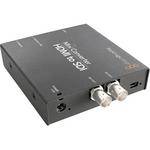
The Mini Converter HDMI to SDI from Blackmagic Design will accept an HDMI signal and convert it to 2 SDI outputs. You can also choose to embed audio from balanced AES/EBU or analog audio inputs. Use this device to add SDI output to cameras with HDMI connections or add SDI outputs to computers with HDMI or DVI connectors.
| Input | HDMI (x1) |
| Output | SDI (x2) - switchable between SD, HD & 3Gbs SDI |
| Audio |
Analog: (2) channels of professional balanced analog with standard 1/4" jack connections Digital: (2) channels of professional balanced digital with standard 1/4" jack connections, AES/EBU standard |
| Standards |
SDI Format Support: 625/25 PAL, 525/29.97 NTSC, 1080PsF23.98, 1080PsF24, 1080PsF25, 1080i50, 1080i59.94, 1080i60, 720p50, 720p59.94 and 720p60 SDI Compliance: SMPTE 292M, SMPTE 259M, SMPTE 296M, ITU-R BT.656, ITU-R BT.601 and SMPTE 297M for Optical Fiber SDI SDI Video Sampling: 4:2:2 None SDI Video Rates: SDI video connections are switchable between standard definition and high definition. SDI Color Precision: 4:2:2 SDI Color Space: YUV SDI Audio Sampling: Television standard sample rate of 48 kHz and 24 bit SDI Auto Switching: Automatically selects between SD SDI, HD-SDI and 3 Gb/s SDI Analog Format Support: 625/25 PAL, 525/29.97 NTSC, 1080PsF23.98, 1080PsF24, 1080i50, 1080i59.94, 1080i60, 720p50, 720p59.94 and 720p60 Analog Color Precision: 4:2:2 Analog Color Space: YUV HDMI Format Support: 625/25 PAL, 525/29.97 NTSC, 625/50p PAL, 525/59.94p NTSC, 1080p23.98/24, 1080i50, 1080i59.94/60, 720p50 and 720p59.94/60 HDMI Color Precision: 4:2:2 and 4:4:4 HDMI Color Space: YUV and RGB Copy Protection: For legal reasons, capture devices from Blackmagic Design are designed not to capture, convert or transmit video or audio from copy-protected sources, e.g. video devices using HDCP |
| Power | 12VDC |
| Dimensions (HxWxD) | 5.5 x 5.25 x 2.5" (14 x 13.3 x 6.4 cm) |
| Weight | 1 lb (0.45 kg) |
REVIEW SNAPSHOT®
by PowerReviewsPros
Cons
Best Uses
Most Liked Positive Review
Great piece of equipment
I use this as a converter for my 5D, 7D, and HVR-z7u to my Marshall Orchid Monitor HDSDI, or my Teradek HDSDI cube vido transmitter. It works great. I had an AJA box...Read complete review
I use this as a converter for my 5D, 7D, and HVR-z7u to my Marshall Orchid Monitor HDSDI, or my Teradek HDSDI cube vido transmitter. It works great. I had an AJA box at first, but as we all learned, aja converters do not work with the 5D mark 2. This converter does the trick no problem!!!
VS
Most Liked Negative Review
Know what your getting into
This mini converter does the job well especially converting my DSLR hdmi output to HD-SDI / SDI output. One thing you have to consider when using it for DSLR video output is that it gets...Read complete review
This mini converter does the job well especially converting my DSLR hdmi output to HD-SDI / SDI output. One thing you have to consider when using it for DSLR video output is that it gets a little hassle when the cables are attached since positioning the converter on the right place can be a slight problem. Having a handy and compact DSLR camera, you want to be mobile or freely moving but having all these converters and cables(including the power supply) attached to you, it can really slow you down.
I also hope this product came with skid protectors or rubber made bump protectors. It gets easily scratched due to its design. Product may easily look old due to friction on surfaces.
If you are using the product for home or post production, I think this product works very well in a stationary area. Very good product for its price. I still highly recommend it. A great product with probably the best price tag out in the market.
Reviewed by 21 customers
Sort by
Displaying reviews 1-20
Previous | Next »
Pros
Cons
Best Uses
Comments about Blackmagic Design Mini Converter HDMI to SDI:
This is a great product! Works very well and has great image quality! Cant beat the price either
Pros
Cons
Best Uses
Comments about Blackmagic Design Mini Converter HDMI to SDI:
Making tv products It is little and efficient
Pros
Cons
Best Uses
Comments about Blackmagic Design Mini Converter HDMI to SDI:
This mini converter does the job well especially converting my DSLR hdmi output to HD-SDI / SDI output. One thing you have to consider when using it for DSLR video output is that it gets a little hassle when the cables are attached since positioning the converter on the right place can be a slight problem. Having a handy and compact DSLR camera, you want to be mobile or freely moving but having all these converters and cables(including the power supply) attached to you, it can really slow you down.
I also hope this product came with skid protectors or rubber made bump protectors. It gets easily scratched due to its design. Product may easily look old due to friction on surfaces.
If you are using the product for home or post production, I think this product works very well in a stationary area. Very good product for its price. I still highly recommend it. A great product with probably the best price tag out in the market.
Comments about Blackmagic Design Mini Converter HDMI to SDI:
Nice way to convert and embed analog audio
Pros
Cons
Best Uses
Comments about Blackmagic Design Mini Converter HDMI to SDI:
I am the Production Director for my church and our entire HD video system is run with SDI. To save money we have choosen to use the Mini Converter to convert our consumer based HDMI video Cameras. It works flawlessly. Simple to use with no problems. Even my volunteer camera ops can set it up and take it down each weekend, which simplifies my job.
Pros
Cons
Best Uses
Comments about Blackmagic Design Mini Converter HDMI to SDI:
I shot video for an international broadcast using my 5d and needed to play it into the EVS machines, needless to say, used my macbook pro display port out into hdmi and put it into this box and it worked just fine. I had thought about buying the AJA mini converter that does the same thing, but this one is actually better because it allows you throw analog audio onto the hd-sdi...just gotta flip a little switch on it.
Pros
Cons
Best Uses
Comments about Blackmagic Design Mini Converter HDMI to SDI:
This is a great converter overall. The only complaint I have is, it periodically drops out (goes black for a few frames) then comes back. It was pretty bad when I first got it because I didn't update its firmware. After the firmware update it only does this VERY sporadically, meaning far less than originally.
Pros
Cons
Best Uses
Comments about Blackmagic Design Mini Converter HDMI to SDI:
very good
Pros
Cons
Best Uses
Comments about Blackmagic Design Mini Converter HDMI to SDI:
These things simply work. No mysticism, just plug it in and go.
Pros
Cons
Best Uses
Comments about Blackmagic Design Mini Converter HDMI to SDI:
I'm using the black magic box to connect my Canon 5D to a large monitor. The converter works nicely and there was no need for firmware update. Haven't used it that much yet but while tested it worked flawlessly.
Pros
Cons
Best Uses
Comments about Blackmagic Design Mini Converter HDMI to SDI:
Cheapest HDMI to SDI out there! Backed by black magic's performance! Love it
Pros
Cons
Best Uses
Comments about Blackmagic Design Mini Converter HDMI to SDI:
This fits on our 5D rails with no real weight gain and allows us to convert the HDMI to SDI for both the on-board monitor and Cube 150. Very nice with no bugs. Make sure you find the right power cord for the cage or on-board Battery. We also use it in the studio to send a signal from the camera system to a large client monitor with an additional SDI to HDMI adapter.
Pros
Cons
Best Uses
Comments about Blackmagic Design Mini Converter HDMI to SDI:
HMDI TO SDI MINI CONVERTER
Pros
Cons
Best Uses
Comments about Blackmagic Design Mini Converter HDMI to SDI:
Excelent product. I like that you can control it from any computer.
Pros
Cons
Best Uses
Comments about Blackmagic Design Mini Converter HDMI to SDI:
We use the product to convert Panasonic HD cameras with HDMI output to SDI signals so they can be integrated into the new Panasonic HD switcher series. It works like a champ. No signal loss and now we can use the HMC150 HD camera in the mix of our switched system. The box is a bit pricey but it does the job. And or course we all hate the old wall warts but no real way to get around them
Pros
Cons
Best Uses
Comments about Blackmagic Design Mini Converter HDMI to SDI:
Last minute substitute. Got a presentation the following day on location. Footage coming from Canon 60D from HDMI to SD-SDI. Got job done without a glitch. Only thing about the product is that there were no instructions that came with the unit. Went online to get information but cant find the right documentation for the unit also. Tired all the dip switches until I found the right one to work with SD. Well made and it comes with power adapter.
Pros
Cons
Best Uses
Comments about Blackmagic Design Mini Converter HDMI to SDI:
I use this as a converter for my 5D, 7D, and HVR-z7u to my Marshall Orchid Monitor HDSDI, or my Teradek HDSDI cube vido transmitter. It works great. I had an AJA box at first, but as we all learned, aja converters do not work with the 5D mark 2. This converter does the trick no problem!!!
Pros
Cons
Best Uses
Comments about Blackmagic Design Mini Converter HDMI to SDI:
It is hard for me to give anything 5 stars. I will give this my best of 4 though. A well made device that worked as needed and packaged for easy appliction as a stand alone converter. Five minuetes out of the box and it was in operation. The quality of the converted video was untouched.
Comments about Blackmagic Design Mini Converter HDMI to SDI:
Remember that as of Nov. 2010 you still have to download and downgrade the firmware from the current to the last version to get this to work well with the Canon 5D MkII. Google it for more details. It's easy and only takes a minute or two.
The only complaint I have is that compared to the last converter I used, it takes a few extra seconds per shot for this converter to scan from one resolution to another, during which time the monitor goes black. That means missing the first couple of seconds per shot, which is rarely a big deal, but might be a problem for some uses.
Pros
Cons
Best Uses
Comments about Blackmagic Design Mini Converter HDMI to SDI:
Note that in our experience, one of four ordered worked right out of the box, but the other three required a firmware update, via usb... after the update, these units function consistently anywhere in the signal path, and provide solid output signal to various devices and processors down the line. No other issues whatsoever. Worked well to provide monitoring from multiple Canon 5Ds, even when switching from HD to SD during recording...
Displaying reviews 1-20
Previous | Next »