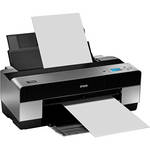
Engineered for the serious professional, the Epson Stylus Pro 3880 Large-Format Printer incorporates a compact, 17-inch wide printer design, along with an amazing variety of technological innovations.
The Pro 3880 is engineered with the all-new AccuPhoto HD2 technology, created from a collaboration between Epson and the Rochester Institute of Technology's Munsell Color Science Laboratory. It combines a complex mathematical architecture and advanced screening technology to provide outstanding image quality, ensuring precision placement of each individual ink droplet, resulting in dynamic looking photos with smoother color transitions, and better highlight - shadow detail.
With a maximum resolution of 2880 x 1440dpi, and an advanced MicroPiezo AMC™ print head, the Stylus Pro 3880 produces gallery-quality color and black-and-white output up to 17 x 22".
The Epson Stylus Pro 3880 includes Epson UltraChrome® with Vivid Magenta Ink Technology, known worldwide for professional printing applications. The printer's 9-ink set ink delivers an amazing color gamut with breathtaking blues and violets. Even more remarkable, the latest high performance, one-inch wide print head now incorporates an Auto-sharing Black Ink technology, allowing both Photo and Matte Black ink to be installed simultaneously.
Capable of handling virtually any type of cut-sheet media up to 17" wide, the Epson Stylus Pro 3880 incorporates a high-capacity paper feeder that accommodates sizes ranging from 4 x 6" up to 17 x 22". The printer also features four different ways to load media, including a front-loading, straight-through path capable of handling media up to 1.5 mm thick and a second, top-loading, single-sheet feeder optimized for fine art paper.
| Printing Method | |
|---|---|
| Printing Technology | Advanced MicroPiezo AMC print head technology. Eight-channel, drop-on-demand, ink jet print head. Auto head alignment and cleaning technology. Color & monochrome heads 180 nozzles x 8 |
| Resolution |
2880 x 1440 dpi 1440 x 720 dpi 720 x 720 dpi 720 x 360 dpi 360 x 360 dpi 360 x 180 dpi |
| Minimum Ink Droplet Size | 3.5 picoliters |
| Ink Type | Pigment-based Epson UltraChrome K3 Ink |
| Ink Palette | 9-color (C, Lc, M, Lm, Y, Lk, LLk + PK or MK) |
| Ink Cartridge Configuration | 9 individual ink cartridges |
| Capacity |
Cartridge fill volume: 80 ml each color x 9 colors total Ink cartridge shelf life: 2 years from printed production date or 6 months after opened 1 Please Note:On-cartridge I.C. chip automatically tracks several ink usage data points for use in production cost estimations and reporting close |
| Ink Cartridges |
Photo Black (T580100) Cyan (T580200) Vivid Magenta (T580A00) Yellow (T580400) Light Cyan (T580500) Vivid Light Magenta (T580B00) Light Black (T580700) Light Light Black (T580900) Matte Black (T580800) |
| Technology |
Auto-sharing Black Ink Technology Fully automatic switching between Black ink modes Black ink conversion times: Matte to Photo Black 3:30 (min:sec) Photo to Matte Black 2:30 (min:sec) Ink used during conversion: Matte to Photo Black Approx. 4.6 ml Photo to Matte Black Approx. 1.6 ml 2 Please Note:Ink used in conversion varies considerably based on temperature and other factors close |
| Performance | |
|---|---|
| Print Speed |
8 x 10" print: from 2:03 to 7:47 - normal is 4:08 11 x 14" print: from 3:18 to 12:15 - normal is 6:39 16 x 20" print: from 5:32 to 19:40 - normal is 10:59 Based upon print engine speed only. Total throughput times depend upon front-end RIP, file size, printer resolution, ink coverage, networking, etc. Normal Mode based on SuperFine 1440 dpi |
| Input Buffer | Not Specified by Manufacturer |
| Printer Duty Cycle | Not Specified by Manufacturer |
| Print Archival Life |
Color: Up to 108 years Black & White: Over 200 years |
| Paper Handling | |
| Maximum Paper Width | 17" |
| Printable Area |
Maximum paper width: 17" Maximum cut-sheet size: 17 x 22" Minimum cut-sheet size: 4 x 6" Left and right margins: 0 or 3 mm each (0.24" total) Top and bottom margins: 0 or 3 mm or 15 mm each Maximum printable width: 17.16" (full bleed, 17" width) |
| Paper Sizes | 4 x 6", 5 x 7", 8 x 10", 11 x 14", 16 x 20", 17 x 22" |
| Borderless Photo Sizes | 4 x 6", 5 x 7", 8 x 10", 11 x 14", 16 x 20", 17 x 22" |
| Paper Types | All types of Inkjet media optimized for Pigment ink printing |
| Media Weight | 12 lb bond, up to 1.5 mm cardboard |
| Paper Capacity |
Main top-loading feeder Up to 17 x 22" Up to 120 sheets plain; 50 photo Second top-loading feeder Up to 17 x 22" Single sheet manual feeder: Optimized for fine art paper Front manual feeder: Up to 16 x 20" Straight-through, single sheet Manual feeder: Up to 1.5 mm |
| Connectivity | |
|---|---|
| Computer Interface |
USB 2.0 (Hi-Speed) USB 1.1 compatible 10/100Base-T Ethernet |
| Compatible Memory Cards | No |
| Direct Print Capable | No |
| Network Capable | Yes (10/100Base-T Ethernet) |
| Printer Language |
Epson ESC/P2 raster photographic drivers standard Optional PANTONE licensed PostScript Language Level 3 compatible Also supported by most leading, third-party RIPs and workflows |
| System & Software Requirements |
Macintosh Tiger 10.4.9 or higher Leopard 10.5 or higher (16-bit) Snow Leopard 10.6 or higher (16-bit) Windows XP Vista, and Windows 7 (32 & 64-bit) |
| Physical | |
|---|---|
| Status Display | 2.5" Monochrome alphanumeric LCD with Backlight and Indicator LEDs |
| Image Preview Display | No |
| Front Panel Controls | Power, Stop/Eject, 4-Way Controller (also function as Menu, Paper feed, & Ink Load), Enter/Function |
| Power Requirements | 110-120V AC, 50-60Hz |
| Power Consumption |
Operating: Approx. 25W Standby: Less than 5W Power Off: Less than .3W Fully ENERGY STAR compliant |
| Environmental |
Temperature: Operating: 50 to 95°F (10 to 35°C) Storage: -4° to 104°F (-20° to 40°C) Relative humidity: 20 to 85% Operating: 40 to 50% Recommended storage 5 to 85% (no condensation) |
| Dimensions (WxHxD) | 27 x 10 x 15" (686 x 254 x 381mm) |
| Weight | 43.2 lb (19.6kg) |
REVIEW SNAPSHOT®
by PowerReviewsPros
Cons
Best Uses
Most Liked Positive Review
The Epitome of Fine Art Inkjet Printing
I am a semi-professional photographer with more than thirty years of experience and produce fine art prints for clients, books and exhibition. Having worked with traditional darkroom printing methods and, for the past six...Read complete review
I am a semi-professional photographer with more than thirty years of experience and produce fine art prints for clients, books and exhibition. Having worked with traditional darkroom printing methods and, for the past six years, inkjet printing on the Epson Stylus Photo 2200, I have found the Epson Stylus Pro 3880 to be a major advance in fine art printing beyond anything I have experienced to date. It is for me a fine art photographer's printing "dream machine." The colors are crisp, clean and brilliant. Black and white output is nothing less than stunning. It interfaces easily with my Mac and prints come out much faster than I expected. Set up was very easy out of the box but, heeding the warnings about all of the packing tape, I took care to remove all of it. There is a great deal of tape in places least expected in order to secure the machine for shipment and it takes time to remove it. Be very careful to remove all of it before activating the printer or damage could result.
The only difficulty I ran into when setting up the printer was the instructions indicated that once the print cartridges were installed and the printer was powered up, it would begin to automatically prime the print lines. The instructions indicated this would take from 7 to 10 minutes. Although I followed the instructions exactly, my printer did not prime the ink lines. It wasn't until I actually started printing test pages that the ink started to flow and it primed the lines. This was a minor inconvenience that was easily overcome but could be more problematic for someone new to inkjet printers.
To date I have produced over 100 prints since I got the printer a month ago and they are without a doubt the most beautiful prints I have ever created. The output from this printer is far beyond anything I have ever gotten from a commercial photo lab and they surely beat the quality of prints I made in a darkroom.
I am also pleased with the relatively small footprint this printer occupies in my digital lab. I am somewhat limited in available space and to set up a machine capable of printing as large as this one does into such a small space is a feat of technological engineering.
If you are serious about obtaining the finest print quality possible in an inkjet printer whether for exhibition, sales or for personal pleasure, then this is the printer to get. You will not be dissappointed.
VS
Most Liked Negative Review
When It Works, It's Great
We purchased this printer for our architectural firm for architectural photography. A few days after setup, we discovered it would not allow multiple sheets to be loaded. It would grab several at a time...Read complete review
We purchased this printer for our architectural firm for architectural photography. A few days after setup, we discovered it would not allow multiple sheets to be loaded. It would grab several at a time. When one sheet only was loaded, it misaligned the sheet, we got an error message and the printer shut down. One week after purchase, Epson sent us a refurbished replacement machine (not a new machine, mind you!). The refurbished machine at least does not misalign the sheets, but we still have to feed only one sheet at a time; you cannot let this printer run unattended, overnight, which was the reason we bought this printer. Furthermore, it does not allow use of roll paper. For a printer this size and cost one would expect roll handling. My 8-year-old Epson 2200 handles rolls, and I have never had any of these problems with it. I guess they've really cheapened their quality in the past 8 years. When everything works, the print quality is wonderful. Ink cartridge costs are ridiculous, but at least they seem to last for a while.
Reviewed by 256 customers
Sort by
Displaying reviews 1-20
Previous | Next »
Pros
Cons
Best Uses
Comments about Epson Stylus Pro 3880 Large-Format Inkjet Printer:
I've never seen blacks that are so rich in a print.
Pros
Cons
Best Uses
Comments about Epson Stylus Pro 3880 Large-Format Inkjet Printer:
It makes better prints than online or local printers- once I discovered the settings that work for me.
I have Photoshop CS5 and I initially used the printer profile for my papaer suggested by the manual. The prints turned out darker and with lower contrast. Something made me select Adobe RGB (1998) for the printer profile and Absolute Colormetric for the rendering intent and suddenly my prints started coming out very close to what I was seeing on my monitor- even though the monitor hadn't been calbrated.
I would buy this printer again and I would suggest to any of my friends in the market for a large format printer.
Pros
Cons
Best Uses
Comments about Epson Stylus Pro 3880 Large-Format Inkjet Printer:
I've only had it for a week now, however I'm completely satisfied -- actually pleasantly surprised at the results.
I'm using ir primarily for B&W with Photoshop controlling the colors/process and using NIK Silver Efexx 2.0 for the conversion -- definitely Gallery Quality prints.
Pros
Cons
Best Uses
Comments about Epson Stylus Pro 3880 Large-Format Inkjet Printer:
This printer replaced an Epson R2400. While the R2400 was adequate for my needs, I wanted to eventually upgrade to the 17"x22" size. The 3880 is quieter than the R2400, more cost effective for paper and ink and the prints are superb! The footprint is not all that much bigger either. I wish I had purchased this printer sooner!!
Pros
Cons
Best Uses
Comments about Epson Stylus Pro 3880 Large-Format Inkjet Printer:
I bought this printer after careful research and consulting with my photography club colleagues about the ones I was considering. This is my first "photo" printer.
The printer was exceptionally well packed on arrival. Although I opened the bottom instead of the top due to the way it was packaged, it came out of the box without trouble. You do have to search for all of the taped and cardboard inserts to make sure they're all removed. A flashlight is helpful for this.
The network setup was easy. Just follow the instructions in the order given and everything should work.
So far I have printed only about 15 pictures--mostly 4 x 6. The first attempts were on some HP premium photo paper that I already had available. I was not happy with the color (I have a calibrated LCD monitor). So, a quick trip to a local store for Epson Premium Glossy provided improved results. The first picture I tried to print was a sunset photo with shades of purple to blue in the sky and white clouds. I think this was a bit more difficult to get just right. The second print was of a red car against green foliage background. This came out excellent. A couple of protraits were also excellent.
I have made a few prints in 5x7 and 8.5x11. The large prints were on Epson Ultra Premium Luster paper. I really liked the way the darks and detail came out in this nighttime picture of an Amtrak train arriving at the station platform.
Great printer so far.
Pros
Cons
Best Uses
Comments about Epson Stylus Pro 3880 Large-Format Inkjet Printer:
My husband is an artist and we use this printer to print high quality prints of his artwork. So far it has met and exceeded our expectations. Color is very true and saves us going to a printer where we were not getting true color and paying high prices and making several trips and not getting quality prints.
Pros
Cons
Best Uses
Comments about Epson Stylus Pro 3880 Large-Format Inkjet Printer:
Upgraded from an R1800. General print quality is great and color match is much better than the 1800.
Larger ink cartridges and cheaper ink as well.
Good upgrade.
Pros
Cons
Best Uses
Comments about Epson Stylus Pro 3880 Large-Format Inkjet Printer:
I use this to print photos for local exhibits and the like. The convenience of having the printer in my home is amazing and the quality is great. The colour is good and likewise the black and whites, which are often as hard if not harder to get rivet, have been great, i got a great deal on this with ink included.
Pros
Cons
Best Uses
Comments about Epson Stylus Pro 3880 Large-Format Inkjet Printer:
Very pleased with my new Epson 3880 photo printer. Fine Art B&W photos look great. No complaints. Waiting for my $300 rebate to flow from Epson, then I will be extra happy.
Pros
Cons
Best Uses
Comments about Epson Stylus Pro 3880 Large-Format Inkjet Printer:
Seeing my raw files go from laptop screen to beautiful archival prints is a wonderful experience.
Pros
Cons
Best Uses
Comments about Epson Stylus Pro 3880 Large-Format Inkjet Printer:
So far so good. The difficult part was getting it out of all the wrapping. I use ColorSync and so far have had prints that match my monitor pretty well. It is a bit larger than I expected. It runs quietly and smoothly and the prints are excellent if you use the right profiles. When I monkey with the Photoshop settings things can go haywire but that is my problem not the printer's. I plan to prepare a gallery show with 16x20 prints.
Pros
Cons
Best Uses
Comments about Epson Stylus Pro 3880 Large-Format Inkjet Printer:
Does a good job on large print sizes, must see how many prints I
get from the ink cartridges. The ink looks a little expense.
Pros
Cons
Best Uses
Comments about Epson Stylus Pro 3880 Large-Format Inkjet Printer:
Moving up from a worn out HP B9180, I should have made the move years ago.
Most of my work is printed on Hahnemuhle fine art papers, but this printer does beautiful images on Breathing Color Lyve canvas, Canson Aquarelle, Epson Ultra Smooth Fine Art, and the Black and White prints on Epson Ultra Premium Luster are breathtaking. The HP could never pull that off for me.
Pros
Cons
Best Uses
Comments about Epson Stylus Pro 3880 Large-Format Inkjet Printer:
I knew this printer was a very good one. I just waited until the price was good also.
Pros
Cons
Best Uses
Comments about Epson Stylus Pro 3880 Large-Format Inkjet Printer:
I was using and still have an Epson R2880. I recently recieved my 3880 from B&H. The 2880 has been collecting dust ever since. The quality of the prints is excellent. The paper feeding issues I sometimes experienced with the 2880 are nowhere to be found on the 3880. I primarily print B&W images from scanned negatives, and the Advanced B&W mode and the ability to pick between warm, cool, and neutral toned prints is fantastic. Detail is amazing as well. I love this printer.
Pros
Cons
Best Uses
Comments about Epson Stylus Pro 3880 Large-Format Inkjet Printer:
Setup was easy. I was making prints within 30 minutes of opening the box. This is my first professional level printer and I was extremely happy with the results. Color prints are awsome and the black and whites rival those that I have made in the darkroom. My only knock is that I wish it would warn you before switching from photo glossy to matt. If you mistakingly select the wrong paper profile it will do the conversion from glossy to matt or visa versa, wasting a lot of ink. I am now very careful to make sure paper profiles are right before hitting the print button. This is a very small negative for an outstanding printer
Pros
Cons
Best Uses
Comments about Epson Stylus Pro 3880 Large-Format Inkjet Printer:
I'm fairly new to photography but wanted a good printer to add to my hardware. The 3880 was easy to setup and I was printing in no time. The quality is amazing. I highly recommend this printer.
Pros
Cons
Best Uses
Comments about Epson Stylus Pro 3880 Large-Format Inkjet Printer:
this is my second epson priter and this pro 3880 is my best one so far. the output of this printer qaulity is beautiful compare to my epson 1400 before. if you really want your photo to look pro then buy this one....you going to love it.
Pros
Cons
Best Uses
Comments about Epson Stylus Pro 3880 Large-Format Inkjet Printer:
Once you get used to the control panel and have all your profiles, then printing becomes really rewarding. The image quality is amazing. The tonal range in both black and white and color prints brings your images to life. The 3880 can handle large print sizes up to 17 x 22. The print speed is good, not too slow and printer driver interface is relatively easy. The print quality is good for archival prints, museum quality prints and great for portfolio prints. It has a separate black and white setting for black and white photos and can handle a variety of paper thickness and types.
I know you are waiting for the other shoe to drop. While the Epson 3880 has amazing fine art print quality, there a few little kinks that could be improved. For one, the front plate that folds up when not in use is very delicate and does not fit tight. You have to be careful not to be too rough and break this panel. It does not take roll papers, only cut sizes. You will have send out for large pano prints. The inks are beautiful, all nine of them, but they are very expensive. You will not want to waste ink. In order to keep the jets from clogging, prints must be run through each week. It would not be a good to let the printer sit for long periods of time without printing. It does not come with a dust cover and needs one. It is heavy and large so you will need a nice big area to give it a home.
Overall, I love this printer. It does everything and does it beautifully. It is a must have for any serious photographer. If you want to ensure you get the best color for your images, this printer will work for you.
Pros
Cons
Best Uses
Comments about Epson Stylus Pro 3880 Large-Format Inkjet Printer:
Professional results for an amateur. Very easy to use and great prints. The size is perfect. Colors match what's on the screen.
Displaying reviews 1-20
Previous | Next »
This item is usually Drop Shipped from the MFR/Distributor within 7-10 days (subject to availability). Your order will be charged at the time of placing the order with the vendor. Item is non-cancelable and non-returnable.