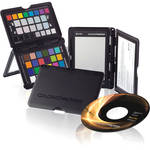
With three photographic targets, the ColorChecker Passport from X-Rite lets you ease your workflow in a variety of ways. A creative enhancement target allows one-click warming and cooling, and easy evaluation of shadow details. The classic target is the standard 24 patch for creating DNG profiles. The white balance target allows for a consistent white point for a series of images, saving the need to correct each one later in your work flow.
A protective case keeps your targets safe from damage, and has a built-in stand so you can situate the targets to adjust for any scene. The included software lets you easily build DNG profiles, and profile adjustments can be applied to hundreds of images, allowing hours of manual changes to be completed in a few minutes. The portable, versatile kit is an excellent tool for all photographers, from aspiring amateurs to professionals.
Note:The ColorChecker Passport is not compatible with Hasselblad cameras.
| System Requirements |
Windows: Microsoft Windows XP, Vista, or 7 (latest SP required, 32- and 64-bit versions supported) 512MB RAM Intel Pentium 4 or AMD Athlon XP or better CPU 200MB of available disk space Monitor resolution of 1024 x 768 or higher Internet connection required for software update Macintosh Mac OSX 10.4.11 or 10.5.x, or 10.6 (with the latest updates installed) G4 Processor or higher (Intel recommended) 512MB RAM 350MB of available disk space Monitor resolution of 1024 x 768 or higher |
| Format | DNG |
| Compatible Software |
Adobe Lightroom 2.0 or newer Adobe Photoshop Camera Raw 4.5 or newer Adobe Photoshop CS3 or newer Adobe Photoshop Elements 7 or newer Adobe Bridge CS3 or newer |
| Languages | English, French, Italian, German, Spanish, Portuguese, Simplified Chinese, Japanese |
| Dimension (DxWxH) | 4.9 x 3.5 x 0.4" (125 x 90 x 9mm) |
| Weight | 3 oz (80g) |
| Environmental Requirements |
Temperature: 32-104°F (0-40°C) Humidity: 0-85% (non-condensing) |
REVIEW SNAPSHOT®
by PowerReviewsPros
Cons
Best Uses
Most Liked Positive Review
A must have to call yourself a pro!
This product from X-Rite is a must have for your camera bag. If you care about the quality of your photos, the accuracy of your color, then please get this ColorChecker.
The Co...Read complete review
This product from X-Rite is a must have for your camera bag. If you care about the quality of your photos, the accuracy of your color, then please get this ColorChecker.
The ColorChecker comes enclosed in a very well made plastic casing. It is a bit stiff to open and close, but not a problem. Only lets me know that the case will last a long time before wearing out. Fits in your back pocket and comes with a long lanyard for wearing around your neck. Simply open it up, snap a shot of it, and go on shooting your scene or subject. When the lighting or scene changes, just pull it out and snap another shot of it. Only takes 5 seconds and you will guarantee yourself accurate colors in post.
X-Rite includes software for creating the DNG Color Profiles, and for the Adobe users there is a plugin for Lightroom. The x-rite software and Lightroom plugin automatically locate the ColorChecker in your photograph (as long as it is larger than 10% of the overall photograph) and will create a custom DNG Color Profile that you can name anything you like. When the newly created DNG Color Profile is then applied to the remaining photographs shot under that lighting condition the magic happens. All of a sudden all of your colors in the scene become exactly what they were when you took the photograph. This product does not make your photographs suddenly look AMAZING. It simply shifts all of the colors in the photograph to exactly what they were in real life. It's like custom white balance to the extreme! With this product there is no guess work. White balance becomes spot on and then all of your colors get shifted to perfection. The subtle variations in a models skin color will now be spot on. The makeup that she took and hour putting on will now be rendered exactly as it was. All of those colorful fall leaves on that mountain side will now be the exact color that they were.
You will have to register the product with X-Rite to get access to downloading some extra software that will work with the Passport. One program is a DNG Manager. It allows you to delete and organize your custom DNG Color Profiles. You will def need this as you keep creating more and more profiles for each lighting circumstance. The other download is a very long and in depth video tutorial that explains exactly what is happening and how to use the Passport.
I have only one con and it's not even X-Rites fault, it's Adobe's. When creating custom DNG Color Profiles in Lightroom, you will not be able to apply them until you restart the program. Hopefully in the future, Adobe will figure out how to reload the color profiles as they are generated. Allowing a photographer to create one and apply it without restarting Lightroom.
Some reviews discuss that this product is difficult to use or figure out, which is not the case. I put the CD in, loaded on the software, opened Lightroom and found the X-Rite plugin in the Export dialog right away. Export the ColorChecker photograph, restart Lightroom, and now at the very bottom of the develop module under Camera Calibration I found my newly created DNG Color Profile waiting to be applied. As for the downloaded software, just read the email that X-Rite sends you. It's easy.
For those photographers who say they won't need this because their camera, editing skills, and knowledge allows them to take perfect pictures without a custom DNG profile, they simply don't know what they are missing and are too stubborn to realize how wonderful this tool is for the digital photographer.
VS
Most Liked Negative Review
Useless for Hasselblad
Just bought it from B & H. Creates DCP profile which is not the same as ICC profile. Only Adobe programs recognise it.
So if you are planning to use it with anyth...Read complete review
Just bought it from B & H. Creates DCP profile which is not the same as ICC profile. Only Adobe programs recognise it.
So if you are planning to use it with anything other than Adobe, you are wasting your money!
X-rite has other color hardware that you can make ICC profiles with. That is a complete waste as well. The color patches are very reflective. When you light them, no matter how you light them, including outdoor cloudy, Elinchrom ring flash, two 36x48 Chimera softboxes, only one box just above the camera etc. etc. there will be some specular highlights and the lightling will not be smooth enough to a point where the software sees it as good enough to create a profile.
It is a great concept but it don't waste your money on it for the moment.
Reviewed by 258 customers
Sort by
Displaying reviews 1-20
Previous | Next »
Pros
Cons
Best Uses
Comments about X-Rite ColorChecker Passport:
I think this is a great product. With the accompanying lightroom plugin it makes color corrections quick and painless. I also appreciate the phsyical construction: sturdy but lightweight, and able to stand on its own if need be.
Pros
Cons
Best Uses
Comments about X-Rite ColorChecker Passport:
I have used other white balance targets and I have to say this one is the best I have ever used. This is certainly worth the $. It makes consistent color results as easy as pie. Anyone who cares about the color in their photos should buy this without question!
Pros
Cons
Best Uses
Comments about X-Rite ColorChecker Passport:
This could possibly be the single best photography purchase I have ever made. It is amazing. Adjusts everything automatically. Pictures just "pop" after using this. I am a partially colorblind photographer and this takes all the guesswork out of the process. I highly recommend this to anyone and everyone.
Pros
Cons
Best Uses
Comments about X-Rite ColorChecker Passport:
This color target seems to be very well standardized, and the case makes transporting it safely almost foolproof. The accompanying software builds a profile effortlessly (and works much better from RAW files). The resulting profile can be selected from within Lightroom or Photoshop to provide an excellent color balance to the set of photos taken under the same lighting conditions. The target is even more useful when accompanied with a correctly adjusted monitor and a good printer profile. I recommend watching a training video to start.
Pros
Cons
Best Uses
Comments about X-Rite ColorChecker Passport:
Nice little tool to adjust color quickly and correctly
Pros
Cons
Best Uses
Comments about X-Rite ColorChecker Passport:
he product is perfect, easy to use, color comes out great every time. I use it almost daily for portrait and weddings! I would highly recommend it!
Pros
Cons
Best Uses
Comments about X-Rite ColorChecker Passport:
to white and color balance my photos
it is easy to use and the colors really pop
Pros
Cons
Best Uses
Comments about X-Rite ColorChecker Passport:
I use this with portraits to establish a neutral color for skin tones. It's hard case protects the color swatches nicely and the profile software works perfectly in stand alone mode or in Lightroom. I bought it because I send file to magazines and was not calibrated so I never knew if I had the colors right or not, now I know longer have to guess.
Pros
Cons
Best Uses
Comments about X-Rite ColorChecker Passport:
It is small, convenient and easy to use. Allows you to get the exact color in your photos as you saw in the field.
There are no negetive aspects to this indispensable tool.
Pros
Cons
Best Uses
Comments about X-Rite ColorChecker Passport:
I was hesitant to buy the passport since I felt all white balance cards are essentially the same I watched a seminar on X-rite equipment and decided to give the passport a try. I used the passport for the first time at the UC Davis Arboretum in California. I placed it on a picnic table took a shot of the grey card and the color swatches and took my pictures. Usually when I am in light room and process with a standard grey card i will see a minor shift in the white balance always to the better, but minor none the less. With the passport the WB popped on the screen. Deep rich colors that were accurate to what my feeble mind saw a few hours earlier. I would give the passport 5 stars if it were maybe 10 dollars or so less. They (X-rite) have a good product, but a [$] is a little high!
Pros
Cons
Best Uses
Comments about X-Rite ColorChecker Passport:
I've considered getting some kind of color calibration card for some time, and finally took the plunge with this one.Though I've used Adobe Photoshop since version 5, I've only recently started using Lightroom. The color checker passport was designed to work with Lightroom, and the two work beautifully.You must shoot RAW for this product to work properly . Once you set up color profiles using X-rite's software, or Lightroom, perfect color is one click away. I almost always shoot RAW, with camera on auto white balance. Since I've gone the extra step with the color checker, I can see anything from a subtle to a dramatic difference, depending on conditions of the shoot.I understand that the cost of producing precise dyes on the color swatches is high, but I thought long and hard about dropping [$] for a color card. Once I've used this card, with it's additional color warming and cooling patches, I'm glad I did it.The only minor issues I have with this product are: 1. The plastic protective case, can be hard to open without getting my fingers on the color chips. Hopefully the hinges will loosen with time.2. Documentation is hard to locate, at least on my Mac. Once you find the 60 page manual, it answers all the questions. When you register the product, you can download an additional profile manager, which is nice.
Pros
Cons
Best Uses
Comments about X-Rite ColorChecker Passport:
My ColorChecker saves me time & money and the training you get with it is outstanding!!!! It didn't take long to get acquainted with this product...
Pros
Cons
Best Uses
Comments about X-Rite ColorChecker Passport:
Like the heading states I've been putting off this purchase thinking if isn't broke don't fix it. Boy was I wrong. It's simple to use and if you're like me and Lightroom is your go to program this is too easy. My biggest issue is retraining myself to use it as the conditions change and the program does the rest.
Pros
Cons
Best Uses
Comments about X-Rite ColorChecker Passport:
perfect white balance every time. i use this handy tool on almost every shoot.
Pros
Cons
Best Uses
Comments about X-Rite ColorChecker Passport:
It is handy and fits in my bag with no extra space taken
Pros
Cons
Best Uses
Comments about X-Rite ColorChecker Passport:
the color passport is invaluable as a color balancing tool, especially to landscape photographers. The gray card used in conjuction with the color checker card saves time and money by reducing off color and unbalanced photographs. The software included is a level above the standard gray card.
Highly recommended
Pros
Cons
Best Uses
Comments about X-Rite ColorChecker Passport:
My new best friend for colour accuracy. I have always had trouble getting the purple just right, not anymore.
Pros
Cons
Best Uses
Comments about X-Rite ColorChecker Passport:
I use it mostly for indoor white balance.
Pros
Cons
Best Uses
Comments about X-Rite ColorChecker Passport:
I love this product and it is saving me a ton of time in post processing. Great tool.
Pros
Cons
Best Uses
Comments about X-Rite ColorChecker Passport:
ColorChecker Passport and the accompanying software make keeping your colors accurate ridiculously simple for an incredibly reasonable price.
Displaying reviews 1-20
Previous | Next »