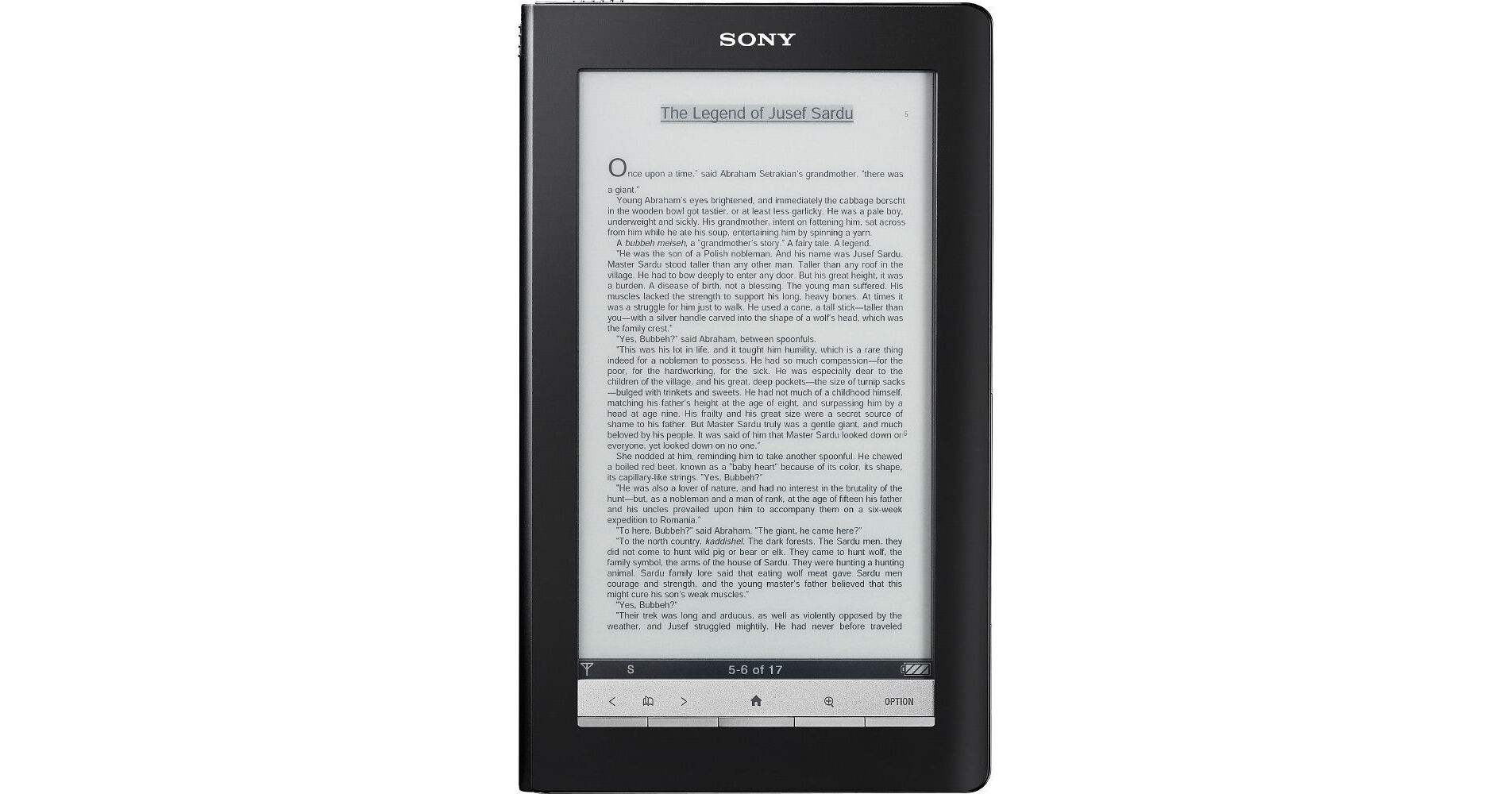
Sony's PRS-900BC Reader Daily Edition is a digital book with a twist: it's also a digital newspaper. Make that several newspapers, actually. The Daily Edition, in addition to giving you access to over one million books, either through the free wireless 3G access to the Sony Reader Store, public domain Google Books, or via a participating public libraries, also gives you the option to download and read the daily paper right on the device. You can choose to purchase one of the available papers on a daily basis, or you can go with a monthly subscription.
When it comes to supported formats the Daily Edition is compatible with multiple choices, including ePub and PDF. Photo formats such as JPEG, PNG, and GIF are supported as well. The Reader stores those files to its 1.6GB built-in flash memory; however, you also have the option to upload files from optional SD/SDHC memory cards or Sony's Memory Stick Media. Media can be purchased through the Reader Store or from various other online sharing sites, personal publishers, and other sources in addition to the aforementioned free downloads from Google Books and free check-out options from public libraries. And no matter if you're a PC or Mac person, the Daily Edition will get along just fine with your computer.
Other various perks include note taking, highlighting, and drawing capabilities, along with The New Oxford American Dictionary built right in. In regards to looks, the Daily Edition is a slim device that features a protective, yet stylish, black leather cover. Inside the cover you'll find a 7" paper-like touch screen display that allows for portrait or landscape viewing, along with a number of font and page view options. Other features include a stylus which discretely tucks away into the eBook's spine, and multiple options for navigation. A zipper cover is included as well for added protection of your new favorite book.
| Memory |
User Available Capacity: 1.6GB Dual Memory Card Expansion Slots: For Memory Stick PRO Duo and SD Card up to 32GB |
| Formats |
DRM Text: ePub (Adobe DRM protected), PDF (Adobe DRM protected) Image: JPEG, PNG, GIF, BMP Unsecured Audio: Unsecured Audio: MP3 (Non encrypted), AAC (Non encrypted) Unsecured Text: ePub, PDF, TXT, RTF, Microsoft Word, (Conversion to the Reader requires Word installed on your PC) |
| Connections |
USB Headphone jack |
| Display |
Screen Size: Vizplex 7.1" Resolution: 600 x 1024 pixels Gray Scale: 16 level gray scale |
| Wireless | Wireless: Supports HSPA (3G), UMTS (3G), EDGE, and GPRS data service with 2 bands (850 and 1900MHz) |
| Compatible Operating Systems |
OS: Microsoft Windows 7 Home Basic/Home Premium/Professional/Ultimate Microsoft Windows Vista (32-bit or 64-bit) Home Basic/Home Premium/Business/Ultimate with Service Pack 1 or later Microsoft Windows XP (32-bit only) Home Edition/Professional/Media Center Edition 2004 & 2005 with Service Pack 2 or later Mac OS X version 10.6, 10.5.6 or later, 10.4.11 or later
CPU: 800MHz Celeron class processor or better for Windows RAM: 128MB or more (minimum 512MB for Windows Vista) Free space on hard disc: 20MB or more, but depending on the content amount, more space may be required Monitor: High Color or more, 1024 x 768 pixels or more (True Color, 1280 x 1024 pixels or more recommended)
Other devices: USB port (High-Speed USB Compatible) |
| Power Requirements |
AC Power: DC 5.2V Battery Life (Approximately): 12,000 (ePub) continuous page turns Battery Type: Rechargeable lithium-ion battery: 3.7VDC |
| Dimensions |
Without Cover: 5 x 8.13 x 0.59" (12.7 x 20.6 x 1.5cm) With Cover: 5 x 8.13 x 0.72" (12.7 x 20.6 x 1.8cm) |
| Weight | 12.75oz (361.5g) |
REVIEW SNAPSHOT®
by PowerReviewsPros
Cons
Best Uses
Most Liked Positive Review
THESE ARE GREAT Although....
I'm giving this device a 4 out of 5 stars mainly because of content and not the device itself. The Device is FANTASTIC should receive 5 of 5 stars.
I received ...Read complete review
I'm giving this device a 4 out of 5 stars mainly because of content and not the device itself. The Device is FANTASTIC should receive 5 of 5 stars.
I received this for a gift on Christmas and have enjoyed it the past few days. The device is great. I can highlight or even make annotations with my own handwriting right on the text itself. I can choose to hide the notes or display them. Best part about that is I can quickly search it through a list on the home screen instead of trying to flip through pages to find my annotations.
I tend to put all my Photo, printer, computer manuals all in PDF as a manual into my eReader so that I have it with me at all times. Thats very useful. This means that I can go "on-Location" shoots and have all my equipment instructions with me at a single time.
While the device does display graphics, don't expect it to have a perfect screen. It does what it does and it's great at doing so.
It does have a 4 numerical password on the device so as to lock the device and giving you a sense of security.
While reading texts, you can double tap a word to look it up with the built in pre-loaded Oxford American Dictionary.
The ONLY Problem I have with this product isn't the devices fault but rather the service content. I bought it so that at any given time I may receive my periodical newspapers. The only ones available at this time are 4 papers. However, those 4 papers on the reader are fantastic to read. They have photos and are able to be sorted by section and article within that section.
Don't buy this product if you don't care about the wireless capabilities or the fact the screen is slightly bigger than the Touch edition. It is almost the exact same product as the Touch edition except for the screen size and wireless capabilities. Not to mention smaller things such as "2-page" view and the thickness (Daily=0.6"; Touch=0.5")
Battery life is as advertised, 2 weeks on a single charge. I have been reading at least 3-4 hours a day since I got it and I'm only a quarter charge depleted.
Written on 12/28/2009
VS
Most Liked Negative Review
Good Cop/Bad Cop
Beautiful, elegant and easy to use piece of hardware. The complaints about reflection are greatly exaggerated. Never have any problems finding a comfortable and clear reading position. The contrast on the touch screen ...Read complete review
Beautiful, elegant and easy to use piece of hardware. The complaints about reflection are greatly exaggerated. Never have any problems finding a comfortable and clear reading position. The contrast on the touch screen is excellent, almost indistinguishable from a friend's nontouch screen Kindle.
The Sony sync software just inept. It is buggy. You cannot turn off sync and perform another task, but nothing ever gets synced. You cannot keep it from launching when connecting the Reader to the computer without hacking the Sony locked autolaunch file. Fortunately it is a common enough problem that people on line have explained how to do it. Sony should be ashamed. I probably will not buy another Sony product. Fortunately, there is a third party app called Calibre that does a good job managing your digital book library.
REVIEWS
Reviewed by 35 customers
Sort by
Displaying reviews 1-20
Previous | Next »
Pros
Cons
Best Uses
Comments about Sony PRS-900BC Reader Daily Edition:
A great travelers companion. Convenient and easy to use with excellent functionality. Appears to be sturdily made when compared to the competition.
Pros
Cons
Best Uses
Comments about Sony PRS-900BC Reader Daily Edition:
Great product, I am using it strictly for books in Russian, device as is does not support it, but I easily found solution on the Net, works perfectly.
Was thinking about Kindle DX but the size and not support of epub format, kept me away.
Touchscreen is a good feature especially when somebody sleeps close to u and dont want to hear click of the buttons to move to the next page.
Pros
Cons
Best Uses
Comments about Sony PRS-900BC Reader Daily Edition:
It works well, probably, the tactile part still has to improve, overcoat, at the moment of spending the pages of the book with the finger. If there is no light, it is not read, it is necessary to have nearby an artificial light. But in general it is very easy to use and perfectly for the persons that they like to read and practically to travel.
Pros
Cons
Best Uses
Comments about Sony PRS-900BC Reader Daily Edition:
Big screen, very handy for daily use, simple operation, cover, charger, protective case included.
Pros
Cons
Best Uses
Comments about Sony PRS-900BC Reader Daily Edition:
Very easy to use with good instructions.
With good clear screen.
Disappointed unable to connect to internet in GB even via my own provider, a GB sim would have been a great plus. Info on web site did not make it clear this would be a problem.
Over all a very good product and the case was an added bonus.
Even with import taxes this deal was cheaper then I found any where in the UK.
Pros
Cons
Best Uses
Comments about Sony PRS-900BC Reader Daily Edition:
This reader is much faster than my older PRS - 505... my only complaints are that there is a lot more glare on the screen, and I can't seem to ge the original cover off so that I can put it into the zippered case. But I love the bigger screen and being able to turn pages by touch-screen. Battery lasts longer too.
Pros
Cons
Best Uses
Comments about Sony PRS-900BC Reader Daily Edition:
This book the best at present from presented in the market. It is happy with the purchase. Has purchased two books (I think to acquire one more for a daughter).
Pros
Cons
Best Uses
Comments about Sony PRS-900BC Reader Daily Edition:
The Daily Edition is very user friendly and easy to hold. It has a very easy turn page function and the dictionary is really nice. I do not use the Sony software after reading several comments indicating the software is twitchy. Instead I use Calabri. Calabri is extremely easy to use and very functional. The only complaint I have about the Sony eReader is the glare on the screen. I've been looking for a screen protector that can reduce the glare.
Pros
Cons
Best Uses
Comments about Sony PRS-900BC Reader Daily Edition:
Rather comfortable device for daily reading - good screen, even good for older people (50+).
Lack of support for advanced formats, i.e. FB2 - need to convert to LRF
Pros
Cons
Best Uses
Comments about Sony PRS-900BC Reader Daily Edition:
Sony's e-Reader PRS900 is the best in its class. It has open format for downloading books. You don't have to be tethered to proprietary book sales. One can download books from Libraries. It is best Reader and very intitive. I love it and read it without page markers. You shut down the Reader and when you go back to it, it opens up the page where you had closed the book.. It was a better investment than any of the other Readers available.. Flawless...
Pros
Cons
Best Uses
Comments about Sony PRS-900BC Reader Daily Edition:
Well constructed easy to use
Pros
Cons
Best Uses
Comments about Sony PRS-900BC Reader Daily Edition:
Larger 7.1-inch touch screen displays more lines of text, especially useful for PDF files. But the screen is glare-prone.
Pros
Cons
Best Uses
Comments about Sony PRS-900BC Reader Daily Edition:
This product has several advantages which include replaceable battery and memory expansion.
The product is easy to use and a wealth of free content exists
Pros
Cons
Best Uses
Comments about Sony PRS-900BC Reader Daily Edition:
I wanted a reader with a bigger display than the normal ones available in Germany (5"/6"). After a few weeks using the prs-700 on a daily basis, it's one of the gadgets I don't want to miss anymore. I tested it against an iPad during the last weekend. I like the iPad, but prefer the iInk display for longer reading.[...]
Pros
Cons
Best Uses
Comments about Sony PRS-900BC Reader Daily Edition:
This has been so much fun, I'm an avid reader and love the Daily Edition. It is so light and small for transporting, yet it is big enough to be easy to read......having so much fun downloading books. Wish I wasn't moving and taking care of three kids under the age of 4 so I could play with it more!
Pros
Cons
Best Uses
Comments about Sony PRS-900BC Reader Daily Edition:
Beautiful, elegant and easy to use piece of hardware. The complaints about reflection are greatly exaggerated. Never have any problems finding a comfortable and clear reading position. The contrast on the touch screen is excellent, almost indistinguishable from a friend's nontouch screen Kindle.
The Sony sync software just inept. It is buggy. You cannot turn off sync and perform another task, but nothing ever gets synced. You cannot keep it from launching when connecting the Reader to the computer without hacking the Sony locked autolaunch file. Fortunately it is a common enough problem that people on line have explained how to do it. Sony should be ashamed. I probably will not buy another Sony product. Fortunately, there is a third party app called Calibre that does a good job managing your digital book library.
Pros
Cons
Best Uses
Comments about Sony PRS-900BC Reader Daily Edition:
This ireader is perfect to use everyday
Pros
Cons
Best Uses
Comments about Sony PRS-900BC Reader Daily Edition:
This is a replacement reader as I'd lost my original one during a recent trip. I highly recommend the Sony Daily Edition Reader. I've downloaded about 20 books so far.
Pros
Cons
Best Uses
Comments about Sony PRS-900BC Reader Daily Edition:
[...] I love my Sony Reader Daily Edition. The built in memory is good for 250 books, that's epub's and large pdf's combined. I love that it is so small, but large enough to read on and annotate. PDF's are almost only readable in landscape mode, if it is a PDF with a few images, converting to epub is a must. PDF's in portrait mode have grey borders above and below, because of the way how PDF's work. Playing with the justification option helps every now and then, sometimes it's good enough to keep it in portrait mode. Reading in landscape is a pleasure. Pages get split in 3's (instead of in 2 parts as on the Touch), which results in a lott of text appearing twice on a page. It is also not always clear if your at the end page, though that might just be me.epubs are better to read, both in portrait, and two-page mode. They also feel a bit faster.Annotation is a bliss. I choose for a Sony Reader because of 1 feature: you can find all your notes and annotations in a central place. This is incredibly useful, because it does not only show you the book in which you made a note, but also when you made it, on what page and it shows a preview of the text! Sweet!I am very happy I bought one, and I believe this is a device perfect for someone who wants:- a portable device- an e-ink screen- the ability to make notes and annotations (despite the "small" screen)
Pros
Cons
Best Uses
Comments about Sony PRS-900BC Reader Daily Edition:
This reader construction is the best I´ve ever seen in any gadget. It is really nice to hold.
It is a very good reader.
The pros wins the cons, and thus the 5 stars.
We use if for reading books and travel guides while traveling.
Displaying reviews 1-20
Previous | Next »