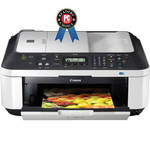
The Canon PIXMA MX340 All-In-One Photo Printer produces gorgeous color prints (up to 8.5 x 11") at up to 4800 x 1200 dpi resolution, scans documents or images up to 8.5 x 11.7" at 48-bit color depth, makes color copies in as little as 37 seconds, faxes at approx. 3 sec/page (black) or 1 min/page (color) with a 50-page memory, and offers wireless connectivity--plus, its compact good looks mean it fits in just about anywhere. The Auto Photo Fix II feature automatically corrects exposure to optimize the quality of your pictures, and you can also print laser-quality black text or pages directly off the web. The ChromaLife100+ system enables your photos to last up to 300 years when using genuine Canon ink and paper and stored in an archival-quality photo album.
High Performance Ink Cartridges: The two Canon ink cartridges are easy to use and to replace, and contain specially formulated inks for great document and photo quality. One is a black cartridge for laser-quality text and one is a multi-color cartridge for pictures. Both are easy to use and replace.
EasyPhoto-Print EX: Print as many images as you want on photo paper up to 8.5 x 11". You can even print multiple pictures on one page. Plus, with one touch of your mouse, EasyPhoto-Print automatically crops images, corrects red-eye, smoothes facial lines and skin tone and even brightens and sharpens faces.
Fully-Integrated Auto Document Feeder: The built-in 30-sheet Automatic Document Feeder (ADF) makes it easy to copy, scan or fax multiple documents without having to load them one at a time. Its full integration makes it easier to fit into tight spots.
Dual Color Gamut Technology: This built-in technology automatically optimizes your originals so copies stay true to it, time after time.
Auto Scan Mode: Automatically recognizes the type of original, then scans and saves with the appropriate settings when accessed through the printer menu.
QuickStart: Powering up your printer is now faster than ever. After pressing the power button you can begin inputting commands in approximately 2 seconds.
Easy-WebPrint EX: Print as many images as you want on photo paper up to 8.5 x 11". You can even print multiple pictures on one page. Plus, with one touch of your mouse, EasyPhoto-Print automatically crops images, corrects red-eye, smoothes facial lines and skin tone and even brightens and sharpens faces.
Super G3 Fax: The business fax standard for color and PC facsimiles on plain paper meets the home office workhorse with 20 coded speed dials and up to 50 incoming pages.
iPhone Printing: Print your photos wirelessly from compatible iPhone 3G, 3GS and iPod touch models.
PictBridge & Optional Bluetooth: Thanks to a PictBridge connection you can conveniently print photos directly from your digital camera, DV camcorder or camera phone. Plus, you can print from the optional BU-30 wireless Bluetooth unit.
USB 2.0 Hi-Speed-Plug the cable into your computer for a super-fast connection for your data transfers.
Reduction in Packaging--the packaging of the iP2702 has been reduced by 36.8% compared to the 2008 model. Downsizing the packaging helps reduces CO2 emissions and waste throughout the whole process of production, from shipping to selling.
ENERGY STAR--25% more efficient than conventional models. By using less energy, these products reduce greenhouse gas emissions and save energy as well as money.
RoHS Compliance--RoHS is a directive from the European Union that restricts the use of hazardous materials found in electronic products. This product restricts the use of cadmium, mercury, lead, hexavalent chromium, Polybrominated Biphenyls (PBB), and Polybrominated Diphenyl Ethers (PBDE).
Hardware Recycling Program--Canon wants to work with our customers to help ensure appropriate recycling of products to help improve the environment and our local communities.
Refurbishing Program--the Canon U.S.A., Inc. refurbishing facility manages all waste stream processes for Canon products, so Canon, not third-party vendors, has full control over recovery and salvage for Canon products.
Inkjet Cartridge Recycling--to contribute to zero landfill waste, Canon is introducing a collection and recycling program for Genuine Canon Inkjet Printer Cartridges.
Note:Logos are trademarks of Ziff Davis, Inc. Used under license.
Reprinted from www.pcmag.com, September 7, 2010, with permission. 2010 Ziff Davis, Inc. All Rights Reserved.
| Printing Technology | Inkjet |
| Maximum Resolution |
Black: 600 x 600 dpi Color: 4800 x 1200 dpi |
| Print Speed |
Color Photo: 4 x 6" borderless photo: approximately 43 seconds Black: ESAT; 8.4 ipm Color: ESAT; 4.8 ipm |
| Ink Type | Canon ink |
| Ink Palette | CMYK |
| Ink Cartridges | Not specified by manufacturer |
| Printer Duty Cycle | Not specified by manufacturer |
| Scanner | |
|---|---|
| Scanner Type | Flatbed |
| Image Sensor | Contact Image Sensor (CIS) |
| Optical Resolution |
Optical: 1200 x 2400 dpi ADF 600 x 600 dpi (Optical) |
| Color Depth | 48 bit internal, 24 bit external |
| Scan Speed | Not specified by manufacturer |
| Reflective Scan Area | 8.5 x 11.7" |
| Dynamic Range | Not specified by manufacturer |
| Light Source | Not specified by manufacturer |
| Fax | |
|---|---|
| Modem Speed | 33.6 Kbps (Super G3 color FAX) |
| Transmission Speed |
Black: Approx. 3 sec/page Color: Approx. 1 min/page |
| Memory Capacity | Approx. 50 pages |
| Copier | |
|---|---|
| Copy Speed | Color ESAT: 3.4 ipm |
| Copy Resolution | Not specified by manufacturer |
| Multiple Copies | Up to 99 copies max. |
| Reduction/Enlargement | 25% - 400% |
| Copy Features | 4-in-1/2-in-1 Copy, AE (Auto Exposure/Intensity) copy, Borderless, Fit-to-Page, Gutter Shadow Correction Copy, Image Repeat, Intensity, Multiple Copy: 1-99 pages , Preset Copy Ratios, Sort (ADF), Zoom |
| Paper Handling | |
| Maximum Paper Width | 8.5" |
| Maximum Printable Area | 8.5 x 14" |
| Paper Sizes | 4 x 6", 5 x 7", 8 x 10", Letter, Legal, U.S. #10 Envelopes |
| Borderless Photo Sizes | Up to 8.5 x 11" |
| Paper Types | Not specified by manufacturer |
| Maximum Paper Thickness | Not specified by manufacturer |
| Paper Capacity |
Automatic Sheet Feeder: 100 sheets ADF: 30 sheets |
| Special Media Support | Not specified by manufacturer |
| Connectivity | |
|---|---|
| Computer Interface | USB 2.0 |
| Internal Memory | Not specified by manufacturer |
| Compatible Memory Cards | N/A |
| Direct Print Capable | No |
| Network Capable | No |
| PostScript Support | Not specified by manufacturer |
| System & Software Requirements | Not specified by manufacturer |
| Compatible Operating Systems | Windows 7, Windows Vista, Windows XP/2000 and Mac OS X v10.4 - v10.6.x15 |
| Physical | |
|---|---|
| Status Display | Not specified by manufacturer |
| Image Preview Display | No |
| Front Panel Controls | No |
| Power Requirements | 120VAC |
| Power Consumption | Not specified by manufacturer |
| Dimensions (WxDxH) | 18.1 x 16.4 x 7.8" (45.97 x 41.65 x 19.81 cm) |
| Weight | 19 lbs (8.6 kg) |
REVIEW SNAPSHOT®
by PowerReviewsPros
Cons
Best Uses
Most Liked Positive Review
Great Product - Best Tech Support EVER!
Cons: Difficulty setting up; lousy instruction book; big footprint.Pros: Fantastic customer support to help you set it up, if you call. Tech reps are in the US, speak clear english, and ...Read complete review
Cons: Difficulty setting up; lousy instruction book; big footprint.Pros: Fantastic customer support to help you set it up, if you call. Tech reps are in the US, speak clear english, and are knowledgeble.Bought this to replace an HP all-in-one that was starting to fail to print well; might have been the aftermarket refill cartriges, or just a 3 year old machine, but got tired of fooling with it. Based on favorable experience with large Canon office copiers/scanners, I decieded to try this brand. Great price from B&H [...]. I was able to set up wireless connection for my desktop computer (Vista), and for one laptop (7 Home Premium), but had trouble with a netbook (7 Starter). Tech rep assured me it would work with Windows Starter, and the solution came by resetting the router. A latter call to Tech support was needed to set up proper setting for the incoming FAX. Seems you MUST have a phone connected to the machine if you want to receive FAX on a single phone line used primarily for voice calls; fortunately, I had an old wired phone to hook on to it. The book does not explain all the settings that are required, I found it VERY confusing until I called Tech Support. Canon Tech Support is the best I have ever encountered.
VS
Most Liked Negative Review
Cannon MX 340 revies
I previously owned several HP All-In-One printers, and decided to try this Cannon product after seeing the fax function quit on the HP printers following any type of power spike. Set up took a ...Read complete review
I previously owned several HP All-In-One printers, and decided to try this Cannon product after seeing the fax function quit on the HP printers following any type of power spike. Set up took a while as you have to go step by step through the manual. The program installs 6 shortcuts on your desktop. (not all of them are needed) I have not tried to fax anything, but the print quality looks good, and the printer only requires 2 ink cartridges. It is a bit noisy, but the price was good, and the printer seems to be well made and should last.
Reviewed by 39 customers
Sort by
Displaying reviews 1-20
Previous | Next »
Pros
Cons
Best Uses
Comments about Canon PIXMA MX340 Wireless All-In-One Photo Printer:
I cannot express how much I despise this machine. I have had this for a little over a year. I purchased it to replace an ancient workhorse of a fax machine. "oh I'll get something that 'does all three'... copier/printer/fax.
From day one I have trouble faxing. The manual is NO HELP and may as well have been written in Chinese. So I figure out by pressing buttons two order of operations that will occasionally send a successful fax. So when I send my one fax a month I regularly spend an hour rescanning and faxing until I finally have success. Today in fact I've literally scanned my stack of 8 pages 25 times (according to the transmit counter.. which is mislead b/c it didn't transmit anything!) only to receive an annoying beeping and redo operation message. I finally had to fax one page at a time and some of those I had to redo. I did this as I sat directly over the TINY screen and watched it flash through a list of non-useful info until... don't blink or you'll miss it... 1 single flash of transmitted.
By far the faxing is the most frustrating NON-feature but 3 months ago the printing portion of this machine went out. I spent hours searching online (again b/c the manual is completely useless) how to trouble shoot the issue only to find out that it cannot be fix and must be replaced. So I have to rely on my old printer for my printing needs even though I have this huge monstrosity sitting on my desk that is supposed to provide for all my scanning/printing/faxing needs!
If their is a light in this story it would have to be that I have not had an issue with the scanner which works perfectly ever time. But I have to say... I am just waiting for the other shoe to drop and do look forward to the day I can afford to replace this d*mn thing.
Pros
Cons
Best Uses
Comments about Canon PIXMA MX340 Wireless All-In-One Photo Printer:
We wanted to replace an ancient ink jet for infrequent text printing. Reviews pointed to this all in one as being able to meet that need and many others for us. When we got it, we found it easy to set up on the wireless at home. It talks to my Mac and our PCs. Out of the box photo quality was awesome. Text, scanning ... so far all good. The only thing I don't like is the paper tray - up in the back. With paper loaded, the printer seems "open". Only when the paper is removed and the feed tray closed does the printer appear slick and neat.
Pros
Cons
Best Uses
Comments about Canon PIXMA MX340 Wireless All-In-One Photo Printer:
easy to use. wireless work great.
Pros
Cons
Best Uses
Comments about Canon PIXMA MX340 Wireless All-In-One Photo Printer:
Using you wireless router is the best for a lap top, no more plugging in stupid wires.... Fast and sweet! While not printing in color: the text can print out and look like it was printed on an old fax machine for one or two lines of a document. I am not sure if it is due to the quality setting or what... It was not set on draft so I don't know yet. I have only used the printer a few times so far.
Pros
Cons
Best Uses
Comments about Canon PIXMA MX340 Wireless All-In-One Photo Printer:
Set-up was quick and easy and so far so good after about 2 months of use. It is used as a general purpose printer on a wireless home network and is exactly what I wanted for this job. Wireless connectivity is reliable throughout the house and print quality is good. I have a dedicated photo printer (PIXMA Pro 9000 MkII)so this one is used for general printing of documents to save expensive ink. The scanner function is adequate for documents and low-res photo scanning as well. Too early to tell how long ink will last.
Pros
Cons
Best Uses
Comments about Canon PIXMA MX340 Wireless All-In-One Photo Printer:
This printer came bundled with a laptop purchase for [$] and is a bargain for that price. It has very powerful features and we use it as a secondary printer in the upper level of our home. The network connectivity is very good. I did find this printer a little noisier than I expected but not much. Also the two sided copy/print feature requires to manually enter the paper which wasn't real clear to me in the description.
Pros
Cons
Best Uses
Comments about Canon PIXMA MX340 Wireless All-In-One Photo Printer:
I haven't used this printer for all that it is capable of as of yet. But the quality is good.
Pros
Cons
Best Uses
Comments about Canon PIXMA MX340 Wireless All-In-One Photo Printer:
Cons: Difficulty setting up; lousy instruction book; big footprint.Pros: Fantastic customer support to help you set it up, if you call. Tech reps are in the US, speak clear english, and are knowledgeble.Bought this to replace an HP all-in-one that was starting to fail to print well; might have been the aftermarket refill cartriges, or just a 3 year old machine, but got tired of fooling with it. Based on favorable experience with large Canon office copiers/scanners, I decieded to try this brand. Great price from B&H [...]. I was able to set up wireless connection for my desktop computer (Vista), and for one laptop (7 Home Premium), but had trouble with a netbook (7 Starter). Tech rep assured me it would work with Windows Starter, and the solution came by resetting the router. A latter call to Tech support was needed to set up proper setting for the incoming FAX. Seems you MUST have a phone connected to the machine if you want to receive FAX on a single phone line used primarily for voice calls; fortunately, I had an old wired phone to hook on to it. The book does not explain all the settings that are required, I found it VERY confusing until I called Tech Support. Canon Tech Support is the best I have ever encountered.
Pros
Cons
Best Uses
Comments about Canon PIXMA MX340 Wireless All-In-One Photo Printer:
Great price it is a little big but works great!
Pros
Cons
Best Uses
Comments about Canon PIXMA MX340 Wireless All-In-One Photo Printer:
I have never had a printer with scanning and copying capabilities so when I got the opportunity to buy a laptop and get this printer along with it, for a VERY good price, I jumped on it and I could not be happier. The Canon PIXMA MX340 is wireless so I am no longer stuck in one place, it scans and prints quickly and in great detail so I am always happy with what it produces, and it also looks cool too. There are simply no cons to mention here. I am in love.
Pros
Cons
Best Uses
Comments about Canon PIXMA MX340 Wireless All-In-One Photo Printer:
First wireless "all in one printer" I have owned. Love it, would recommend it to anyone.
Pros
Cons
Best Uses
Comments about Canon PIXMA MX340 Wireless All-In-One Photo Printer:
jut a simple machine does it all...
Pros
Cons
Best Uses
Comments about Canon PIXMA MX340 Wireless All-In-One Photo Printer:
I use the printer and scanner for home office use. So far the scanner has worked very well and the setup was very smooth. It is very sleek looking and doesn't take up much room. So far so good! Love the wireless capability.
Pros
Cons
Best Uses
Comments about Canon PIXMA MX340 Wireless All-In-One Photo Printer:
East set up instructions, and use made easy even for me. Follow instructions for file saving. It's just a wonderful convenience for us, all wireless!
Pros
Cons
Best Uses
Comments about Canon PIXMA MX340 Wireless All-In-One Photo Printer:
This inexpensive printer/scanner/copier produces much better prints than the HP that it replaced. The print speed is good. The scanner also works great. I had no problems setting up the unit to work on wi-fi. The instructions were quite clear. The only downside to this printer is it is very noisy.
Pros
Cons
Best Uses
Comments about Canon PIXMA MX340 Wireless All-In-One Photo Printer:
I've had HP printers for years, this is my first Canon. It was easy to set up, even the WIfi. My biggest problem so far, is finding the right paper. So far my old HP photo paper doesn't seem to work too well with it, but maybe I haven't figured out the right setting yet either, so it may not be the machines fault. I haven't tried the Fax machine part yet, as I rarely need to send a fax. For the price this has been a great printer. As for the paper issue, I haven't tried actual Canon paper yet, so maybe that will solve my problem.
Pros
Cons
Best Uses
Comments about Canon PIXMA MX340 Wireless All-In-One Photo Printer:
Love the looks of the printer. Bonus is it has wireless built into it.
Pros
Cons
Best Uses
Comments about Canon PIXMA MX340 Wireless All-In-One Photo Printer:
Prints, scans, copies, and faxes. Automatic document feeder. WiFi. Better-than-par output quality. Best suited as a shared printer for home office use. High-quality photo output and WiFi support that makes it easy to share. Priced right!
Pros
Cons
Best Uses
Comments about Canon PIXMA MX340 Wireless All-In-One Photo Printer:
I use this printer primarily for printing pictures and business & school documents. Very easy to set up, hook to a network and use. The ink cartridges are very reasonably priced, compared to HP they're a dream.
Great quality printing!
I would recommend this printer.
Pros
Cons
Best Uses
Comments about Canon PIXMA MX340 Wireless All-In-One Photo Printer:
I use this printer in a WLAN. It was easy to setup and has a strong signal on the network map with the printer being about 30 feet and 2 walls away. My main uses are copying, scanning and printing. Especially like the adf for scanning and copying.
Displaying reviews 1-20
Previous | Next »