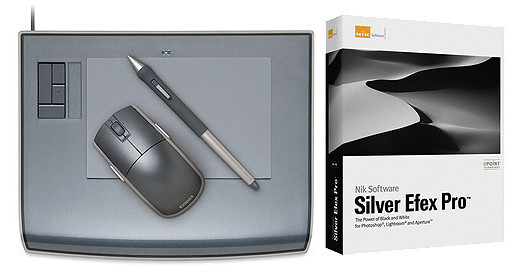
The Intuos3 Platinum 4" x 6" Graphics Tablet with Silver Efex Pro Software Kit from Wacom gives you the power to quickly and professionally edit photos and create digital artwork by turning on the full power of Adobe Photoshop, Corel Painter, and other leading software applications. The included Silver Efex Pro plugin from Nik Software allows you to create professional-quality black-and-white images with precise detail and control.
| Input | |
|---|---|
| Tablet Dimensions | 10.6" x 8.5" x 0.5" |
| Active Area | 4" x 6" |
| Pressure Levels | 1024 |
| Tilt Range | +/-60° |
| Accuracy | +/- .01" |
| Resolution | 5080 lpi |
| Maximum Data Rate | 200 pps |
| Computer Interface | USB 1.1 |
| General | |
|---|---|
| System & Software Requirements |
Tablet: Windows 98SE, 2000, Me, or XP; Mac OS X 10.2.6 or higher Powered USB Port CD-ROM Drive Color Monitor Software: Windows 2000 Professional, XP, or Vista with 1GHz Pentium III processor or better; Mac OS X 10.4 or later on a PowerPC (G4, G5) or Intel (Core Solo, Core Duo, Core 2 Duo, Xeon) System 512MB RAM CD/DVD Drive Adobe Photoshop 7 through CS4 or Adobe Photoshop Elements 2.0 - 6.0 (4.0 - 6.0 for Mac) or Adobe Photoshop Plug-in Compatible Application* or Apple Aperture 2.1 or later (Mac only) 1 Please Note:Please consult your image editing application's documentation for compatibility and installation instructions for 3rd-party plug-ins. close |
Displaying reviews 1-2
Pros
Cons
Best Uses
Comments about Wacom Intuos3 Platinum 4" x 6" Graphics Tablet with Silver Efex Pro Software Kit:
In the past several months i've been improving my photoshop skills and thought that it would be a nice idea to work like the pros do and so i considered purchasing a Wacom tablet.
I came across this product which is last years model (Intuos 3) packaged with Nik Silver Efex pro. The price is excellent and i'm very impressed with the product. the wacom tablet does exactly what it should.. its generally easy to use and is an excellent product. This is my first tablet and so i have nothing to compare it to, but i'm very impressed with its use-ability ease of installation. for touching up photos and the adjustments that i'm doing this4 x6 tablet is big enough. Nik siver efex is a very popular program for creating grayscale images. I was able to install it as a plugin in Photoshop CS5 and in lightroom 2.7. I've not used it too much but i know from experience that this program is one of the best of its type. This being said, at this time Photoshop CS5 must be run in 32bit mode to be able to use it.
No complaints about the Wacom Intuos 3. The software is excellent as well. I'm jsut waiting for Nik to make availible a 64bit version. hence 4 ouf of 5. Great deal i think if you want to expose yourself to a tablet at a reasonable price.
Pros
Cons
Best Uses
Comments about Wacom Intuos3 Platinum 4" x 6" Graphics Tablet with Silver Efex Pro Software Kit:
I always wanted to try a tablet, but couldn't justify the expense. After a trial of Silver Efex Pro, I decided to purchase, and found I could get the software and the tablet for less than the list price of either.
Silver Efex Pro does as advertised: makes quick, competent BW conversions as an add-on in PS5. It does not necessarily do a better job than I can do by hand, but it gets me to a starting point and provides all the controls I need to get what I want. In addition, it gives me control of "grain" and color sensitivity based on particular popular films. I use it ONLY on smart objects, so I can go back and fine-tune repeatedly. It does not currently work in 64-bit PS5, and that is a big downer.
The Wacom tablet is unexpectedly versatile. The mouse works just like any other mouse as long as you keep it on the tablet. I have taken my old mouse off the system completely in favor of the Wacom mouse.
I'm a complete novice with the pen, and having some difficulty adjusting to the absolute positioning of the pen on the tablet, corresponding to the same relative position on the screen. If you move the pen a half inch above the tablet, the cursor follows along. Put it in contact with the surface to do work. The opposite end of the pen acts as an eraser where appropriate. The switch on the pen acts as mouse buttons, facilitating drag-and-drop, right-click, double-click -- pretty much anything you can do with the mouse can be done with the pen. In addition, there is a nice grouping of on-tablet controls, similar to the touch-pad controls of a laptop. It's all easily configurable, and all works as advertised.
The main reason for me to buy a tablet is to gain finer control of delicate editing operations in Photoshop. The pen controls the PS5 editing tools, and is pressure-sensitive. Pressing lightly affects a small portion of the configured tool size, with that portion growing proportional to the pressure. I'm already seeing dramatic improvement in my ability to trace fine details in a selection or mask.
Because of the equivalence of the tablet to the screen, I've also begun flipping my screen vertical for portrait-oriented images. A couple mouse clicks change the tablet orientation to match, then turn the tablet 90 degrees, and once again the position of the pen on the tablet matches the cursor on the screen.
The software is useful, though not crucial in my workflow. It saves me time, and the quick switching among possible renditions feeds my imagination. It needs to support 64 bit PS5, which Nik's website indicates is coming sometime in the future. I'd subtract a star for this, but don't want it to appear that I'm downgrading the tablet.
The Wacom Intuos3 4x6 tablet is a wonderful device. I hope it's durable, because I'm hooked. Setup is a snap, and it does everything you could expect and then some. Five stars for sure.
Displaying reviews 1-2