The Professional's Source 866.276.1435 / 212.502.6357

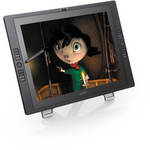
Wacom Cintiq 21UX

  • Price: $1,999.00
  • Click to see current price
  • B&H # WAC21Q
  • Mfr# DTK2100

Product Highlights

  • VGA + DVI
  • 1600 x 1200 Resolution
  • USB Data Port
  • 10 Nibs
  • 2048 Pressure Levels
  • 180° Rotation
  • 16 Programmable ExpressKeys
  • 2nd Generation

Protect Your Purchase


What item is right for you?

Ask our Experts!

866.276.1435
Live Chat

The Cintiq 21UX from Wacom is a 2nd generation, full-sized 21.3" pressure sensitive display ideal for designers, illustrators, animators, and other creative professionals. It functions as a Wacom input tablet, allowing you to create digital illustrations with the greatest nuance and finest detail. The grip pen includes three types of nibs to simulate pen, brush, and felt pressures, while the screen itself has over 2000 pressure levels, giving you complete control of line weight. Sixteen programmable ExpressKeys let you turn features and functions from your illustrating program of choice on or off with a single touch. This unique display/tablet allows your creativity to translate seamlessly into a digital environment.

Control

With a 21.3" TFT display area, you have more room to use the pen directly on screen. This allows you to take advantage of natural hand-eye coordination and provides the feel of natural media, but with all the benefits of a completely digital workflow.
With Wacom's new pen tip sensor and 2048 levels of pressure sensitivity the Cintiq 21UX gives you superior control over your workflow and allows you to control your software tools by changing how hard you press the pen tip on the screen.
The Cintiq Grip Pen has programmable side switches that allow you to program your most common actions into the pen itself. For ultimate control, the pen comes with three different nibs that allow you to get the feel you're looking for. The standard nib provides the right balance of control and longevity for extensive everyday use. The stroke nib includes a dual-action spring to simulate a natural brush-like feel. The felt nib replicates the sensation of using a felt-tip marker by creating just the right amount of surface friction.
Sixteen programmable ExpressKeys provide quick access to modifier keys, keyboard shortcuts, and pop-up menus.
Two finger-sensitive Touch Strips serve as natural ways to control up to 4 different functions per application such as zooming, scrolling, brush size and canvas rotation.

Comfort

The Cintiq 21UX has a completely flat surface edge-to-edge to allow the pen and hand to glide over the entire surface comfortably. This means that artists and designers can use guides and drawing tools such as French curves, protractors, rulers, and templates directly on the Cintiq 21UX surface.
The second-generation Cintiq 21UX has a durable, textured glass surface. The LCD itself has been structured to eliminate any screen distortion when the pen tip is pressed against the surface. The result is an incredibly natural and intuitive experience.
Rotate your display 180° in either direction to suit your natural arm movements, or recline the stand from 10 to 65°. Rear roller feet make the incline adjustments easy, while locking handles ensure that the display stays in your selected position.
The Cintiq Grip Pen has a contoured, cushioned barrel to reduce grip effort by 40% and offers an alternative to a mouse that can help reduce repetitive motion-related stress on your hand and wrist when spending long hours on a computer.

Productivity

Intuitive to use and quick to assimilate into your workflow.
The Cintiq 21UX gives you control and precision over your work and helps you speed production in your digital workflow.
Use both hands at the same time for greater speed and efficiency by combining pen input with ExpressKeys and Touch Strips.
Compatible with both Mac and PC platforms, the Cintiq 21UX gives you ultimate control of our configuration, working seamlessly with your existing mouse, a Cintiq 12WX, or any Wacom tablet, and can be installed as a single monitor or as part of a multi-monitor combination.

Performance

Premium 21.3" TFT active matrix LCD display with UXGA (1600 x 1200) resolution.
Patented professional pen technology with 2048 levels of pressure sensitivity and a resolution of 5080 lines per inch for enhanced workflow. Electromagnetic resonance powers the pen via induction and radio frequencies to communicate data from the pen to the tablet sensor for outstanding accuracy and responsiveness.
Cintiq employs standard connection options to work with all primary platforms (USB for pen input; DVI or VGA for video).
Tablet driver software allows you to create universal settings for your display or alter your settings by application for maximum productivity. Personalize the way your pen feels, access your favorite keystroke combinations and optimize your work environment with flexible mapping.
Display
Aspect Ratio 4:3
Screen Size 21.3"
Display Area 17 x 12.75" (432 x 324mm)
Resolution 1600 x 1200
Pixels 1,920,000
Pixel Dot Pitch 0.27mm
Brightness 200cd/m²
Contrast Ratio 550:1
Viewing Angle 170°
Color Management System DDC/CI
ICC Profile
6500°K Whitepoint Default
Input
Type Pen: Pressure-sensitive, cordless, battery free
Switches Tip Switch, 2 Side Switches, Eraser
Pressure Levels 2048 (Pen Tip/Eraser)
General
Technology Patented electromagnetic resonance method
Resolution 5080 lines per inch
Enhanced Function Keys 16 User-assignable ExpressKeys
Data Port USB
Interface VGA, DVI
Mount Compatibility VESA 100 x 100mm
Power Adapter Input: AC 100-240V 50/60Hz
Output: DC 12V 6.67A
Dimensions 22.1 x 16.5 x 1.8" (561.3 x 419.1 x 45.7mm)
Weight With Stand: 22.4 lbs (10.2kg)
System Requirements Windows 7, Vista, XP (SP2); OS X 10.4.8 or higher
Available DVI or VGA connection
Available USB port
CD/DVD Drive

REVIEW SNAPSHOT®

by PowerReviews
Wacom Cintiq 21UX
 
4.8

(based on 31 reviews)

Ratings Distribution

  • 5 Stars


    (27)

  • 4 Stars


    (3)

  • 3 Stars


    (1)

  • 2 Stars


    (0)

  • 1 Stars


    (0)

100%

of respondents would recommend this to a friend.

Pros

  • Good control (21)
  • Increased productivity (20)
  • Natural feel (17)
  • Durable (4)
  • Easily viewed (4)

Cons

  • Heavy / bulky (8)

Best Uses

  • Graphic artists (19)
  • Home office (8)
  • Productivity (4)
  • Photo editing (3)
  • Professional (3)
    • Reviewer Profile:
    • Professional (12), Experienced (9), Midrange shopper (6)
    • Primary use:
    • Business (7), Personal (5)
    • Computer Platform:
    • PC (3)

Most Liked Positive Review


cintiq 21ux

I'm a character animator and am trying to make the transition from paper to an entirely digital process. I teach in an art school which has a dozen cintiqs (the previous version of the ...Read complete review

I'm a character animator and am trying to make the transition from paper to an entirely digital process. I teach in an art school which has a dozen cintiqs (the previous version of the 21ux) so I've had an opportunity to experiment with them and knew exactly what to expect. When I received my Cintiq it was really just an issue of setting it up, calibrating it and making sure there there weren't any of the typical problems (dead pixels, for example). It set up effortlessly with my Macbook Pro (I found the online videos helpful in this regard) and works great. I do notice that the pressure sensitivity is improved in this new model. Now it's just getting to work with it and getting accustomed to the new workflow, which seems as if it's going to be very efficient. Quite happy.

VS

Most Liked Negative Review


Would be awesome but...

Wacom's Cintiqs are amazing, I've been using them at work for quite a while, with no problems. We have a whole studio full. When the new model came out i decided i would ...Read complete review

Wacom's Cintiqs are amazing, I've been using them at work for quite a while, with no problems. We have a whole studio full. When the new model came out i decided i would buy one for myself, since i have grown so accustomed to it. I ordered my Cintiq from B&H back in May, and i opened it up, and to my dismay, it had numerous dead pixels, and the panel was blotchy and not up to snuff. I've never seen a defected Cintiq before, so it was no big deal. [...]I then received a second Cintiq[...], which had less problems, but still a few dead pixels in the middle of the screen, which isn't really acceptable for a such an expensive "graphics" display/tablet.We've gotten these new models in at work, and none of them have even one dead pixel. I sent this one back[...]The Cintiq is amazing to work with, and i highly recommend it if you are a professional with some expendable income. It won't make you a better artist, but it's certainly efficient compared to a tablet alone, or a tablet PC with a small screen. I am giving minus 1 star for quality control[...]I can't wait to get one that works as i do believe it is a quality product, and i would highly recommend it despite these hang-ups.

REVIEWS

Reviewed by 31 customers

Sort by

Displaying reviews 1-20

Back to top

Previous | Next »

 
5.0

Cintiq 21UX by Wacom

By Ramesh

from Dallas, TX

About Me Novice

Verified Buyer

Pros

  • Easy to Use
  • Good Control
  • Increased Productivity
  • Natural Feel

Cons

    Best Uses

    • Graphic Artists
    • Home Office
    • Photo Editing

    Comments about Wacom Cintiq 21UX:

    - Use it for high end graphics / multi-media
    - Renders graphics very well
    - Pen sensitivity is very good

    • Primary use:
    • Personal
    • Computer Platform:
    • Mac

    Comment on this review

     
    5.0

    My hands on Cintiq 21UX from Wacom

    By A.A.

    from Bosnia and Hercegovina

    About Me Professional

    Verified Buyer

    Pros

    • Easy to Use
    • Good Control
    • Increased Productivity

    Cons

      Best Uses

      • Graphic Artists
      • Photo Editing

      Comments about Wacom Cintiq 21UX:

      I work as an 2D/3D graphic designer and animator for more than 10 years now and I used few traditional wacom tablets. It was quite usefull to work with... but this tool is simply amazing! Its intuitivity, size, customization... there is nothing more that digital artist needs no matter which specialitty he does; illustration, design, animation.... Users have to know that it is not good to work with dirty hands (buy 2finger gloove!) or leaveing it without care in dusty environments because it can be the reason of appearing scratches on its hard plastic surface under its drawing pen. But, if you take care of your device propertly, and not push too hard, I am shure it can be a very good partner for long time. The only thing that is little scary is its price, but, I am shure that it is not because of its production costs but its huge creative opportunities. I highly recommend this 'thing' whoever wants to work more intuitive and even faster.

      • Primary use:
      • Personal
      • Computer Platform:
      • PC

      Comment on this review

       
      5.0

      Cintiq 21UX in Landscape Design

      By Primo Jose

      from Bermuda Dunes, CA

      About Me Professional

      Verified Buyer

      Pros

      • Easy to Use
      • Good Control
      • Increased Productivity
      • Lightweight
      • Natural Feel

      Cons

        Best Uses

          Comments about Wacom Cintiq 21UX:

          My name is Jose Garza
          I am a landscape and pool designer, when I first saw the Cintiq in an ad I felt in love. I saw the great advantages that my designs and sketches can provide to the clients.
          I take a photo of an area that I need to design and use the erase tool and erase what I need. Then I can draw on the screen the new ideas, not only that but I can set it in different layers.

          Overall it is the best product I've ever used.
          Thank you

          • Primary use:
          • Business
          • Computer Platform:
          • PC

          Comment on this review

           
          5.0

          "Very useful,no regrets,it's worth it!".

          By Chef Cher

          from California

          About Me Professional

          Verified Buyer

          Pros

          • Easy to install
          • Easy to Use
          • Good Control
          • Increased Productivity
          • Natural Feel

          Cons

          • Bulky
          • Screen gets warm

          Best Uses

          • Animation
          • Graphic Artists
          • Home Office
          • Photo Editing

          Comments about Wacom Cintiq 21UX:

          A big help for animators and artists, my husband loves it..I gave it to him as a gift..he's the happiest animator in the world!! [...] My daughter wants one in her room since she got her artistic talent from Dad, well it's worth it, might purchase one more for her. [...]

          • Primary use:
          • Personal
          • Computer Platform:
          • PC

          Comment on this review

           
          5.0

          Finally got myself a cintiq :)

          By Alan S

          from Maine

          About Me Midrange Shopper

          Verified Reviewer

          Pros

          • Durable
          • Easily Viewed

          Cons

            Best Uses

            • Den
            • Productivity

            Comments about Wacom Cintiq 21UX:

            I use the cintiq in illustrator, photoshop and lightroom. I tried an intuos 4 before the cintiq and just couldnt get used to the disconnect of drawing while looking at the screen. Looked everywhere for a Ciniq 21ux and not one in stock, The big online auction site you know the one has some over priced ones or buy used for pretty much the same price as new and take a chance it would work?[...] Its a good thing I have a big desk because when you add this to beast to a desk that already houses a 23inch LCD it gets kind of crowded. Anyhow the tablet does everything I want it to and more, ive found I like the felt tips the best, the black tips are too scratchy for me. Ive read about the older 21ux and its lack of contrast, the new one I have is great, plenty of color contrast.[...]

            • Primary use:
            • Personal

            Comment on this review

             
            5.0

            Great Product

            By Robot Master

            from Long Beach, CA

            About Me Midrange Shopper

            Verified Buyer

            Pros

            • Useful

            Cons

            • Expensive
            • Two Stuck Pixels

            Best Uses

            • Productivity
            • Workflow Efficiency

            Comments about Wacom Cintiq 21UX:

            I use this for animating with Flash, Toon Boom Animate and other art programs.
            This allows you to draw on the surface just like paper.
            The only thing I don't like (and some of you will like this) is that the screen isn't smooth enough. My tablet PC is smooth like using a marker on glass, this screen has a little bit of friction. I called Wacom and they said the glass is etched to make it feel more like paper.

            • Primary use:
            • Personal

            Comment on this review

             
            5.0

            Well Worth the Money!

            By Mark C.

            from Honolulu, HI

            About Me High-end Shopper

            Verified Reviewer

            Pros

            • Superb drawing accuracy

            Cons

            • Expensive but worth it

            Best Uses

              Comments about Wacom Cintiq 21UX:

              There isn't much else I can add to what everyone else has posted about the Wacom Cintiq 21UX. I absolutely love this product and it was worth every penny. Due to the type of work that I do, one job pays for itself. [...]

              • Primary use:
              • Business

              Comment on this review

               
              4.0

              Awsome Cintiq

              By Aps the designer

              from Chicago, IL

              About Me Midrange Shopper

              Verified Buyer

              Pros

              • Durable

              Cons

                Best Uses

                • Productivity
                • Professional

                Comments about Wacom Cintiq 21UX:

                Everything was perfect, [...] the product is beauifula nd works so well. The only remark I hae is with regards to the stand, it seems a little loose, so it doesnt stand completely upright. It starts tilting backwards a bit.

                • Primary use:
                • Business

                Comment on this review

                 
                5.0

                Truly Amazing

                By STH Printing

                from New Jersey

                About Me Midrange Shopper

                Verified Buyer

                Pros

                • Durable
                • Easily Viewed
                • Excellent Stand
                • Large Display Area
                • Quick setup

                Cons

                  Best Uses

                  • Any graphics
                  • Photo Retouching

                  Comments about Wacom Cintiq 21UX:

                  [...] day!! - This is truly an amazing piece of technology - Quick setup - customer support top notch - I own a print design firm and it opens doors for things you never thought of...

                  • Primary use:
                  • Business

                  Comment on this review

                   
                  5.0

                  Not sure how we lived without this

                  By adamtr

                  from seattle, wa

                  About Me Midrange Shopper

                  Verified Buyer

                  Pros

                  • Beautiful
                  • Bright
                  • Easily Viewed

                  Cons

                    Best Uses

                      Comments about Wacom Cintiq 21UX:

                      I'm able to get through twice as much work with this Cintiq as I could before... The performance is amazing. The display is top notch. I love everything about this and recommend it without reservation.

                      • Primary use:
                      • Business

                      Comment on this review

                       
                      5.0

                      Cintiq 21UX by Wacom

                      By Mad Menace

                      from Huntington Beach, CA

                      About Me Midrange Shopper

                      Verified Buyer

                      Pros

                      • Durable
                      • Easily Viewed
                      • Long Lasting

                      Cons

                        Best Uses

                        • Professional

                        Comments about Wacom Cintiq 21UX:

                        Product is used for game development. User friendly and very precise. [...]

                        • Primary use:
                        • Business

                        Comment on this review

                         
                        5.0

                        Excellent

                        By Krys

                        from Sao Paulo, Brazil

                        Pros

                          Cons

                            Best Uses

                            • Productivity
                            • Professional

                            Comments about Wacom Cintiq 21UX:

                            Been using it for both professional and personal use. It's simply great. It's pretty much everything people and wacom advertise.

                            Accurate, easy to use, several usefull features, quality of image is excellent.

                            The one and only con i would give is that is somewhat heavy. So it's not the easiest thing in the world to transport. But after you set it up on your desk, best tablet by miles.

                            • Primary use:
                            • Business

                            Comment on this review

                            (1 of 1 customers found this review helpful)

                             
                            5.0

                            Wonderful product

                            By Taphaba

                            from Lexington, MN

                            About Me Experienced

                            Verified Buyer

                            Pros

                            • Good Control
                            • Increased Productivity
                            • Natural Feel

                            Cons

                              Best Uses

                              • Graphic Artists

                              Comments about Wacom Cintiq 21UX:

                              I purchased the Cintiq to replace my Intuos 2. I was tired of looking in one place, while I drew somewhere else. The cintiq is fantastic for illustrating and photo editing. I love how fully customizable the buttons are and the various tilt and rotate options. So far I haven't found anything wrong with it. It has exceed expectation and made my workflow so much more efficient.

                              Comment on this review

                               
                              5.0

                              Cintiq 21UX

                              By Jaymz77

                              from Columbus, Ohio

                              About Me Experienced

                              Verified Buyer

                              Pros

                              • Good Control
                              • Increased Productivity

                              Cons

                              • Bulky

                              Best Uses

                              • Graphic Artists
                              • Home Office

                              Comments about Wacom Cintiq 21UX:

                              I am currently taking design classes and do some design work on the side. The Cintiq is an amazing product. I haven't come close to getting the full advantages yet.
                              Simple, easy to use and Wacom folks are very helpful. I love this product.

                              Comment on this review

                               
                              5.0

                              Wow!

                              By James Arnold

                              from Oklahoma

                              About Me Experienced

                              Verified Buyer

                              Pros

                              • Good Control
                              • Increased Productivity
                              • Natural Feel

                              Cons

                              • Bulky

                              Best Uses

                              • Graphic Artists
                              • Home Office

                              Comments about Wacom Cintiq 21UX:

                              I been holding off for a top of the line tablet to begin learning digital painting and to edit photo's for our upcoming photography business, After watching now in stock alerts at over 6 different stores I was able to score one here at B&H. The screen only has 1 full dead pixel and 1 faint dead pixel, that is pretty good considering some of these that have been manufactured have more than that.[...]

                              Comment on this review

                               
                              5.0

                              cintiq 21ux

                              By tom

                              from st. paul, mn

                              About Me Professional

                              Verified Buyer

                              Pros

                              • Good Control
                              • Increased Productivity

                              Cons

                                Best Uses

                                • Animation

                                Comments about Wacom Cintiq 21UX:

                                I'm a character animator and am trying to make the transition from paper to an entirely digital process. I teach in an art school which has a dozen cintiqs (the previous version of the 21ux) so I've had an opportunity to experiment with them and knew exactly what to expect. When I received my Cintiq it was really just an issue of setting it up, calibrating it and making sure there there weren't any of the typical problems (dead pixels, for example). It set up effortlessly with my Macbook Pro (I found the online videos helpful in this regard) and works great. I do notice that the pressure sensitivity is improved in this new model. Now it's just getting to work with it and getting accustomed to the new workflow, which seems as if it's going to be very efficient. Quite happy.

                                Comment on this review

                                 
                                5.0

                                Best ever!

                                By Fabio Redivo

                                from NJ

                                About Me Professional

                                Verified Buyer

                                Pros

                                • Good Control
                                • Increased Productivity
                                • Natural Feel

                                Cons

                                • Bulky

                                Best Uses

                                • Graphic Artists

                                Comments about Wacom Cintiq 21UX:

                                This is the best thing I ever bought it. If you are serious about doing digital work, this is the ultimate tablet. The screen is so sharp, the precision of the pen, everything makes this product essential to the next generation of digital production.

                                Comment on this review

                                 
                                4.0

                                Everything it is suppose to be

                                By thelux

                                from napa, ca

                                Verified Buyer

                                Comments about Wacom Cintiq 21UX:

                                works just like it should.
                                Huge screen.

                                Comment on this review

                                 
                                5.0

                                Cintiq 21UX Review

                                By Pablo

                                from Albuquerque, NM

                                About Me Experienced

                                Verified Buyer

                                Pros

                                • Good Control
                                • Increased Productivity

                                Cons

                                  Best Uses

                                  • Graphic Artists

                                  Comments about Wacom Cintiq 21UX:

                                  This is my first tablet and I absolutely love it. It has increased my productivity.

                                  Install on Windows 7 was flawless.

                                  Would like to see:
                                  An automatic driver update feature. I was using a old driver and it caused the stylus to malfunction, but the latest drive fixed the problem.

                                  Comment on this review

                                   
                                  5.0

                                  Expensive, but well worth it

                                  By rhb

                                  from Plano, TX

                                  About Me Experienced

                                  Verified Buyer

                                  Pros

                                  • Good Control
                                  • Natural Feel

                                  Cons

                                    Best Uses

                                    • Graphic Artists
                                    • Illustration

                                    Comments about Wacom Cintiq 21UX:

                                    Amazingly responsive the cintiq allows me to draw at a natural speed. The monitor and tablet layers have a bit of parallax, but it didn't take long to get use to it, in fact I found that the hardest thing to learn was not to prod my regular computer screen with the pen :-)

                                    Comment on this review

                                    Displaying reviews 1-20

                                    Back to top

                                    Previous | Next »

                                    Tablet Pens and Mice

                                    Wacom -  Intuos4 and Cintiq 21UX Airbrush Pen with Stand
                                    • Price: $84.95
                                     

                                    Books, Journals, Apparel

                                    PhotoShop Cafe -  CD-Rom: Wacom Tablets and Photoshop CS4 by Colin Smith and Weston Maggio
                                    • Price: $39.95
                                     

                                    Item is non-returnable.

                                    What's in the Box

                                    Wacom Cintiq 21UX
                                    • Grip Pen (KP501E2)
                                    • 10 x Nibs (6x Standard, 3x Felt, 1x Stroke)
                                    • Pen Stand
                                    • Display Stand
                                    • Five Replacement Pen Nibs
                                    • DVI-I to VGA cable adapter
                                    • DVI-I to DVI-D cable adapter
                                    • AC Power Adapter
                                    • Power Cable
                                    • 4 x Rotation Lock Screws
                                    • Bearing hub recess cover plate and screws
                                    • Quick Start Guide
                                    • User Manual
                                    • CD w/ Software and Documentation
                                    • Application DVD
                                    • 2-Year Limited Warranty
                                     
                                     
                                    See any errors on this page? Let us know.

                                    Close

                                    Close