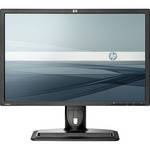
The ZR24w 24" Widescreen LCD Computer Display from Hewlett-Packard is a high-performance LCD display, perfect for use in color-critical environments. The display uses an S-IPS panel, which can reproduce 97% of the sRGB color space. An integrated 4-port USB 2.0 hub allows for easy device connectivity.
The display features an impressive industrial design, intended to complement the HP Z series of desktop workstations. Its stand features rotation, swivel, height, and pivot adjustment. The display features a 1920 x 1200 native resolution, 16:10 aspect ratio, 1000:1 contrast ratio, 400cd/m² brightness, 7ms response time, and 178°/178° viewing angle.
| Panel/Display | |
|---|---|
| Type | S-IPS (H2-IPS) Active Matrix TFT |
| Viewable Size | 24" |
| Brightness | 400cd/m² |
| Contrast Ratio | 1000:1 (3000:1 dynamic) |
| Viewing Angle | 178° horizontal, 178° vertical |
| Pixel Dot Pitch | Not Specified by Manufacturer |
| Response Time | 7ms (Gray-to-Gray); 12ms (On/Off) |
| Panel Life | Not Specified by Manufacturer |
| Colors Supported | 16.7 million |
| Signal | |
|---|---|
| Internal Interface | Analog/Digital |
| Frequency |
Horizontal: 24-80Hz Vertical: 59-61Hz |
| Sync Type | Not Specified by Manufacturer |
| Resolution | 1920 x 1200 |
| Input/Output Connectors | |
|---|---|
| Analog | 1x VGA |
| Digital |
1x DVI-D (HDCP) 1x DisplayPort (HDCP) |
| Audio Input | None |
| Headphone Jack | None |
| Hub Ports | 4x USB 2.0 |
| Speakers | None |
| Mount | Desktop |
| Controls | |
|---|---|
| Buttons | Not Specified by Manufacturer |
| On-Screen Display | Brightness, Contrast, Positioning, Color Temperature (5000k-Warm, 6500k-sRGB, 9300k-Cool, Custom), Serial Number, Display, Clock, Clock Phase, Monitor Management, Factory Reset |
| Auto Configuration | Yes |
| Touch Screen | None |
| Tilt/Swivel Range |
Tilt: -5-30° Swivel: -45-45° Height: 3.9" (10cm) Pivot: Yes |
| Security | Kensington Lock Slot |
| Compliant Standards | ISO 13406-2 VDT Guidelines Approval, CISPR Requirements, VCCI Approvals, MIC (Korean) Requirements, CSA, Australian ACA Approval, "GS" Mark, TUV Approvals, CE Marking, FCC Approval, Microsoft Windows Certification (Microsoft Windows 98, Microsoft Windows 2000, Microsoft Windows XP, Microsoft Windows Vista Premium, and Microsoft Windows 7) |
| System Requirements | Computer with VGA, DVI-D, or DisplayPort output |
| Power Requirements |
AC: 90-265VAC Consumption: 85W (Typical), 95W (Maximum), < 1W (Sleep/Off) |
| Environmental Requirements |
Operating Temperature: 41-95°F (5-35°C) Storage Temperature: -4-140°F (-20-60°C) |
| Dimensions (WxHxD) |
With Stand: 16.8 x 21.9 x 9.25" (42.5 x 55.6 x 23.5cm) Without Stand: 14.25 x 21.9 x 3.4" (36.2 x 55.6 x 8.7cm) |
| Weight | Not Specified by Manufacturer |
REVIEW SNAPSHOT®
by PowerReviewsPros
Cons
Best Uses
Most Liked Positive Review
EXCELLENT Monitor
I have struggled with Dell's 2408 and 2410.....the 2408 had a horrible green cast.....2410 was slightly red. This HP was pretty much dead on right out of the box....Read complete review
I have struggled with Dell's 2408 and 2410.....the 2408 had a horrible green cast.....2410 was slightly red. This HP was pretty much dead on right out of the box. As I sit here...I have the Dell 2410 on the left...ZR24W in the middle and Dell 2408 on the right. The same image duplicated on all three displays and the HP is the obvious winner. The contrast, clarity and color are far superior on the HP. If I could show you the picture I took of the three monitors I think you would agree as well.
Note: the comparison I made was with NO color calibration and all FACTORY DEFAULTS. Even with calibration I could not get rid of the horrible green color cast on my DELL 2408...haven't tried fixing the red cast on my Dell 2410. For this HP ZR24w...I have tried calibrating even though I felt it didn't need it...and the corrections were NEGLIGIBLE. :-)
Only downside is that it doesn't have the card reader like the Dell Monitors do.
I use it for photo editing where color accuracy is critical. I highly recommend this monitor.
VS
Most Liked Negative Review
Returned it
Colors were great on the top half of the screen. The bottom half however were dark and a little red. Calibration made it worse. I may have received a bad panel but after reading...Read complete review
Colors were great on the top half of the screen. The bottom half however were dark and a little red. Calibration made it worse. I may have received a bad panel but after reading plenty of reviews this is apparently quite common. I didn't want to play the monitor shuffle so I returned it for a refund. I would rather spend less and know that it's not prefect than spend more and regret image problems. I may try IPS again (as it is beautiful) but not for a while. B&H is awesome, will buy from again!
Reviewed by 123 customers
Sort by
Displaying reviews 1-20
Previous | Next »
Pros
Cons
Best Uses
Comments about HP / Hewlett Packard ZR24w 24" Widescreen LCD Computer Display:
Good consistent color from any angle. Not much light bleeding. Good lower price point screen for color critical uses.
Pros
Cons
Best Uses
Comments about HP / Hewlett Packard ZR24w 24" Widescreen LCD Computer Display:
Very good monitor for photography and basic digital film editing. Easy to set up and calibrate. Note: you need to change the factory settings when you do setup -- brightness is set way too high and this could impact life of screen.
Pros
Cons
Best Uses
Comments about HP / Hewlett Packard ZR24w 24" Widescreen LCD Computer Display:
Good IPS monitor
Pros
Cons
Best Uses
Comments about HP / Hewlett Packard ZR24w 24" Widescreen LCD Computer Display:
Color rendition out of the box is excellent for photo work. Size makes working with Photoshop elements so much easier.
I watched live streaming rock concert last night. Wonderfully sharp and clear!
I'm 77 years old, and general use visual is such an improvement for me. No eye strain.
Pros
Cons
Best Uses
Comments about HP / Hewlett Packard ZR24w 24" Widescreen LCD Computer Display:
I use this monitor for web development, including image editing software. Great to have more screen real estate with good color. Wonderful adaptability with the pivot to view portrait or landscape. Quick release and extra USB ports are nice options.
Pros
Cons
Best Uses
Comments about HP / Hewlett Packard ZR24w 24" Widescreen LCD Computer Display:
I'm using a pair of these monitors with a Dual 12 core Mac for video production. They are GREAT! Wide viewing angle is excellent. Wide Gamut and virtually no color distortion. At this price point these ZR24W monitors are great. They generate a little extra heat, but well worth it in color balance.
I've used LCD Viewsonics and Samsungs at about $100-$200 or so less per monitor, and have never been satisfied with the gamut, color range and over-amped rendition with the less expensive monitors.
In my book the best money I've spent since big CRT monitors.
Pros
Cons
Best Uses
Comments about HP / Hewlett Packard ZR24w 24" Widescreen LCD Computer Display:
I'm a photographer and have to have a screen that allows me minute work on a photo with a clear view of the big picture. I use this screen for work too--mostly word processing--and I have bad eyes. Reading glasses don't help on an average monitor of *any* size--but this monitor finally makes up for my aging eyes--clear and sharp to read.
Pros
Cons
Best Uses
Comments about HP / Hewlett Packard ZR24w 24" Widescreen LCD Computer Display:
I was badly in need of upgrading because my prints were disappointing. This monitor (for photographers on a budget) was just what I needed. I also purchased a color calibration device but the size and clarity really help me get editing done more efficiently. No zooming in and out to double check how it looks. Adjustments were needed for brightness and contrast but easily adjusted. One drawback is that LCD screens are harder to clean, but that is a drawback for any LCD screen. I was not excited about the need to purchase this but now I am loving the ease of editing and confidence that my prints will look the way I see them on my screen. Considering the amount I have invested in camera equipment, this was a wise purchase to ensure the quality of output for prints.
Pros
Cons
Best Uses
Comments about HP / Hewlett Packard ZR24w 24" Widescreen LCD Computer Display:
I was looking for a upgrade to my HP 2465 monitor that is about 5 yrs old. Originally I bought a cheaper model from another monitor-only vendor and learned about panel technology the hard way! The cheaper $150 monitor had TN panels. So I returned it promptly because the viewing angle was very limited. After reading about S-IPS panels, I would agree they are the way to go for consistent image viewing without color variation from top to bottom without spending for a super high-end profesional model. The HP ZR24w is very bright - the whites look white. My older HP is a bit yellow in comparison. Couldn't be happier.
Pros
Cons
Best Uses
Comments about HP / Hewlett Packard ZR24w 24" Widescreen LCD Computer Display:
Use for every day personal & business tasks - documents, spreadsheets, etc. Bought it mainly for image processing. Colors are transferring well from screen to printer - no calibration. I use a KVM switch - business laptop to home desktop. Works well although not a direct switch as I am using one on DVI & one on VGA so it takes 2 or 3 clicks depending which way I am going. Noticeably brighter than my Samsung which was starting to go (flicker at start-up) from capacitor failure - per various blogs. I like this HP - although probably would not have been my first choice had I had double the money to spend.
Pros
Cons
Best Uses
Comments about HP / Hewlett Packard ZR24w 24" Widescreen LCD Computer Display:
I use the screen for digital photography. This monitor has a so-called IPS display which are best for this application. In particular they are usually less prone to color or brightness changes when seen from an angle. The display is more uniform. On the other hand IPS monitors are usually not very good for games and / or video (I did not test that part). Some have more sophisticated back lighting and present extended gamut like adobeRBG (the utility of which is questionable ...).
The HP ZR 24 w stands among the other monitor with an IPS screen by its price. The screen has good uniformity (my unit doesn't have an issue with the bottom part as others have reported). Viewing angle is however a little disappointing: check it when displaying a uniform grey background and you'll notice that the bottom looks darker as you look at the monitor slightly high up. This is not really an issue for practical use, though.
The unit gives surprisingly great output even before calibration. Calibration in particular changes the brightness (too bright by default) and contrast (too little). The images look detailed and colorful. But (there is a but) the screen is not very good at displaying more subtle nuances. For instance when showing a grey gradient from black to mid-grey the banding is very visible all accross the gradient . I know it's an 8-bit monitor ... it looks like a 6-bit monitor! This is not a result of calibration as the results are the same after disabling the profile.
All in all I'd say the monitor performs well for what it costs. This is one of this situation where the tests show some flaws but in real life one just enjoys the screen without really noticing the shortcomings. I'd recommend it for amateur photography but not "serious" graphics.
Pros
Cons
Best Uses
Comments about HP / Hewlett Packard ZR24w 24" Widescreen LCD Computer Display:
This is used on a full time photographer editing machine. Great price for an IPS panel that will rotate. It is a bit bulky, but it is such a great panel with plenty of connectivity options.
Pros
Cons
Best Uses
Comments about HP / Hewlett Packard ZR24w 24" Widescreen LCD Computer Display:
This is a very solid monitor at an excellent price point. I needed an IPS panel at a decent size for graphic design, and this fit the bill.
Pros
Cons
Best Uses
Comments about HP / Hewlett Packard ZR24w 24" Widescreen LCD Computer Display:
Very pleased with my choice. After a week or so of comparing monitors, I decided to replace a 22" HP that I owned with this one. Colors are great, beautiful screen, very pleased with the purchase. Shipping was fast too - thanks B&H!
Pros
Cons
Best Uses
Comments about HP / Hewlett Packard ZR24w 24" Widescreen LCD Computer Display:
This was probably one of the longest decision making processes I've been through. Knew my old CRT monitor was on its way out. Narrowed my choices to this HP and one other IPS monitor. HP's recent decision about its PC business was a factor, but finally decided $ was a factor. This is one great monitor. Image quality is sharp, set-up was very easy, and HP's set up program is first rate. I'm VERY pleased with my choice.
Pros
Cons
Best Uses
Comments about HP / Hewlett Packard ZR24w 24" Widescreen LCD Computer Display:
I work at an interactive agency doing design & development on a 27" iMac and figured it was time to upgrade my screen back home from a 19" 4:3 TFT monitor to something bigger with better color like an IPS panel. I hooked this up to my 13" macBook Pro and my home PC and it works great!
I'm loving the size of this monitor and the colors are spot on. I wanted an anti-glare finish because as nice as the 27" Apple screen is, I can't stand the glare I get from any light in the room. This screen does well in that respect but the anti-glare coating makes a white screen look kind of fuzzy to me which is a tad bit annoying but really not bad, that's my only complaint, and the only reason this isn't a 5 star product.
Great panel at a great price, definitely recommend it!
Pros
Cons
Best Uses
Comments about HP / Hewlett Packard ZR24w 24" Widescreen LCD Computer Display:
I use the monitor for web browsing and software developemnt. The monitor feels a little different from the regular LCD monitors because it seems like there is a fine dust or something like this on the surface. It is only noticeable on the white background. However, the text is really crisp and colors are vivid. My eyes feel better with this monitor than with the regular LCD.
Pros
Cons
Best Uses
Comments about HP / Hewlett Packard ZR24w 24" Widescreen LCD Computer Display:
I bought this monitor to repalce an aging 19" CRT I was using to edit and prview photos for printing. The prints I get now using the HP are a tad dark (recalibation should resolve this) but nothing like I was getting when using a non-IPS LCD monitor. I gave it a 5 star rating based on the fact that it met my expectations and the price vs performance ratio - you can get better performce but not at this price point. I have only had this 2 weeks and love it...
Pros
Cons
Best Uses
Comments about HP / Hewlett Packard ZR24w 24" Widescreen LCD Computer Display:
Wanted a good IPS monitor for photo editing. Great value for the $$. Like size/resolution/color rendition. Only problem was dirt embedded in the middle of the screen. [...]. Replacement monitor has similar problem but very near the edge so it is not as much of an issue. HP needs to clean up their assembly clean room.
Pros
Cons
Best Uses
Comments about HP / Hewlett Packard ZR24w 24" Widescreen LCD Computer Display:
Most large-screen displays today have vertical resolution of 1080 (intended for video display). I use mine as a computer display, and wanted high resolution in both dimensions. The list of options is fairly limited. And I paid half the price for this 24" monitor as for the Sony 21" that it replaced. 1920x1200, replacing 1600x1200. Nice to see prices coming down, performance going up[...]Good.It took me ten minutes to connect it and set it up. Most of the time was just unpacking things. No need to use the minimal documentation. Still good.The screen is so bright that I had to reduce the intensity to keep from washing out the laptop screen sitting next to it. Great!I'm also an amateur photographer, and have nothing but good things to say for the rendering of images in photoshop.The only complaint I have is that I switch back and forth between VGA (the laptop doesn't have a DVI output) and DVI (on my home computer), and it takes a long time and/or manual action for the monitor to respond. Better and faster switching between inputs would have been greatly appreciated.
Displaying reviews 1-20
Previous | Next »