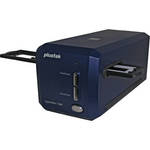
The Plustek OpticFilm 7400 Scanner is a dedicated 3600 dpi film and mounted slide scanner delivering better quality images, higher efficiency and power saving than the earlier 7300 model. With an improved white LED light source, the OpticFilm 7400 scans at 48-bit color for accurate and vibrant color images.
To minimize noise, the multi-sampling function makes 4 scan passes that are averaged together so image noise is cancelled out. It has a multi-exposure function that is utilized with negative film to provide improved shadow and highlight detail and delivers images with richness and depth that makes your pictures look as if they are three dimensional.
The 7400 comes with the very powerful SilverFastSE Plus (Multi-Exposure) software with scanning tools, editing, and color reproduction functions. This software is bundled with NewSoft Presto! Page Manager 7.1 for OCR, PDF creation, or format conversion to Word or Excel. It also comes with NewSoft Presto! ImageFolio 4.5, a comprehensive multimedia image-processing program for image fine-tuning.
OpticFilm 7400's performance and powerful software package make it a great solution for photographers at all experience levels.
The holders are designed to keep your originals well protected. There is no physical contact with the originals during the scanning process.
With SilverFast SEPlus ME comes more powerful functions featuring Multi-Exposure, SilverFast Basic, AACO, iSRD, SRD, Auto-Adjust, USM, SCC, NegaFix, and many other advance features.
This software provides the following capabilities:
The Image Manager functions as an image database and uses folders to manage and preview files.
PageManager includes the following features:
| Film Types |
35mm film (up to 6 frames) Mounted 35mm slides (up to 4 slides) |
| Scan Quality | |
|---|---|
| Scan Sensor | Color CCD image sensor |
| Lamp | White LED |
| Scanning Area | 1.45 x 1.0" (36.8 x 25.4mm) for negative film |
| Hardware Resolution | 3600 dpi |
| Interpolated Resolution | 7200 dpi |
| Color Depth | 48-bit |
| Dynamic Range | 3.5 |
| Scan Modes | Single pass |
| Buttons |
Quickscan Intelliscan Power |
| Performance | |
|---|---|
| Preview Speed |
Approx. 7.57 sec (Multi-Sampling ON) for slides Approx. 7.96 sec (Multi-Sampling ON) for negative film Without calibration time |
| Scan Speed |
3600 dpi: Approx. 54.56 sec (Multi-Sampling ON) 7200 dpi: Approx. 112.59 sec (Multi-Sampling ON) Under 24-bit true color |
| Multi-Sampling | Yes |
| Batch Scanning | No |
| Automation | No |
| Connectivity | |
|---|---|
| Computer Interface | USB 2.0 |
| OS Support |
Windows 7 (64-bit) Windows 7 (32-bit) Windows Vista (64-bit) Windows Vista (32-bit) Windows XP (64-bit) Windows XP (32-bit) Windows 2000 Windows 98 Windows 98SE Windows ME Mac OSX 10.6 (Snow Leopard) Mac OSX 10.5 (Leopard) Mac OSX 10.4 (Tiger) Mac OSX 10.3 (Panther) Mac OSX 10.2 (Jaguar) Mac OSX 10.1 Mac OS9 |
| Minimum System Requirements |
CD-ROM drive 1 x available USB port 512MB RAM 500MB free hard disk drive space High color graphic card (VGA or higher) Windows: CPU: Pentium III or faster CPU Windows 2000 Windows XP Windows Vista Windows 7 Mac: CPU: PPC G4, PPC G5, Intel Mac 10.3.9 and higher including Leopard 1 Please Note:The manufacturer STRONGLY recommends using a higher performance computer. close |
| Physical | |
|---|---|
| Power Requirements |
110-220VAC, 50-60Hz Power adapter (included): output: 15V, 1.0A |
| Dimension (DxWxH) | Scanner only: 4.73 x 10.7 x 4.7" (272 x 120 x 119mm) |
| Weight | Scanner only: Approx. 3.5 lb (1.6 kg) |
REVIEW SNAPSHOT®
by PowerReviewsPros
Cons
Best Uses
Most Liked Positive Review
Great results for the price
OPTIC-FILM 7400 SCANNER
I purchased the 7400 because it works with Windows 7 and I had an assignment that required scanning many old slides and negatives, blowing up these photos, some to ...Read complete review
OPTIC-FILM 7400 SCANNER
I purchased the 7400 because it works with Windows 7 and I had an assignment that required scanning many old slides and negatives, blowing up these photos, some to 11 x 16 inches, to create a dozen poster-size collages. I wanted to do this work at home. At work I have used other slide scanners – Minolta and Nikon - which are not available for loan and no longer are sold. The 7400 did the job, efficiently and as well as those mentioned. I was pleasantly surprised at how quietly it operates. I have used SilverFast software previously and appreciate that it comes with the 7400 because it provides the controls needed to achieve high quality results. Installation was relatively simple and straightforward, although I did need to make a phone call to get SilverFast to recognize the scanner. The only feature lacking on the 7400 is automatic movement from one slide to the next - you must move the slide holder by hand to the next detent. Even so, once I reacquainted myself with SilverFast, I was able to move along fairly quickly. Now that the project is completed, I have neatly packed up the scanner with all of its components into its carry bag – until the next assignment - or I have time to tackle our family's 60-year collection of slides and negatives waiting in storage.
VS
Most Liked Negative Review
Basic but functional and affordable
I have thousands of slides to digitize, and my flat bed scanner just isn't up to the task. The 7400 is a reasonable step up from the flat scanner. It is slow (expectedly)...Read complete review
I have thousands of slides to digitize, and my flat bed scanner just isn't up to the task. The 7400 is a reasonable step up from the flat scanner. It is slow (expectedly) and requires a lot of attention if you are scanning many originals. But you can't beat the price.
REVIEWS
Reviewed by 56 customers
Sort by
Displaying reviews 1-20
Previous | Next »
Pros
Cons
Best Uses
Comments about Plustek OpticFilm 7400 Scanner:
I bought the OpticFilm 7400 to scan old slides and negatives on an occasional basis. This is a replacement for my old Nikon LS-30, which performed very well on a number of fronts but had trouble scanning Kodachromes. Setup time was brief, and the software installed on my Mac without errors. The scanner hardware meets my expectations and produces detailed images. The software user interface has a very 'Windows 2000' feel to it, but it is no different in that respect from other scanner software I have used. Functionally, the software is full of features and with some time and experimentation, I was able to go beyond the defaults and control my scans to produce very good results. Kodachromes scanned well without much adjustment. Tri-X negatives with a large density range needed a lot of adjustment before I got the result that I wanted.
Pros
Cons
Best Uses
Comments about Plustek OpticFilm 7400 Scanner:
good quality and faster than any scanners I have owned.
Pros
Cons
Best Uses
Comments about Plustek OpticFilm 7400 Scanner:
Good:
Well priced alternative to a flatbed scanner.7200 dpi scanner (when measured with a target it turns out to be 3800 dpi in both directions which is right in Nikon cool scan territory)
Actual Dmax > 3.6 and can be increased through multiple exposure mode.
Negative:
Scanning is done through the included Silverfast Se plus software.
Manual feeder so after you load the carrier you have to push it through by hand one frame at a time. This is not really a problem as I hand correct every negative
No digital ICE (not really a problem for me as I don't use it anyway and it doesn't work on B&W)
My Findings:
If you have any form of workflow the Silverfast software is a piece of junk you would have to spend at least the cost of a scanner to upgrade to a usable version. Besides a rather useless raw mode it doesn't have 48 bit per colour save function. The raw mode would be good if it integrated with lets say Lightroom but it doesn't. It's designed to work with another pricey piece of software you have to buy from them. I don't know about you but I only like to scan once and use the file as a master.
To top it off they keep on telling you to read a 500 page manual and strongly implying that if you want to be a pro you are using the wrong scanner software.
The solution is easy buy reasonably priced Vuescan software. The pro has lifetime support, useful raw workflow and can support multiple scanner types.
Scanning B&W I used some nice grainy HP5+ and found out this:
Multi-exposure is effectively a two pass scan with each scan taken at a different exposure, the 2 passes are then blended together. This actually works and extends the dmax and dynamic range for difficult frames. There is a slight but noticeable lose of resolution. most of which can be recovered with some of the hated USM filtering. Not much need for this function with HP5 I will have to wait until I test it on some high dynamic range shot using TMAX film.
The raw scans pre-adjusted with a film profile seem to contain all the tone information with no banding or noise. Thus they can act as masters.
For 3600dpi scans there was marginally better detail and micro-contrast when scanning at 7200dpi at letting Vuescan reduce the output to 3600dpi (down sampling). This seems to be real not some USM shapening slight of hand (USM was off). Makes sense as the measured on a target dpi is 3800dpi and downsizing by 2 is equivalent to multiple sampling without the alignment problems.
As scan time is almost 4 times as long at 7200dpi I will use 3600dpi scans on images that I don't care so much about and 7200dpi down sampled to 3600dpi on images that look interesting.
Also of slight interest was that letting the software convert from the colour scan to BW gave slightly better micro-contrast then converting the 48bit colour to 16 bit B&W after the fact or scanning in 16bit B&W.
I tested the same negative on my Epson V500. The Epson had less then half the actual resolution and more compression in the grey scale. The hp5 film grains were blobs instead of salt and pepper with the Plustek
Pros
Cons
Best Uses
Comments about Plustek OpticFilm 7400 Scanner:
I use this product for digitizing the numerous scientific negatives and slide I have.
The scanner is cheap. Therefore it is somewhat slower than more expensive scanners but the quality of scanning is good.
The software offers a lot of possibilities but could be easier and more intuitive
Pros
Cons
Best Uses
Comments about Plustek OpticFilm 7400 Scanner:
Used to archive old negative and slide film in digital format. A great way to make extra copies for back-up and stored at an alternate location.
Pros
Cons
Best Uses
Comments about Plustek OpticFilm 7400 Scanner:
We are transferring old slides to DVD and had a HP flatbed scanner with a slide adapter, some of the slides are very dark and the HP could not do the job.This scanner made the difference, not only did it bring the dark slides to life, but the good slides became GREAT SLIDES.I would recommend this product to anyone.You do not have to be a photo or PC genius to operate this, and I would say the unit is user friendly all around.[...]
Pros
Cons
Best Uses
Comments about Plustek OpticFilm 7400 Scanner:
I have thousands of old slides to digitize. I use the 7200 dpi setting. It does take a few minutes to scan but this is expected. The resolution is excellent. The software takes a little time to get used to but once you do things go faster.
Pros
Cons
Best Uses
Comments about Plustek OpticFilm 7400 Scanner:
Once the latest software was installed the unit works perfectly. Even though the scans are one at a time, this really is no issue, as batch scanning is always a risk. For low volume use it does the job that scanners costing three times as much can do.
Pros
Cons
Best Uses
Comments about Plustek OpticFilm 7400 Scanner:
I got this scanner to scan selections from 1000+ 30-50 year old slides. I'm tech-comfortable, and can generally figure out difficulties with software, to the point that I'm the 'go-to' person for software troubleshooting where I work. This software, however, is giving me fits, beginning with its poorly designed user interface and continuing through options that sometimes have no effect, to occasionally bizarrely miscolored psycho styled output.
I'm not really sure how 'good' the scanner is. Slides look fine in its prescans, but the software often seems to reset or ignore my settings to the point that the final scans have less definition, clarity, and worse color than the prescans to say nothing of the original slides. I'm very disappointed. I've let it sit around too long before seriously using it to return it. Otherwise I would.
Pros
Cons
Best Uses
Comments about Plustek OpticFilm 7400 Scanner:
Everything about it is good. Needed to replace my Nikon CoolScan III, which didn't work with my Mac G5. This thing works great. It is easy to set up and use. The color correction controls are fantastic. Intuitive from the start. Didn't even need to read the instructions. Great price for such a machine if you are only interested in scanning single slides or negatives. Not good for batch scanning, as the speed is slow and it is manually fed. I like the manual feed however, because the less moving parts the better, from my perspective. Great for artistic work.
Pros
Cons
Best Uses
Comments about Plustek OpticFilm 7400 Scanner:
I'd been using a Nikon Coolscan III for years and needed something compatible with my Mac G5. This one beats everything about the Nikon hands down, not to mention it was $500 less expensive. The SilverFast software is great, intuitive, don't even need the manual if you've ever done any kind of digital imaging. The 7200 dpi allows me to print a 20 by 30 inch print at 300 ppi. Many features, including multi-scans of a single image for more depth of color information. Color correction can be handled several ways. Out of the box, didn't need to read the documentation.
The price is completely reasonable. I'm an artist and only need to scan one slide at a time, so if I were doing batches for magazine production, would need one of the higher grade machines, which I presume are faster and handle more than one slide at a time. For my purposes this scanner goes far beyond my greatest expectations. I'm jumping for joy. The scanner is slow but so is a good dinner.
Pros
Cons
Best Uses
Comments about Plustek OpticFilm 7400 Scanner:
I am transfering years of Kodak Gold negatives to digital. Easy to use, and reading the reviews helped focus where to read the directions for clarity. Faster than earlier scanners I have owned, but expect to spend time using the system. If you don't care for the software that comes with it for editing, it is easy enough to load files into other photo editing software. Great quality digital renderings.
Pros
Cons
Best Uses
Comments about Plustek OpticFilm 7400 Scanner:
Setup was straight forward. The software lacks a useful manual, but after trying different settings one can make good images. As far as I can tell the dust and scratch removal does virtually nothing, but cleaning beforehand is better anyways.
Pros
Cons
Best Uses
Comments about Plustek OpticFilm 7400 Scanner:
This unit is a terrific film scanner. Once learned it is easy to use and produces high quality digital images from film originals. The instructions are a bit difficult to get through but once you get the workflow it functions well. It is also a bit difficult to learn how to align film in the holder. I am very happy with the value of this product.
Pros
Cons
Best Uses
Comments about Plustek OpticFilm 7400 Scanner:
I bought this scanner for my father for Christmas. We love it. While I watch TV or work on the computer I scan.
I have been scanning at 3600dpi to save some time. The scans are coming out great. The program took a little bit to get used to, but once I figured it out it's so easy. The software was easy to load.
The slides are very easy to load into the holders.
I like how I can do a prescan to see how the slide looks before I use the full scan.
I have been recommending this to friends. I'm so excited to be able to preserve millions of memories.
Pros
Cons
Best Uses
Comments about Plustek OpticFilm 7400 Scanner:
I read one lengthy unfavorable review of this scanner, comparing it's output to the Nikon Coolscan 5000. It said it's scans were much less sharp than the Nikon's and attributed this most likely to the optics. It also said the Silverfast software was difficult to use. I have found that if you dont overuse the options of the powerful and many faceted Silverfast software, and dont require fast turnover, you can achieve fabulous results from this scanner.
The multi sampling feature can be set to make up to 16 passes to optimize detail. This will take over a half hour. I found that setting it to 4 scans is sufficient. Of the many other controls I found the "image-automatic" highlight, midtone, shadow control to be most useful. Also, dont over sharpen. the" less auto sharpen" setting gives the most true rendering of the film grain.
It will still take 5 to 10 minutes to get a very high quality scan at full resolution, but you can use more basic settings for less critical work.
Pros
Cons
Best Uses
Comments about Plustek OpticFilm 7400 Scanner:
Great film scanner
Fast
Easy to use
Pros
Cons
Best Uses
Comments about Plustek OpticFilm 7400 Scanner:
I shoot a lot of film by choice, but I want digital images to share. This scanner is an excellent and helpful tool to that end. It produces output that is similar to the expensive brands of film scanners of just a few years ago, but followed the arc of digital gadget prices down. It's priced similar to a film-compatible flatbed, but with far superior output. The difference is sharpness is simply beyond belief. I no longer have to use unsharp mask on my pics to make them look sharp.
I bought this model because of the sale price, but probably would've picked it anyway. It doesn't have infrared dust removal, but I shoot so much B&W that I'd have not been using it anyway.
The only drawback to this for a 35mm user is that it doesn't have a motor to feed the carrier through like the big brands did. The user must manually move it to each frame. Considering the price, that's not too big a deal. If you ever shoot medium format, it can't scan that so you'll still need a flatbed. My only real complaint is that the film carrier could be a little easier to load.
For the price, I can't see anything beating it. It's far cheaper than a digital SLR (especially full frame), and allows you the versatility to shoot film but have digital pictures later.
Pros
Cons
Best Uses
Comments about Plustek OpticFilm 7400 Scanner:
I have 26 slide trays dating back to 1972. I wanted to convert them to digital images. The scanner installed quickly and easily. The Silverfast software also installed quickly and easily. I was up and running within 1/2 hour.
I don't use the full capability of the software, but the digital images are turning out very well. Takes about 90 seconds per slide.
Comments about Plustek OpticFilm 7400 Scanner:
I used it at work and it's working well so far! I would suggest getting an extra film strip so you can load it while one scans.
Displaying reviews 1-20
Previous | Next »