USB and Ethernet Cables are NOT Included
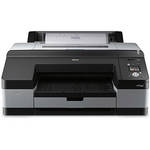
To reach ultimate heights in professional inkjet printing consider the super-quality of the Epson Stylus Pro 4900 Inkjet Printer. This amazing wide-format printer accepts sheet and roll media up to 17"/432mm wide and incorporates the newest professional printing technologies to produce breath-taking photos and artwork. Epson's UltraChrome HDR - the latest generation of pigment ink technology - uses ten colors, including an all-new orange and green to produce the widest color gamut ever from an Epson Stylus Pro printer.
Improving upon earlier models, the Stylus Pro 4900 incorporates a three-level black ink technology which simultaneously uses black, light black and light light black inks. The results show outstanding gray balance and highlight-to shadow grayscale accuracy plus impressive high density levels and virtually no bronzing. The Stylus Pro 4900 further improves upon previous models with automatic black ink mode switching - load both photo and matte black inks into the printer and the 4900 will automatically switch from one to the other with minimal ink loss - talk about custom printing!
With an even higher level of ink droplet accuracy than found on previous Epson printer models, the high-precision, ten-channel MicroPiezo TFP Print Head has been enhanced with an exclusive ink repelling coating technology to dramatically reduce nozzle clogging for more printing production with fewer headaches. This, combined with the Epson AccuPhoto HD screening technology, gives you the means to print at an astonishing resolution of 2880 x 1440 dpi.
Capable of handling virtually any type of cut-sheet media up to 17"/432mm wide, the Epson Stylus Pro 4900 incorporates a high-capacity paper tray that accommodates up to 250 sheets of plain paper in sizes ranging from letter size sheets to roll media up to 17.0" x 132.0'/432mm x 40 m. The printer conveniently provides different ways to load media, including a front-loading, straight-through path capable of handling media up to 1.5 mm thick and a second, top-loading, single-sheet feeder optimized for fine art paper.
When you are printing large-format photos or artwork the biggest nightmare is waiting - slow production means less profit. The 4900 is a natural solution to the problem - it delivers a 2880 dpi 16.0 x 20.0"/406 x 508mm photo in High-Speed/HS print mode in only 6 minutes, 28 seconds!
Note! USB and Ethernet Cables are NOT Included
| Printing Method | |
|---|---|
| Maximum Resolution |
2880 x 1440 dpi 1440 x 1440 dpi 1440 x 720 dpi 720 x 720 dpi 720 x 360 dpi Draft: 360 dpi |
| Printing Technology |
Advanced MicroPiezo TFP print head with ink repelling coating technology 10-channel, drop-on-demand, ink jet print head |
| Minimum Ink Droplet Size | 3.5 pl |
| Ink Type |
Epson UltraChrome HDR ink Professional-level pigment-based ink |
| Ink Palette | O, G, C, LC, VM, VLM, Y, LK, LLK, PK or MK |
| Ink Cartridge Configuration | 11 individual cartridges |
| Compatible Ink Cartridges |
Included: 80 ml Starter ink cartridges 200 ml replacement cartridges: Photo Black (T653100), Cyan (T653200), Vivid Magenta (T653300), Yellow (T653400), Light Cyan (T653500), Vivid Light Magenta(T653600), Light Black (T653700), Light Light Black (T653800), Matte Black (T653900), Orange (T653A00), Green (T653B00) |
| Shelf Life | Ink: 2 years from production date or 6 months after opening |
| Number of Nozzles | Color and monochrome: 10 x 360 nozzles |
| Line Accuracy | ±0.2% of specified page length |
| Print Archival Life |
With Epson UltraChrome HDR Ink: Color: Up to 200 years B&W: Over 200 years Actual print stability will vary according to media, printed image, display conditions, light intensity, humidity and atmospheric conditions |
| Performance | |
|---|---|
| Print Speed |
8 x 10" (216 x 254mm): from 0:59-4:15 - Normal is 1:28
11"x 14" (279 x 356mm): from 1:42-7:00 - Normal is 2:31
16"x 20" (406 x 507mm): from 2:46-11:40 - Normal is 4:11
1
Please Note:Based upon print engine speed only. Total throughput times depend upon front-end RIP, file size, printer resolution, ink coverage, networking, etc. Normal Mode based on SuperFine - 1440 dpi HS. close |
| Printer Duty Cycle | Not Specified by Manufacturer |
| Paper Handling | |
| Paper Sizes | Single sheets: 8.0 x 10.0" (216 x 254mm)-17.0 x 24.0" (432 x 610mm) |
| Maximum Paper Width | 17" (432mm) |
| Maximum Printable Area | Left and right margins 0-3mm each (0.24" total) Maximum printable width 17.23" (438mm) - full bleed 17" width Maximum printable length limited by application, OS, and driver/RIP used |
| Borderless Photo Sizes |
Complete borderless printing on the following roll media sizes: 8.0" (216mm), 10.0" (254mm), 11.0" (279mm), 13.0" (330mm), 14.0" (356mm), 16" (406mm), 16.5" (419mm), 17" (432mm) Top and bottom edges can be automatically cut to any length when printing on roll media |
| Paper Types |
Epson Photographic, Fine Art, Proofing, Signage, Coated Matte, Coated Gloss papers Third party papers up to 1.5mm thickness |
| Paper Capacity | 20-100 sheets |
| Media Weight | 12 lb (46 gsm) bond - up to 1.5 mm posterboard |
| Core Size | 2"(51mm) and 3.0" (76mm) |
| Maximum Media Roll Diameter | 4.0" (102mm) or 6.0" (152mm) |
| Maximum Roll Print Length | Up to 132' (40.2 m) - limited by core diameter |
| Paper-Feed Method |
Roll feed Auto loading cassette: 0.08-0.27mm thick media, 20-100 sheet capacity based on media type and thickness |
| Cutter |
Built-in rotary cutter Automatic and manual single pass cut on up to 17" (432mm) wide roll media |
| Connectivity | |
|---|---|
| Interfaces |
1 x hi-speed USB 2.0 (1.1 compatible) 1 x Ethernet port - 10/100Base-T |
| Compatible Memory Cards | N/A |
| Direct Print Capable | N/A |
| Network Capable | Yes, wired Ethernet 10/100Base-T |
| PostScript Support |
Epson ESC/P 2 raster photographic drivers standard Optional PANTONE licensed and SWOP certified Adobe PostScript RIP by EFI (EFI eXpress included only with Designer Edition bundle) Supported by most leading third-party RIPs |
| Operating Systems Supported |
Windows: XP, Vista, and Windows 7 (32 & 64-bit) Mac: Leopard 10.5 or higher (16-bit) |
| Physical | |
|---|---|
| Status Display | High-resolution 2.5" (62mm) color LCD |
| Image Preview Display | N/A |
| Front Panel Controls | Yes |
| Operating Temperature |
Operating: 50-95°F (10-35°C) Storage: -4-104°F (-20-40°C) |
| Operating Humidity | Relative: 20-80% Operating: 40-50% RH |
| Acoustic Noise | Approximately 45 dB(A) according to ISO 7779 |
| Power Requirements | 110-120VAC, 50/60 Hz, 1.0A |
| Power Consumption |
Operating: approx. 52W or less Standby: <8.5W Power off: <0.5W |
| Safety Compliance |
Safety standards: UL 60950-1, CSA C22.2 No.60950-1, Low Voltage Directive 2006/95/EC - EN60950-1 EMC: FCC Part 15 subpart B class B, CAN/CSA-CEI/IEC CISPR 22 Class B, AS/NZS CISPR Class B, EMC Directive 2004/108/EC - EN 55022 Class B, EN 55024, EN61000-3-2, EN61000-3-3 |
| Dimensions (WxHxD) | 34.0 x 16.0 x 30.0" (864 x 406 x 762mm) |
| Weight | 115 lb (52.2 kg) |
REVIEW SNAPSHOT®
by PowerReviewsPros
Cons
Best Uses
Most Liked Positive Review
Epson 4900 an instant winner
A lot has changed in 15yr...
I once owned an Epson Stylus 1200 color inkjet that I used for printing photos. It was ok but had low resolution and poor color fidelity....Read complete review
A lot has changed in 15yr...
I once owned an Epson Stylus 1200 color inkjet that I used for printing photos. It was ok but had low resolution and poor color fidelity.
Fast forward to the 4900 and WOW, this printer blows my socks off.
I am a hobbyist, not a pro, but have been taking photos for about 40yr and making larger format (8x10 or larger) prints for about 25yr. I currently shoot mainly landscape, architecture and nature but am working on my people/street images more and more, using a Nikon D700 with either the AF-S 24-70mm f2.8G ED or the AF-S 70-200mm f2.8GII ED VRII lens to shoot RAW, 14bit depth, lossless compressed files.
Pros: Fabulous image quality/color reproduction; easy to set up out of the box; ICC profiles provided w the product work great for softproofing in and printing from Aperture3; has given my work a whole new dimension and obviated the need to go back and forth to the retail photo lab to make test prints. Accessible, responsive and well-informed telephone tech support from Epson. Great media choice features.
Cons: Big footprint (they warn you) and massive (again, they warn you!). Rear Manual feed has been a little fussy using 17x22in paper (repeated misfeed errors but I am getting better at loading it the way it wants). Otherwise I have had no problems. Biggest challenge will be to restrain myself from going on a mounting and framing binge.
VS
Most Liked Negative Review
Epson all most got it wright
There is only one reason for me to give this printer 2 stars. Bordeless printing is next to impossible. If you use a sheet of paper from tray or manuel feed, example, 8.5 ...Read complete review
There is only one reason for me to give this printer 2 stars. Bordeless printing is next to impossible. If you use a sheet of paper from tray or manuel feed, example, 8.5 x 11 or 17 x 22, the printer will only print 2 edges borderless the other 2 edges will need to be trimmed in a secondary opperation and you end up with 8.5 x 10.25. No sheet paper can be ptinted true 4 side borderless. Roll paper can be printed borderless if you set the printer to double cut and paper roll is the correct width. However, Epson dose not make roll widths to print the major size I use reguarly. Which are 11x17, 8.5x11, 5x7 or 4x6. The first print job I had for this printer was a 325 piece job which took over 2 hours of secondary trimming. This is something with my older HP printer I didn't have to do. It was true 4 side borderless. On the Epson, for me to print true 8.5 X 11 I use 17" paper roll. I must secondary cut and throw paper away. A huge waste of paper and my time.
Now on a positive, print quality is great, sharp, crisp, and color is outstanding. Best we have ever experenced and faster than any of our other printers. Very quiet, easy to set up and put on our network .Print drivers work great with Adobe Lightroom or Adobe Photoshop plenty of setup confrigations. Cost of operation we have not yet determined however, we feel this to be very economical. When we called Epson for tech support about our bordless print issues it was easy and quick to reach customer support and they were above average and knowledgeable. Product Manuals are easy to understand and printer is very user friendly. IF only it would print Bordeless 8.5x11 prints. In conclusion, if you are looking to print large prints and don't mind the secondary opperation of trimming, I feel for the money there is no better printer. We are keeping this printer for larger printing but will replace our older HP with a newer HP for smaller print sizes. Think about trimming out a few hundred 5x7s every other week is not something I look forward to. When all Epson needs to do is produce roll paper in enough sizes to accomadate our needs.And have printer support drivers for borderless printing to these sizes. Hope this helps in your decision.
Reviewed by 23 customers
Sort by
Displaying reviews 1-20
Previous | Next »
Pros
Cons
Best Uses
Comments about Epson Stylus Pro 4900 Inkjet Printer:
I ordered the Epson 4900 after researching both the Canon Pro Series AND the Epson. I have owned an Epson 1200, 2200 and the 2400.
The Epson documentation and set up were by far the easiest I have ever had. I really was expecting a massive job for this "Gorilla" but I was printing in less than an hour.
The prints are absolutely brialliant.
My only complaint (and it's a small one) is that the right side ink door does not close very solidly. Epson could have made this a bit more solid.
Beyond that, this is an awesome 115 pound gorilla that prints every bit as good as Epson claims.
Pros
Cons
Best Uses
Comments about Epson Stylus Pro 4900 Inkjet Printer:
This thing is massive. Over 100 pounds right out of the box.
So far I haven't had any issues except I destroyed a few sheets of paper trying to figure out how do the manual paper load. The instruction manual isn't much help.
It's pretty slow hand feeding it one sheet at a time as I can only print via manual feed with the Museo fine art paper that I use. I wish it was a bit easier.
Pros
Cons
Best Uses
Comments about Epson Stylus Pro 4900 Inkjet Printer:
I purchased for my design department and the user love it.
Pros
Cons
Best Uses
Comments about Epson Stylus Pro 4900 Inkjet Printer:
I've used a lot of small home printers and online print services. I have never gotten a print to look as good from any of them as they do from this printer.
Pros
Cons
Best Uses
Comments about Epson Stylus Pro 4900 Inkjet Printer:
had this printer for a couple of days. easy set up, networked, good colors
Comments about Epson Stylus Pro 4900 Inkjet Printer:
I upgraded from the 4880 which I thought was a wonderful printer. However, the 4900 HDR ink set can yield prints with a greater visual impact. Also, the management of nozzle testing and cleaning is much improved. Switching MK and PK inks works well. Paper loading and handling improvements are great.
Pros
Cons
Best Uses
Comments about Epson Stylus Pro 4900 Inkjet Printer:
I am a serious hobbyist photographer, ie. I work every day on it for several hours. I do landscapes, portraits, architectural abstracts, and lots of travel work. I bought this printer based on reviews (luminouslandscape.com is a great source for these) and because I've owned an Epson 2200 for years and wanted to upgrade but still be in the Epson family I know and appreciate.The printer is fast and the output is gorgeous! I've been using Velvet FA paper so far. I like that I can easily switch between matte and photo blacks. Midtone separation and color gamut are excellent, as is rendition of blacks. I love this printer and would purchase again.The only beefs I have are that centering one's photo on the paper is not easy. Also, they call this a desktop printer but it is a monster, thus its similarity to a VW bug sitting in my studio. I am petite, so need a step stool to load thick papers from the top. I purchased two used, 5-drawer architectural plan cabinets and placed this 115 lb printer on top of them with a solid board underneath it. The printer does not come with a stand and I found this solution, while a bit pricey, serves two purposes -- a good, solid stand for the Beast and great storage for large prints.
Pros
Cons
Best Uses
Comments about Epson Stylus Pro 4900 Inkjet Printer:
This is a fantastic printer, the quality of the prints are amazing. The printer is huge, be sure to have enough space (and prepare your partner for the surprise, my wife almost threw it out, luckily, the beast was too heavy – the printer, not my wife!).
The only problem is the paper which is very difficult to load sometime (rear feed); additionally, I would have appreciated fully loaded cartridges considering the price of the machine.
Pros
Cons
Best Uses
Comments about Epson Stylus Pro 4900 Inkjet Printer:
Moving from R1800 to a more versatile printer was easy with rapid setup and well thought out start up documents. A commercial style chassis needing a wide open bench to set up. Printing went well from the first image even without calibrating the system. Downloading and installing additional profiles was rapid and simple.
Pros
Cons
Best Uses
Comments about Epson Stylus Pro 4900 Inkjet Printer:
I use this printer almost exclusively for canvas prints on Breathing Color's media, primarily in B&W. I have experimented with the printer's B&W mode and compared it to the full color mode on the same image - there is a slight color cast in some areas, but I was able to correct it by regenerating the .icc profile with a Color Munki.
Regardless, the printer's range of blacks is incredible. There are four black cartridges in the printer, but only three are used for any one print - the matte black and photo black switch depending on the media (and therein lies another story).
Besides B&W, the color gamut is impressive - color prints have real presence and 'pop.' Note that I use a Color Munki to calibrate my workflow - an essential step, IMHO.
The roll and cassette media handling features are excellent, but I find the rear load slot a bit finicky and have not succeeded in getting the front manual feed to work at all. These have always been weak areas in Epson wide format printers, IMHO.
It is very nice to load proof paper in the cassette and production media in the roll (and, BTW, I recommend a second roll - it makes media changes much simpler). I don't have to do anything but change the paper type to go from proof to a production print - but here's the rub - if I'm using a glossy/semi gloss proofing media and a canvas production media this requires a switch from matte black to photo black - and subsequent loss of a few ml of black (matte or photo) ink. The printer has ten ink cartridges but the print head has only nine nozzles, with one shared by photo black and matte black, so the ink system must be purged.
The purge cycle aside, this printer is extremely economical on ink. I have owned this printer since March of 2011 and my ink costs are about half that of my previous R2400 and 2880 units. However, a full set of cartridges runs close to $1,000 and they have a six month service life, so this is not a printer for the casual user (unless you want to do a little electronic cheating [and probably void your warranty, BTW]).
I have had some problems with the cyan nozzle clogging and, after a heavy cleaning cycle to fix it, have found ink staining on the edge of media left in the printer during cleaning. BTW, use the control panel to clean nozzles - you can clean them in pairs and save a lot of ink.
Some reviewers commented on the size - yes it's big and heavy and you need a commercial-grade service cart to support it.
I like this printer a lot - and respect it, as well - it's a professional tool and must be approached with care and knowledge. If you want to print a few snaps for the kids, get something else. If you are serious about your work, this is a good way to go.
Pros
Cons
Best Uses
Comments about Epson Stylus Pro 4900 Inkjet Printer:
Prints are great BUT I am not a high volume printer, so the 6 month after opening will be up on the 80 mil cart that comes with the printer before i use some of them. Some of the 200mil cart may not run out for years. They need to offer the 80mil cart to. 2: every time i go to the web site for ink they ask me what printer and the 4900 is not there, so i have not been able to replace the cart i need. There must be a way i just havent found it. I would recomend the printer if you are high volume. For low volume printers like me-don't buy it
Pros
Cons
Best Uses
Comments about Epson Stylus Pro 4900 Inkjet Printer:
It is silent, fast and of the highest quality.
Pros
Cons
Best Uses
Comments about Epson Stylus Pro 4900 Inkjet Printer:
Design appears way too large for its output. 1 size up is 6-8x larger.
Pros
Cons
Best Uses
Comments about Epson Stylus Pro 4900 Inkjet Printer:
There is only one reason for me to give this printer 2 stars. Bordeless printing is next to impossible. If you use a sheet of paper from tray or manuel feed, example, 8.5 x 11 or 17 x 22, the printer will only print 2 edges borderless the other 2 edges will need to be trimmed in a secondary opperation and you end up with 8.5 x 10.25. No sheet paper can be ptinted true 4 side borderless. Roll paper can be printed borderless if you set the printer to double cut and paper roll is the correct width. However, Epson dose not make roll widths to print the major size I use reguarly. Which are 11x17, 8.5x11, 5x7 or 4x6. The first print job I had for this printer was a 325 piece job which took over 2 hours of secondary trimming. This is something with my older HP printer I didn't have to do. It was true 4 side borderless. On the Epson, for me to print true 8.5 X 11 I use 17" paper roll. I must secondary cut and throw paper away. A huge waste of paper and my time.
Now on a positive, print quality is great, sharp, crisp, and color is outstanding. Best we have ever experenced and faster than any of our other printers. Very quiet, easy to set up and put on our network .Print drivers work great with Adobe Lightroom or Adobe Photoshop plenty of setup confrigations. Cost of operation we have not yet determined however, we feel this to be very economical. When we called Epson for tech support about our bordless print issues it was easy and quick to reach customer support and they were above average and knowledgeable. Product Manuals are easy to understand and printer is very user friendly. IF only it would print Bordeless 8.5x11 prints. In conclusion, if you are looking to print large prints and don't mind the secondary opperation of trimming, I feel for the money there is no better printer. We are keeping this printer for larger printing but will replace our older HP with a newer HP for smaller print sizes. Think about trimming out a few hundred 5x7s every other week is not something I look forward to. When all Epson needs to do is produce roll paper in enough sizes to accomadate our needs.And have printer support drivers for borderless printing to these sizes. Hope this helps in your decision.
Pros
Cons
Best Uses
Comments about Epson Stylus Pro 4900 Inkjet Printer:
I needed to upgrade from my Epson 2200 for the larger 17" output. I printed the same tif file in both printers; same settings, paper,etc. The 4900 output was clearer and sharper, very noticeable in shadowed areas. The colors were brilliant. I was going to retire the 2200 for B&W only , but the 4900 is great there,too.
Pros
Cons
Best Uses
Comments about Epson Stylus Pro 4900 Inkjet Printer:
Does what it suppose to do. And , does it very well.
Pros
Cons
Best Uses
Comments about Epson Stylus Pro 4900 Inkjet Printer:
This is my first truly professional photographic printer. I'm comparing against old HP Photosmarts, Lexmarks, Canons, etc that I've used in the past. I thought it was cool to see an inkjet printer spit out a photograph. At least I thought they were photographs. Now that I've seen what the Epson can do, the best I can call all previous printings would be crude representations of what a photo should look like.
In a word, the Epson Stylus Pro 4900 is AMAZING. There was a slight learning curve to it for me as I wasn't used to setting up Photoshop with the printer's profile information, the paper's profile information, etc. Once I figured the settings out, I was blown away by the quality of the prints. The color gamut is amazing, as is its ability to handle subtle shading and detail in B&W.
This printer is a hefty beast as all the reviews say. Heavy and bulky. But very quiet, beautiful and efficient. I honestly have found nothing negative about the printer to this point. I guess you could say ink prices--11 cartridges at $100 each is kind of daunting...but then again, I do mostly B&W so I'll be changing only a few of those cartridges on any regular basis. That being said, you get what you pay for, and if you're paying for this printer you'll want to pony up for the correct ink. It would be like owning a Porsche but insisting on using Kia parts.
All-in-all, a great printer and one I'm hoping will help me launch my photographic hobby into a career!
Pros
Cons
Best Uses
Comments about Epson Stylus Pro 4900 Inkjet Printer:
I print a great deal for photography and need borderless printing paper, heavier shock. But this border doesn't not print do that. It's heavy, big, and take a great deal of space. Ink is expensive and not worth getting. It is a lemon.
Pros
Cons
Best Uses
Comments about Epson Stylus Pro 4900 Inkjet Printer:
I have only had the printer a week or so, so these are preliminary thoughts. But, man, the colors are wonderful. Very rich, a lot of pop-- but not overkill. Construction seems very solid. Prints very quietly. So far, very satisfied.
Pros
Cons
Best Uses
Comments about Epson Stylus Pro 4900 Inkjet Printer:
A lot has changed in 15yr...
I once owned an Epson Stylus 1200 color inkjet that I used for printing photos. It was ok but had low resolution and poor color fidelity.
Fast forward to the 4900 and WOW, this printer blows my socks off.
I am a hobbyist, not a pro, but have been taking photos for about 40yr and making larger format (8x10 or larger) prints for about 25yr. I currently shoot mainly landscape, architecture and nature but am working on my people/street images more and more, using a Nikon D700 with either the AF-S 24-70mm f2.8G ED or the AF-S 70-200mm f2.8GII ED VRII lens to shoot RAW, 14bit depth, lossless compressed files.
Pros: Fabulous image quality/color reproduction; easy to set up out of the box; ICC profiles provided w the product work great for softproofing in and printing from Aperture3; has given my work a whole new dimension and obviated the need to go back and forth to the retail photo lab to make test prints. Accessible, responsive and well-informed telephone tech support from Epson. Great media choice features.
Cons: Big footprint (they warn you) and massive (again, they warn you!). Rear Manual feed has been a little fussy using 17x22in paper (repeated misfeed errors but I am getting better at loading it the way it wants). Otherwise I have had no problems. Biggest challenge will be to restrain myself from going on a mounting and framing binge.
Displaying reviews 1-20
Previous | Next »
This is a special order item. Est. arrival at B&H is 7-14 days (subject to availability). Your order will be charged at the time of shipment.
Adding SpectroProofer imparts three functional changes: Borderless printing and the front straight through thick-cut paper path are not available, minimum roll media cut length increases to 8.25 inches
This item is usually Drop Shipped from the MFR/Distributor within 7-10 days (subject to availability). Your order will be charged at the time of placing the order with the vendor. Item is non-cancelable and non-returnable.