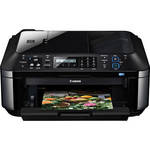
The PIXMA MX410 Wireless Inkjet Office All-In-One Printer from Canon, compatible with Mac and Windows computer systems, is an all-in-one printer that supports standard USB 2.0 connectivity as well as printing via Wi-Fi.
The printer features a built-in 30-sheet Auto Document Feeder for fast copying, scanning, and faxing. It supports Super G3 High-Speed Fax for fast communication. And it's Dual Color Gamut Processing Technology ensures that your copies are just as good as the original document. A Full Dot Matrix LCD display is present, allowing you to directly control the printer -- there's no need to change settings from a computer.
The included software makes it easy to convert your scans to PDF format -- complete with password protection for enhanced security. The printer can also print still frames from videos recorded with Canon EOS DSLR and Canon PowerShot digital cameras. You can connect your camera directly thanks to the PictBridge interface.
The included Easy-WebPrint EX software makes it easier to print pages from the web. You'll be able to select which part of the pages print, so you won't waste paper and ink printing navigation bars and the like. Canon offers an optional Bluetooth adapter for the printer, allowing you to further extend its wireless capabilities.
| Printing Technology | Inkjet |
| Maximum Resolution |
Color: 4800 x 1200dpi Monochrome: 600 x 600dpi |
| Print Speed |
Black: ESAT: 8.7ipm Color: ESAT: 5.0ipm 4 x 6" Borderless Photo: 42 seconds per photo |
| Depth | Not Specified by Manufacturer |
| Skew | Not Specified by Manufacturer |
| Minimum Ink Droplet Size | 1/4800" pitch, 2 picoliter, and 5 picoliter |
| Ink Type | Not Specified by Manufacturer |
| Ink Palette | Not Specified by Manufacturer |
| Ink Cartridge Configuration |
1x Color (CL-211) 1x Black (PG-210) |
| Input Buffer | Not Specified by Manufacturer |
| Printer Duty Cycle | Not Specified by Manufacturer |
| Print Archival Life | 300 years |
| Printer Language | English, Spanish |
| Scanner | |
|---|---|
| Image Sensor | Contact Image Sensor (CIS) |
| Optical Resolution | 1200 x 2400dpi |
| Interpolated Resolution | 19,200 x 19,200dpi |
| Color Depth | 48-bit internal/24-bit external |
| Hardware Resolution | Not Specified by Manufacturer |
| Scan Speed | Not Specified by Manufacturer |
| Dynamic Range | Not Specified by Manufacturer |
| Light Source | Not Specified by Manufacturer |
| Reflective Scan Area |
Flatbed: 8.5 x 11.7" ADF: 8.5 x 14" |
| Transparency Scan Area | Not Specified by Manufacturer |
| Interface | USB 2.0 |
| Fax | |
|---|---|
| Modem Speed | 33.6kbps (Super G3 Color Fax) |
| Transmission Speed |
Black: 3 seconds per page Color: 1 minute per page |
| Transmission/Reception Memory | 50 pages |
| Fax Resolution | Not Specified by Manufacturer |
| Hardware Platforms | Not Specified by Manufacturer |
| Modem | Not Specified by Manufacturer |
| Dialing Options | Answering Machine Connectivity, Caller Rejection, Check RX Fax Info., Fax Reception Reject, Fax Number Re-Entry, F/T Changing (manual), Group Dialing, Memory Transmission, One-Touch Speed Dialing, Redial, Remote Reception |
| Copier | |
|---|---|
| Copy Speed | ESAT: Color: 3.4ipm |
| Copy Resolution | Not Specified by Manufacturer |
| Reduction/Enlargement | 25-400% |
| Copy Features | 4-in-1 / 2-in-1, Copy AE (Auto Exposure/Intensity) Copy, Borderless, Fit-to-Page, Gutter Shadow Correction Copy, Image Repeat, Intensity, Multiple Copy: 1-99 pages, Preset Copy Ratios, Sort (ADF), Zoom |
| Paper Handling | |
|---|---|
| Maximum Paper Width | 10" |
| Maximum Printable Area | Legal |
| Paper Sizes | 4 x 6", 5 x 7", 8 x 10", Letter, Legal, U.S. #10 Envelopes |
| Borderless Photo Sizes | 4 x 6", 8.5 x 11" |
| Paper Types |
Plain: Plain Paper, Canon High Resolution Paper Super High Gloss: Photo Paper Pro Platinum Glossy: Photo Paper Plus Glossy II, Photo Paper Glossy Semi-Gloss: Photo Paper Plus Semi-Gloss Matte: Canon Matte Photo Paper Envelope: U.S. #10 Envelope |
| Maximum Paper Thickness | Not Specified by Manufacturer |
| Paper Capacity |
100 sheets ADF: 30 sheets |
| Special Media Support | None |
| Connectivity | |
|---|---|
| Computer Interface | 1x USB 2.0 |
| Compatible Memory Cards | None |
| Direct Print Capable | PictBridge |
| Network Capable |
802.11b/g/n Wi-Fi Bluetooth via optional adapter |
| PostScript Support | Not Specified by Manufacturer |
| System & Software Requirements | USB 2.0 port or 802.11b/g/n Wi-Fi network |
| Compatible Operating Systems | Windows 2000, XP, Vista, 7; Mac OS X 10.4.11, 10.5, 10.6 |
| Physical | |
|---|---|
| Status Display | Full Dot Matrix LCD |
| Image Preview Display | None |
| Front Panel Controls | Yes |
| Power Requirements | AC: 100-240VAC |
| Dimensions (WxDxH) | 18.1 x 16.4 x 7.8" (46 x 41.7 x 19.8cm) |
| Weight | 18.9 lb (8.6kg) |
REVIEW SNAPSHOT®
by PowerReviewsPros
Cons
Best Uses
Most Liked Positive Review
Everything I need
I manage a few properties on the side of my normal job and having a wireless all-in-one (that works without hiccups with my MacBook Air) has made a huge difference than the old set-up ...Read complete review
I manage a few properties on the side of my normal job and having a wireless all-in-one (that works without hiccups with my MacBook Air) has made a huge difference than the old set-up I had. Installation and configuring it to work on the network was a breeze, and I've never had any issues with it since I've had it. Works just like it should, and doesn't require any fiddling around beyond that.
Apart from being a bit larger than my last printer, the fact that it's wireless allows me to set it up anywhere within range of it's power cord to an outlet. So it actually isn't much of a con since I keep it next to my filing cabinet and can just grab what I've printed and archive it right away. Scanning and faxes are simple to do as well since it can handle multiple pages in one go (a definite plus over my old all-in-one).
I've loved every bit of this Canon product since I've had it, and don't think I'll need to replace or upgrade it for any reason anytime soon.
VS
Most Liked Negative Review
Should not be used for photos
Uses ink quickly, only prints photos well with very limited and limiting Canon photo software; this software does all sorts of unauthorized cropping.
Prints from Photoshop Elements 9 are awful, no ...Read complete review
Uses ink quickly, only prints photos well with very limited and limiting Canon photo software; this software does all sorts of unauthorized cropping.
Prints from Photoshop Elements 9 are awful, no matter the setting. (I spent something like $50 on ink and paper proving this point.) Besides being too dark, a problem that can be overcome with extreme output changes, the prints from PSE9 are mud.
Prints from GIMP 2.6 for Windows are much better, but there's a glitch in GIMP 2.6 on a Windows 7 machine--print's can't be larger than about 5.5 by 7.8 inches, again no matter the setting.
Paint.NET software has similar cropping problems to the supplied Canon software, though Paint.NET allows for colour control the Canon software doesn't.
I like the conventional paper feed, and I like that one can set the platen at a different height for think photo paper, thereby avoiding paper surface damage.
It's a good B&W text printer. I assume the fax works, didn't try it. The scanner is low resolution, something like 400 dpi maximum whereas 2400 dpi or greater is normal.
Reviewed by 30 customers
Sort by
Displaying reviews 1-20
Previous | Next »
Pros
Cons
Best Uses
Comments about Canon PIXMA MX410 Wireless Inkjet Office All-In-One Printer:
Good printer for the price. Prints pretty quickly. Did not purchase this printer for the ability to print photos, but was pretty impressed with the quality of the pictures I did print. I wish the colors were separate ink cartidges, and in general, I wish all in one printers could be made with a slightly smaller "footprint". this print does take up a significant amount of room on my desk. I found the written instructions a bit difficult to floow at certain points, but overall, the wireless setup went smoothly.
Pros
Cons
Best Uses
Comments about Canon PIXMA MX410 Wireless Inkjet Office All-In-One Printer:
I manage a few properties on the side of my normal job and having a wireless all-in-one (that works without hiccups with my MacBook Air) has made a huge difference than the old set-up I had. Installation and configuring it to work on the network was a breeze, and I've never had any issues with it since I've had it. Works just like it should, and doesn't require any fiddling around beyond that.
Apart from being a bit larger than my last printer, the fact that it's wireless allows me to set it up anywhere within range of it's power cord to an outlet. So it actually isn't much of a con since I keep it next to my filing cabinet and can just grab what I've printed and archive it right away. Scanning and faxes are simple to do as well since it can handle multiple pages in one go (a definite plus over my old all-in-one).
I've loved every bit of this Canon product since I've had it, and don't think I'll need to replace or upgrade it for any reason anytime soon.
Pros
Cons
Best Uses
Comments about Canon PIXMA MX410 Wireless Inkjet Office All-In-One Printer:
Very please with my purchase. The printer does an excellent job. The wireless setup was a bit cumbersome, but fairly straightforward if you've used a computer for more than a year or two. The printer is a bit noisy, as some have said, but again - it does a great job and is a nice replacement for a previous PIXMA printer I owned.
Pros
Cons
Best Uses
Comments about Canon PIXMA MX410 Wireless Inkjet Office All-In-One Printer:
Inexpensive for an all in one
Compact to fit on small desk
Only uses 2 cartridges vs. 4 so money saved
Fast enough speeds for everyday use
Comprtment lids are closeable so that trays can't be broken off by kids or pets
Pros
Cons
Best Uses
Comments about Canon PIXMA MX410 Wireless Inkjet Office All-In-One Printer:
I'm using the printer mostly for documents, though I have copied using the the color option, and it was amazingly true to the original in color tones.
I think it's a good buy for the price.
It's strangely noisy starting up and shutting,but unless you're worried about waking someone up, that is not important. It is Big and Bulky though. Consider your space requirements! And I don't know yet about ink consumption.
Pros
Cons
Best Uses
Comments about Canon PIXMA MX410 Wireless Inkjet Office All-In-One Printer:
Easy to install, sleek looking and great quality printing!
Pros
Cons
Best Uses
Comments about Canon PIXMA MX410 Wireless Inkjet Office All-In-One Printer:
I use this printer as my duty printer and scanner to take the load off of my Cannon i9100 printer (on its third ink pad change and still producing market grade prints) and an Epson perfection scanner. I prefer to use that equipment for my photo art work only. The Cannon MX410 has exceeded my expectations in all of it's attributes. The print quality is very good, the scanning and faxing of multiple sheets is very smooth. The WiFi feature is just icing on the cake for my portable devices. My old HP All-In-One Printer never lived up to my expectations in any of it's attributes, in fact had an aversion to assigning itself as the default printer without asking permission and the print quality was poor.
Pros
Cons
Best Uses
Comments about Canon PIXMA MX410 Wireless Inkjet Office All-In-One Printer:
This printer is fast and quiet. The wireless functionality is convenient and effortless to setup.
Pros
Cons
Best Uses
Comments about Canon PIXMA MX410 Wireless Inkjet Office All-In-One Printer:
it was simple to hook up this printer to my 3 computers. They all use wireless connection. This printer however is very loud so if you look for the one to use at home at night it may not be a good idea
Pros
Cons
Best Uses
Comments about Canon PIXMA MX410 Wireless Inkjet Office All-In-One Printer:
Other than being a little bulky, this printer seems great so far, especially for the price. Easy to set up and runs great. Printing is solid if a little noisy.
Pros
Cons
Best Uses
Comments about Canon PIXMA MX410 Wireless Inkjet Office All-In-One Printer:
So far so good. Haven't setup the fax yet, but the instruction seems ok.
Pros
Cons
Best Uses
Comments about Canon PIXMA MX410 Wireless Inkjet Office All-In-One Printer:
I use my Canon printer for my home office, printing, scanning, copying and faxing.
The Pixma MX300 this replaced was a workhorse but slow and hard on ink.
the MX410, prints faster, copies quicker, has larger ink cartridges that cost less than for the old model and it is wireless.
Setup took a little bit but not hard, just plug in the USB cable for the initial setup then unplug and you are wireless.
Pros
Cons
Best Uses
Comments about Canon PIXMA MX410 Wireless Inkjet Office All-In-One Printer:
Prints and copies cleanly. The scanner is quick and the ADF is nice. Great price!
Pros
Cons
Best Uses
Comments about Canon PIXMA MX410 Wireless Inkjet Office All-In-One Printer:
The first MX410 arrive DOR. Canon technical service was called and it was replaced with a factory refurbished with full warranty. I was allowed to keep the original ink, wires etc plus those that arrived with the replacement. The replacement transaction proceeded smoothly except for an annoying E-mail stating that Canon had not received the original and inquiring when and where I would be returning. Since I took to the UPS Store the day after the arrival of the replacement and Canon had supplied the return UPS label, they should have been able to track this on their own. In the future if I have ever have to return a DOR I will retain tracking numbers and obtain receipts. Overall the MX410 performs well. Yes the setup may be a bit slow, but the wireless is working well from 3 computers. I usually turn the printer off after use and find the startup rapid. For the features it provides it is very cost effective.
Pros
Cons
Best Uses
Comments about Canon PIXMA MX410 Wireless Inkjet Office All-In-One Printer:
I use this as a spare.
Pros
Cons
Best Uses
Comments about Canon PIXMA MX410 Wireless Inkjet Office All-In-One Printer:
Disappointed it does not work wireless with IPhone nor IPad.
Pros
Cons
Best Uses
Comments about Canon PIXMA MX410 Wireless Inkjet Office All-In-One Printer:
Best printer for your money.
Works great and the price cannot be beat.
Pros
Cons
Best Uses
Comments about Canon PIXMA MX410 Wireless Inkjet Office All-In-One Printer:
Completely satisfied with the product.
Completely satisfied with B&H.Delivered on time & packaged carefully
Pros
Cons
Best Uses
Comments about Canon PIXMA MX410 Wireless Inkjet Office All-In-One Printer:
I use the printer at home and not for commercial use. I was somewhat concerned about the setup but found it quite straightforward, easy to follow and uncomplicated.
Pros
Cons
Best Uses
Comments about Canon PIXMA MX410 Wireless Inkjet Office All-In-One Printer:
I use this machine at home. It set-up easy.
Displaying reviews 1-20
Previous | Next »