
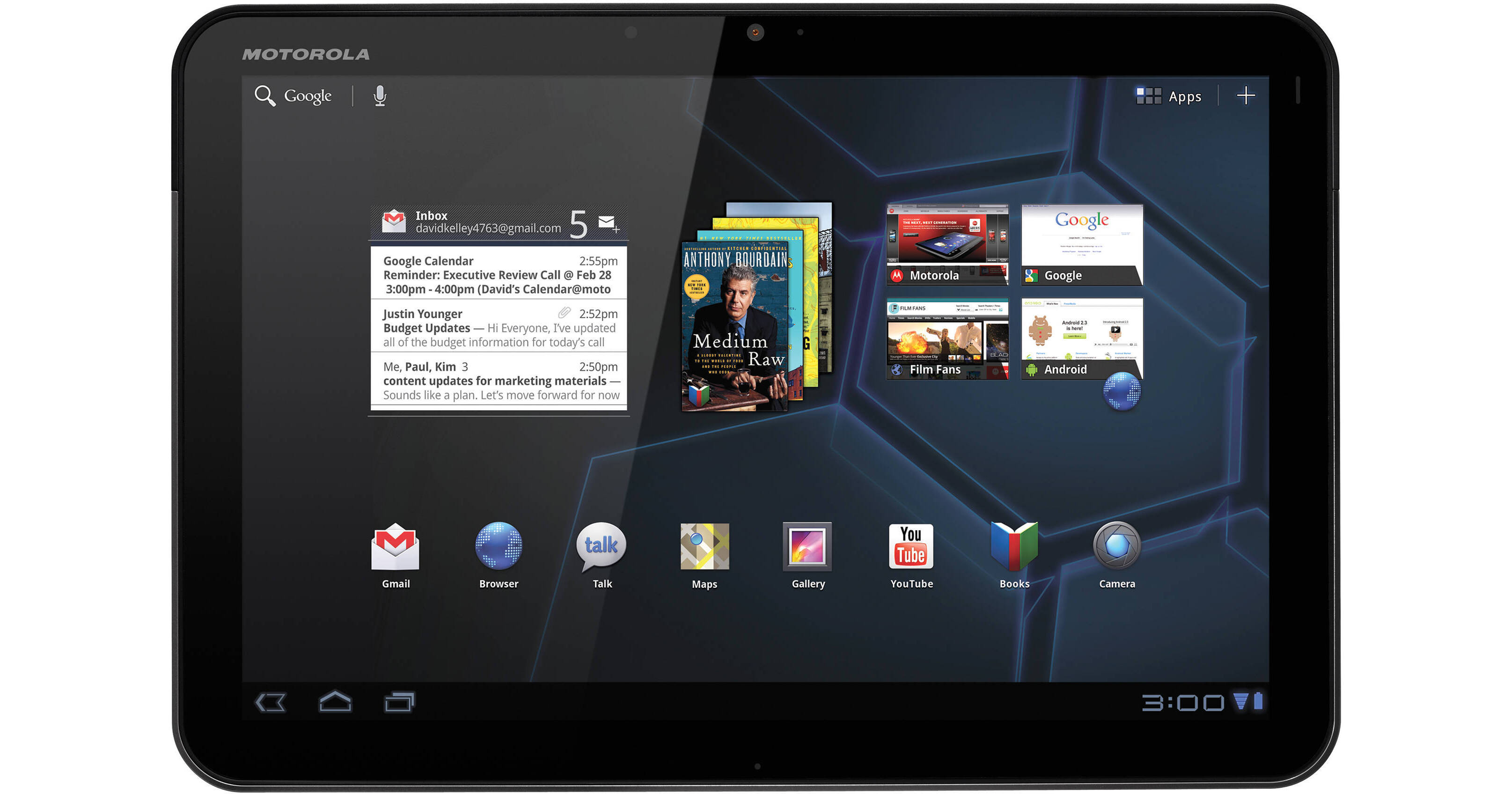
The XOOM Wi-Fi 10.1" Tablet from Motorola is a versatile media tablet, powered by the Android 3.1 (Honeycomb) operating system. The tablet features a large 10.1" widescreen display with touch input capability -- perfect for web browsing, games, and HD video playback. The tablet is powered by a high-performance 1GHz dual-core CPU and features 1GB of RAM and 32GB of internal flash storage.
The XOOM can operate for up to 10 hours on a single battery charge. It features a rear-facing 5MP camera -- perfect for capturing digital photos and HD video. The tablet's front-facing camera features a 2MP resolution, making it an ideal choice for capturing your image for online video chat. You'll be able to connect to 2.4GHz and 5GHz networks thanks to built-in dual-band 802.11n Wi-Fi. And you'll be able to use wireless peripherals -- including keyboards and headphones -- via Bluetooth 2.1+EDR.
The XOOM provides a full-featured web experience. Its Google Chrome browser offers full support for Adobe Flash 10, giving you the ability to view almost any site on the web. Of course, you'll also be able to access other Google services, including a 3D version of Google Maps and Google Talk with video chat.
You'll be able to download new applications for the device via the Android Marketplace. Thousands of apps are available for download, making it easy to extend the functionality of the device. Many of the apps are free, and premium applications are often available for only a few dollars!
| Performance | |
|---|---|
| Operating System |
Android 3.1 Honeycomb
1
Please Note:Tablet may ship with Android 3.0. A free update to 3.1 is available via download from Motorola. close |
| Memory |
Type: LPDDR2 SDRAM Installed: 1GB |
| Processor | 1.0GHz ARM Dual-Core |
| Storage | Flash 32GB |
| Display | |
|---|---|
| Type | Capacitive |
| Size |
10.1"
2
Please Note:(25.7cm) close |
| Aspect Ratio | 16:10 |
| Native Resolution | 1280 x 800 |
| Input/Output Connectors | |
|---|---|
| Ports |
1x HDMI - Micro 1x USB - Micro |
| Audio |
1x 1/8" (3.5 mm) Headphone 1x Integrated Microphone 2x Integrated Stereo Speakers |
| Flash Media Slot |
1x Micro SD
3
Please Note:Memory Expansion Up to 32GB close |
| Communications | |
|---|---|
| Wi-Fi | 802.11a/b/g/n |
| Bluetooth |
Bluetooth 2.1 + EDR
4
Please Note:(+HID) close |
| Camera |
Front: 2.0 MP Back: 5.0 MP 5 Please Note:Back Camera: Dual LED Flash close |
| General | |
|---|---|
| Keyboard | Virtual |
| Battery |
Built-In Providing up to 10 Hours per Charge
6
Please Note:Charge Time: 3.5 Hours close |
| Dimensions (WxHxD) | 9.8 x 6.6 x 0.5" / 24.89 x 16.76 x 1.27 cm |
| Weight | 1.6 lb / 726 g |
REVIEW SNAPSHOT®
by PowerReviewsPros
Cons
Best Uses
Most Liked Positive Review
Tablet goodness outside Apple Ecosphere
I've used a first-generation iPad previously, and decided that, as good as the iPad is, its main advantage--the Apps available--was overshadowed by the device's limitations (Flash compatability, connectivity).
90% of what we use a tablet for, this devices does just fine: Web-surfing, PDF- and book-reading, all fairly light-duty things that a tablet needs to to really well, the Xoom does really well. As an added bonus, we found an excellent drawing & painting program for this tablet that was not available for the iPad.
The touch-screen quality and interactivity, screen quality, and battery life are excellent and similar to an iPad's. Speakers and cameras are good, but not great. The GPS built into the WiFi version of the Xoom is the best I've ever used (though it needs to pull map data from a WiFi connection). Touch-typing seems a bit better than the iPad.
The Applications variety remains limited. There is no Java runtime to install to support games like Runescape, and basic Office-like programs seem to cost about $15. It feels like the hardware was available a little before the software was fully baked.
The iPad will remain the device of choice for non-tech-savvy users for at least another year, in my opinion. I expect that, as the Android 3.0 Operating System software evolves through automatic updates, and more Apps are created for this brand new OS, the usefulness of my Xoom will increase beyond its regular, 10-hour tablet functionalities, to surpass the flexibility of the iPad. I love having choices, and my expectation is that I will have fewer with the iPad than I will with the Xoom in a fairly short time. Overall, a very good product, especially to supplement a laptop or desktop PC.
VS
Most Liked Negative Review
Surprisingly fragile
Smooth transitions...clean design...well executed in almost every way..
BUT
My 5 month old Motorola Xoom tablet died a few days ago. Motorola returned the thing as...Read complete review
Smooth transitions...clean design...well executed in almost every way..
BUT
My 5 month old Motorola Xoom tablet died a few days ago. Motorola returned the thing as unrepairable due to water damage. They had pictures of the innards with little arrows to prove it.
Ok, so I don't take saunas with the thing or take it to the beach. I keep it in a case and transport it in the case, inside a briefcase. No liquids have spilled on it. From my view, the moisture ingress is environmental, my sweaty palms, whatever. Life.
This fragility is inconsitent with how you normally handle it...It's a solid, substantial-feeling piece of hardware
Motorola won't hear anything...escalation did nothing. Very disappointed in the product. I can understand their stolid not-budging, as I am sure there is lots of room for abuse by folks that do go water skiing with it...But I should be enjoying the thing now instead of shopping for a replacement. Worse, it was a gift from someone who has to work very hard for the money.
It is hard to recommend, well executed design that it is. If they replaced it for free I'd be afraid to use it.
Reviewed by 97 customers
Sort by
Displaying reviews 1-20
Previous | Next »
Pros
Cons
Best Uses
Comments about Motorola XOOM Wi-Fi 10.1" Tablet:
I love the xoom. The only reason i gave it 4 stars instead of 5 is the weight. It is quite hefty especially when u add a case. Other than that it is wonderful. The app market is great. It's easy to use. The screnn is crisp and clear. Soon as i turned it on it picked up my wifi network and started updating itself...i can't put it down!
Pros
Cons
Best Uses
Comments about Motorola XOOM Wi-Fi 10.1" Tablet:
Smooth transitions...clean design...well executed in almost every way..
BUT
My 5 month old Motorola Xoom tablet died a few days ago. Motorola returned the thing as unrepairable due to water damage. They had pictures of the innards with little arrows to prove it.
Ok, so I don't take saunas with the thing or take it to the beach. I keep it in a case and transport it in the case, inside a briefcase. No liquids have spilled on it. From my view, the moisture ingress is environmental, my sweaty palms, whatever. Life.
This fragility is inconsitent with how you normally handle it...It's a solid, substantial-feeling piece of hardware
Motorola won't hear anything...escalation did nothing. Very disappointed in the product. I can understand their stolid not-budging, as I am sure there is lots of room for abuse by folks that do go water skiing with it...But I should be enjoying the thing now instead of shopping for a replacement. Worse, it was a gift from someone who has to work very hard for the money.
It is hard to recommend, well executed design that it is. If they replaced it for free I'd be afraid to use it.
Pros
Cons
Best Uses
Comments about Motorola XOOM Wi-Fi 10.1" Tablet:
Great buy, flash is awesome, easy to use, way better than other tablets. The only bad thing is all the covers and docks are sold out in town so you'll have to order them from bh.
Pros
Cons
Best Uses
Comments about Motorola XOOM Wi-Fi 10.1" Tablet:
I got this tablet as a Christmas present. It was a great tablet it was easy to use and there were no problems. But I am a klutz and I dropped it once, it wasnt a hard fall, but it did fall. When I got home I tried to turn it on and the screen just had bars going down the screen I turned off and on and the same thing happened! The next day we took it back to Best Buyto try to make an exchange, and they wouldnt let me because I had dropped it.. 400 bucksfor one fall. That doesnt sound right now does it? I most certainly DO NOT recommend this product unless you are certain that you will not drop it!
Pros
Cons
Best Uses
Comments about Motorola XOOM Wi-Fi 10.1" Tablet:
Use the product mostly for out-of-the office productivity when working with campus community or in meetings. Good size screen at 10.1, smaller would be useless. Would use my phone for it. Wifi good enough for me would recommend 4G if on the go often. Continue to find more and more ways to use it and make the information readily available.
Pros
Cons
Best Uses
Comments about Motorola XOOM Wi-Fi 10.1" Tablet:
I have iPad and iPad 2, but I just brought a Xoom. Im finding that im using this more than my iPad 2. Great feel in the hands, quality construction, crisp graphics, smooth play, flash, and I love Android. No offense to Apple, but I don't like having my hands tied. Cannot download even free apps if credit card info is not up to date etc etc. That's too monoplozing. I will be sticking with Android. I want to get rid of my iPhone 4 too lol.
Pros
Cons
Best Uses
Comments about Motorola XOOM Wi-Fi 10.1" Tablet:
I have found this product all I expected it to be after rigorous comparision before purchase with the IPAD and Galaxy 10. I use it to keep up to date on news, sports and with SKYPE. Every application I have downloaded works great and at blinding speed.
Pros
Cons
Best Uses
Comments about Motorola XOOM Wi-Fi 10.1" Tablet:
Just Amazing! I'm thinking to buy another one!
Pros
Cons
Best Uses
Comments about Motorola XOOM Wi-Fi 10.1" Tablet:
This is my first real android tablet and I am impressed. It feels very solid in the hand just like the iPad, it does an excellent job of playing flash content, which the iPad can't do.
Pros
Cons
Best Uses
Comments about Motorola XOOM Wi-Fi 10.1" Tablet:
First I tried a cheap chineese tablet thinking that I only need the tablet for reading. I realized that it was better to throw away the money than having that thing. Then I bought Xoom. What an amazing product. Worth every penny!
Pros
Cons
Best Uses
Comments about Motorola XOOM Wi-Fi 10.1" Tablet:
Has been great for getting and running android apps. Love the game interaction.
Watching web movies is really slick.
Linking into my email and web calendar is very useful.
Pros
Cons
Best Uses
Comments about Motorola XOOM Wi-Fi 10.1" Tablet:
Use it for flight planning and email. Very compact. Has great features.
Pros
Cons
Best Uses
Comments about Motorola XOOM Wi-Fi 10.1" Tablet:
Usage - Normal web surfing, mostly blogs and twitter. using LAN media streaming, work flawlessly with 1080p.
Great - Lightweight, fast, capable to multi task.
Not too great - should be purchased along with its Motorola Official Casing as in some sitting positions it could be uncomfortable to hold.
Pros
Cons
Best Uses
Comments about Motorola XOOM Wi-Fi 10.1" Tablet:
We use this product everyday in many different ways. Web use and games are the most. Sleek design and a load of accessories. We love it.
Pros
Cons
Best Uses
Comments about Motorola XOOM Wi-Fi 10.1" Tablet:
excellent tablet for replacing netbooks
but need to buy few - for each family member :{)
Pros
Cons
Best Uses
Comments about Motorola XOOM Wi-Fi 10.1" Tablet:
I love this device it's great for my everyday need. Easy to carry around. I have not as of yet in the week I've owned it found anything dissatisfing about it.
Pros
Cons
Best Uses
Comments about Motorola XOOM Wi-Fi 10.1" Tablet:
This product is built sturdy.... would recommend buying a leather case and screen protector just for added protection from scratches and everyday use. Android 3.2 upgrade is available as soon as you power up for the first time. Quick response on the touch screen and easy to use...
Pros
Cons
Best Uses
Comments about Motorola XOOM Wi-Fi 10.1" Tablet:
Overall i could not be happier with the Xoom!
It's snappy and accurate, does what i want it to and thanks to the apps that are now available on the market it does even more. My Xoom arrived just after the Android 3.1 update so i had a lot less bugs and problems, i also had flash support which was not enabled on the Xoom's initial release.
Battery life is wonderful, i normally get about 2 days of average use in games and video playback as well as music and wifi is left on the whole time (Meaning that when i am out on jobs it's searching). I did notice some apps and games really kill the standby life so if your having battery issues just check over what apps you have installed when the issue started.
I have used an iPad a little bit and never really liked the interface. Got hold of this tablet of glory and fell in love with it!
A lot of people complained about the on/off button being on the rear, i found no problems what so ever with this, its easy to get at and out of the way at the same time. a big + for me!
It's a purchase i wont regret.
Pros
Cons
Best Uses
Comments about Motorola XOOM Wi-Fi 10.1" Tablet:
Familiar with the system, familiar environment,Simple and powerful hardware, but unfortunately these are not enough software in market.but i do love Android.
Pros
Cons
Best Uses
Comments about Motorola XOOM Wi-Fi 10.1" Tablet:
We have desktop, and laptop computers but this device is EXCITING right out of box the feel, the finish and the craftsmanship is love at first sight. This is before we turn it on. After using it with a bluetooth keyboard, we discovered the display is HIGH DEFINITION, BEAUTIFUL. Works well with internet, with apps and emails. We have downloaded the upgrades to Android version 3.2 at this time.
Displaying reviews 1-20
Previous | Next »