A Thunderbolt cable is required but not included with this item. Please be sure to purchase a Thunderbolt Cable.
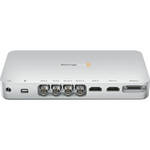
Blackmagic Design UltraStudio 3D is a Mac-compatible 3G/HD-SDI capture & playback device that connects to your computer via Thunderbolt and supports two streams of 1080p HD video for stereoscopic 3D workflows. The compact, handsome, machined-aluminum device includes all necessary capture/playback software and drivers, so setup is a breeze.
The device captures uncompressed 10-bit 4:4:4 RGB and 4:2:2 YUV video from any deck, broadcast router, or video camera with SDI output, and plays it back to broadcast-quality SDI monitors. With both dual- and single-link 3G-SDI supported, resolutions up to 2K are supported, for feature film work. The Thunderbolt connection supports data rates up to a blazing 10 Gb/s, which is plenty fast to effect a direct high-speed connection to your video editing software's real-time effects processing, even for dual-stream stereoscopic productions.
UltraStudio 3D also features an HDMI 1.4a input for capture and an HDMI 1.4a output for monitoring via an HDMI-enabled television, computer monitor, or projector. RS-422 deck control is included for controlling HDCAM SR, Digital Betacam, HDCAM, D5, DVCPRO HD, and other VTRs. For genlock, the device accepts a blackburst or tri-sync reference signal.
All UltraStudio 3D files are open standard DPX and QuickTime format, so you can edit with just about any software, including Apple Final Cut Pro, The Foundry's Nuke, eyeon Fusion, Digidesign Pro Tools, and Adobe Premiere Pro, Photoshop, and After Effects. UltraStudio 3D is qualified by Apple for Final Cut Pro compatibility, so you can batch capture from decks and play back FCP timelines with RT Extreme real-time effects. Other supported Final Cut Pro features include 10-bit rendering, 16-channel audio, deck control, and support for ProRes, JPEG, DV, DVCPRO, DVCPRO HD, and 8- & 10-bit uncompressed video.
Note! Requires a Mac computer with a Thunderbolt port. Thunderbolt cable sold separately.
| Connectivity | |
|---|---|
| SDI Input | 2x 10-bit SD/HD switchable |
| SDI Output | 2x 10-bit SD/HD switchable |
| Analog Video Inputs | 1x component YUV on 3 BNCs switchable to S-Video or composite. Component supports HD and SD |
| Analog Video Outputs | 1x component YUV on 3 BNCs switchable to S-Video or composite. Component supports HD and SD |
| HDMI Input Connectors | 1x HDMI 1.4a type A |
| HDMI Output Connector | 1x HDMI 1.4a type A |
| Analog Audio Output | 2 channels of professional balanced analog audio via XLR connectors |
| Analog Audio Inputs | 2 channels of professional balanced analog audio via XLR connectors |
| AES/EBU Audio Input | 2 channels unbalanced with sample rate converter |
| AES/EBU Audio Output | 2 channels unbalanced with sample rate converter |
| SDI Audio Input | 16 channels embedded in SD and HD |
| SDI Audio Output | 16 channels embedded in SD and HD |
| HDMI Audio Input | 8 channels embedded in SD and HD |
| HDMI Audio Output | 8 channels embedded in SD and HD |
| Computer Interface | Thunderbolt |
| Sync Input | Blackburst in SD, 720p50, 720p59.94, 1080i50 and 1080i59.94 formats or Tri-Sync in any HD format |
| Device Control | Sony-compatible RS-422 deck control port. Serial ports TxRx direction reversible under software control |
| Standards | |
|---|---|
| SD Format Support | 625/25 PAL, 525/29.97 NTSC, 525/23.98 NTSC, and 480p |
| HD Format Support | 720p50, 720p59.94, 720p60, 1080PsF23.98, 1080PsF24, 1080PsF25, 1080PsF29.97, 1080PsF30, 1080p23.98, 1080p24, 1080p25, 1080p29.97, 1080p30, 1080i50, 1080i59.94, 1080i60, 1080p50, 1080p59.94, 1080p60 |
| 2K Format Support | 2048 x 1556PsF24 and 2048 x 1556PsF25; 2048 x 1556p23.98, 2048 x 1556p24, and 2048 x 1556p25 |
| SDI Compliance | SMPTE 259M, SMPTE 292M, SMPTE 296M, SMPTE 372M, and SMPTE 425M |
| SDI Metadata Support | VITC read for 3:2 pulldown removal. VANC capture and playback using up to 3 lines of video in file. HD RP188. Closed captioning |
| Video Sampling | 4:2:2 and 4:4:4 |
| Audio Sampling | Television standard sample rate of 48 kHz at 24-bit |
| Color Precision | 10-bit |
| Color Space | REC 601, REC 709 |
| HDMI Color Precision | 10-bit |
| HDMI Resolution | Pixel-for-pixel HD resolution input to connected device |
| HDMI Configuration | HDMI automatically configures to connected display |
| Multiple Rate Support | SDI, HDMI, and component analog video connections are switchable between standard definition and high definition. SDI switches between 270 Mb/s standard definition SDI, 1.5 Gb/s HD-SDI, and 3 Gb/s HD and 2K SDI |
| Copy Protection | For legal reasons HDMI input is unable to capture from copy protected HDMI sources. Always confirm copyright ownership before capture or distribution of content |
| Processing | |
|---|---|
| Colorspace Conversion | Hardware-based real time |
| 3D Processing | Dual-stream and frame-packed capture & playback |
| HD Down Conversion | Software-based down conversion during video playback |
| HD Up Conversion | Real-time standard definition to 1080HD and 720HD during video capture |
| HD Cross Conversion | Real time 720 HD to 1080 HD during video capture |
| Real-Time Effects | Apple Final Cut Pro internal effects in DV, DVCPRO HD, ProRes, and uncompressed on Intel Mac OS X. Adobe Premiere Pro Mercury Playback Engine effects in DV, MJPEG, DVCPRO HD, DSLR, AVCHD, XDCAM, XDCAM HD, and uncompressed. |
| Extras | |
|---|---|
| Software | Media Express, Disk Speed Test, Blackmagic System Preferences, and Blackmagic driver on Mac OS X |
| Firmware Upgrade | Firmware built into software driver. Loaded at system start or via updater software |
| Minimum System Requirements | Compatible with Mac OS X 10.6 Snow Leopard. Requires Macintosh computer with Thunderbolt |
REVIEW SNAPSHOT®
by PowerReviewsPros
Cons
Best Uses
Reviewed by 9 customers
Sort by
Displaying reviews 1-9
Pros
Cons
Best Uses
Comments about Blackmagic Design UltraStudio 3D:
I bought this in a rush to complete a job under a tight deadline. It was simple to use, easy to understand and very capable. The amount of connections on the break-out cables are immense. I was even able to connect my older cameras via composite connections (the Canon XL-2 conveniently has a BNC connection for the composite signal). Keep in mind, this is aimed at the professional, so ALL connections on the break-out cable, save for the XLR audio connections, are BNC. If you need to connect Component, S-Video or composite signals in or out of this box, you will need BNC cables or converters to hook it up.
The software is simple and straight-forward. For recordings on the fly, Media Express is a light-weight program to get things recorded onto the hard drive.
Cons:
The device gets quite hot. Not so hot I couldn't leave my hand on it, but hot enough for my hand to be uncomfortable.
Media Express (which gets updated with new features often) does not currently support audio inputs from other sources. I have requested this feature. I could use other programs to record when this feature is needed.
One Thunderbolt port (upside down?). Put it at the end of your Thunderbolt chain. Hopefully your TB harddrive has more than one port.
Fans can make a bit of noise. Don't place it right next to a microphone, and you should be okay.
Despite what you may have read (I had), this does not currently allow for multiple camera inputs outside of a 3D pair So you cannot use this as a switcher. They have an impressive series of ATEM switchers for that purpose.
Pros
Cons
Best Uses
Comments about Blackmagic Design UltraStudio 3D:
Love the Ultrastudio 3D. Went back and forth for awhile on whether to invest or wait to see what other big brands did in terms of Thunderbolt capture/monitoring.
Could not be happier I went with Blackmagic, I'm a professional editor and the ability to output to HDMI and dual link HDSDI from my Macbook Pro is hard to wrap my mind around. It lends even more professional resource to those of us without instant access to pricey post-production houses.
Sleek design, quiet fan, but it does get warm during operation---not unreasonably so. ZERO sync problems when monitoring out of HDMI, which I've seen on top of the line AJA PCI cards.
Fantastic purchase, could not recommend it more. Opens up lots of possibilities. If your on the fence, seek one out and see it in action---it's incredible.
Pros
Cons
Best Uses
Comments about Blackmagic Design UltraStudio 3D:
We needed a portable solution for events like Commencement outdoors on our quad. This allows us to connect either a single camera via component or the SDI output of our Panasonic AW-RS50 switcher, plus pro audio to a MacBook Pro using Firewire. We've been testing it for weeks and it works flawlessly.
Pros
Cons
Best Uses
Comments about Blackmagic Design UltraStudio 3D:
Wowed by this box so far. I have 2 different BlackMagic cards in my MacPros. This gives me all the same functionality, but with my laptop (and MacMini). I love it so much I bought 2. :) Big win for me and a ton of flexibility with up/down/cross conversion since all the outputs are live all the time. Rock solid to this point.
Pros
Cons
Best Uses
Comments about Blackmagic Design UltraStudio 3D:
I bought this for use in a mobile Davinci resolve kit and the unit just works the way you would expect. It's basically the same as the Decklink 3D except external. On that note, the unit does get pretty hot so make sure it has some room around it. The only other problem is that it is a Thunderbolt end piece, meaning you cannot daisy chain through it, as it only has one Thunderbolt port.
Pros
Cons
Best Uses
Comments about Blackmagic Design UltraStudio 3D:
Our new system is an iMac and the UltraStudio 3D. (Among other things)
The UltraStudio 3D not only works as advertised, but has a standard break-out cable for connections as well as an available unit that has more, connections.
Tech support from Blackmagic was very helpful too. We had an original issue with getting video to play smoothly on the NTSC monitor, but tech support explained that my problem was related to Final Cut Pro X not being able to support an external monitor. Going to FCP 7 did indeed fix the issue.
Back to the UltraStudio 3D. Price was more than competitive and it had more connections that other units I researched..I'd recommend it highly to anyone that's going to an iMac for video...the Thunderbolt connection works very well.
Pros
Cons
Best Uses
Comments about Blackmagic Design UltraStudio 3D:
It is exciting to use this IO box with Premiere Pro 5.5 and Davinci Resolve for color correction. It is so much better to use the Panasonic (BT-LH 1700W) broadcast monitor in real time with my MacBook Pro instead of the computer screen. No hassle. Setup the software, plug in the Thunderbolt connection and that's it! It works! Love it.
Pros
Cons
Best Uses
Comments about Blackmagic Design UltraStudio 3D:
My first unit was overheating and shut off after about 15 mins. Blackmagic didn't seem very knowledgeable about the product. From what I could tell, latency was very low, and lots of audio / video options. We're using to capture HDMI and component video for live video conferences.
The downside is that you have to match up the exact camera input, so tricky if you want to switch between multiple camera inputs. As I understand this device uses legacy QT 32-bit driver, so will cause problems as apps are moving to 64-bit. Someone more knowledgeable could say if the firmware or driver can be updated.
Breakout cable seems a brittle for those connecting and disconnecting. HDMI connector is upside down. Would be nice to have more status LEDs to see what's going on, and an on/off switch.
Pros
Cons
Best Uses
Comments about Blackmagic Design UltraStudio 3D:
The only thing to complain is the fan. It's louder than my iMac. Ok, the iMac is sooo quiet :-)
I would buy this product again.
Displaying reviews 1-9