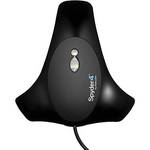
Datacolor's Spyder4Pro is a display color calibration tool well-suited for photographers and creative professionals who need to match prints to their displays. It includes the ability to adapt to ambient light conditions.
The Spyder4Pro features a full-spectrum 7-color sensor that can accurately characterize a variety of wide-gamut and normal displays. Calibrate your monitor, laptop computer, or even an iPad or iPhone. The fourth-generation sensor employs double-shielded filters for longer life and optimal performance.
| System Requirements |
Windows XP 32/64, Windows Vista 32/64, Windows 7 32/64 Mac OS X Panther (10.4), Leopard (10.5), Snow Leopard (10.6) and Lion (10.7) Color monitor with at least 1024 x 768 resolution 24-bit video card Powered USB port |
REVIEW SNAPSHOT®
by PowerReviewsPros
Cons
Best Uses
Most Liked Positive Review
Does the job
This is my first time using a color calibration tool so I can't give a scientific review or a comparison, but only generalities.
In terms of ease-of-use of the Spyder4 Pro...Read complete review
This is my first time using a color calibration tool so I can't give a scientific review or a comparison, but only generalities.
In terms of ease-of-use of the Spyder4 Pro, I'd say there's a slight learning curve when you first do it if you have never used a calibrator before. But it is straight forward. Install software and go through registration process. Then, run software and just read what's on the screen and follow the prompts. Plug the calibrator into the USB, hang from monitor (it has a counterweight to keep it in place). Pretty easy. It takes care of applying the calibration settings to Windows.
I was surprised how far I had to turn down brightness on my HP ZR24w monitor - down to 7 out of 100 on the brightness setting. The monitor's out of the box color was off too (it is a year old). At the end of the configuration process, the software has some example photos and you can toggle to see what it looks like before and after the calibration. Big difference for me!
The end result of the calibration is worth it. When I print to my Canon Pro9000 Mark II printer, I am pleasantly surprised as to how closely what I see on the screen matches the print. Prior to calibration, it was a guessing game and a lot of wasted paper.
VS
Most Liked Negative Review
Not sold on this yet
I'm still working on this, but so far it hasn't allowed me to install the application on my 2009 Macbook, so I'm sure I'll be calling the company soon for assistance. While I was...Read complete review
I'm still working on this, but so far it hasn't allowed me to install the application on my 2009 Macbook, so I'm sure I'll be calling the company soon for assistance. While I was able to install it on my brand new iMac, all it did was tell me to adjust the brightness level about two keyboard clicks, which basically doesn't do anything for fixing my images as far as hue, saturation, contrast, etc. So basically it's been worthless so far, but I have faith because of all the other reviews I've read. I'll modify this review if I'm able to receive assistance soon from the company that is actually effective.
Reviewed by 54 customers
Sort by
Displaying reviews 1-20
Previous | Next »
Pros
Cons
Best Uses
Comments about Datacolor Spyder4Pro Display Calibration System:
Once you get the hang of it, the Spyder is a wonderful tool to keep your display calibrated so you can see exactly how your photo images will print(on a calibrated printer. I highly recommend it to serious photographers who want to get the most out of their images.
Pros
Cons
Best Uses
Comments about Datacolor Spyder4Pro Display Calibration System:
When I built a new rig and went from XP/32 to 7/64, I replaced my old Spyder 2 Express with this unit. There are many enhancements, including ambient light measurement, a more extensive set of calibrations and tests, and *greatly* improved interface software with better configurability and easy updating. I think everybody who provides post-processed images to "customers" (i.e., as a primary source of income or otherwise) should be able to say to doubters and questioners, "Well, yes, as a matter of fact, I use a hardware-calibrated monitor, and if you'd like to see the process, stop by sometime." The Spyder products make these arguments easy to win.
Pros
Cons
Best Uses
Comments about Datacolor Spyder4Pro Display Calibration System:
I found this very easy to use and quite user friendly. It worked wonders for my monitor. I'm a photographer and my printed photos are much, much better now.
Pros
Cons
Best Uses
Comments about Datacolor Spyder4Pro Display Calibration System:
Makes my screen look great, just wish my photos would show the same when I distribute my photos.
Pros
Cons
Best Uses
Comments about Datacolor Spyder4Pro Display Calibration System:
E-Z to use I love it
Pros
Cons
Best Uses
Comments about Datacolor Spyder4Pro Display Calibration System:
As soon as I received this, I immediately calibrated all of my monitors, and it has immediately effects of all sorts. As expected, the displays look much better than before. An unexpected side effect was that the tool also pointed out flaws in all of my displays, including overinflated stats published by the manufacturer, and explains why the "experts" gave my main monitor a rather mediocre rating. I may actually upgrade to Elite so that I can match displays to each other. One problem is that my displays don't end up looking the same (isn't that the primary reason for getting this?). I'm wondering, though, if it's more a limitation of the monitors used (my cheapo monitor doesn't have the same color saturation as others). I'm not deducting a star until I do more investigation.
Pros
Cons
Best Uses
Comments about Datacolor Spyder4Pro Display Calibration System:
Much better then tring to Calibrate by eye. Start the program, go get a coffee when you get back its done!
Pros
Cons
Best Uses
Comments about Datacolor Spyder4Pro Display Calibration System:
I do photo editing on my desktop computer with LCD monitor and need the display to match prints, color and brightness. My prior calibrator did the color correction ok but had no tools to help match the brightness. The Spyder4Pro includes brightness cal as well as color, although the recommended brightness is too high for print match (you can set as desired). Also, the Spyder4Pro successfully calibrated my laptop with LED screen, although results not as good as the desktop. I have read that LED displays generally do not provide the best color calibration for photo editing.
Pros
Cons
Best Uses
Comments about Datacolor Spyder4Pro Display Calibration System:
Almost hands free calibration. I wish it did a better job of brightness, not much in the way of instructions, I have had to turn the brightness way down from the "middle" indicator to get proper density from my color lab photos (I send the files in with no adjustment required). I think it is a good product so far for the money, my 2nd unit from them. The first one lasted for years on my old CRT tube, calibration is a must for critical color output. The sales guy at colorvision/datacolor claims the Pro model has a better sensor than the express version, I went ahead and popped for the extra money but question his statement. I used it on a friends flat screen too, and he was impressed with the ease and cool feature at the end of routine that lets you compare the before and after, it is huge.
Pros
Cons
Best Uses
Comments about Datacolor Spyder4Pro Display Calibration System:
I use this product to calibrate my 24" monitor and it is really easy to use.
Pros
Cons
Best Uses
Comments about Datacolor Spyder4Pro Display Calibration System:
As a professional photographer, calibration is a must. I was looking for an affordable product to give me the best results for my money, and I have been very impressed with the Spyder4Pro. I work on a MacBook Pro and saw a big difference in my monitor color following calibration with this product. So glad I bought it!
Pros
Cons
Best Uses
Comments about Datacolor Spyder4Pro Display Calibration System:
Editing on multiple computers and monitors was driving me crazy. This guy keeps the images looking the same throughout
Pros
Cons
Best Uses
Comments about Datacolor Spyder4Pro Display Calibration System:
I'm still working on this, but so far it hasn't allowed me to install the application on my 2009 Macbook, so I'm sure I'll be calling the company soon for assistance. While I was able to install it on my brand new iMac, all it did was tell me to adjust the brightness level about two keyboard clicks, which basically doesn't do anything for fixing my images as far as hue, saturation, contrast, etc. So basically it's been worthless so far, but I have faith because of all the other reviews I've read. I'll modify this review if I'm able to receive assistance soon from the company that is actually effective.
Pros
Cons
Best Uses
Comments about Datacolor Spyder4Pro Display Calibration System:
Work great, very easy to use, printing result look like what you see in the screen.
Pros
Cons
Best Uses
Comments about Datacolor Spyder4Pro Display Calibration System:
Very straightforward installation and operation. The only surprise is how easily and seamlessly it works on my 27" led. Highly recommended . . .
Pros
Cons
Best Uses
Comments about Datacolor Spyder4Pro Display Calibration System:
I have a dual monitor setup on a Windows 7 x64 PC. The Spyder4 allowed me to calibrate and bring the two monitors much closer together for working with photos. There were a few quirks and crashes during the calibration process but I just restarted the whole thing and was able to complete the calibration successfully. Unfortunately, there is still a noticeable difference between the 2 monitors brightness wise, despite the fact that both were calibrated for the exact same brightness target. Ran the cal a second time but results were the same. Might be because the two monitors are not the exact same model (although very close).PROS: Really easy to use. Does a good job at making your monitor display proper colors (matched a calibrated test printout very closely).CONS: Still somewhat buggy. Does not address monitor contrast setting other than asking you to reset monitor to default values before starting (that may explain the brightness difference between my 2 monitors).NOTE: The readme file that comes with the package states that you can't calibrate dual monitors under windows (no version specified) unless you use one video card per monitor. This is NOT the case if you run Windows 7 with a recent video card which has dual color look-up tables (LUTs).
Pros
Cons
Best Uses
Comments about Datacolor Spyder4Pro Display Calibration System:
The Spyder4Pro is extremely easy to use, the initial calibration takes around 2 or 3 minutes and the difference between calibrated and uncalibrated is a night and day difference! Improved my photographic prints 100x and Im much more confident with what I produce now.
Pros
Cons
Best Uses
Comments about Datacolor Spyder4Pro Display Calibration System:
I have used the Spyder 2 pro, but it's sufficiently outdated that it wouldn't work with my new Mac operating system, so invested in the Spyder 4. The best new thing is the adjustment for ambient light. I have only used it once, but I no longer have a problem with too dark prints. The setup and use was a bit more complicated than the Spyder 2, but was generally intuitive and quick. I would definitely recommend this product. I expect it will pay for itself in paper and ink savings relatively soon.
Pros
Cons
Best Uses
Comments about Datacolor Spyder4Pro Display Calibration System:
Had a previous Colorvision Spyder product, but it did not have software drivers for Lion+. They've improved the software experience - it's a one-step, very quick calibration process, and the hardware is compact and sturdy. Would buy again.
Pros
Cons
Best Uses
Comments about Datacolor Spyder4Pro Display Calibration System:
I had no idea that my monitor was off that much..
Spyder 4 Pro corrected the color shifts and made the photos look great again.
Displaying reviews 1-20
Previous | Next »