Wacom

Wacom just announced the newest iteration of its popular Intuos Pro Creative Pen Tablet. Available in three sizes, the new tablet offers various levels of scalability, allowing users to choose the form factor that best fits their setup and workflow.
Intuos Pro Creative Pen Tablet
While the

Creating professional illustrations and touching up photos while on location just became easier with the launch of the Wacom Movink 13 Creative Pen and Touch Display. In addition to its portable design, this creative display features a 13.3” Full HD OLED touchscreen that supports 10-bit color with sharp contrast, delivering 100% DCI-P3 and 95% Adobe RGB coverage. Connecting your compatible device allows you to transfer

In 2019, the launch of the Wacom One Creative Pen Display introduced the world to an entry-level 13.3" pen display that allowed users to make precise photo edits and draw detailed illustrations directly on a Full HD color display. Four years later, the Wacom One 13 touch Pen Display and the

0 Views ·Posted
Enjoy impeccable color accuracy and a stunning 4K display, all in a 17-inch screen that fits small desk spaces. Take a look at what the Wacom Cintiq Pro 17 and the new Pro Pen 3 have to offer.
0:00 - Introduction
0:33 - Build and Design
1:04 - Display
1:29 - Pen Pro 3
2:06 - Ergonomics
2:48 - Connectivity
3:07 - Final Thoughts
Are

Imaging news was fairly light, which means we get to spend a little more time highlighting some other types of products. Before we do so, we need to talk about a pair of “ultra” wide-angle lenses from Leica, for the SL System. A Super-APO-Summicron-SL 21mm f/2 ASPH. and Super-Vario-Elmarit-SL 14-24mm f/2.8 ASPH

Wacom adds ease and comfort to your professional content workflow with the launch of the Cintiq Pro 17 and Cintiq Pro 22 Creative Pen and Touch Displays. Featuring 17.3" and 21.5" touchscreens, respectively, these creative displays deliver a natural pen-and-paper feel as you draw illustrations,

A coterie of new Wacom devices just landed at B&H. Two sizes of Wacom One pen tablets were announced, along with a 12-inch Wacom One pen display and a 13.3-inch Wacom One touch display.
Available in white, the new Wacom One pen tablet comes in two size variations: medium and small. The Wacom One S (for small) features a 6.0 x 3.7-inch active area, while the

0 Views ·Posted
Wacom takes your professional graphics workflow to a new space with the launch of the Cintiq Pro 27 Creative Pen and Touch Display. Designed to keep you focused on your projects, this high-performance 26.9-inch pen-and-touchscreen display features 3840 x 2160 resolution, 120 Hz refresh rate, and support for 10-bit color and high-dynamic range, covering 98% of the DCI-P3 gamut to deliver life-like photos and illustrations. The easy-to-reach
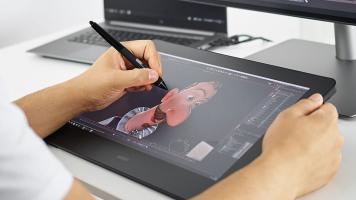
Wacom recently released an updated version of its popular Cintiq Pro 16 Creative Pen Display. This release came as something of a surprise since many of us didn’t know the 2017 model had quietly been discontinued earlier this year. To see what was new, what was better, and how it faired against its predecessor, we took the updated Cintiq Pro 16 for a test drive.

Wacom is helping to elevate the professional content creation experience with the launch of its Cintiq Pro 16 Creative Pen and Touch Display. After listening to feedback from users, the new Cintiq Pro 16 has been designed with numerous improvements to help streamline creative workflows with exceptional accuracy, control, and comfort. For starters, its 3840 x 2160 4K resolution, 15.6" glass touchscreen features an anti-glare coating and

Heading back to school today means starting from a clean slate, with both students and those who shop for them discovering that—in addition to a fresh wardrobe—tools for study, storage, and safety could use a total refresh.
There is a lot to consider when adding to a tech-savvy student’s back to school arsenal, and many essential items can get overlooked. We’ve created the short list below to help you shop smart and pinpoint the right tools for your needs.
Hi-Tech Writing Implements
Yesteryear’s essential supplies of paper notebooks and
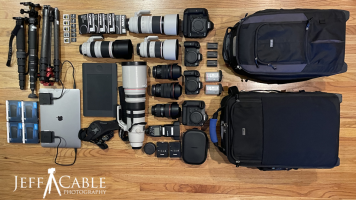
This post is all about the gear I am bringing with me to the Games in Tokyo. As always, my goal is to share with you all what it is like to be at the Games. In the past I focused mainly on the photography, but this time around I plan on giving you the photographic view, but also the behind-the-scenes view from these very different Games.
As I stated before, this is the first Games where I need to bring everything with me, since Canon is not allowed to lend products to photographers (due to COVID protocol) unless it is a dire emergency. And yes

Great news for students, educators, and other Chromebook users: The One by Wacom Creative Pen Tablet has just received its “Works with Chromebook” certification from Google. This certification is a critical endorsement, because it guarantees that the One by Wacom meets all of Google’s compatibility standards and will therefore work with Chromebook devices running the latest version of Chrome OS.

0 Views ·Posted
Jordan uses the Wacom Intuos Pro and Wacom Cintiq Pro 24 to edit his food photography. Both Wacom products offer a customizable, comfortable, and ergonomic editing experience.
How do you see the Intuos Pro and Cintiq Pro 24 fitting into your workflow? Let us know in the Comments, below.

For digital photographers, a well-calibrated and accurate photography monitor is an indispensable tool for a solid practice. Whether you like to print your photos or share exclusively online, a photo monitor you can trust will make a big difference in how someone views your photographs, yourself included. Besides just helping to achieve accurate colors and contrast, a finely tuned monitor is also more enjoyable to work on and contributes to a seamless all-around workflow. When looking for a monitor, you should consider size and resolution as