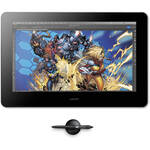
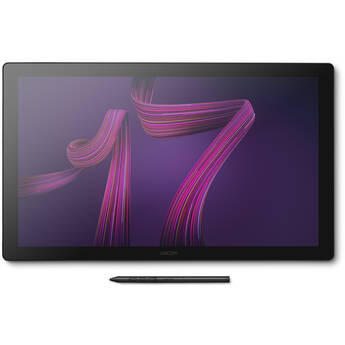
Wacom Cintiq Pro 16 Creative Pen & Touch Display (2021)

BH #WADTH167K0A • MFR #DTH167K0A
Print
Wacom Cintiq Pro 16 Creative Pen & Touch Display (2021)
Key Features
  • 15.6" UHD 4K 3840 x 2160 Touchscreen
  • 98% Adobe RGB
  • 8192 Levels of Pen Pressure Sensitivity
  • USB Type-C & HDMI Connectivity
Designed specifically for the needs and workflows of creative professionals, the Wacom Cintiq Pro 16 Creative Pen & Touch Display (2021) provides a natural, accurate pen experience along with high color accuracy and 4K resolution in a compact format. The 15.6" display features a 3840 x 2160 resolution, a 16:9 aspect ratio, and a 98% Adobe RGB color gamut. The screen also supports multi-touch gestures and on-screen controls. It also provides 8192 levels of pressure sensitivity, thanks to the included Wacom Pen 2.
More Details
In Stock
No Store Display
Shipping Charges Apply
Protect Your Gear
Add a protection plan from $109.99
Ask an Expert
800-952-1815

Wacom Cintiq Pro 16 Overview

Designed specifically for the needs and workflows of creative professionals, the Wacom Cintiq Pro 16 Creative Pen & Touch Display (2021) provides a natural, accurate pen experience along with high color accuracy and 4K resolution in a compact format. The 15.6" display features a 3840 x 2160 resolution, a 16:9 aspect ratio, and a 98% Adobe RGB color gamut. The screen also supports multi-touch gestures and on-screen controls. It also provides 8192 levels of pressure sensitivity, thanks to the included Wacom Pen 2.

The combination of the Wacom Pro Pen 2 and the etched glass screen provides that distinct, pen-on-paper feel. The etched glass screen also serves another purpose, which is to reduce glare and reflections. Fold-out legs provide a 20° tilt angle so you can work in comfort. While there are multiple ways to navigate the Cintiq Pro 16, Wacom added eight ExpressKeys to the rear edge of the display, which allows for tactile one-touch shortcuts that streamline your workflow. The Cintiq Pro 16 connects to your Mac or Windows computer via a single USB Type-C port that supports DisplayPort in Alt. Mode or using an HDMI port alongside a USB Type-A connector. Cables are included.

Features
Experience Wacom's advanced yet natural Wacom Pro Pen 2 performance with 8192 levels of pressure sensitivity, 120° tilt, an eraser, dual switches, and virtually lag-free tracking with a battery-free electromagnetic resonance (EMR) design
The 15.6" display provides a UHD 4K 3840 x 2160 resolution and a 98% Adobe RGB color gamut
While you can use the multi-touch gestures, on-screen controls, and the two pen side switches to navigate the Cintiq Pro 16, there are also 8 ExpressKeys on the rear edge of the display to provide tactile, one-touch shortcuts
Prevent stray taps from interrupting your workflow, with a button that switches touch functionality on and off
The etched glass screen reduces glare and reflections while a special treatment adds friction for a distinct, tactile drawing experience that mimics the pen-on-paper feel
The included USB Type-C and HDMI cables allow you to connect your Cintiq Pro 16 to your Mac (macOS 10.14 or later) or PC (Windows 7 or later)
Register your Cintiq Pro and receive trial access to a suite of creative applications to get started.
Note:
Offer available for customers located in the Americas.
UPC: 753218985255

Wacom Cintiq Pro 16 Specs

Key Specs
Display Size
15.6"
Aspect Ratio
16:9
Native Resolution
3840 x 2160
Active Area
13.5 x 7.6" / 344 x 194 mm
Display
Panel Type
IPS-Type LCD
Size
15.6"
Aspect Ratio
16:9
Native Resolution
3840 x 2160
Contrast Ratio
1000:1
Color Gamut
98% Adobe RGB
98% CIE1931
Maximum Brightness
300 nits / cd/m2
Pixel Pitch
0.08964 mm
Response Time
30 ms
Display Colors
16.7 Million
Viewing Angle (H x V)
178 x 178°
Tablet
Active Area
13.5 x 7.6" / 344 x 194 mm
Number of Buttons
8
Buttons Customizable
Yes
Inputs/Outputs
1x USB-C (Unspecified Interface) / Supports Video Alt Mode
1x HDMI
Connectivity Cable
USB-C
Dimensions
16.1 x 10.5 x 0.9" / 410 x 266 x 22 mm
Stylus
Pressure Sensitivity
Yes: 8192 Levels
Tilt
120°
Number of Switches
2
Resolution
5080 lpi
Technology
Electromagnetic Resonance (EMR)
General
Wireless
No
OS Compatibility
Windows / macOS
Adjustments
Tilt
Multi-Touch
Yes
Input Power
100 to 240 VAC, 50 / 60 Hz
Weight
4.2 lb / 1.9 kg
Packaging Info
Package Weight
7.885 lb
Box Dimensions (LxWxH)
18.1 x 14.5 x 2.6"

Wacom Cintiq Pro 16 Reviews

Just the perfect size for…

By Azadeh
Rated 5 out of 5
Date: 2026-04-14

I also have the larger display, but I needed a small one for my everyday workspace. In the beginning before receiving the product, I thought perhaps this might be too small to work with, but when I received it, I found that this is actually the perfect size for what I need. I love it and it works perfect.

Excellent

By Barbara M.
Rated 5 out of 5
Date: 2022-11-20

The tablet works great with my Mac Book Pro. My editing work is made easy by using the pen and tablet. It connects with the computer with no issues and the resolution and image is perfect.

See any errors on this page?

Does the response time seem very slow with the ...

Does the response time seem very slow with the pen compared to the Wacom Cintiq pro 24?
Asked by: Linda
The Wacom Cintiq Pro 16 Creative Pen & Touch Display (2021) has a 30 ms response time, which is around double the Wacom Cintiq Pro 24 Creative Pen Display's 14 ms repose time, however since we are speaking about a difference of 16 milliseconds, the difference is fairly minor. If you are the type of person who picks up on small millisecond differences in response time you should get the Wacom Cintiq Pro 24 Creative Pen Display instead.
Answered by: Paige K
Date published: 2023-12-11

Is there a way to use or program quick commands ...

Is there a way to use or program quick commands with this tablet?
Asked by: Linda
Yes, the Wacom Cintiq Pro 16 supports on screen, customizable quick commands.
Answered by: Michael M
Date published: 2021-12-08

Does this device have a VESA mount?

Does this device have a VESA mount?
Asked by: Elora
Yes, as per the Wacom website, "The Wacom Cintiq Pro 16 has a new VESA mount and can be combined with our adjustable stand (or any VESA-compatible third-party arm or stand). This gives you maximum flexibility and comfortability when using your Wacom Cintiq Pro graphic display."
Answered by: Luis A
Date published: 2022-02-07

Besides the pen, does this have full touch ...

Besides the pen, does this have full touch capabilities (like an iPad) or is it still selective like the Intuos line?
Asked by: Micah
The Wacom Cintiq Pro 16 Creative Pen & Touch Display (2021) BH #WADTH167K0A is touchscreen for multi gesture support as well as the Pro pen 2.
Answered by: Reuben K
Date published: 2023-12-13

If the laptop you're hooking it up to has a ...

If the laptop you're hooking it up to has a resolution of 1920 x 1080, can you still get the resolution 3840 x 2400 on the cintiq? What controls the resolution?
Asked by: Mary
The laptop's processor, or built in GPU if available, would drive the video signal to the Wacom Cintiq Pro 16 Creative Pen & Touch Display. Most modern processors and graphics processors are capable of this resolution.
Answered by: Michael M
Date published: 2022-10-20

Would you please tell me how loud is it?

Would you please tell me how loud is it?
Asked by: Freddy
There are no fans or moving parts to hum or buzz. I turned off my AC and fans to check this for you (it's in the 90's here in SoCal). Obviously there could be a really low grade electronic hum if you have your display sitting immediately next to a microphone as you try to record a "how to" procedure, but honestly, for all practical purposes it's silent.
Answered by: Mary
Date published: 2022-10-20

When drawing in Photoshop, does photoshop show up ...

When drawing in Photoshop, does photoshop show up on your screen with tools or do you only see the image?
Asked by: Linda
The Wacom Cintiq Pro 16 Creative Pen & Touch Display works as an external screen, so it can display whatever you wish.
Answered by: Michael M
Date published: 2021-12-08

Basic question. Most of my PS/LRC images are ...

Basic question. Most of my PS/LRC images are stored simultaneously on a local SSD drive and in the cloud. Are there any changes required from my current setup if I chose to edit using this pen display? Does it work like an ordinary external monitor? TIA
Asked by: Kevin
The Wacom Cintiq Pro 16 Creative Pen & Touch Display (2021) is an add-on to your existing computer and is considered a mouse replacement. You connect it to your computer and the signal will be sent to the unit.
Answered by: Zev
Date published: 2022-03-09
  • y_2026, m_6, d_7, h_12CST
  • bvseo_bulk, prod_bvqa, vn_bulk_3.0.46
  • cp_1, bvpage1
  • co_hasquestionsanswers, tq_9
  • loc_en_US, sid_1669349, prod, sort_[SortEntry(order=HAS_STAFF_ANSWERS, direction=DESCENDING)]
  • clientName_bhphotovideo
Whatever You Need, We've Got It