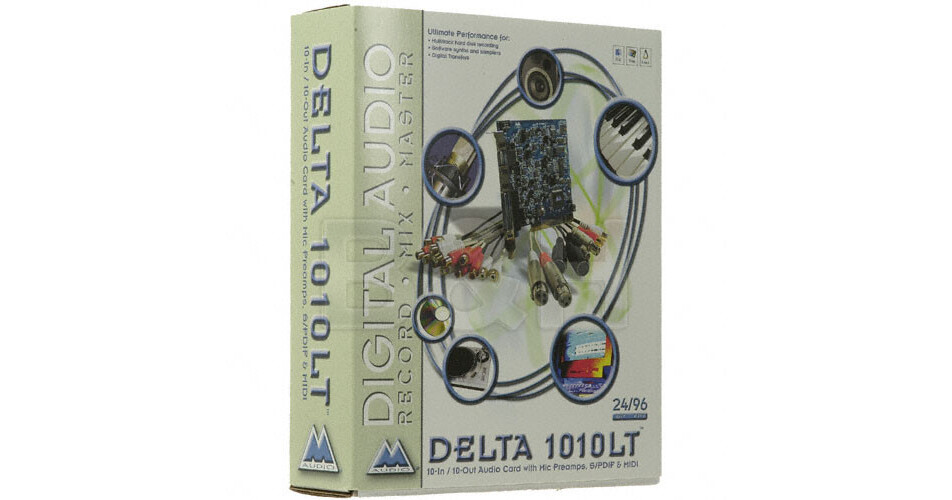
Due to all the stray electronic fields inside a computer, traditional thinking concerning the housing of the analog and digital converters on the audio card has held that doing so degrades the final audio product. And while it is still preferable to have external converters, great strides have been made in shielding the electronics on audio cards from the brutal environment of the computer. Thus the Delta 1010-LT can offer professional performance and provides features like 24-bit 96kHz recording, zero latency monitoring and digital mixing at a very attractive price point.
The Delta 1010-LT offers all of the interface features required to record music on a computer, including eight analog inputs and outputs, including two XLR microphone inputs with preamps, S/PDIF digital input and output, MIDI I/O, and wordclock in and out. The Delta Control Panel software can set and fine-tune the input line level, so that the XLR inputs can be set to receive a balanced line or a microphone level signal, eliminating the need for an outboard microphone preamp. The S/PDIF input will interface with equipment such as DAT players, CD players and recorders, DVD or Mini Disc, and offers control over the SCMS copy protection protocol.
The Delta 1010-LT outputs can be connected to an external mixer or sound system, while the S/PDIF output can simultaneously feed a digital mixdown deck. The Delta Control Panel Software also controls a hardware mixer embedded in the PCI card, giving still more routing and mixing control. The MIDI I/O will communicate with MIDI controllers and sound modules, while wordclock capable devices will function with rock-solid sample clock synchronization.
All Delta audio cards feature drivers for Windows XP, 2000, ME, 95/98, and NT, ASIO, Direct Sound, EASI, Multi-client 95/98/ME and Multi-card drivers for all Windows OS, Gigasampler, Mac Sound Manager and Mac ASIO and ASIO2.
| Converters | All data paths support up to 24bit/96kHz performance |
| Sample Rates | From 8kHz to 96kHz |
| Analog In | 2 x XLR microphone or balanced line, 6 x unbalanced on RCA coaxial connectors (on breakout cable) |
| Analog Outputs | 8 x unbalanced on RCA coaxial connectors (on breakout cable) |
| Digital Input Connectors | S/PDIF on coaxial connector (on breakout cable) |
| Digital Output Connectors | S/PDIF on coaxial connector (on breakout cable) |
| MIDI In/Out | 1 x In, 1 x Out |
| Sync In/Out | Word Clock In/Out on BNC connectors (on breakout cable) |
| Headphone Output | No |
| THD + N | Less than 0.002% @ 0dBFS |
| Dynamic Range |
Outputs: 101.5dB (A-weighted) Inputs: 99.6dB (A-weighted) |
| Frequency Response |
22Hz to 22kHz, -0.2,-0.4dB @48kHz 22Hz to 40kHz, -0.2,-0.7dB @96kHz |
| Minimum System Requirements |
PC: Windows 95, 98 200, XP or NT, Pentium III 500MHz, 128 MB of RAM for 96kHz operation; Pentium II 400MHz, 64 MB of SDRAM for 48kHz or less; UDMA EIDE or SCSI hard drive Mac: G4, G3 or G3 accelerator, System 8.6 or above, 128 MB RAM for 96kHz operation, 64 MB RAM for 48kHz operation, OMS 2.3.8 for MIDI operation |
| Specialties | Hardware sample-accurate sync will allow linking of multiple Delta units via S/PDIF |
REVIEW SNAPSHOT®
by PowerReviewsPros
Cons
Best Uses
Most Liked Positive Review
Works great with Linux
I bought this because I knew it would work with my linux system (Fedora 12). I upgraded from my M-Audio 24/96 card that I've had for several years so that I could input...Read complete review
I bought this because I knew it would work with my linux system (Fedora 12). I upgraded from my M-Audio 24/96 card that I've had for several years so that I could input multiple channels. I haven't really needed the multiple outputs yet, but may find them useful in the future. I think the sound quality of this card is great for my home recording studio needs. It was easy to install and worked great out of the box. Given my studio is a desktop computer, PCI was preferred and in my view generally more stable than Firewire/USB stuff. The only thing I didn't like was the labelling on the input/output leads was hard to see and I ended up using a sharpie to help label them. I don't plan on disconnecting and reconnecting things very often so this will be okay. This is proven stable card for anyone using a desktop computer and linux.
VS
Most Liked Negative Review
Solid card but has problems
I rated this card medium because of all the trouble I had in getting a decent recording out of it.
I got this card to create audio files from the numerous min...Read complete review
I rated this card medium because of all the trouble I had in getting a decent recording out of it.
I got this card to create audio files from the numerous mini disc of interviews I have done in the last 3-5 years. It was easy to install the hardware but the sound quality of the recordings I made in soundbooth was scratchy and poor even with the updated drivers. After searching the internet for solutions, I found a lot of users with dual core cpus and on Windows 7 had the SAME problem. google Delta 1010 Troubleshooting to see the problems and solutions for a fix.
REVIEWS
Reviewed by 12 customers
Sort by
Displaying reviews 1-12
Pros
Cons
Best Uses
Comments about M-Audio Delta 1010LT Sound Card:
I rated this card medium because of all the trouble I had in getting a decent recording out of it.
I got this card to create audio files from the numerous mini disc of interviews I have done in the last 3-5 years. It was easy to install the hardware but the sound quality of the recordings I made in soundbooth was scratchy and poor even with the updated drivers. After searching the internet for solutions, I found a lot of users with dual core cpus and on Windows 7 had the SAME problem. google Delta 1010 Troubleshooting to see the problems and solutions for a fix.
Pros
Cons
Best Uses
Comments about M-Audio Delta 1010LT Sound Card:
I use these to do multi track recording, it is pretty easy to use, it should mention more prominently that only IN 1/2 are preamplified.
Pros
Cons
Best Uses
Comments about M-Audio Delta 1010LT Sound Card:
This is my 2nd M-Audio 1010lt to add to my 1st one. Install was easy. Was able to record on 12 separate channels at the same time without any performance problems. Have a 3.0Ghz PC running XP with 3Gb RAM. Great card for the price I paid at B&H.
Pros
Cons
Best Uses
Comments about M-Audio Delta 1010LT Sound Card:
No latency and all of the reliability i would expect from m-audio. Great product!!!
Pros
Cons
Best Uses
Comments about M-Audio Delta 1010LT Sound Card:
High quality, economical sound card. Using in radio automation system. Great sound and easy to use/install.
Would prefer balanced in/out but hard to beat for the price.
Pros
Cons
Best Uses
Comments about M-Audio Delta 1010LT Sound Card:
Whereas I am moderately knowledgable in the use of electronic music, I, over a period of many years, have developed an electronic organ to simulate a sampling of pipe organ sounds. Through a friend, who uses several 1010 LT sound cards, I have become knowledgable with organ softwere provided by Hauptwerk. Hauptwerk supports, among other sound boards, the 1010 LT. Installation of the 1010 LT was pretty much straightforward, my only limitation being the interface of the sound board with software provided. To this point I have a very admirable VPO operational with no problems associated with the 1010 LT.
Pros
Cons
Best Uses
Comments about M-Audio Delta 1010LT Sound Card:
Flawless installation under Windows-7 64 bit with downloaded driver from M-Audio web site.
The card performed all the functions as advertised.
I have not found any problems with this product other than the Pro Tools demo program won't run on Windows 7. That is of no concern to me as I don't need it.
I found it also works great with Audacity 1.2.6.
and with Sony Acid Music Stuido 7.
Record and playback were easy to figure out.
I would recommend this card to anyone wanting to record and edit audio on their computer.
Pros
Cons
Best Uses
Comments about M-Audio Delta 1010LT Sound Card:
I bought this because I knew it would work with my linux system (Fedora 12). I upgraded from my M-Audio 24/96 card that I've had for several years so that I could input multiple channels. I haven't really needed the multiple outputs yet, but may find them useful in the future. I think the sound quality of this card is great for my home recording studio needs. It was easy to install and worked great out of the box. Given my studio is a desktop computer, PCI was preferred and in my view generally more stable than Firewire/USB stuff. The only thing I didn't like was the labelling on the input/output leads was hard to see and I ended up using a sharpie to help label them. I don't plan on disconnecting and reconnecting things very often so this will be okay. This is proven stable card for anyone using a desktop computer and linux.
Pros
Cons
Best Uses
Comments about M-Audio Delta 1010LT Sound Card:
The 1010LT is great for me because the number of inputs and outputs, so I can use my hardware processors as External Effects in my DAW. The sound quality is great and I can see no flaws for Home Recording.
Pros
Cons
Best Uses
Comments about M-Audio Delta 1010LT Sound Card:
Just a few hoops to jump thru before this is up and running. Anyone who buys this product is more than likely to be tech savvy enough to have it working in short order, then it just plain works! Sonically excellent. This is my second one of these. That should say it all.
Pros
Cons
Best Uses
Comments about M-Audio Delta 1010LT Sound Card:
If you need some ins and outs for your home studio, but don't have a lot of cash to spend. This is a great add for your desktop computer. It was easy to install and easy to use. The only con that I can find with this card is that though the XLR ins have preamps, they do not have phantom power. This is only an issue if you're using mics that need it though.
Pros
Cons
Best Uses
Comments about M-Audio Delta 1010LT Sound Card:
a super product combine with Live, now replaced my mixer
Displaying reviews 1-12