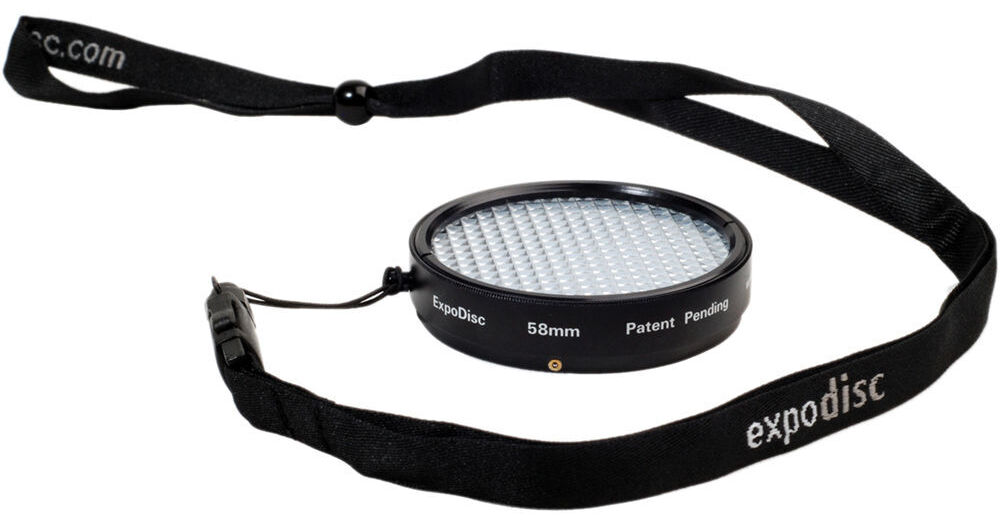
The ExpoDisc Neutral White Balance Filter allows digital photographers to quickly and easily set an accurate custom white balance. Each ExpoDisc is individually assembled, calibrated and certified for neutrality in the visible spectrum, and for 18% light transmission. The ExpoDisc can be used on-the-fly to set a white balance in-camera when shooting JPEG, or later in post production when shooting RAW. Using an ExpoDisc to set a custom white balance results in consistently balanced color and eliminates many of the yellow, red and blue color casts commonly seen in digital photography. The ExpoDisc is easy to use. Setting a white balance with the ExpoDisc eliminates many of the inconsistencies and inconveniences associated with using white balance cards and targets, including unwieldy size, unwanted reflectivity, improper angling, and shadows. To set a white balance with an ExpoDisc, simply take a photograph of the light source (incident light) through the ExpoDisc, then follow your camera's instructions to set the camera's custom white balance. Because the ExpoDisc is calibrated for an 18% light transmission, you can also use it as a reference tool for manually determining proper exposure. The ExpoDisc is available in a variety of sizes to fit most popular lenses. The ExpoDisc does not thread into the lens; instead, its quick mount design can be pushed-on and popped-off to facilitate a quick white balance. ExpoDiscs do not screw in. They lack front threads and were designed to be pushed-on over the lens threads in order to facilitate a quick white balance.
REVIEW SNAPSHOT®
by PowerReviewsPros
Cons
Best Uses
REVIEWS
Reviewed by 11 customers
Sort by
Displaying reviews 1-11
Pros
Cons
Best Uses
Comments about ExpoImaging ExpoDisc 58mm Digital White Balance Filter - Neutral:
If you need accurate colouring then this is great - I had to take photos of paintings for a Gallery Catalogue so the renditions had to be perfect. Setting up the lighting, which remained constant, the white balance on the camera was set through the ExpoDisc and all worked perfectly.
Pros
Cons
Best Uses
Comments about ExpoImaging ExpoDisc 58mm Digital White Balance Filter - Neutral:
While I have only had the chance to use it in the studio thus far, it has given me satisfactory results (though at times gives more of a red tone than I would desire). Now the real deal is when I try it out at upcoming weddings!
Pros
Cons
Best Uses
Comments about ExpoImaging ExpoDisc 58mm Digital White Balance Filter - Neutral:
Used the disc to set the white balance when taking photos in a gym. Easily readjusted each time I moved to a different location. Photos improved markedly over trying to 'eye' the white balance or adjust it later.
Pros
Cons
Best Uses
Comments about ExpoImaging ExpoDisc 58mm Digital White Balance Filter - Neutral:
I am a semi-professional portrait photographer and I use this white balance filter before every session. This is an essential step to achieve great skin tone. It removes all cast colors and it's simple and easy to use. The only downside is that it doesn't have threads, so sometimes it falls off of the lens. Overall though, a definite must buy.
Pros
Cons
Best Uses
Comments about ExpoImaging ExpoDisc 58mm Digital White Balance Filter - Neutral:
I used an Expo Disc in the past and I wanted another one that fit the lens I typically use indoors. With a variety of light sources, the auto balances never really work. The expo disc helps with exposure and allows for spot on white balance. Setting the white balance takes only seconds with the Expo Disc. Highly recommend.
Pros
Cons
Best Uses
Comments about ExpoImaging ExpoDisc 58mm Digital White Balance Filter - Neutral:
Finally, there is a professional solution to obtaining proper white balance with challenging lighting. I found this to be the ultimate solution to a problem I have had for a long time.
Pros
Cons
Best Uses
Comments about ExpoImaging ExpoDisc 58mm Digital White Balance Filter - Neutral:
Great for those times that preset white balance just doesn't cut it! Sometimes overcorrects if used outside at first light or sunset.
Pros
Cons
Best Uses
Comments about ExpoImaging ExpoDisc 58mm Digital White Balance Filter - Neutral:
How and why I went this long without one; I don't know...this is a must have for any photographer...!!!
Pros
Cons
Best Uses
Comments about ExpoImaging ExpoDisc 58mm Digital White Balance Filter - Neutral:
Results were much better than anticipated. Color rendition was magnificent. It’s has a nice strap to carry around your neck; however, I find it a bit too annoying to carry around for a casual shoot out.
My only comment is that it doesn’t mount firmly on my various filters, and especially on the “slim” filters. If you mind using an extra hand to hold the ExpoDisc against your lens, stay away from the “slim” filters.
I would consider the ExpoCap if it delivers similar accurate results.
Pros
Cons
Best Uses
Comments about ExpoImaging ExpoDisc 58mm Digital White Balance Filter - Neutral:
I would normaly edit my photos & fix white balance with photoshop, Now that I use the expodisc , very little correction is needed. Its important to know how to use it or results will not be satisfactory. It really does make a difference.
Pros
Cons
Best Uses
Comments about ExpoImaging ExpoDisc 58mm Digital White Balance Filter - Neutral:
I need to make product shots with white backgrounds and that means shooting under various incandescent and fluorescent lights in a studio setup. The white balance presets on my Canon 30D are not close enough to the Kelvin temps I work with so I had to adjust the colorcast out in the PS RAW plugin. With the Expodisc the white balance comes out right on and I don't need to adjust the temperature and hue by trial and error.
ExpoImaging recommends you get the large disc and just hold it over the end of the lens. I think that is too cumbersome using both hands to take the sampling shot and the disc too heavy to be dangling around my neck bumping things when I bent over. I don't have the Canon L lenses so I got the standard 58mm but it's immediately obvious that the spring loaded metal balls that act like snaps to hold it in place don't grab well enough to let go of the ExpoDisc without it falling out.
I fixed the mounting problem easily by snapping a spare 58mm UV filter to the Expo Disc then running a strip of black electrical tape along the seam between the two to hold them together as a single unit. Now my ExpoDisc is threaded and looks like it was made that way too.
Once I had a secure mount the ExpoDisc performs accurately and easily and I am really happy I got it. Toss the 18% gray card and get an ExpoDisc. A side-by-side comparison of custom white balance showed me that the ExpoDisc was more accurate and tons easier to use.
Displaying reviews 1-11