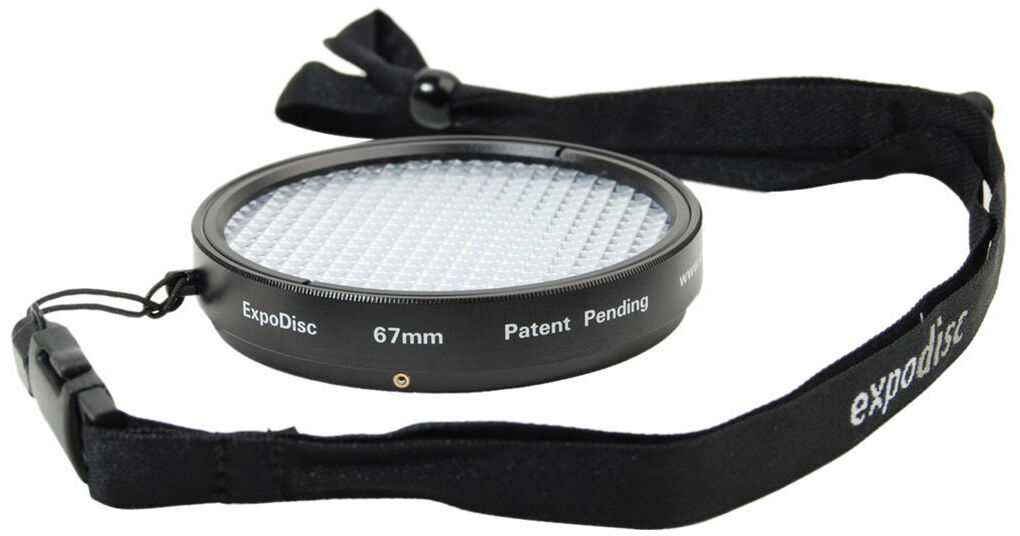
The ExpoDisc Neutral White Balance Filter allows digital photographers to quickly and easily set an accurate custom white balance. Each ExpoDisc is individually assembled, calibrated and certified for neutrality in the visible spectrum, and for 18% light transmission. The ExpoDisc can be used on-the-fly to set a white balance in-camera when shooting JPEG, or later in post production when shooting RAW. Using an ExpoDisc to set a custom white balance results in consistently balanced color and eliminates many of the yellow, red and blue color casts commonly seen in digital photography. The ExpoDisc is easy to use. Setting a white balance with the ExpoDisc eliminates many of the inconsistencies and inconveniences associated with using white balance cards and targets, including unwieldy size, unwanted reflectivity, improper angling, and shadows. To set a white balance with an ExpoDisc, simply take a photograph of the light source (incident light) through the ExpoDisc, then follow your camera's instructions to set the camera's custom white balance. Because the ExpoDisc is calibrated for an 18% light transmission, you can also use it as a reference tool for manually determining proper exposure. The ExpoDisc is available in a variety of sizes to fit most popular lenses. The ExpoDisc does not thread into the lens; instead, its quick mount design can be pushed-on and popped-off to facilitate a quick white balance. ExpoDiscs do not screw in. They lack front threads and were designed to be pushed-on over the lens threads in order to facilitate a quick white balance.
REVIEW SNAPSHOT®
by PowerReviewsPros
Cons
Best Uses
Most Liked Positive Review
ExpoDisc Works
I am not a professional photographer, but an amateur that likes quality images. I take lots of photos and video of mostly family and scenic events using my Nikon D40 SLR and my Canon ...Read complete review
I am not a professional photographer, but an amateur that likes quality images. I take lots of photos and video of mostly family and scenic events using my Nikon D40 SLR and my Canon HV30 camcorder. I do not have the time or software to fool around spending lots of time correcting images/video after the fact.
I first ordered the ExpoDisc 52mm for my camcorder and loved it. I then got a larger lens for my Nikon D40 and decided to go to the expense of getting the 67mm ExpoDisc, as I was so impressed with the way it worked on my camcorder. It was immediately apparent that the resulting colors were much more accurate than those by the camcorder's white balance settings. I video my granddaughter's dance competition which is mainly held in very low light gym conditions. Whenever I used the ExpoDisc, the colors always came out correctly. Prior to this, I was getting colors of costumes that were completely different than what they really should have been.
I also was able to use the ExpoDisc on a recent trip to Lake Tahoe. I was amazed at the accurate color rendition of snow scenes, both with a polarizing filter and without.
The ExpoDisc worked flawlessly on top of the polarizing filter.
One important suggestion, buy the largest possible ExpoDisc for any future lens that you think you might acquire. I made the mistake of buying a 52mm and then had to turn around and buy a larger 67mm due to buying a larger lens. The nice thing is that a larger ExpoDisc works on any smaller lens just by holding it in front of the lens.
The construction is very solid and quality oriented. At first I thought the lanyard was a bit "Geeky", but now it is invaluable, as the disc is always available.
VS
Most Liked Negative Review
Works great has small challenges.
Works well, however you can not put on over other filters. It clips on but only to the lens. Filters will not let the lens attach proporly. The lanyard string is too large ...Read complete review
Works well, however you can not put on over other filters. It clips on but only to the lens. Filters will not let the lens attach proporly. The lanyard string is too large to fit in the small hole povided, had to imporvise some other way. Still beets white carding!
Reviewed by 22 customers
Sort by
Displaying reviews 1-20
Previous | Next »
Pros
Cons
Best Uses
Comments about ExpoImaging ExpoDisc 67mm Digital White Balance Filter - Neutral:
The first time I used this little jewel I could see a big difference in the quality of the picture color. WOW.....If WB is crucial to you then the ExpoDisc is your answer, look no further. I have already recommended it to a friend and will keep doing so.
Pros
Cons
Best Uses
Comments about ExpoImaging ExpoDisc 67mm Digital White Balance Filter - Neutral:
This probably a problem for pentax owners who are getting long in the tooth. I can't figure out how to make it work on my current K5. The website provides only information about the K10 from 6 years ago.
Pros
Cons
Best Uses
Comments about ExpoImaging ExpoDisc 67mm Digital White Balance Filter - Neutral:
Works well, however you can not put on over other filters. It clips on but only to the lens. Filters will not let the lens attach proporly. The lanyard string is too large to fit in the small hole povided, had to imporvise some other way. Still beets white carding!
Pros
Cons
Best Uses
Comments about ExpoImaging ExpoDisc 67mm Digital White Balance Filter - Neutral:
In my opinion the EXPODISC is the overall custom white balance aid/tool available. This is well made and comes in an excellent storage pouch with a good lanyard. Furthermore, the company, EXPO Imaging offers rapid and excellent canned and personal support of their products.
Pros
Cons
Best Uses
Comments about ExpoImaging ExpoDisc 67mm Digital White Balance Filter - Neutral:
I've never bothered with gray cards, but this solution is simple and straightforward enough that I will use it. It's still a few steps to calibrate the camera for the conditions, but well within the realm of what I'm willing to do. (Oh, and it works well. Tried under the yellow of our kitchen lights and immediately got better color than any "camera preset" white balances")
Pros
Cons
Best Uses
Comments about ExpoImaging ExpoDisc 67mm Digital White Balance Filter - Neutral:
Fast, accurate and easy to use. I use it on a Nikon D90, just select w/b preset click the shutter and your all set.
Pros
Cons
Best Uses
Comments about ExpoImaging ExpoDisc 67mm Digital White Balance Filter - Neutral:
Works perfectly! Great tool for getting the correct white balance for your photos.
Pros
Cons
Best Uses
Comments about ExpoImaging ExpoDisc 67mm Digital White Balance Filter - Neutral:
Use primarily for portrait WB customer setting although plan on trying it for landscape photography as well. Takes only a minute to pop it on and get a setting (at least on my Nikon).
Works as advertised - no more guessing on K values, leaving it up to the camera's "best guess" algorithm, or picking a fixed mode and hoping for the best.
Pros
Cons
Best Uses
Comments about ExpoImaging ExpoDisc 67mm Digital White Balance Filter - Neutral:
This has to be one of the easiest way to improve your photography and work flow. It is simple to use and just simply works if I lost mine today I would replace it immediately.
Pros
Cons
Best Uses
Comments about ExpoImaging ExpoDisc 67mm Digital White Balance Filter - Neutral:
Where was this during basketball season? This is a very handy tool. The expo disc takes the guess work out of setting the white balance on your camera. Wish i would of had this last basketball season; those gym lights were murder on some of my pictures. Being new to shooting inside of gyms and old school auditoriums It can be tough getting the white balance right on every shot; even when using the auto white balance on your camera.
I live in a old house with old light fixtures. So most of my pics come out orange with no flash or sometimes with a flash.
After a few mintues looking at the expo website. I was taking some test shots and the results were amazing! Shots that were orange the first time; look like they were suppose to the second time around with the expo disc.
I can't wait to take this to the basketball games this year.
Pros
Cons
Best Uses
Comments about ExpoImaging ExpoDisc 67mm Digital White Balance Filter - Neutral:
I am a Semi pro photographer, who's recent decision to convert to digital from analog had me a bit frazzled. It was an interesting time getting used to white balancing with respect to my strobes. The Expo disc did the job, saving me tons of time...WTG!!!!!
Pros
Cons
Best Uses
Comments about ExpoImaging ExpoDisc 67mm Digital White Balance Filter - Neutral:
Easy to use and accurate. A little on the expensive side.
Pros
Cons
Best Uses
Comments about ExpoImaging ExpoDisc 67mm Digital White Balance Filter - Neutral:
I had somebody show me their white balance filter a few months ago. I loved the idea of a perfectly set white balance every time I took a pic. It is easy to use and I will not leave home without it going forward. True color pictures... Can't beat them! I did not know the difference till I took some side by side's on auto white balance. I was amazed.
Pros
Cons
Best Uses
Comments about ExpoImaging ExpoDisc 67mm Digital White Balance Filter - Neutral:
I have only owned this item for a couple weeks, but it is easy and quick to make a custom WB setting. I hope to get in the habit of using it often. It is likely best for someone who does shoots mostly one area with a static light source. I tend to be chasing around my niece and nephew so the light source is constantly changing, making custom WB settings a larger chore than correcting in PP.
Pros
Cons
Best Uses
Comments about ExpoImaging ExpoDisc 67mm Digital White Balance Filter - Neutral:
I am not a professional photographer, but an amateur that likes quality images. I take lots of photos and video of mostly family and scenic events using my Nikon D40 SLR and my Canon HV30 camcorder. I do not have the time or software to fool around spending lots of time correcting images/video after the fact.
I first ordered the ExpoDisc 52mm for my camcorder and loved it. I then got a larger lens for my Nikon D40 and decided to go to the expense of getting the 67mm ExpoDisc, as I was so impressed with the way it worked on my camcorder. It was immediately apparent that the resulting colors were much more accurate than those by the camcorder's white balance settings. I video my granddaughter's dance competition which is mainly held in very low light gym conditions. Whenever I used the ExpoDisc, the colors always came out correctly. Prior to this, I was getting colors of costumes that were completely different than what they really should have been.
I also was able to use the ExpoDisc on a recent trip to Lake Tahoe. I was amazed at the accurate color rendition of snow scenes, both with a polarizing filter and without.
The ExpoDisc worked flawlessly on top of the polarizing filter.
One important suggestion, buy the largest possible ExpoDisc for any future lens that you think you might acquire. I made the mistake of buying a 52mm and then had to turn around and buy a larger 67mm due to buying a larger lens. The nice thing is that a larger ExpoDisc works on any smaller lens just by holding it in front of the lens.
The construction is very solid and quality oriented. At first I thought the lanyard was a bit "Geeky", but now it is invaluable, as the disc is always available.
Pros
Cons
Best Uses
Comments about ExpoImaging ExpoDisc 67mm Digital White Balance Filter - Neutral:
This disc produces excellent, consistent results. I compared a number of photos in different lighting situations, and I was amazed at the improvement. This device will allow you to get the white balance right in the camera, without extensive adjustments in Photoshop. Highly recommended.
Pros
Cons
Best Uses
Comments about ExpoImaging ExpoDisc 67mm Digital White Balance Filter - Neutral:
The ExpoDisc White Balance Filter is a must have. Using this device is simple and will save you hours of manual white-balance correction. Take one shot at the beginning of a photo-shoot and you are good to go for the entire session. I am using a Canon 40D and selecting custom white balance is easy and straight forward. And you need only one ExpoDisc so you can save a few bucks by choosing the filter for your smallest lens.
Pros
Cons
Best Uses
Comments about ExpoImaging ExpoDisc 67mm Digital White Balance Filter - Neutral:
Saves time both in preshoot and postshoot workflow. Accurate but will not fit to some of my filters. You might consider the Expocap instead
Pros
Cons
Best Uses
Comments about ExpoImaging ExpoDisc 67mm Digital White Balance Filter - Neutral:
Just set your camera to programed white balance.
Attach the expo disc.
aim the camera from the subject to the light source and take a picture.
The camera is set to the perfect white balance.
Remove the expo disc and start takeing your pics.
So eacy to use, always available from the lanyard around your neck. I never take the camera out with out it now.
Pros
Cons
Best Uses
Comments about ExpoImaging ExpoDisc 67mm Digital White Balance Filter - Neutral:
I use it on my R1, which is a simple three step process. I was amazed at how accurate it is. I probably could have bought the expocap which is cheaper, and works on the same principle. It snaps
on the lens,and not to securely I might add,make sure you use the included lanyard.
Displaying reviews 1-20
Previous | Next »