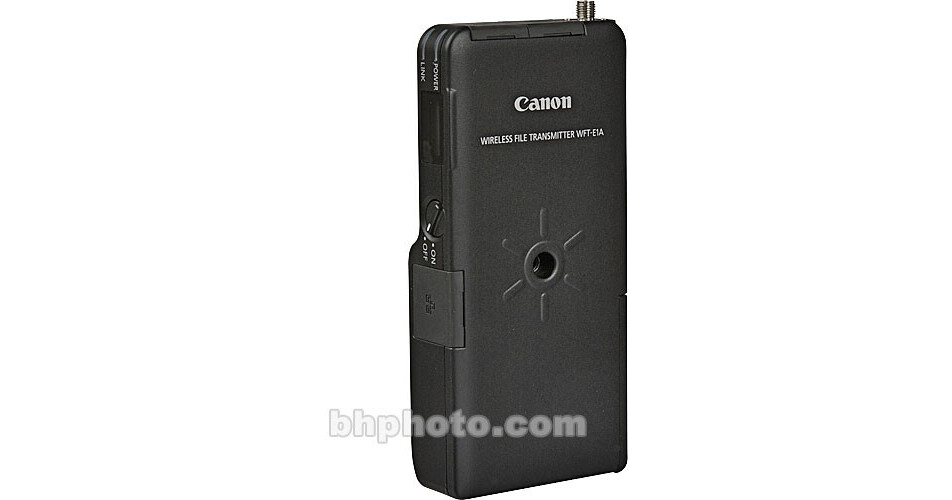
Canon WFT-E1A Wireless LAN File Transmitter

  • No Longer Available
  • B&H # CAWFTE1A
  • Mfr# 0032B002

Product Highlights

  • Compatible with Canon EOS 20D, EOS 20Da, EOS 30D, EOS 5D, EOS-1D Mark II, EOS-1D Mark II N & EOS-1Ds Mark II Digital Cameras

Protect Your Purchase


What item is right for you?

Ask our Experts!

800.831.2434
Live Chat

The Canon WFT-E1 Wireless LAN File Transmitter for Canon EOS Digital Cameras allows photographers to transmit images from their cameras directly to a computer over a wireless local area network (LAN) using both the slower 802.11b and faster 802.11g wireless transmission protocols. To Protect your data when transmitting, the WFT-E1 includes security and authentication/encryption Protocols covering WEP, TKIP, MAC address filtering and SSID support for access to closed networks. The WFT-E1 is also equipped with a standard RJ-45 Ethernet port on the side of the unit that enables it to connect to a wired router, the Ethernet port of a computer or other 100Base-T-compatible networking device.

Requires Canon BP-511, BP-511A BP-512, BP-514 Rechargeable Lithium Ion Battery or AC Adapter Kit ACK-E2 with DR-400 DC Coupler (Sold Separately)

The transmitter is compatible with the EOS-1D Mark II and the EOS 20D digital SLR cameras via a firmware upgrade.

The NA-E1 normal antenna will work up to 60 meters. An optional extended range antenna ERA-E1, boosts the working range to 150 meters.

REVIEW SNAPSHOT®

by PowerReviews
Canon WFT-E1A Wireless LAN File Transmitter
 
3.8

(based on 5 reviews)

Ratings Distribution

  • 5 Stars


    (2)

  • 4 Stars


    (2)

  • 3 Stars


    (0)

  • 2 Stars


    (0)

  • 1 Stars


    (1)

80%

of respondents would recommend this to a friend.

Pros

    Cons

    • Difficult setup (3)

    Best Uses

        • Reviewer Profile:
        • Professional (3)

      REVIEWS

      Reviewed by 5 customers

      Sort by

      Displaying reviews 1-5

      Back to top

       
      5.0

      Great accesory

      By Rocco de Wet

      from Bloemfontein, South Africa

      About Me Professional

      Pros

      • Fast Transfer
      • Reliable

      Cons

      • Difficult Setup

      Best Uses

      • Digital Capture
      • Digital Photography
      • Image Transfer

      Comments about Canon WFT-E1A Wireless LAN File Transmitter:

      Yes - the setup on this is a nightmare. But that is a PC / Windows issue. The functioning of this device is awsomely easy. If your Windows setup is done correctly. I still use Win XP, and it would seem like I will be staying there for quite a while, since it works so well.

      I use it just about every time I switch my camera on, it is just soooo nice to shoot directly to the PC!

      Comment on this review

       
      4.0

      install tips.

      By feetgrinder!

      from ATL_GA

      About Me Professional

      Pros

      • No wires no slow tether

      Cons

      • 54mb is slow 10100tFast
      • Difficult Setup

      Best Uses

      • Digital Capture
      • Image Transfer
      • Viewing Images

      Comments about Canon WFT-E1A Wireless LAN File Transmitter:

      Set up can be very complicated. I was getting a lot of error 46, which is a computer communication error. The camera was set up and actually able to create the capture file on my mac. no file transfer though. I recommend trying to set it up (with set up wizard) wired with an ethernet cable first. (i use a netgear 5 port switch instead of a crossover cable) once you have that working. which should be easy... then use the set up wizard to set it up for wifi. I'm using an airport express on an isolated LAN. I set the airport express up with canons wft manual 2.0. I also recommend defragmenting your HD, and updating to wft 3.3. I almost gave up on it, but given these suggestions it works and i love it! I wish my phaseone backs had the same function! They should!

      Comment on this review

      (4 of 4 customers found this review helpful)

       
      4.0

      works excellent when set-up but pricey

      By se

      from fontana, ca

      About Me Semi-Professional

      Verified Reviewer

      Pros

        Cons

          Best Uses

            Comments about Canon WFT-E1A Wireless LAN File Transmitter:

            Works very well but took a bit to figure out how it worked. one con is it will only work under the slower 11mb/sec wireless b mode when wanting to connect directly to a laptop. to get the wireless g mode you have to have a intermediate basestation to get it to work. that's the trick to it. the manual states this and it was easy to overlook. spent a hour pulling my hair out trying to figure out why it worked on my old wireless b laptop but not my new wireless g intel mac before reading the fine print. once this is set-up it works like a charm. i use a apple airport express as the basestation and a apple laptop with filesharing on for the destination in the field. able to shoot little league baseball and not have to run to the booth to download as soon as the game is over is a godsend. i think if the manual would state more clearly that a basestation is required for high speed transfer which i think everyone wants the high speed then it would get rid of alot of the problems that people are having.

            Comment on this review

            (1 of 2 customers found this review helpful)

             
            5.0

            Fantastic, once set up...

            By instaimage

            from Minden, NV

            About Me Professional

            Verified Reviewer

            Pros

            • Durable
            • Quick file transfer

            Cons

            • Bulky
            • Tricky setup

            Best Uses

            • Everyday use
            • Location shooting
            • Portraits
            • Studio

            Comments about Canon WFT-E1A Wireless LAN File Transmitter:

            I use this on location for fast transfer to the laptop from the camera. Once it's set up, which does take some effort and understanding of wireless networks and computer file hierarchy... the system works fantastic! I can shoot, pull the people out of place walk to the laptop to show and the photos are there already. THAT is impressive to customers, they think it's magic (and it is!). The physical size could be better as attaching it to a 1D body makes for sizable mass in your hands but I love the system.

            Comment on this review

            (27 of 35 customers found this review helpful)

             
            1.0

            Nightmare trying to set it up!

            By bev

            from Austin, TX

            About Me Semi-Professional

            Verified Buyer

            Pros

              Cons

              • Difficult To Use
              • No setup support

              Best Uses

                Comments about Canon WFT-E1A Wireless LAN File Transmitter:

                I bought this to use with my 5D and Mac laptop with wireless card. I could not get this set up on my own even though I am very computer savvy! I called Canon and they can't tell you what settings you need on your computer for it to talk to this device directly (as a server), via a router, or WEP (wireless entry port). I had to hire an IT guy to help, but turns out the E1A was defective. Sent it back. Second one: IT guy got it hooked up to my laptop using the laptop as a server. Each image took 30-45 seconds to transfer instead of the 10 seconds I was expecting. A WEP or a router is supposed to be faster (additional purchase), but that would have involved paying the IT guy to help me again and with no guarantee it would be fast enough! Even the IT guy said it was confusing to hook up and he was surprised Canon didn't provide more info or support for this. When you call your cable company their support people walk you through the internet setup whether you are on a Mac or PC, and they tell you the numbers to enter in the menu boxes. They help you get your email set up. Canon assumes you know the numbers and where to find them, and all the buttons to click in the menus (and which menus to even go to)! WHO knows this but maybe IT people? Another guy in the photo forum who tried to use this device said it was a nightmare to set up and he had to hire an IT guy, too. I was so disappointed and frustrated I gave up and returned it. Canon has no plans to improve the E1A though they said they made improvements to the E2A. However, I must say B&H was WONDERFUL as always!!!!!!!! The return and refund was no problem.

                Comment on this review

                Displaying reviews 1-5

                Back to top

                Canon WFT-E1A Wireless LAN File Transmitter for the EOS-1Ds Mark II Digital Camera
                • Mini antenna
                • Long IEE1394 cable
                • Short IEE1394 cable
                • Case
                • Camera mounting screw
                 
                 
                See any errors on this page? Let us know.

                Close

                Close