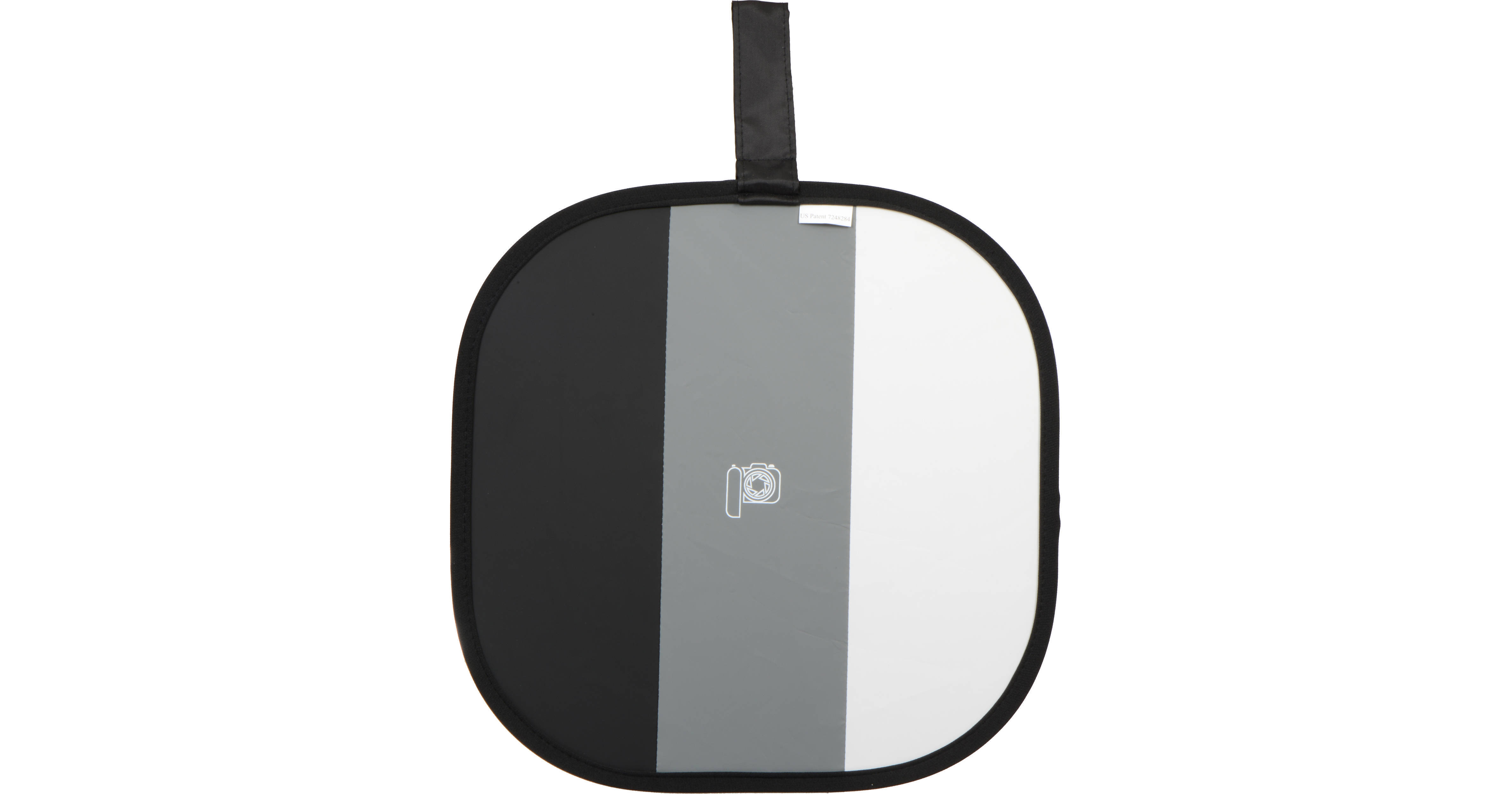
The Photovision 14" One Shot Digital Target is large enough to fill the frame in most situations, but folds to just 6 inches to allow carrying in your pocket or instant access when using with the included belt pouch slip case. Soft silver fabric on the backside creates an efficient reflective surface to open up the shadows. This size has become the favorite of many of the industry's leading wedding photographers.
The Neutral 3-Tone Panels of the One Shot Digital Target allows for custom white balancing, accurate metering and exposure monitoring through the camera's histogram function - all with a single shot. Thereby, vastly improving setup time, and minimizing the need for post correction to your image files. You'll drastically reduce your workflow on the back-end by getting it right on the front-end.
REVIEW SNAPSHOT®
by PowerReviewsPros
Cons
Best Uses
A month or less | 100% (5 reviews) | |
One-to-three months | ||
Three-to-six months | ||
More than six months |
Most Liked Positive Review
Works as advertised.
The One Shot is sort of a glorified gray card. You use it in conjunction with your on-camera histogram to get not just a middle gray, but a highlight & shadow reading as w...Read complete review
The One Shot is sort of a glorified gray card. You use it in conjunction with your on-camera histogram to get not just a middle gray, but a highlight & shadow reading as well to make sure you're getting the most value from your scene.
I have a much larger one shot target that I never used - it was far too big. This size is just right - about the size of someone's head. Get them to hold the target up to their face, with the highlight side closer to the light so highlight side is where the highlight on their face will be and take a few test shots, adjusting your camera settings & flash until the histogram tells you that you're getting highlight & shadow detail. You can check for blinking highlights too.
Once this is done, you can set your white balance using this card too - easier on Canons than Nikons - Canons use the center area of the frame from a picture you've already taken (hence the "one shot" name). For Nikons you need to fill the frame with the target & tell it to take a white balance from that. Or you can just take a picture of this somewhere in your shooting session & set the white balance in post.
Each line on your histogram represents one stop, so you can estimate where you have to go from the photo you took - if the highlight spike is 2 stops down, then you need to increase your exposure by 2 stops through a combination of flash power, aperture, shutter speed (for ambient light), flash to subject distance, and film speed. Anything that adjusts in full stops only will get you in the ballpark - anything that adjusts in half or third stops will let you get close to what this will tell you is a perfect exposure- you want all 3 spikes to be fully contained within the histogram - one in the middle (middle gray), one about 1.5 stops bright, and one about 1.5 stops darker, and none of them too close to the edge (so that you're losing detail).
Go through a few tests firsts before using it in the field - you should learn how to read an exposure from this & adjust your equipment accordingly, and what an acceptable reading looks like.
The back side of this is a silver foil that you can use to fill shadows or bounce a highlight on someone's face - but not much more than that, it's a very small reflector and all but useless unless you can clamp it to something & make sure the model doesn't move either. It would be better to get a larger reflector - the larger the better, I say, as long as you can still hand-hold it. I originally got the large size target for the large white reflector in on the back, but that was a mistake - it's too big of a target and not a very versatile reflector (with just white on the back). Still, it'll help in a pinch and I've used it taking photos of small products like handbags.
Another problem with the reflector is that it's silver, meaning it's specular and depending on how you use it, it may become your key light, so you'd be setting your exposure to that. For example if you put your subject in shadow & use the silver reflector to push light from the sky into their face. Well how do you get a reading for the reflected light now coming off of their face? Still, the manufacturer has to do something with the back of the card, and a silver reflector will probably sell more items than a gray card, which may actually be more useful (though would be them admitting that a gray card is just as good if not better in some circumtances). But if you use the reflector as fill (as you may with flash photography) then it won't change the expoosure enough to matter - so I think that's what it's designed for, a fill light reflector for flash photography.
It folds down to about 1/3 its size with a simple twist - hold it on each side in each hand and twist in opposite directions. It comes in a convenient bag made out of some sort of thick canvas-like nylon type material. The bag has an open top (no zipper) and a loop in the back with some velcro, presumably for mounting it on a belt or camera bag (just be careful, with no zipper, if you have it sideways it could fall out).
So how does it differ from a gray card? How is it better, how is it worse? The closest equivalent gray card (the 20" Lastolite) is about the same price and size (but with a white reflector on the back rather than silver - at this size a white reflector isn't very useful), and you can get 8x10 cardstock gray cards much cheaper.
A gray card works in mostly the same way, and in fact is even easier to work with. A gray card is a neutral, middle gray, and you can use the same basic procedure to set your camera's exposure with a gray card.
For natural light photography, you point the camera at the gray card and set the exposure to ±0, and then take a white balance. Bam you're done, no messing with histograms - you can't do that with the one shot target. If you're doing flash photography, then you go through a similar process as with the one shot - checking your histogram for that middle gray spike and trying to get as close to that as possible.
The supposed advantage of the One Shot is that it will tell you if you've blown out your highlights or shadows, but you can generally do that by just looking at a photo you just took and looking for blinking highlights, and the exposure readings it gives you won't be radically different from a gray card.
Still, if you want accuracy in your workflow, it's the same price as an equivalent collapsible gray card, so why not, plus the silver foil back will push more (and more specular) light at your subject than the white back of the Lastolite 20" gray card.
Another thing to be aware of - natural light photographers - sunset light changes very quickly, and the sun going behind clouds change things very quickly too, so when you get a reading with this or a gray card, it could be accurate for mere moments. At times like this I find it better to shoot using an auto exposure mode (program, shutter priority, aperture priority), unless I'm combining flash with ambient, or otherwise want fine control over my exposure - and then I may want to use this to get my flash exposure accurate.
One of the other reviewers mentions that he just "walks up close" to get the correct exposure. This is fine. In fact, you can use this for more than one person - just take a shot for each location you want to expose for - once for each person's face. Exposures don't change if you, the photographer, move around, as long as the light hitting the subject stays the same - e.g. natural light or off-camera flash.
Be aware though that cheap zoom lenses that have different a maximum aperture throughout the length of the zoom will change your exposure as you zoom unless you set it to its smallest maximum aperture or less. This product is really for someone who shoots with good glass - primes or zooms with fixed maximum apertures & in manual mode, but then the same is true for gray card users.
For what it is, it's great, and for flash photography it's as good as a gray card if not better. For natural light photography, a gray card is better because you can get a reading off of it without going to the histogram - just fill your frame with the card and adjust your settings. The silver reflector is a welcome addition, but not as good as a larger reflector and a gray card would be more useful. Is it better than a gray card for getting better exposures? I guess marginally so - if you're into super accuracy, especially with regards to highlights.
VS
Most Liked Negative Review
Don't be fooled, not color neutral
Product is good way to measure exposure. However, the 3 color panels are *NOT* color neutral. If you set a custom white balance with your camera on the card, the gray point ...Read complete review
Product is good way to measure exposure. However, the 3 color panels are *NOT* color neutral. If you set a custom white balance with your camera on the card, the gray point average will often render a fairly accurate reading.
However, if you photograph the card and later try to measure the color temp and tint, you will be dismayed at the delta between the three panels. All 3 panels should be equally neutral. For instance, use your WB dropper to balance to the gray. Then, check the white. You will get an RGB reading of about: 76-74-73 (tinted warm). Try to take a dropper reading off the white, and your gray will be cool, tinted blue/green. Hardly what I'd call a reliable white balance system.
Reviewed by 88 customers
Sort by
Displaying reviews 1-20
Previous | Next »
Pros
Cons
Best Uses
Comments about Photovision 14" Pocket One Shot Digital Target:
Excellent target for simple white balance or both balance and exposure setting. Great videos on the included DVD and on the mfg website.
The only gripe is that it does not lay perfectly flat and does not have a "flat black" spot like the WhiBal card to be sure there is no glare.
Also, seems a little pricey for what it is.
Pros
Cons
Best Uses
Comments about Photovision 14" Pocket One Shot Digital Target:
This product was recommended by my photography mentor. She uses it during every portrait session. I have used mine now and really like how it helps get perfect exposure. The price is affordable, especially considering it's frequent use.
Pros
Cons
Best Uses
Comments about Photovision 14" Pocket One Shot Digital Target:
Small enough when folded to put in your bag or pocket on any photo shoot and makes quick work out of getting a perfect color balance and exposure in just a few seconds. Great product!
Pros
Cons
Best Uses
Comments about Photovision 14" Pocket One Shot Digital Target:
If you use the digital Target properly it will cut your post production time by half. The best thing about the Target has to be its size. I have nothing negative to say.
Pros
Cons
Best Uses
Comments about Photovision 14" Pocket One Shot Digital Target:
This little gem will save the photographer and videographer a ton of time in post production by getting exposure and white balance correct during shooting.
Using your camera's built in histogram and white balance target settings (Canon EOS 1d MkIV and 5d MkII for me) you can absolutely NAIL exposure and color balance.
Thought I'd mainly use it for video production, but find myself employing it in almost every still shoot as well.
Any complaints about this being hard to use can be overcome by:
1) Read your camera manual and understand how to set custom white balance and read your historgram.
2) Watch the DVD. I didn't at first and got 95% of the results I wanted. A few pointers in the DVD got me the extra 5%.
Pros
Cons
Best Uses
Comments about Photovision 14" Pocket One Shot Digital Target:
The 14" Pocket One Shot Digital Target by PhotoVision has helped so much with my exposure and white balance. Its really easy to use and such a great investment for my business. B & H shipping was super fast also.
Pros
Cons
Best Uses
Comments about Photovision 14" Pocket One Shot Digital Target:
Helps get the White Balance perfect every time
Pros
Cons
Best Uses
Comments about Photovision 14" Pocket One Shot Digital Target:
This is a must for any photographer who is serious about white balance
Pros
Cons
Best Uses
Comments about Photovision 14" Pocket One Shot Digital Target:
The idea of this target is great, and it does work in a sense that if you photograph it properly and the histogram will display the proper highlights, mid tones and shadows, but that exposure did not translate to the proper exposure on my subject. perhaps it might work well for someone else, i prefer to rely on the in camera histogram from a shot from the subject.
Pros
Cons
Best Uses
Comments about Photovision 14" Pocket One Shot Digital Target:
Had been looking for this product -- folds small and makes it a breeze to set the custom white balance.
Pros
Cons
Best Uses
Comments about Photovision 14" Pocket One Shot Digital Target:
Had to buy a second one to replace one I lost on a shoot. I have several of the Photovision targets and this one is the one I use most. It's big enough to fill the frame yet small enough to put in your pocket. I would buy this target again and again and wouldn't be without it! Great for getting accurate white balance & color on outdoor shoots, in the studio and in mixed lighting situations.
Pros
Cons
Best Uses
Comments about Photovision 14" Pocket One Shot Digital Target:
Have used it in a variety of situations such as direct sun, shade, overcast. high school gyms, and mixed lighting. Simple to use after watching the included DVD. Best out of the camera results. If you want perfect exposures and white balance to minimize post processing and can operate your camera in manual, this is the ticket. Now that I know how far off of perfect my camera's metering is I can get the target out and set exposure quickly and then have a perfect sample for custom white balance. I love it.
Pros
Cons
Best Uses
Comments about Photovision 14" Pocket One Shot Digital Target:
This product has saved me countless hours in post production. I love it.
Pros
Cons
Best Uses
Comments about Photovision 14" Pocket One Shot Digital Target:
A good Target for white balance.
Pros
Cons
Best Uses
Comments about Photovision 14" Pocket One Shot Digital Target:
TSA lost my last one. It will last forever if you don't lose it. If you need a good white balance target for video and photography then you found it. Don't lose it and it will last forever.
Pros
Cons
Best Uses
Comments about Photovision 14" Pocket One Shot Digital Target:
Simple to use, works perfectly and will save you invaluable time in the long run! This handy target will get your exposure and white balance perfect every time.
For the best results, you will want to fill the entire frame of the camera with the target... so buy the appropriate size target for your use; or buy the full set.
The instructional DVD is great. It is very well presented and explained so you aren't left confused. It touches on every aspect of the Target and how to use it in post processing (Photoshop & Lightroom).
All the targets have a reversed side that can act as a reflector.
Pros
Cons
Best Uses
Comments about Photovision 14" Pocket One Shot Digital Target:
I purchased this target to keep me from having to make a lot of adjustments to white balance in post processing. I chose the 14" version of the target since it looked to be easy to carry while still being large enough to fill a frame of my camera. I am very pleased with the purchase. It works exactly as advertised and the accompanying DVD is quite helpful to understand some of the nuances for setting up your shots properly. Highly recommended.
Pros
Cons
Best Uses
Comments about Photovision 14" Pocket One Shot Digital Target:
The video by itself is worth what I paid for my PhotoVision digital target. Great concept very satisfied.
Pros
Cons
Best Uses
Comments about Photovision 14" Pocket One Shot Digital Target:
I so far use this just to set the white balance. The exposure has not been so clearly defined to me and I have watched the entire DVD. (I will watch again) This is a very nice product and I am so far happy with it. Small enough to fit in my camera bag easily.
Pros
Cons
Best Uses
Comments about Photovision 14" Pocket One Shot Digital Target:
Works exactly as advertised. Compact, easy to use and insures correct white balance every time. Great idea.
Displaying reviews 1-20
Previous | Next »