This item can only be shipped to a US address.
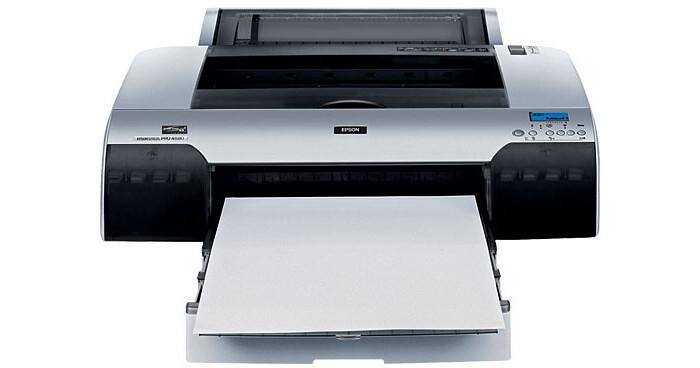
The Epson Stylus Pro 4880 Large-Format Printer incorporates a durable, 17-inch wide print carriage. It uses UltraChrome K3 Ink technology - now enhanced with Epson's breakthrough Vivid Magenta pigments - to produce archival prints with amazing color accuracy, gloss level, and scratch resistance; all while providing consistently stable colors that significantly outperforms other professional printers. Furthermore, the use of three levels of black ink provides neutral or toned black-and-white prints with impressively high density levels and virtually no metamerism or bronzing.
With an even higher level of ink droplet accuracy than found on previous Epson printer models, the MicroPiezo AMC print head has been enhanced with an exclusive ink repelling coating technology to dramatically reduce nozzle clogging. This is combined with the Epson AccuPhoto HD screening technology. You'll be able to print at an astonishing resolution of 2880 x 1440 dpi. You can obtain extremely accurate fine color blends and photographic transitions.
Capable of handling virtually any type of cut-sheet media up to 17 inches wide, the Epson Stylus Pro 4880 incorporates a high-capacity paper tray that accommodates up to 250 sheets of plain paper in sizes ranging from letter (8.5 x 11") up to 17 x 22". The printer also incorporates four different ways to load media, including a front-loading, straight-through path capable of handling media up to 1.5 mm thick and even a second, top-loading, single-sheet feeder optimized for fine art paper.
| Printing Method | |
|---|---|
| Printing Technology | 8-channel, drop-on-demand, Advanced MicroPiezo AMC print head with ink repelling coating technology and Auto Head Alignment and Cleaning technology |
| Maximum Resolution | 2880 x 1440 dpi |
| Minimum Ink Droplet Size | 3.5 picoliters with Variable Droplet Technology |
| Ink Type | Epson UltraChrome K3 with Vivid Magenta pigment-based ink |
| Ink Palette | C, LC, VM, VLM, Y, LK, LLK, PK/MK |
| Ink Cartridge Configuration | Uses 8 individual ink cartridges (total 9 cartridges available) |
| Performance | |
|---|---|
| Print Speed |
8" x 10" prints: 1:18 to 6:25 (Normal is 2:00) 11"x 14" prints: 2:27 to 10:55 (Normal is 3:25) 16"x 20" prints: 4:07 to 18:57 (Normal is 6:07) time listed in Min:Sec |
| Input Buffer | Not Specified by Manufacturer |
| Printer Duty Cycle |
First major maintenance interval (8" x 10" prints) At 720 x 720 dpi - 45,000 prints At 1440 x 720 dpi - 29,500 prints At 2880 x 1440 dpi - 15,200 prints Cutter life: 2,000 cuts (coated media) |
| Print Archival Life | Up to 200 Years (depending on print media) |
| Paper Handling | |
|---|---|
| Maximum Paper Width | 17" |
| Maximum Printable Area |
17" x 22" (Cut Sheet) with border 17" wide with length limited by application, OS, and Driver RIP used |
| Paper Sizes |
Roll Media with width of 8.25", 8.5", 10", 12", 13", 14", 16", 17" Cut Sheet from 8.5" x 11" to 17" x 22" |
| Borderless Photo Sizes |
Borderless printing with roll media sizes of 8.25", 8.5", 10", 12", 13", 14", 16", 17". Top and bottom edges can be automatically cut to any length |
| Paper Types | Inkjet media approved for use with pigment based inks |
| Maximum Paper Thickness |
12.5 mil (roll, tray and top feed slot) 1.5 mm posterboard (rear manual feed slot) |
| Paper Capacity |
Cut Sheets Paper Tray: 250 Sheets (Plain paper) Top and Rear manual feed slots: 1 Sheet Roll Media |
| Special Media Support | Works with non-paper based inkjet media |
| Connectivity | |
|---|---|
| Computer Interface |
USB 2.0 (Hi-Speed) 1.1 compatible Ethernet (10/100Base-T) RJ-45 connector |
| Compatible Memory Cards | None |
| Direct Print Capable | No |
| Network Capable | Yes (via Ethernet) |
| PostScript Support |
Optional PANTONE licensed and SWOP certified PostScript Language Level 3 Compatible RIP by ColorBurst Supported by most leading third-party RIPs and workflows |
| System & Software Requirements |
Windows System
Macintosh System
|
| Physical | |
|---|---|
| Status Display | Monochrome Alphanumeric LCD & Indicator LEDs |
| Image Preview Display | No |
| Front Panel Controls | Power, Pause/Cancel, Back/Paper source, Up/Paper feed, Down/Paper feed, Menu-Enter/Clean |
| Power Requirements | 110-240 V AC; 50-60 Hz |
| Dimensions (WxHxD) | 33 x 14 x 30" (839 x 356 x 762mm) |
| Weight | 89 lb (41 kg) |
REVIEW SNAPSHOT®
by PowerReviewsPros
Cons
Best Uses
Most Liked Positive Review
Outstanding value
I did a great deal of research comparing the 3800 with the 4880, which are the two printers I considered. I read about everything from pizza wheel marks left on paper by the 3800 ...Read complete review
I did a great deal of research comparing the 3800 with the 4880, which are the two printers I considered. I read about everything from pizza wheel marks left on paper by the 3800 to large ink usage to do a photo black to matte black ink conversion on the 4880. I am converting from darkroom to desktop, and in the end the print quality, the construction quality, and the ability to print rolls were the deciding factors. You can definitely make darkroom-quality prints with the 4880, using the appropriate print settings and paper. Now that Epson has a 3880 version with vivid magenta, that additional consideration is off the table. At the time of purchase, I did not want to have to look at a color print and wonder if I could have done better. With the 4880, I feel confident that I could not have done better. The rebates didn't hurt, either. The only downside is that it weighs nearly 100 lbs and is large, but that should not be a surprise for a solidly built 17 inch printer.
VS
Most Liked Negative Review
Do your research!
I finally had to replace my workhorse 2200. When researching, I guess I didn't read between the lines or what I was reading didn't register in my brain. This printer can not do true...Read complete review
I finally had to replace my workhorse 2200. When researching, I guess I didn't read between the lines or what I was reading didn't register in my brain. This printer can not do true borderless for roll paper without you trimming the top and bottom. For cut sheets, borderless is not possible. paper smaller than 8x10 is not usable. I'll have to buy another printer just to do everyday stuff. Epson doesn't make a 17" wide roll in their Luster (GREAT PAPER), so if I buy the 16" rolls, I lose an inch of print size before even starting.
REVIEWS
Reviewed by 33 customers
Sort by
Displaying reviews 1-20
Previous | Next »
Pros
Cons
Best Uses
Comments about Epson Stylus Pro 4880 Large-Format Printer:
I use the product to print photographic images. What is nice about the printer is not a lot. Ink is outrageously expensive. The well in the bottom that absorbs overflow ink will need to be replaced even if there is little ink in the absorption pad. I don't use my printer very often so the nozzles need cleaning for almost every color when i start it up; cleaning the nozzles is extremely expensive. The other day I turned my printer on and Windows 7 said peripheral not recognized. Try unplugging and re-plugging device in. If this does not work, REPLACE THE DEVICE. Replace a [$] machine. Sure. Real [*]. Don't buy!
Pros
Cons
Best Uses
Comments about Epson Stylus Pro 4880 Large-Format Printer:
We use this printer for graphic design printing and proofing. It does what it's supposed to. and consistantly. ...Only if the print cartridges were cheaper... :)
Pros
Cons
Best Uses
Comments about Epson Stylus Pro 4880 Large-Format Printer:
This printer is fast and consistent. after some debating over which of the 17 inch models to purchase, I arrived at the 4880. I've had it for a few weeks and I'm astounded by its consistency and speed. I got it up and running and made my first print in under an hour.
Pros
Cons
Best Uses
Comments about Epson Stylus Pro 4880 Large-Format Printer:
This is my first wide format printer and I was concerned with ink usage as much as anything. I am printing panoramas 16" X 48" and was pleasantly surprised how far the ink goes even with high DPI. I did find some adjustments needed when using this printer from my Stylus R2400-13". The vivid magenta definitely changed the hue and saturation, but once I adjust for this in PS the prints are awesome. I am finding this cheaper to run than my 13" R2400. I agree that this printer will cause extra costs if your switching to matte black, but for my B/W or matte I still use my R2400 and avoid this change over.
Pros
Cons
Best Uses
Comments about Epson Stylus Pro 4880 Large-Format Printer:
I am very pleased with this printer. There is a bit of a learning curve for set-up and it has a significant footprint, but it is a professional grade printer that does 17" wide matterial. The print quality is great, the ink is perminent and water proof after 1 day. Black and white printing quality is very near that of darkroom printing. Charging the system took almost half of the ink in the 110ml cartrages, but I have made about 50 11x17 inch quality photo prints on semi gloss paper and have only used about 1/4 of what was left after charging. If you do a lot of printing and need the large paper capacitiy this is a great printer.
Pros
Cons
Best Uses
Comments about Epson Stylus Pro 4880 Large-Format Printer:
I had spent most of the last year printing with a very highly regarded online lab, and I was getting into printing larger sizes, which really limits the value of printing through a lab.
With the recent (now ended) rebates, I calculated that it would take roughly 50 12x18 prints for the Epson to break even, which seemed fairly reasonable given my current printing rates.
Since receiving the 4880, I can honestly say that the value proposition has been the furthest thing from my mind. The extended color gamut over the lab process, combined with the immediate feedback of seeing my images in print has so much greater value than I could possibly ascribe a dollar amount.
I have yet to have a single disappointing print come out of this machine, though I do thoroughly soft-proof before printing. What I have found is that it is easy to push color saturation pretty far outside "natural" ranges, but the prints do not look fake as a result. If you desire to create more of a graphic art print than a photo, this printer has no trouble delivering brilliant colors with other-worldly saturation.
The black and white output is also phenomenal. I took a print under a microscope, and while the print monitor software showed that it had used all of the inks to create the print (colors and blacks,) I could only see black dots building up the image. Even under reasonably high magnification, it had a pleasant Ken-Burns grain effect. There was no color tint to the image whatsoever.
With regards to print speed, I have no trouble waiting 7 minutes for an 8x10 print at the highest quality uni-directional setting. Compared with waiting typically 4 days including shipping from the lab, 7 minutes is an instant.
And finally, using roll media to print 17x25 images at my discretion is beyond description. But despite my love of roll printing, the tray-based handling of 8.5x11 media is flawless.
In short, if you are in the market for a 17" wide printer and even suspect you might want to work with roll media at some point, the 4880 will produce stunning output with near-zero effort. I could not recommend this printer highly enough!
Pros
Cons
Best Uses
Comments about Epson Stylus Pro 4880 Large-Format Printer:
we use this product almost exclusively to produce separations for silk screening. we print black on clear, waterproof acetate. since we've purchased it, the quality of the ink comes out great. it's nice and black. never had a problem with a clog or a streak or anything! i really have no negative comments about it except that is really heavy ~88 lbs. but what do you expect? this thing is a monster of size and quality!
Pros
Cons
Best Uses
Comments about Epson Stylus Pro 4880 Large-Format Printer:
Great printer for quality photographs both in color and black & white.
Pros
Cons
Best Uses
Comments about Epson Stylus Pro 4880 Large-Format Printer:
Being able to print up to 16x24 is one of the more obvious attributes of this printer, but what really impresses me is how beautiful the black and white images are that it produces. Very neutral and when printed on Epson's Exhibition Fiber paper or Ilford's Gold Fiber Silk they look very, very much like prints from the traditional wet dark room. Print speed is much better than the Epson 2200. ICC profiles are quite accurate and the driver dialogue box is well thought out and intuitive.
Only drawback I have seen so far, and the reason for only 4 stars, is that from time to time it will smudge ink in the margin area of the paper and on at least two occasions it has done this in the printed area as well. Could be something I'm doing incorrectly, though, since this is quite a step up from the Epson 2200. In spite of it being quite a step up it was not at all difficult to set up and start making stunning prints in fairly short order.
I use this printer to print my photographic images on for sale to the public and I have no hesitation selling my images when they are printed using this machine.
Pros
Cons
Best Uses
Comments about Epson Stylus Pro 4880 Large-Format Printer:
Outstanding colors, efficiency and ease of use. The only problem at all that I can come up with is having to swap the black ink and it isn't completely intuitive to set up the first time.
Pros
Cons
Best Uses
Comments about Epson Stylus Pro 4880 Large-Format Printer:
So far no nozzle clogging even with light use. The inks are lasting longer than I was anticipating and it does an amazing job even on the fast setting.
Pros
Cons
Best Uses
Comments about Epson Stylus Pro 4880 Large-Format Printer:
At last a printer in my home that can make large prints! I'm so excited. This printer was easy to install, the hardest part was getting a friend to help lift it ;-) After that it was up and running inside of thirty minutes. I sat up all night making test prints and the next day loaded on roll paper and started making 17 x 30" prints. Remarkable. I love it.
Pros
Cons
Best Uses
Comments about Epson Stylus Pro 4880 Large-Format Printer:
We've owned many inkjet printers ranging in size from small table top to 60" large format. This epson is fast and delivers great output. We use it to print photos from digital cameras and artwork we correct. Most prints are close enough in color that no color correction is needed by us. Although it is a large printer, i think the actual footprint is more than acceptable. Just plan on 2 people to carry it.
Pros
Cons
Best Uses
Comments about Epson Stylus Pro 4880 Large-Format Printer:
I am a photographer that does his own printing for clients and this printer is remarkable. I had a 3800 which was wonderful also. I use one printer for regular ink and one with Sawgrass Sublimation ink for printing on objects. Epson support is wonderful. I had it unpacked and ready to go in under an hour.
Pros
Cons
Best Uses
Comments about Epson Stylus Pro 4880 Large-Format Printer:
[...] the results have been fantastic. As it sits, nestled atop a homemade shelf, my new Epson 4880 rocks out my photos sharper and faster than any printer I have previously used. With its easy to use instructions, included ink and test paper, I was off and printing in about an hour. I recommend this printer to anyone who is willing to listen.
Pros
Cons
Best Uses
Comments about Epson Stylus Pro 4880 Large-Format Printer:
I've worked with this printer in a local digital photo lab. All the prints I've made on this are beautiful. The prints are accurate and stunning.
I found that learning to correctly load the paper was a bit of a task, but once you master this, the process is smooth.
As you will read in most reviews of this machine, each time you go from printing either glossy or matt prints, you have to go through a process of changing inks. It uses a lot of ink and is a costly procedure. The newer model, the 4900, does not have this issue.
The machine is really large, weighing 89 pounds.
I love this printer and the images it helps me to produce.
Pros
Cons
Best Uses
Comments about Epson Stylus Pro 4880 Large-Format Printer:
AMAZING print quality. Amazing detail. Totally not cool when you don't print for a while and cleaning the heads uses a ton of ink. Ink flushing for changing blacks would be very costly but I stick to photo black so not a problem yet. Note that is cant print on small cut sheets as the 3800 can. I didn't know that going in, but roll printing is very good.... we just do a lot of cutting. :) ..... highly recommended.
This thing is built to last, think of it this way, the 3800 or 3880 what ever it is weighs about 40 lbs. it is a 17in wide printer. This is also a 17in. wide printer that weights 80lbs! That means the hardware is better, stronger and built to last.
Also get a dehumidifier for the summer and a humidity gauge or else the inks will clog up like nobodies business.
Pros
Cons
Best Uses
Comments about Epson Stylus Pro 4880 Large-Format Printer:
I purchased this printer so I could get back control over my photography. After years of printing my own work in the darkroom, I packed up my enlarger and started having my prints done in a lab.I was often disappointed in the printers interpretation of my images.The lab was using a chromera printer. I've made a couple prints on the 4880 using their exhibition fiber paper and in comparison to the prints on the chromera, the 4880 had much better depth and color. I'm very pleased so far. Do note that unless you have deep pockets, switching black inks wastes ink and it's best to commit to papers that either use the regular black ink, or the photo black ink. Also, buy additional ink at time of purchase because 40 percent of the ink supplied is used tho charge the print head.
Pros
Cons
Best Uses
Comments about Epson Stylus Pro 4880 Large-Format Printer:
Works quickly, quietly and the quality and reliability is superb!
Pros
Cons
Best Uses
Comments about Epson Stylus Pro 4880 Large-Format Printer:
I use this printer for both large format Network diagrams and photos. It does a great job of both, but be forewarned, it's big. The dimensions only take into consideration the size of the printer, not the space you'll need around the printer for large format paper feeding. Also, if you buy the 220ml ink cartridges, the printer looks stupid, since half of each cartridge sticks out of the front of the printer (the cartidges are about 10" long, but the hole is only 5" deep) . If you're concerned about asthetics, then stick to the 110ml cartridges. Nothing bad at all to say about the quality of the printouts or functionality. So far, it's been a dream to have in my home office...size aside.
Displaying reviews 1-20
Previous | Next »