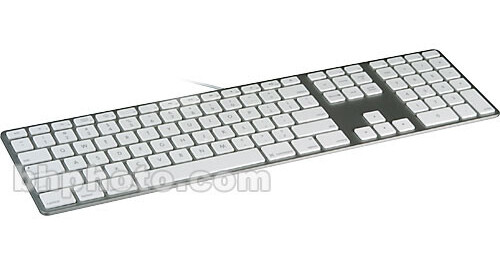
The Apple Keyboard with Numeric Keypad is an elegantly designed input device that is sure to turn heads. It features a standard QWERTY layout, dedicated OS X function keys, an integrated two-port USB 2.0 hub, and an ultra-thin anodized aluminum design. The keys themselves are of the low-profile variety, practically identical in feel and function to those found on Apple's MacBook line of notebook computers.
| Ergonomic | No |
| Interface | USB |
| Wireless | No |
| Buttons | None |
| Enhanced Function Keys | Mac OS X Function Keys |
| Dimensions (WxHxD) | Not Specified by Manufacturer |
| Weight | Not Specified by Manufacturer |
REVIEW SNAPSHOT®
by PowerReviewsPros
Cons
Best Uses
Most Liked Positive Review
Great Keyboard!
When I first started using this keyboard, I have to tell you, it was a little weird getting used to typing on it.
The key surface is flat across unlike the keyb...Read complete review
When I first started using this keyboard, I have to tell you, it was a little weird getting used to typing on it.
The key surface is flat across unlike the keyboards I'm so used to typing on with a dip in the key, think of these keys more like laptop keyboard keys where they're flat across. But these have a different feeling to them.
It's best to keep the keyboard at the edge of your desk (or that's what I found) to have the most comfort when using it, but experiment with different positions to have the keyboard that best suit your requirements.
I say this, because the keyboard is SO thin that it's huge change to what I'm used to, and what I'm sure a lot of others are used to as well.
However, over the course of a few days you'll eventually get used to typing on it and things will go smooth again, I made a few mistakes at first when typing on it.
But after adjusting to the new keyboard, I have to say that I can't go back to using a regular keyboard again!
I'm a programmer, so I'm always using my keyboard and using it a lot, so I need to have a keyboard that I will be comfortable with and be able to type efficiently on.
Overall, this is a good keyboard the only downfall is that it's wired, I wanted the numeric keypad on the side, but the full keyboard doesn't come wireless.
This is a great keyboard otherwise, and if you own a Mac and you're looking for a Mac keyboard, then this is perfect.
VS
Most Liked Negative Review
elegant, but different
I purchased the keyboard to replace old G5 work station keyboard. It is functional, but it takes a little while to get used to the different feel of the keyboard.
There is n...Read complete review
I purchased the keyboard to replace old G5 work station keyboard. It is functional, but it takes a little while to get used to the different feel of the keyboard.
There is not as much "bounce" in the keys as previous keyboard due to the thin design and the keyboard feels somewhat "cold" and "hard" when you start using it first.
The biggest annoyance in the beginning is that you don't feel that the key is being hit, so there were a lot of double letter typing in the beginning.
However after a while you do get used to it, but you do miss the old design.
REVIEWS
Reviewed by 84 customers
Sort by
Displaying reviews 1-20
Previous | Next »
Pros
Cons
Best Uses
Comments about Apple Keyboard with Numeric Keypad:
idk how apple is going to 1-up this, but im excited to see how they pull it off
Pros
Cons
Best Uses
Comments about Apple Keyboard with Numeric Keypad:
It is much more user friendly with micro soft products.
Pros
Cons
Best Uses
Comments about Apple Keyboard with Numeric Keypad:
better then macbook pro keyboard
Pros
Cons
Best Uses
Comments about Apple Keyboard with Numeric Keypad:
Low profile, no excess to work around, and easy to use are descriptions I would use about this keyboard. The only thing I would change is to make it wireless. I got this model because of the numeric keys on the side. I will be a mac user from now on...
Pros
Cons
Best Uses
Comments about Apple Keyboard with Numeric Keypad:
Every time I buy an iMac, I have to buy one of these keyboards. For some reason, iMacs come with a small, no-number-pad keyboard, and many users have grown so accustomed to having access to the separate number pad that we have to go out and buy this keyboard at extra cost. The keyboard is attractive and is of quality construction. Unfortunately, the numeric pad keyboard is not wireless (by comparison to the standard, smaller keyboard, which IS wireless), but this aspect is fairly inconsequential when compared to the increased functionality it affords.
Pros
Cons
Best Uses
Comments about Apple Keyboard with Numeric Keypad:
This keyboard is wonderful and a great deal. The wire does not get in the way, and having an extra USB port is nice, since I have a Macbook Pro that only have two USB ports. The keyboard is less than 3" longer than my laptop, so it fits into my laptop backpack. Having the number keypad and additional keys (arrows, delete, etc.) is great! I bought the keyboard, so that I could work with better/healthier posture. I have set my laptop up in a box, so that I sit up straight and look straight forward, but my arms/neck/back are relaxed, because the keyboard is at waist level. I have no complaints at this point, except that the spacebar is kind of loud, and I realize that is inconsequential.
Pros
Cons
Best Uses
Comments about Apple Keyboard with Numeric Keypad:
Needed a full size keyboard for my Mac. No brainer, these keyboards are great, both, in functionality and styling. And, it's cheaper to get it from B&H than directly from Apple!
Pros
Cons
Best Uses
Comments about Apple Keyboard with Numeric Keypad:
A well designed and beautiful keyboard. The two USB ports on sides and quiet keys when typing are a plus. This Apple keyboard with numeric keypad enhances and integrates the whole look of the Apple computer and mouse.
Pros
Cons
Best Uses
Comments about Apple Keyboard with Numeric Keypad:
I have compared a number of Apple's keyboards, and like this model best. The 2 integrated USB ports are welcome and easy to access. I like the assortment of keys better on this one than others. Not having to monitor and replace batteries is a big plus too, because this one is wired to the Mac (I use one on a mini Mac and another on an iMac).
Pros
Cons
Best Uses
Comments about Apple Keyboard with Numeric Keypad:
Just love the number pad for my iMac.
Pros
Cons
Best Uses
Comments about Apple Keyboard with Numeric Keypad:
Its striking, minimalist design doesn't hamper its versatility, perfect layout makes for comfortable hands...I can't find anything wrong with it.
Pros
Cons
Best Uses
Comments about Apple Keyboard with Numeric Keypad:
[...]I love the Apple Keyboard I received -- especially with all keys working perfectly, plus the price [...]were right.
Pros
Cons
Best Uses
Comments about Apple Keyboard with Numeric Keypad:
Nice upgrade from my older bluetooth apple keyboard. Its so much easier to type on these low profile keys.
Pros
Cons
Best Uses
Comments about Apple Keyboard with Numeric Keypad:
NOW GIMME 1000 dollars
Pros
Cons
Best Uses
Comments about Apple Keyboard with Numeric Keypad:
I love the keyboard but I am missing the directions for the use
Pros
Cons
Best Uses
Comments about Apple Keyboard with Numeric Keypad:
At home I use a macbook laptop in combination with a 21" monitor, and I wanted an external keyboard so I could free up space on my desk area.
The keyboard is very well build and is accurate and responsive to every key stroke. Some of the F keys double as volume, brightness, etc... control which comes in very handy. The keyboard also features an auxiliary USB port that can be used for the computer mouse or any other device that doesn't draw excessive power from the computer. If you use your Apple keyboard like I do, that extra USB port is a nice add-on.
The build quality is superb, and is priced accordingly.
Pros
Cons
Best Uses
Comments about Apple Keyboard with Numeric Keypad:
After trying the smaller wireless keyboard that came with the 21.5" iMac I ordered this larger wired version. This is what I use with my MacPro and for me it is simply easier to use. The wireless keyboard is more like a MacBook Pro board, and I miss having a forward delete key on that and so missed it on the wireless board. In addition, the wired keyboard also has the advantage of two USB 2.0 ports, which are great for transferring data via thumb drives. [...]
Pros
Cons
Best Uses
Comments about Apple Keyboard with Numeric Keypad:
I've had the same keyboard for about 8 years...hammering it on a daily basis with my speedy gonsalez typing...but alas, some keys starting sticking last week. It was heartbreaking to let the guy go after our long time together but the ultra-thin keyboard has dried my tears and I'm typing faster than ever!! A long overdue purchase that will probably last another 8 years!! Well done Apple!!
Pros
Cons
Best Uses
Comments about Apple Keyboard with Numeric Keypad:
I use this with my macbook pro when docked into a henge docks station along with magic trackpad. Love the feel of keys. Would have gone wireless version but no number pad on wireless, which is a must for me.
Pros
Cons
Best Uses
Comments about Apple Keyboard with Numeric Keypad:
Bought this to replace an old MAC keyboard and love the sleek design. Made of light weight aluminum and white plastic combined. Less bulky than previous designs and keys are very thin. I would compare it to playing an electric guitar vs an acoustic as far as ease of use.
Displaying reviews 1-20
Previous | Next »