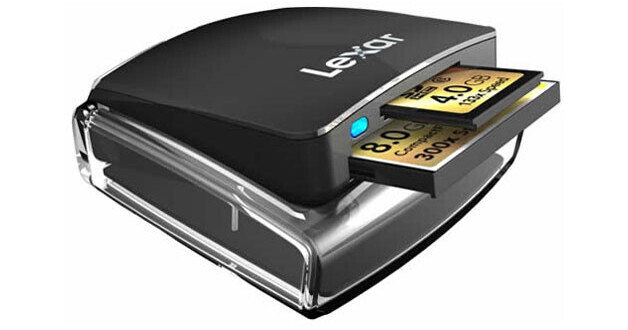
The Lexar Professional UDMA Dual-Slot USB Reader is a high-performance card reader with a compact, portable design that enables fast download speeds from the high capacity CompactFlash (CF) and Secure Digital (SD) cards. It is also fully compatible with UDMA CF & Secure Digital High Capacity (SDHC) cards.
REVIEW SNAPSHOT®
by PowerReviewsPros
Cons
Best Uses
Most Liked Positive Review
Using a UDMA card? You must get this!
After upgrading to a UDMA card for my Canon 7D, and continuing to use the bargain-bin USB multi-card reader I've had for years (and waiting more than 30 minutes for an 8GB card full ...Read complete review
After upgrading to a UDMA card for my Canon 7D, and continuing to use the bargain-bin USB multi-card reader I've had for years (and waiting more than 30 minutes for an 8GB card full of RAW files to copy over), I thought, "Really, there's nothing quicker?!"
Yes there is. A UDMA card reader to keep up with the speed of a UDMA card! In hindsight, I would say, "Duh..." But prior to hearing a pro photographer on a podcast talk about using a UDMA card reader, I really had no clue what I was missing.
So I bought this reader after comparison and review shopping. Holy cow, does the copying of files from card to computer scream in comparison to the basic card reader I had before!
Size, form factor are perfect on this item. Yes, it only takes two sizes of cards, but for my needs, those are the only two types of cards I've ever used.
A great feature is that the body of the reader pops up when you squeeze the sides, exposing the slots. The body then clicks into storage mode when pushed back down--great for keeping out dirt and other particles. I just keep this card reader floating around in my camera bag with the included USB cable wrapped up, not worrying about how those slots might be gathering dust. So light and portable, this reader is always with me!
VS
Most Liked Negative Review
Not trustworthy
I purchased this reader about a year ago. The CF bay worked only occasionally, but the SD bay worked very well. Suspecting it was my laptop having issues with reading the CF cards, ...Read complete review
I purchased this reader about a year ago. The CF bay worked only occasionally, but the SD bay worked very well. Suspecting it was my laptop having issues with reading the CF cards, I did nothing. Recently the CF bay stopped working completely, so I attempted to use another machine to transfer my files. It did not work - and neither did a third machine or any of three other CF cards, two of which were new. It now appears that the problems I was having were with the reader itself.
The reader's CF bay has become completely non-functional. Given that, and issues with SanDisk cards not fitting properly into the SD slot, I cannot recommend this card reader. While fast when it works, it has worked too few times to be trusted.
REVIEWS
Reviewed by 391 customers
Sort by
Displaying reviews 1-20
Previous | Next »
Pros
Cons
Best Uses
Comments about Lexar Professional UDMA Dual-Slot USB Reader:
Very easy to use. Securely attaches to your computer or laptop, with a quick upload. Closes while not using to keep openings clean from dust and debree. Great product.
Pros
Cons
Best Uses
Comments about Lexar Professional UDMA Dual-Slot USB Reader:
We like the dual slot and the portable design that makes it compact & clean. Sadly we are unable to get the Firewire readers anymore & have to revert back to these USB for our Macs.
Pros
Cons
Best Uses
Comments about Lexar Professional UDMA Dual-Slot USB Reader:
Works great and nice that I don't have to switch readers when downloading from SD cards
Pros
Cons
Best Uses
Comments about Lexar Professional UDMA Dual-Slot USB Reader:
Answered the need for compact, rugged, card reader. It is reasonably fast and pop-up shell case keeps out the travelbag lint. I'll be getting another one that will live in my studio. A good solution for the professional photographer on the move.
Pros
Cons
Best Uses
Comments about Lexar Professional UDMA Dual-Slot USB Reader:
The cards fit perfectly in the slots, and are downloaded to my laptop in seconds. At first, I thought something was wrong, but the process from card to laptop was so fast I didn't believe it was possible!
The Lexar Professional UDMA Dual-Slot USB Reader is extremely well built, compact and FAST. The top folds down out of the way for compact and safe storage. The BEST card reader ever!
Pros
Cons
Best Uses
Comments about Lexar Professional UDMA Dual-Slot USB Reader:
I got this reader to dump CF and SD cards from my 7D and Gopro HD Hero. It works as expected. The design is nice, with a pop up mechanism to hide/protect the slots when not in use.
Pros
Cons
Best Uses
Comments about Lexar Professional UDMA Dual-Slot USB Reader:
I have had several USB card readers which I always found to be slow. This card reader is FAST! Both of the SD and CF slots, I get incredible fast speeds, something that I have not see even on the onboard card readers.
Pros
Cons
Best Uses
Comments about Lexar Professional UDMA Dual-Slot USB Reader:
This thing is very fast compared to other readers I own. For dumping large amounts of images/video to a Macbook Pro, this is all you need. If you have a USB3.0 capable device pay the extra $10 and get the USB3.0 version.
Pros
Cons
Best Uses
Comments about Lexar Professional UDMA Dual-Slot USB Reader:
It plugs in and does just what it's supposed to do - Download highspeed cards containing video and photos. I use it on My MAC and it runs cards just fine. It is quick and works about as I would expect for USB 2.0. Absolutely no problems, Its a bonus that it closes up so that less dust from yur desk gets inside.
Pros
Cons
Best Uses
Comments about Lexar Professional UDMA Dual-Slot USB Reader:
Works great with my UDMA Compact Flash Cards
Pros
Cons
Best Uses
Comments about Lexar Professional UDMA Dual-Slot USB Reader:
Use it for video in a 7D with CF cards.
Great design for protecting its function.
Long and universal cord.
Pros
Cons
Best Uses
Comments about Lexar Professional UDMA Dual-Slot USB Reader:
I have used this card reader to export many different examples of my work. I can effortlessly off load my pictures and video in extremely quick order. I used to have a USB plug in only and it only lasted about 3 months. This has a much more robust feel and look and is very easy to use.
Pros
Cons
Best Uses
Comments about Lexar Professional UDMA Dual-Slot USB Reader:
Fast, ergonomic and easy to use. It works, and thats it.
Pros
Cons
Best Uses
Comments about Lexar Professional UDMA Dual-Slot USB Reader:
It's great to finally just grab my case of memory cards and card reader and look over pictures instead of changing through my camera. This reader transfers very fast and works just as it should!
Pros
Cons
Best Uses
Comments about Lexar Professional UDMA Dual-Slot USB Reader:
I had such high hopes for this slim card reader. It had great reviews and worked well most of the time. However, the small plastic pieces on the side that pop the reader open broke within a few uses. The non-skid pad on the bottom also detached from the reader and shortly thereafter the reader wouldn't hold a connection during transfer. This is the type of thing I would expect from a cheap card reader, but not a Lexar product.
Pros
Cons
Best Uses
Comments about Lexar Professional UDMA Dual-Slot USB Reader:
Not a real complicated device...plug it in, put in you card and it transfers data to the computer. The free Image Rescue software that came with it is nice and seems to work fine. I like that it has both the CF and SD slot so I do not have to use two different readers.
Pros
Cons
Best Uses
Comments about Lexar Professional UDMA Dual-Slot USB Reader:
Downloading footage faster then ever.
Great reader!
Pros
Cons
Best Uses
Comments about Lexar Professional UDMA Dual-Slot USB Reader:
For a USB 2.0 reader, this is the fastest I've owned. Paired with the Lexar 16GB 400x cards, and I am very pleased with the speed I can offload pictures and videos. I really like how it opens and closes to minimize any dirt getting into the card drive. It's compact and takes up hardly any space.
Pros
Cons
Best Uses
Comments about Lexar Professional UDMA Dual-Slot USB Reader:
Used the card reader about 10X so far and it works really well...happy with it :)
Pros
Cons
Best Uses
Comments about Lexar Professional UDMA Dual-Slot USB Reader:
Portability and speed downloading images. Great product
Displaying reviews 1-20
Previous | Next »