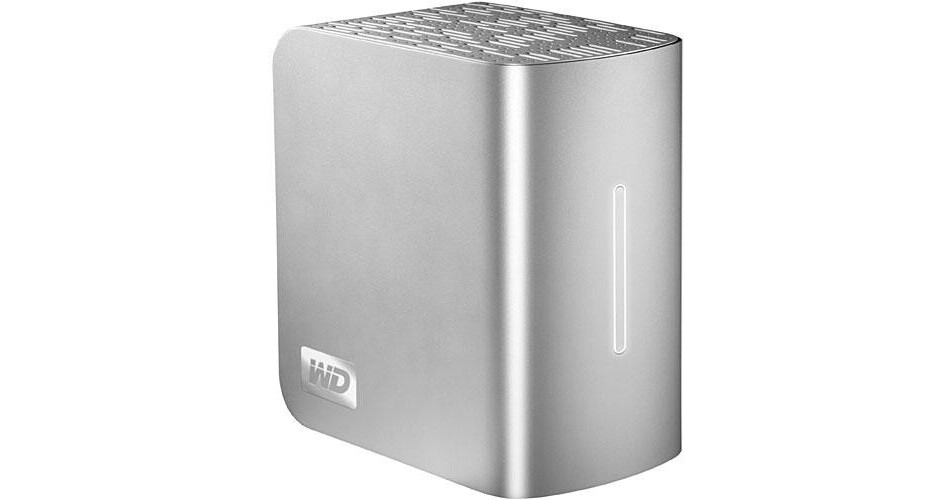
O HD Externo My Book Studio Edition II de 1TB com Interface Quádrupla da Western Digital é um drive externo de alta capacidade com uma interface que permite conexão via FireWire-800, FireWire-400, USB 2.0 ou eSATA.
O drive está alojado em um design elegante que pode, à primeira vista, ser confundido com um livro de capa dura. Isso torna o drive uma excelente escolha para qualquer um que gostaria de ter um drive exclusivo e elegante para uso para armazenamento externo de dados. O drive possui economia de energia integrada, não tem nenhum elemento que possa contaminar o ambiente e vem em um pacote reciclável, tornando-o tão amigável ao meio ambiente quanto é aos seus dados.
O drive vem pré-formatado com o sistema de dados Mac OS X HFS+ Journaled, tornando-o uma escolha excelente para profissionais criativos que trabalham com a plataforma Mac. O software WD Anywhere Backup para OS X vem incluído. O drive também pode ser reformatado para uso em Windows. Esse drive é uma excelente escolha para qualquer um que gostaria de adicionar armazenamento ao próprio computador sem a necessidade de sacrifícios estéticos.
| Desempenho | |
|---|---|
| Capacidade | 1TB |
| Interface |
1 eSATA 1 USB 2.0 1 FireWire-400 de 6 Pinos 1 FireWire-800 de 9 Pinos |
| Velocidade do Drive | 7200rpm |
| Buffer | Não especificado pelo fabricante |
| Tempo Médio de Busca | Não especificado pelo fabricante |
| Taxa de Transferência de Dados Sustentada | Não especificado pelo fabricante |
| Drivers | |
|---|---|
| Suporta | Não é Necessário |
| Incluído | Não é Necessário |
| Requisitos de Sistema | |
|---|---|
| Mac | Sistema Operacional: Mac OS X 10.4.10+; 10.5.2+ |
| Windows | Sistema Operacional: Windows 2000, XP, Vista |
| Hardware | Porta FireWire-400, FireWire-800, USB 2.0 ou eSATA |
| Geral | |
|---|---|
| De Mesa | |
| Requisitos de Alimentação | AC: 100-240VAC, 47-63Hz |
| Requisitos Ambientais |
Temperatura Operacional: 41-95° F (5-35° C) Temperatura de Armazenamento: -4-149° F (-20-65° C) |
| Dimensões (LxAxP) | 3,9 x 6,5 x 6,1 polegadas (9,8 x 16,6 x 15,4cm) |
| Peso | 5,2 libras (2,6kg) |
REVIEW SNAPSHOT®
by PowerReviewsPros
Cons
Best Uses
REVIEWS
Reviewed by 18 customers
Sort by
Displaying reviews 1-18
Pros
Cons
Best Uses
Comments about Western Digital 1TB My Book Studio Edition II Quad Interface External Hard Drive:
Just what I needed. Lots of storage, quiet and multiple ports. Great Drive!
Pros
Cons
Best Uses
Comments about Western Digital 1TB My Book Studio Edition II Quad Interface External Hard Drive:
I use this product for Digital Audio Production, using Firewire 800 on an iMac. This acts as my media drive for project files and working folders.
The RAID 0 is super fast. Transferring 51GB took only 20 minutes!
Unit disconnects every day or two. It will shut down and disappear from my Mac's Desktop. My other MyBook (USB) does not do this. A simple pressing of the power button and it is reconnected. Maybe it is supposed to do this? Still disconcerting.
All in al 4 out of 5. Solid unit, amazing price at B&H!
Pros
Cons
Best Uses
Comments about Western Digital 1TB My Book Studio Edition II Quad Interface External Hard Drive:
This one gets top ratings from me because it suited my needs exactly.
A cheap, portable (enclosed) RAID for storage which had FW800 to connect to my MBP.
All I needed, and thats what I got. No complaints.
Pros
Cons
Best Uses
Comments about Western Digital 1TB My Book Studio Edition II Quad Interface External Hard Drive:
This drive was installed on a Vista 64 via Firewire 800 port so my comments are limited to that OS.
The installation was easy, reformatting the drive for NTFS went smoothly but this is a large drive so it takes quite a bit of time. The drive is setup in a RAID 1 configuration for maximum redundancy.
The Vista backup system creates both file backups and image backups on this drive without any difficulties so it was not necessary to install any of the utilities that come with the drive.
This is a ‘green’ drive so there were some (possibly) unexpected consequences: With the button manager installed the drive spins up and down frequently and some applications (Photoshop CS4 for instance) cause the drive to spin up when the application is launched, which causes the application to wait until the drive is on line before completing the load sequence.
The button manager also prevents the drive from being taken off line; a reboot is needed to safely remove it when button manager is running on Vista 64 ...so don't install button manager if this will be an issue.
My recommendation is to limit the use of this drive for backups (image or file), to not install or at least not run the button manager, to take the drive off line during the day (easy to do via the button on the drive as long as the button manager is not installed), to exclude the drive from Vista’s indexing and possibly set your virus protection software to ignore this drive. In this configuration the drive is great for backing up huge amounts of data on a daily basis (at night) without having any impact on the normal use of the computer.
The drive is not yet a month old so I can’t comment on its reliability.
For highly active external drives a non-green drive would be better.
Pros
Cons
Best Uses
Comments about Western Digital 1TB My Book Studio Edition II Quad Interface External Hard Drive:
I have to admit one of the things I love best about this drive is how well it matches my computer. It hums real quietly during a big file transfer but it's nothing remarkable so I don't even remember what it sounds like.
Pros
Cons
Best Uses
Comments about Western Digital 1TB My Book Studio Edition II Quad Interface External Hard Drive:
This is a good product for backup and time machine on mac. it saves everything and you will not lose any files.
Pros
Cons
Best Uses
Comments about Western Digital 1TB My Book Studio Edition II Quad Interface External Hard Drive:
Sits on my desk behind my iMac doing what it is supposed to do. The device functions flawlessly and quiet as a mouse.
The device was easy to install. Currently using Firewire 800 and backing up my iMac using Time Machine.
It was a little tricky doing the firmware update - had to switch to USB connection etc, but went well as I followed the instructions.
Ask me next year if it is still working
Pros
Cons
Best Uses
Comments about Western Digital 1TB My Book Studio Edition II Quad Interface External Hard Drive:
Use mainly for backup of another My Book, and (hopefully) permanent storage of my best photos.
Pros
Cons
Best Uses
Comments about Western Digital 1TB My Book Studio Edition II Quad Interface External Hard Drive:
I love having the freedom of four different connection types, not to mention the added speed of an e-sata connection. It's also great having the option between RAID 0 and 1. Once I downloaded the cd and installed the trial software I was actually impressed. It's nice not having to remember to manually back up my files.
Pros
Cons
Best Uses
Comments about Western Digital 1TB My Book Studio Edition II Quad Interface External Hard Drive:
I purchased this after looking at other similar products. I worked as a full time professional photographer for over a decade and have a collection of DVD's and CD's in cases that I wanted to back up. Also with my digital file sizes increasing with a new 12MP camera, hard drive space has been dwindling.
The drive was easy to set up, runs very quietly, and has a nice display. I use it in a RAID 1 configuration and have has no problems transferring data over to it. I haven't used any of the optional back up software that comes with it but I do like having the easy to access menu bar status feature that tells me how full the drive is and if it's feeling happy today.
The only con that I can see is that the case is plastic and not aluminum which another user also pointed out. This does give it a slightly less durable feel when handling. That said I've only handled it once which was when I unpackaged it.
Pros
Cons
Best Uses
Comments about Western Digital 1TB My Book Studio Edition II Quad Interface External Hard Drive:
I have been looking for good reliable external storage and found it with the My Book. I’ve used WD external drives when I go on shoots and the My Book is a very good choice for my studio. I run a 64bit PC and found the setup to be easy right out of the box. I figure it took me less than ½ hour to have the drive totally up and running and I’m far from being the sharpest stick around when it comes to IT.
I was looking for good reliable storage and I got it.
Pros
Cons
Best Uses
Comments about Western Digital 1TB My Book Studio Edition II Quad Interface External Hard Drive:
I haven't had the drive for too long yet, but so far, it's great. I use time machine to back up. I have a lot of raw photo files, photoshop files and some video. I needed something because I had no more space on my hard drive. I bought a 500gb WD drive and I was happy with it but I needed more space.
This one solves my problems.
Pros
Cons
Best Uses
Comments about Western Digital 1TB My Book Studio Edition II Quad Interface External Hard Drive:
I use this drive for storage of my hd video projects edited on final cut. Its been great so far. I've only had it a couple weeks. If I had to nit pick, it would be the fact that even the photos lead you to believe that this is a heavy metal made piece of gear, the exterior is actually silver plastic, which feels cheaper than the product I was expecting.
Pros
Cons
Best Uses
Comments about Western Digital 1TB My Book Studio Edition II Quad Interface External Hard Drive:
I purchased this HD to use as my primary video storage device on my Apple iMac. Transfer rates are great using the Mac's Firewire 800 connection. The drive is virtually silent (no fan) and runs surprisingly cool.
I have setup the drive in a RAID-1 configuration via the supplied utility. That process was quick and painless.
Overall I would say this an excellent product and performs just as expected.
Pros
Cons
Best Uses
Comments about Western Digital 1TB My Book Studio Edition II Quad Interface External Hard Drive:
I use my 1TB My Book for professional music creation and high def video editing. It's simple to install, quiet, great performance with the eSATA interface and at a great price point.
The one negative if you purchase this drive for the fast eSATA interface and intend to use it in a RAID 1 configuration - the My Book RAID Manager DOES NOT support the eSATA interface which means 1) one of the other 3 interfaces must be used to configure the drive as RAID 1, and 2) there is no way to monitor the health of the RAID array (e.g., disk failure). WD tech support suggests occasionally connecting via one of the other interfaces to confirm the health of the RAID array.
Overall, I’m very happy with the drive, just a bit disappointed that WD choose not to fully support all four interfaces; i.e., lack of RAID Manager support for the eSATA interface.
Pros
Cons
Best Uses
Comments about Western Digital 1TB My Book Studio Edition II Quad Interface External Hard Drive:
This is my second WD external HDD and it will not be my last. The design, performance, and value these models provide are unmatched. I use this unit for backing up digital photos and can easily accumulate 2-3 GB in a trip so a large, fast, dependable drive is essential for archiving and for serving my photo editing. Hookup to my Macs and iBooks are absolutely flawless plug and play and all interfaces function smoothly. It is a bit bulky but the dual drives and RAID capability are desirable for my use. I cannot think of one flaw, significant or not other than perhaps that it does not stack securely when placed on its side. Other than that, this unit is easily the equal of any other units in this class...and economical to boot.
Pros
Cons
Best Uses
Comments about Western Digital 1TB My Book Studio Edition II Quad Interface External Hard Drive:
I've had no problems with this 1TB drive, and I make this thing work under extreme conditions. Compared to other external FW drives the case does not seem as rugged, but if it is going to sit on a shelf next to your computer it is perfect. Spins up quick and looks nice next to my mac.
Pros
Cons
Best Uses
Comments about Western Digital 1TB My Book Studio Edition II Quad Interface External Hard Drive:
We use the hard drive for backup of two computers. It is very easy to use. I like how it has four interfaces. However, I think the drive would be better if it were aluminum instead of plastic.
Displaying reviews 1-18