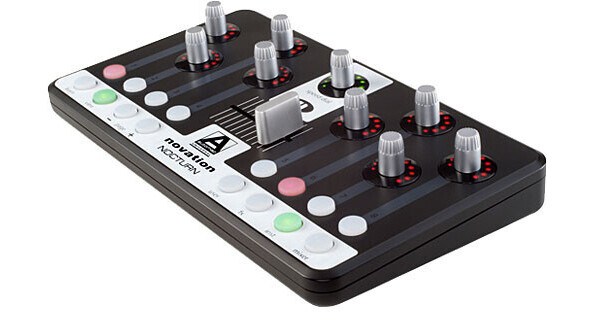
Nocturn from Novation is a hardware plug-in controller featuring Automap Universal 2.0 software, that in turn provides automatic, instant and intelligent control of all automatable plug-ins within every major sequencer, including Pro Tools. Featuring a transparent control GUI, the software places a transparent control map across the computer screen, to be recalled or hidden at will.
The controller features eight touch-sensitive rotary encoders, each equipped with a bright eleven-LED ring, which can be ideal for a laptop DJ working in a dark club environment. These are complemented by eight, user-assignable illuminated buttons and a smooth, professional 45mm crossfader. Also included is a "speed dial", a touch-sensitive rotary encoder that instantly takes control of whatever the user's mouse is focused on.
When a plug-in is instantiated, how the parameters are assigned to each of Nocturn's controls is instantly visible. A click and control "learn" function is also available for quick re-assigning of controls, or for creating custom controller maps. Multiple page options mean the user can assign a potentially infinite number of parameters for each plug-in. Automap Universal also supports standard MIDI protocol, providing the same transparent display for quick and simple assigning of MIDI parameters.
Nocturn's tactile control layout, side mounted USB socket, and ultra-low profile, allow it to sit neatly in front of a QWERTY keyboard, or on a larger keyboard, while rugged rubber grips hold it steady. Combined, Automap Universal 2.0's transparent control GUI, and the controller's touch sensitive dials remove issues inherent in controlling multiple instruments and effects.
| Connection | USB MIDI |
| Faders | 1 x Crossfader |
| Transport Controls | No |
| Jog/Shuttle | No |
| Rotary Controls | 9 |
| Numeric Keypad | No |
| Display | Transparent control GUI |
| Multiple Units | If used alongside a dedicated Automap system for a DAW |
| Included Software | Automap Universal |
| Software Supported |
VST Audio Units TDM/RTAS (Mac only at present) |
| System Requirements |
Mac G4 1GHz minimum OS X 10.4.0 or greater (Leopard supported) 256MB RAM PC Pentium III 1GHz minimum Windows XP SP 2 and Vista 32/64 256MB RAM (Vista requires more) |
| Dimensions (WxDxH) | 9.4 x 5.4 x 1.1" (239 x 137 x 28mm) |
| Weight | 1.1 lbs (0.5 kg) |
| Specialties | USB 1.1 and USB 2.0 compatible |
REVIEW SNAPSHOT®
by PowerReviewsPros
Cons
Best Uses
REVIEWS
Reviewed by 6 customers
Sort by
Displaying reviews 1-6
Pros
Cons
Best Uses
Comments about Novation Nocturn - Hardware Controller for Plug-Ins:
Novation makes good stuff. This is a nice controller with a good amount of flexibility. The mix of endless rotary encoders and buttons are nice. As a maker of audio-visuals, I am trying to find a good use for the DJ slider... but with not much luck. Still nice to have I guess but more so for a DJ. The automap software is nice with a few annoying things that are minor. And another very nice feature is 4 buttons to instantly change the map and better yet, a bunch of "pages" per map that allow for new cc's for each control, making this a very flexible machine. For the low price, can't ask for anything more... and it's very solidly built and it delivers.
Pros
Cons
Best Uses
Comments about Novation Nocturn - Hardware Controller for Plug-Ins:
Price is good. Pretty sturdy for being plastic. The automap software works splendidly - can use knobs and stuff generically or custom map them. The 'speed dial' knob is a great concept and works well (can alter any parameter that the mouse cursor is hovered over). i absolutely LOVE how the buttons can be set to increment a range - SO useful. The only 'problem' is that the Automap software is essential - you can't simply 'plug and play' like most midi controllers, and it can be a little tricky to configure with your DAW.
Pros
Cons
Best Uses
Comments about Novation Nocturn - Hardware Controller for Plug-Ins:
Works as advertised out of the box. Well made hardware/software and ease of use makes this a great value.
Pros
Cons
Best Uses
Comments about Novation Nocturn - Hardware Controller for Plug-Ins:
I recently purchased this item, and have not had the opportunity to familiarize myself with all of its capabilities. It seems well built, and is very compact, perfect for a space-limited setup.
I am running Logic Studio 9, and the unit works well, but not perfectly, with this software. Following directions, I have still been unable to get it to work as advertised. It controls many functions, but does not, for example, bring up the Logic mixer as it should. I find it particularly tedious that for every new file I create, I have to go through the somewhat time intensive procedure of "connecting" the device as a monitor.
I also don't like that it doesn't have assigned transport buttons.
However, as I noted, I have yet to become familiar with its particular nuances; given the complexity of setting up midi parameters for controllers, this device via Automap, is relatively painless. Automap Standard is a bit clunky and always has to be running somewhere in the background, but generally, it seems to do the job of controlling midi functions. My only other controller was an Akai LPK, and it was terrible in comparison to this one.
Manuals are in PDF format and not that helpful. There is scant support (one video tutorial) for setup in Logic.
Pros
Cons
Best Uses
Comments about Novation Nocturn - Hardware Controller for Plug-Ins:
The program ability is endless, truly a piece of art.
Pros
Cons
Best Uses
Comments about Novation Nocturn - Hardware Controller for Plug-Ins:
The product is easy to use thanks to automap. The only problem I had was that some cc signals conflict with my launchpad but this can be easily fixed.
Displaying reviews 1-6