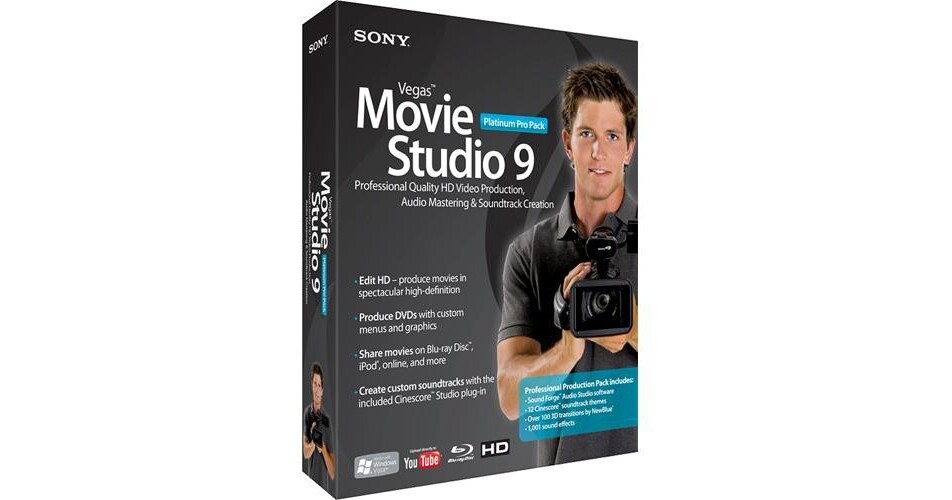
The Vegas Movie Studio 9 Platinum Edition Pro Pack Video Editing Software from Sony is a powerful editing and DVD creation software suite designed for home users. The software allows you to capture and organize DV, HDV, and AVCHD video, edit clips on a timeline, and export the finished movie to Blu-ray, DVD or VCD. It even allows you to export movies for use with the PSP, iPod, and YouTube. This is a great option for home users who would like to reap the benefits of a powerful, yet simple to use, editing suite.
| Video System | NTSC, PAL |
| Video Formats | DV, HDV, AVCHD |
| Audio Formats | 16-bit/48kHz |
| Supported Codecs | DV, HDV, AVCHD |
| Supported File Types |
Import: AIFF, ATRAC, AVI, BMP, CDA, FLAC, GIF, JPG, LPEC, MMV, MP3, MPEG-1, MPEG-2, MPEG-4, Sony M2TS, OGG, PCA, PNG, PSD, QuickTime, SFA, SWF, TGA, TIF, W64, WAV, WMA, WMV Export: AC-3, ATRAC, AVI, FLAC, MP3, MPEG-1, MPEG-2, MPEG-4, OGG, PCA, QuickTime, RealAudio, RealVideo, W64, WAV, WMA, WMV |
| Number of Video Tracks | 4 |
| Number of Audio Tracks | 4 |
| Film Editing Support | None |
| Edit Decision List (EDL) Support | None |
| Deck Control | via FireWire |
| DVD Authoring | Yes |
| System Requirements |
Computer: 800MHz (2.8GHz for HDV) Operating System: Windows XP SP2, Vista Memory: 256MB (512MB for HDV) Hard Drive: 200MB Hardware: Windows-compatible Sound Card, DVD-ROM drive, OHCI-compliant IEEE-1394DV Card, Blu-ray, CD, or DVD Burner Software: Microsoft .NET Framework 2.0, DirectX 9.0c (included) |
| Qualified Hardware | DVD, DV, HDV, and AVCHD camcorders |
REVIEW SNAPSHOT®
by PowerReviewsPros
Cons
Best Uses
Most Liked Positive Review
Very powerful, yet easy to use!
I use this product for editing of HD (1080i) video from my Sony HD Handicam. My videos combine a little of everything, from softball games, ballet recitals, 4-wheeling excursions, and vacations...Read complete review
I use this product for editing of HD (1080i) video from my Sony HD Handicam. My videos combine a little of everything, from softball games, ballet recitals, 4-wheeling excursions, and vacations. This works flawlessly for all of them, giving me complete control over the scenes, audio, and effects. I've used a half-dozen other programs, but all of them needed something else, so I found myself switching between them to do various editing jobs. With Vegas, I only have to use 1 program! In my opinion nothing else around this price range even comes close.
I made a DVD (titles, menus, chapters, etc) from my daughter's latest ballet recital, and made some copies for family members. My DVD looked just as good (and sometimes better) than the professional DVD of the recital they sold for $20!
VS
Most Liked Negative Review
Disappointed
Downloads easily, then the nightmare begins. Horrible instructions, slow slow slow rendering, absolutely 0 support from sony techs. Waste of valuable time and money.
REVIEWS
Reviewed by 19 customers
Sort by
Displaying reviews 1-19
Pros
Cons
Best Uses
Comments about Sony Vegas Movie Studio 9 Platinum Edition Pro Pack Video Editing Software:
I've used Vegas for editing for years and I've also had formal Film training using Final Cut so I'm very picky when it comes to editing software. Sony's Movie Studio 9 is an awesome editor! It allows great functionality that's easy to use and can produce extremely high quality videos. The DVD Architect is an amazing DVD creation tool and Sony's Sound Forge is one of the best audio editors!
Pros
Cons
Best Uses
Comments about Sony Vegas Movie Studio 9 Platinum Edition Pro Pack Video Editing Software:
Had Vegas pro 7.0 and decided to get 9.0 Good price. Good bundle pkg for the price
Pros
Cons
Best Uses
Comments about Sony Vegas Movie Studio 9 Platinum Edition Pro Pack Video Editing Software:
Very nice & easy to use video editing software. Loading of software into my computer was easy and fast. Slight learning curve, but managable. Easy to use software and fun. My only suggestion to others is use a computer with two side by side monitors because there are quite a few action windows you will have to learn to manage. I am using a laptop computer to run this software and other than too little screen space at times, the software run very fast and is easy to use.
Pros
Cons
Best Uses
Comments about Sony Vegas Movie Studio 9 Platinum Edition Pro Pack Video Editing Software:
I use the product to make minor videos with pictures and some video. It gives you about everything you need and more. Some of the procedures and other video effects are hard to get too but thats fine. It's also hard to make video flow.
Pros
Cons
Best Uses
Comments about Sony Vegas Movie Studio 9 Platinum Edition Pro Pack Video Editing Software:
I'm far from being a professional when it comes to video editing, but I'm certainly not a novice either. My current level of experience allows me to utilize some of the advanced features of Studio 9 Pro and produce really great results. That's my reward for purchasing such a great suite of software.
If I have to be critical of this product, it would only be that it has a completely different feel from other editing software I've used in the past. Thus... the learning curve is a bit broader, but not unmanageable. The tutorial included is quite informative and easy to understand.
For someone wanting lots of bells & whistles and is not afraid to expand their editing knowledge and technique... this is definitely software of interest.
Pros
Cons
Best Uses
Comments about Sony Vegas Movie Studio 9 Platinum Edition Pro Pack Video Editing Software:
I use this software to edit home video, weddings, and special events. I classify myself as semi-pro. Once you become familiar with it, it is not difficult to use but it packs almost as much power as Vegas Pro. There are some video tutorials available which really help to learn how to use it. DVD Architect easily creates high quality DVDs.
Pros
Cons
Best Uses
Comments about Sony Vegas Movie Studio 9 Platinum Edition Pro Pack Video Editing Software:
This is the best video editing software that I have ever used. It is extremely efficient and easy to use and I really like all the features. The only complaint i have if you can call it that is the video I shoot using my pov 1.5 cannot be put straight into vegas movie studio or the audio wont show up. You can open it in windows media player and the avi file has audio which was confusing. What i do now is open the file in windows movie maker and save it as an dv-avi file and that can upload into vegas movie studio and the audio works.
Pros
Cons
Best Uses
Comments about Sony Vegas Movie Studio 9 Platinum Edition Pro Pack Video Editing Software:
Getting my feet wet with Microsoft Movie Maker, it was time to move up to a much more robust video editing tool. I first took a look at Vegas Movie Studio through their free 30-day trial, and was extremely impressed with the lack of delay I was getting, compared to the Microsoft product. A friend gave me as a gift Adobe Premiere Elements which I took a look at and was very disappointed with its performance and video display problems.Vegas Movie Studio was just what I was looking for: a product that actually works as advertised, a not-too-difficult learning curve, and plenty of bells and whistles packed into it to help me have great outcomes with my personal video projects. The part of Vegas Movie Studio that really helped me was their interactive Show Me How tutorials. It sure beats reading a manual and it's kind of like having an instructor right here on my computer.Thank you B & H for your [...] and at the best competitive price I found online!!!
Pros
Cons
Best Uses
Comments about Sony Vegas Movie Studio 9 Platinum Edition Pro Pack Video Editing Software:
it s great It was what I want for me to edit my home videos
Pros
Cons
Best Uses
Comments about Sony Vegas Movie Studio 9 Platinum Edition Pro Pack Video Editing Software:
I make great home videos that are watchable. The Included sound effects and soundtracks is a bonus I did not expect. Easy capture from almost any format, and convert, publish, and compress to hdv, bluray or youtube. Thousands of transitions,video FX, color corrector, 5.1 surround sound. Online help is available. You will not be disappointed.
Pros
Cons
Best Uses
Comments about Sony Vegas Movie Studio 9 Platinum Edition Pro Pack Video Editing Software:
Good for capture and edit of video
Good interface although there is a learning curve
Includes help menu but no hard copy manual
Pros
Cons
Best Uses
Comments about Sony Vegas Movie Studio 9 Platinum Edition Pro Pack Video Editing Software:
My daughter uses this to make her movies and she loves it. She says it is really easy to use and has a lot of fun features.
Highly recommends it.
Pros
Cons
Best Uses
Comments about Sony Vegas Movie Studio 9 Platinum Edition Pro Pack Video Editing Software:
I used version 6 with great success and then needed to upgrade to v.9 as the new laptop is running Vista 64bit. It seems to work perfectly on this new laptop, and the DVD Architect software works on it as well.
I love the professional controls in this program, especially the ability to adjust the curves and the color of different clips so that they match each other and you don't have that disconcerting change of color or brightness from one clip (or camera) to another.
Be warned that the learning curve for this software is steep precisely because it is so powerful. The tutorials help a lot but you will need to pay great attention to the details. It is well worth the effort, though, as you can do things with this program that are completely impossible in the lightweight solutions generally supplied with camcorders and new computers (yes, even Macs.)
4 video tracks and 4 audio tracks give you a great deal of flexibility and allow for a host of effects. I don't think that I would need more than this unless I turned professional (not remotely likely!)
My only gripe is that when you move a group of clips, it is very difficult to ensure that other pieces don't inadvertently get moved at the same time. Not a problem until the project gets large enough that you can't see it all at once...
I would recommend this program to anyone who wants to do more than the basics. It rarely crashes (in WinXP or in Vista), and is pretty speedy even without dual core processors. You get so much for the price, almost as much as a full professional program.
Pros
Cons
Best Uses
Comments about Sony Vegas Movie Studio 9 Platinum Edition Pro Pack Video Editing Software:
I have gone faaarr too long simply using Windows Movie Maker. I tried out the trial of Sony Vegas Platinum Pro and I was impressed; impressed enough to buy it. When comparing it to the other version, regular Platinum, I'd recommend Platinum Pro. It is worth the few extra dollars. I love its dual monitor compatibility and how you can customize the layout of everything. Also, the DVD Architect design and SoundForge studio are a wonderful extra. To just get to the point, it is a fantastic program. I'd recommend it for home movies and school projects.
Pros
Cons
Best Uses
Comments about Sony Vegas Movie Studio 9 Platinum Edition Pro Pack Video Editing Software:
The editor is very easy to use. Tons of functionality. The bundled package gives you more than you need to produce high quality videos. Plus you get music editing software. I created a quick edit of some video within 1 hour of loading the software
Pros
Cons
Best Uses
Comments about Sony Vegas Movie Studio 9 Platinum Edition Pro Pack Video Editing Software:
Downloads easily, then the nightmare begins. Horrible instructions, slow slow slow rendering, absolutely 0 support from sony techs. Waste of valuable time and money.
Pros
Cons
Best Uses
Comments about Sony Vegas Movie Studio 9 Platinum Edition Pro Pack Video Editing Software:
Although a little different from others, Vegas Platinum is amazing. You can not a get an editor this good for the same price. You get a wide choice of compressions for what ever project. It is also easy to convert 60i footage to 24p.
Pros
Cons
Best Uses
Comments about Sony Vegas Movie Studio 9 Platinum Edition Pro Pack Video Editing Software:
Vegas Movie Studio 9 Platinum Pro is a feature-packed editing platfom that boasts many professional quality tools. It's quite a step up from Windows Movie Maker which I've been using, but not as intuitive.
Be prepared to invest some time into learning this product. This is an editor that I will grow into and if I ever need more power (doubtful) I appreciate that the interface is virtually identical to Sony's Vegas professional editing software.
Pros
Cons
Best Uses
Comments about Sony Vegas Movie Studio 9 Platinum Edition Pro Pack Video Editing Software:
I use this product for editing of HD (1080i) video from my Sony HD Handicam. My videos combine a little of everything, from softball games, ballet recitals, 4-wheeling excursions, and vacations. This works flawlessly for all of them, giving me complete control over the scenes, audio, and effects. I've used a half-dozen other programs, but all of them needed something else, so I found myself switching between them to do various editing jobs. With Vegas, I only have to use 1 program! In my opinion nothing else around this price range even comes close.
I made a DVD (titles, menus, chapters, etc) from my daughter's latest ballet recital, and made some copies for family members. My DVD looked just as good (and sometimes better) than the professional DVD of the recital they sold for $20!
Displaying reviews 1-19