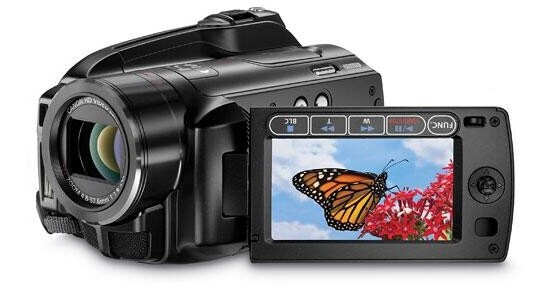
A Camcorder de Alta Definição com Disco Rígido VIXIA HG20 AVCHD da Canon traz alta definição real 1920 x 1080. Capture até 22 horas e 55 minutos de vídeo HD (em LP) no disco rígido interno de 60GB. Quando ficar sem espaço no disco rígido, basta gravar em cartões de memória SD/SDHC. É possível capturar fotos de 2.76Mp com o HG20 ou em um cartão ou de gravações de vídeo armazenadas no disco rígido.
O sensor CMOS de 1/3,2" 3.3Mp e o processador de imagem DIGIC DVII operam juntos para oferecer imagens de alta definição nítidas e belas sempre que você gravar. Além disso, a estabilização Ótica SuperRange garante mais proteção contra as inevitáveis oscilações e o tremor da mão. Outros recursos incluem gravação 24Mbps, modo Cinema 24p e modo Progressivo 30p. Na ausência de um visor, você compõe e reproduz suas imagens exclusivamente no display LCD Widescreen de 2,7". Acrescente um microfone externo com a Mini Sapata Avançada de Acessórios e verifique a duração e tempo restante da bateria de Íons de Lítio Inteligente. E, quando você estiver pronto para editar, o Software de Edição de Vídeo Pixela ImageMixer 3SE incluído o guiará neste processo.
| Optics | |
|---|---|
| Sensor | Sensor CMOS 3.3Mp de 1/3,2" |
| Lente |
Genuína Lente de Vídeo HD Canon 12x
Distância focal=4,8-57mm f/stop=1.8-3.0mm |
| Zoom |
Ótico 12x Digital 200x |
| Tamanho do Filtro | 37mm |
| Recording | |
|---|---|
| Sistema | NTSC |
| Formato | MPEG-4 AVC/H.264 |
| Áudio | Dolby Digital de 2 canais (AC-3 de 2 canais) |
| Estabilização de Imagem | Ótica SuperRange (deslocamento de lente) |
| Lux | 0,2 lux (modo Noturno) |
| Mídia de Gravação |
Disco Rígido de 60GB Cartão de memória SD/SDHC (não incluído) |
| Tempo de Gravação |
Disco Rígido de 60GB MXP: 5 horas, 30 minutos LP: 22 horas, 55 minutos
Cartão de memória de 32GB |
| Display | |
|---|---|
| Tipo de Display | Widescreen LCD (211.000 pixels) |
| Tamanho da Tela | 2,7 polegadas (6,8cm) |
| Visor | Não |
| Camera Features | |
|---|---|
| Controles Manuais | Balanço de Branco, Foco, Exposição |
| Auto Falante Integrado | Sim |
| Microfone Integrado | Sim |
| Sapata de Acessórios | Mini Sapata "S" Avançada |
| Luz/Flash Integrado |
Sim - flash Não - luz |
| Digital Still Mode | |
|---|---|
| Mídia de Gravação de Fotos | SD/SDHC |
| Resolução | 2.76Mp (1920 x 1080) |
| Input/Output Connectors | |
|---|---|
| Entradas | Mini estéreo de 3,5mm |
| Saída |
mini USB USB 2.0 Componente Composto HDMI (Tipo C) Mini de 4 pólos e 3,5mm |
| Entrada de Microfone | Sim |
| Jack de Headphone | Sim |
| General | |
|---|---|
| Idiomas | Não especificado pelo fabricante |
| Sistemas Operacionais Compatíveis | Não especificado pelo fabricante |
| Requisitos de Alimentação | 100-240V AC, 50/60Hz |
| Dimensões (LxAxP) | 3,1 x 3,0 x 5,4 polegadas (80 x 77 x 138mm) |
| Peso | 1,1 libra (515g) |
REVIEW SNAPSHOT®
by PowerReviewsPros
Cons
Best Uses
Most Liked Positive Review
Good mix of quality and value
I've had this camera for a bit over a month. So far, I'm very impressed. I'm a casual user with likely a bit more than average technical skill.
General Comments, Han...Read complete review
I've had this camera for a bit over a month. So far, I'm very impressed. I'm a casual user with likely a bit more than average technical skill.
General Comments, Handling the Camcorder, and Ease of Use:
This camera is really easy to use if you have some basic understanding or prior experience with hard-drive based video cameras. The camera is a bit bulky, but it is nevertheless easy to handle and fits comfortably in my hand. I recommend a good case. The Sony case, while large, is quite good in my experience, as the camera is not pocketable anyway. The major downside to this camera is the lack of an optical viewfinder, but the price and performance far outweigh this limitation for the casual user, in my opinion. The overall video quality is great. I'm shooting indoors primarily. Under proper light conditions, the quality is excellent (e.g., bright daylight indoors or a well-lit room). I do see occasional compression noise, but it is minimal and may also be due to shooting with default settings so far. Under average light conditions (e.g., incandescent lighting when subjects are not direclty lit), the video noise increases and the video may look more like DVD quality due to the noise. A good video light (and likely not using default video settings) should fix this problem. The camera is certainly capable of great HD quality video.
Video Editing and Rendering:
So far, I shot less than an hour of video and imported it into iMovie 08 (Mac) without any problems and without the need to install the software that accompanies the camera. I shoot at the highest quality setting (1920x1080) and 24 fps. Editing the AVCHD files on the iMac (2.8 Ghz Dual Core Intel processor) was smooth and easy. The video project also contained a mix of movie files from my older standard def DV camera, as well as a number of transitions and titles. iMovie lets you export either to 960 x 540 (highest setting, but not quite HD) or to a QuickTime movie format, which can be rendered at full HD resolution of 1920x1080, 24 fps, etc. Exporting 10 minutes of edited video to 960x540 certainly took a bit longer than 10 minutes, but not too bad. Exporting the edited video project to a QuickTime movie at 1920x1080, 24 fps, H.264 codec at "best quality" took a very long time, however. Over 70 minutes for less than 10 minutes of video (the quality was phenomenal though, I couldn't see any compression noise). At the high-def QuickTime movie setting above, each minute of exported video took about 0.5 GB of hard drive space! There is likely a better setting though that achieves comparable video quality and results in a smaller file size. My goal is to find a setting that lets me save an HD quality QuickTime movie to a memory card that could then be played back on a TV via a memory card input. This should obviate the need to record the rendered movies to a Blu-Ray disc, which Macs currently do not allow due to some licensing issues (to my knowledge Sony Vegas for Windows should allow burning to a Blu-Ray disc if you are editing your movies in Windows).
In summary, I would highly recommend this camera to someone who has at least an average technical skill and is willing to spend some time playing with the video editing software to find the right settings.
VS
Most Liked Negative Review
Stunningly Sharp
Amazing images, but there is a mild artifacting that occurs with motion even on the higher bitrates. This might be one of the sharpest cameras I've worked with ever. Very low noise as well...Read complete review
Amazing images, but there is a mild artifacting that occurs with motion even on the higher bitrates. This might be one of the sharpest cameras I've worked with ever. Very low noise as well.
REVIEWS
Reviewed by 99 customers
Sort by
Displaying reviews 1-20
Previous | Next »
Pros
Cons
Best Uses
Comments about Canon VIXIA HG20 AVCHD Hard Disk Drive High Definition Camcorder:
I researched camcorders for several months, with one of the key aspects being low light performance. I read several reviews over the internet that gave this camera high ratings in all phases, including low light. It has not disappointed. I have used it so far mainly to shoot the Christmas lights at Temple Square in Salt Lake City and absolutely love the quality of video. Anyone who rates this camera poor in low light does not know how to manually alter the camera mode/settings to achieve better low light performance. Picture quality is fantastic, ease of use is very good, amount of manual controls very good. Some things are a bit cumbersome, such as the manual focus being controlled only by a joystick on the flip out LCD, but hey, for what I paid for it I can live with some of its quirky attributes. A wonderful camcorder!
Pros
Cons
Best Uses
Comments about Canon VIXIA HG20 AVCHD Hard Disk Drive High Definition Camcorder:
A good product, but small details that I forgot for the buy are dificult to asimilate:
You can't use like a webcam, it's a big pity today
The .mts video format it's dificult to try in other pc to download in web,etc.. or to transform in other format.
The pixela software is a trial version to make videos, a mistake and particulary mine didn't work,don't like at all this version.
Pros
Cons
Best Uses
Comments about Canon VIXIA HG20 AVCHD Hard Disk Drive High Definition Camcorder:
Good camcorder for a decent price. Easy to use, low battery life!
Pros
Cons
Best Uses
Comments about Canon VIXIA HG20 AVCHD Hard Disk Drive High Definition Camcorder:
I'm not a professional; just use this to capture my memorable outings & my 2yr old daughter. I have been using the HG20 for more than a month, almost everyday.
Easy to use.
Crisp Clear videos.
Not so great battery life (As other reviewers commonly mention).
Night / low light videos are not as great as the bright light ones; but it is not bad.
Still a lot more options to explore.
Pros
Cons
Best Uses
Comments about Canon VIXIA HG20 AVCHD Hard Disk Drive High Definition Camcorder:
This camera is maybe the best deal ever. Stunning image quality, silent, huge storage and fantastic colors. If it had a 5 mp still camera it would be unbeatable.
Pros
Cons
Best Uses
Comments about Canon VIXIA HG20 AVCHD Hard Disk Drive High Definition Camcorder:
I used this the second day I had it to record our senior play. I was the lighting tech in the back of an 800 seat auditorium.
The camcorder performed flawlessly, even when zooming in on the performers from that distance. Faces were very sharp, and the sound recorded very well.
I was able to plug the HG20 into my DVD/VCR recorder to make great copies of the performance. I am very pleased with my purchase.
The Imagemaker 3 software is clumsy to use, and woefully under-featured. I used AVS4YOU video software instead to edit and clip the recordings.
Pros
Cons
Best Uses
Comments about Canon VIXIA HG20 AVCHD Hard Disk Drive High Definition Camcorder:
Amazing video quality. Have been filming in XP+ and that is too good. Sound is great. Looks great on HDTV. Low light performance is great. Best value for the price that is [$].On the downside, the battery life is low. Must have spare battery. Also, the video editing software provided is no match to the camcorder features.
Pros
Cons
Best Uses
Comments about Canon VIXIA HG20 AVCHD Hard Disk Drive High Definition Camcorder:
Picture quality not as expected from other reviews
The software that comes with it is useless, the worst I have ever seen.
Camera's value is brought down by this software.
Canon should drop them like a hot potato.
Overall not a bad camera but you can find better picture quality in HD than this one for the same kind of money.
Pros
Cons
Best Uses
Comments about Canon VIXIA HG20 AVCHD Hard Disk Drive High Definition Camcorder:
I bought this unit to utilize as a wide camera angle when i tape weddings. I have to say that though It is difficult for me to match the picture and colors to my Panasonic HMC150, it still gave me a great picture.
When I switched it to Cinema mode, I found there to be much less noise (and, of course, what appears to be much less gain).
I did allow my sister to use it to tape her Daughter's outside graduation and the results were very stunning.
Though I didn't utilize the software with that came with the camera, I don't suppose that it is anything outstanding. I do all of my editing in Imovie 09 on an Intel Macbook pro or Adobe Premiere CS4 (upgraded to 4.1) on a Core I7 with 6 GB of DDR3.
When I am inside, I switch to "Cinema Mode" and set the white balance manually and always seem to produce a clean image.
For the price, this unit has served it's purpose. I have since upgraded my second camera to a Panasonic HMC40 so that I can better match my HMC150 footage.
Still, I am happy to keep it as a carry around camcorder because the image quality is so great for the price.
Pros
Cons
Best Uses
Comments about Canon VIXIA HG20 AVCHD Hard Disk Drive High Definition Camcorder:
This Camera is amazing the picture is phenominal. Built in Hard Drive a plus. No More Tapes! Yay! Plus the low light performance is awesome. Exceptional job from Canon. Great Value. You need a fast computer to edit. "Quad Core if Possible"
Pros
Cons
Best Uses
Comments about Canon VIXIA HG20 AVCHD Hard Disk Drive High Definition Camcorder:
The Canon HG20 has served me well in the short time I have owned it. It takes good quality video, it is simple to use, while still offering a surprising depth of features for a consumer model.
Like all consumer camcorders, the audio leaves something to be desired. Thankfully, it can mount a shotgun mike on it's (proprietary) hot shoe. If you don't like the Canon DM-100, it also accepts 3.5mm mic input, and wireless mikes are cheap enough now that there should be no difficulty in bypassing the compressed and somewhat noisy audio from the internal mic.
The Optical Image Stabilization is good, though some reviews hiding in the depths of the internet made exaggerated claims about it's effectiveness. It will not make your walking footage look like a stedicam shot by any measure, nor will the OIS substitute for a tripod.
Battery Life is dismal, plan on buying an extended battery or a couple of spares. Also, the camera doubles as the battery charger, and will not charge after-market batteries. Plan on shelling out the premium price for official Canon batteries.
Pros
Cons
Best Uses
Comments about Canon VIXIA HG20 AVCHD Hard Disk Drive High Definition Camcorder:
If you are lookng for an HD camcorder, this is the one you need. Stop looking else where and wasting your time with reviews. The Canon HG20 is top of most lists.
The 3 negatives of the camera are that you have to use the lcd view finder, no other built in finder. Secondly, the supplied battery with the camera doesn't last very long, buy the BP-819 BATTERY PACK (1780mAH) which lasts 4 hours or so and thirdly, the software isn't great.
Otherwise, this is the camcorder, stop looking any further......
Pros
Cons
Best Uses
Comments about Canon VIXIA HG20 AVCHD Hard Disk Drive High Definition Camcorder:
I've had this camera for a couple of weeks now, and I have to say that I really like it. I can't say that I've explored all of it's features yet, but so far it's almost perfect for my purposes.
I've been learning the subtleties of video blogging for a little while now, and I wanted a camera that was as easy to use as the FlipVideo, but one that took higher quality video and was a bit more versatile.
First of all, the menus are really easy to understand and operate. I've only owned a FlipVideo camera and a Canon Elura (another great camera). The navigation button is sturdy and responsive. The menus are simple and easy to navigate. When you change the video size, the camera let's you know different details about the particular format you're choosing. Sort of like having a user's manual built into the menu. Really helps make informed choices, but helps you as you're operating the camera.
The quality of the HD is quite good. I play these movies on my 23" monitors, and they look great. But this is my first time using an HD camera, and my first time using a camera with a hard drive. First of all, neither of these pose any problem, but it did take me a few minutes to figure out how to get the videos from the camera to my computer. I don't use the camera to edit (though some of the in-camera filters are really cool). Instead, I take everything from the camera to my hard drive, and then use commercial video editing software to polish the work. I wasn't familiar with the native file format (m2ts), which sort of scared me at first. I thought I would have to use the included software to translate (and degrade) the files into .wmv or .mp4. Not easy with the software. But then I realized that this each of the different kinds of video editing software I use imports the .m2ts files directly. No need to translate first. What a great feature! Now I can record onto the hard drive, plug the camera into my computer, transfer the files, import them into my editing software, all within a matter of minutes. It's so much faster and easier than my process with the Elura 100.
One of the reasons I loved the Elura so much was that it had both a built-in light and microphone port. That was a tough combo to find in an affordable camera. With this HG20, I simply paid a little extra and picked up the integrated (well designed!) VFL-2 VIDEO FLASH LIGHT. And this camera already has a good quality microphone port, too. So now I still have all the functionality of a camera that I love, with the speed, quality, and convenience of an High-Def, hard drive camera.
I am soooo glad I pick up this camera. Though it was definitely at the top of my price range, it's so much better than I had even hoped for. I would recommend this camera to anyone. I hope you pick one up and enjoy it as much as I have. Happy shooting!
Pros
Cons
Best Uses
Comments about Canon VIXIA HG20 AVCHD Hard Disk Drive High Definition Camcorder:
Use the camcorder to tape the grandchildren and to tape family events.
Pros
Cons
Best Uses
Comments about Canon VIXIA HG20 AVCHD Hard Disk Drive High Definition Camcorder:
Works great out of the box. This is my replacement to an older Sony SD camcorder. Difference is like day and night for a much better value. Easy to navigate thru the controls. Great Video in low light conditions. Very light and compact.
Pros
Cons
Best Uses
Comments about Canon VIXIA HG20 AVCHD Hard Disk Drive High Definition Camcorder:
This is great for catching my kids sports and family videos around the house.
Pros
Cons
Best Uses
Comments about Canon VIXIA HG20 AVCHD Hard Disk Drive High Definition Camcorder:
Canon makes terrific products and this Vixia HG20 is no exception! It is easy to use and the visual output quality is much better than expected both for still shots and video. I plan to use this camcorder for both business and personal use and this is an outstanding choice for both! My only criticism is the lackluster software packaged with the HG20. Limited ability to edit and excessive time to render an output file. I would pay a bit more for the camcorder to get a more substantial software editing and rendering package. I'd give it five stars with improved software. Purchasing this camcorder is an excellent choice.
Pros
Cons
Best Uses
Comments about Canon VIXIA HG20 AVCHD Hard Disk Drive High Definition Camcorder:
Great quality video. Easy to use. Very compact and light. The only draw back I have is that the hot shoe accessories I have from my old Canon don't work with the new mini hot shoe and I can not find an adapter.
Pros
Cons
Best Uses
Comments about Canon VIXIA HG20 AVCHD Hard Disk Drive High Definition Camcorder:
This is incredible TV-like quality. The only thing is you need a FAST FAST FAST computer to play and edit the files ( at least 4gb ram and dual core processor). I have a 6gb ram that barely plays them.
Pros
Cons
Best Uses
Comments about Canon VIXIA HG20 AVCHD Hard Disk Drive High Definition Camcorder:
I had the opportunity to film for the first time this week. It was a water sport event, with lots of motion, lots of cheering and noise, and a partly cloudy day. The results were so much better than expected. The camera microphones did a great job of capturing the sound, and the image quality was superb. The 30 minutes of recording yielded 384MB of video, which is a massive amount of data to manipulate. I am using the video editor and converter from AVS4YOU [@], and it made the editing easy and inexpensive.
Displaying reviews 1-20
Previous | Next »