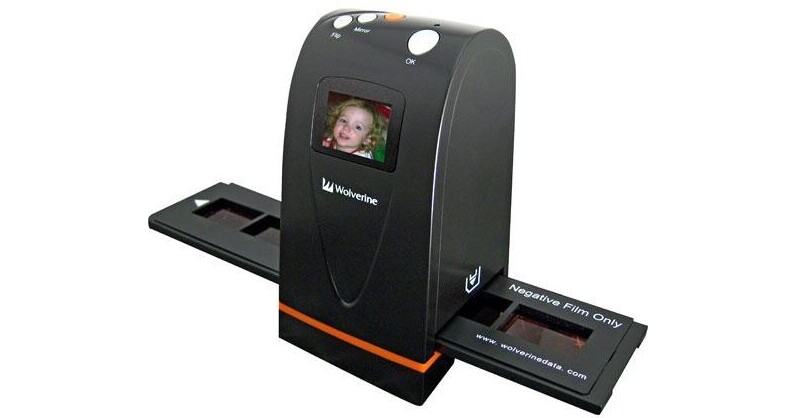
The Wolverine F2D Film to Digital Image Converter makes quick work of digitizing all of your 35mm slides and negatives. This stand-alone unit is incredibly compact and lets users quickly convert 35mm slides and negatives into a digital format that is stored directly onto a Secure Digital (SD) Memory card that fits right into a card slot on the scanner. You'll get 5 megapixel images that have beautiful color and enough detail to reproduce poster size prints from the scans. The unit is also fast - with a scan time of 5 seconds per image.
The F2D is so simple to use, it only requires a push of button - NO computer or software is needed. The 1.5" LCD Display allows users to not only view the images and show slide shows of what images are already on the card, but it also provides users with some basic image editing options so your images look exactly as you would like them to. Simply plug it into an AC outlet or any USB port to power it up, and once your images are on the SD card, you can instantly play them through a Digital Picture Frame or upload them to your computer for printing or e-mail.
| Film Types | 35mm film strips & slides |
| Scan Quality | |
|---|---|
| Scan Sensor | 1/1.8" 5 megapixel CMOS sensor |
| Optical Resolution | 1800dpi |
| Hardware Resolution | 1800dpi |
| Interpolated Resolution | None |
| Color Depth | 30-bit RGB |
| Dynamic Range | Not Specified by Manufacturer |
| Focus System | Fixed Focus |
| Performance | |
|---|---|
| Preview Speed | None |
| Scan Speed | 5 seconds |
| Batch Scanning | No |
| Automation | Color Balance |
| Connectivity | |
|---|---|
| Computer Interface | USB 2.0 |
| System & Software Requirements |
Windows ME, 2000, XP, Vista (32 or 64 bits) Macintosh OS X (10.1 and above) |
| Physical | |
|---|---|
| Light Source | White LED |
| Power Requirements |
100-120VAC, 50-60Hz Or Powered Via USB Port |
| Dimensions (WxHxD) | 6.0 x 3.0 x 3.0" |
| Weight | 14 oz |
REVIEW SNAPSHOT®
by PowerReviewsPros
Cons
Best Uses
Most Liked Positive Review
A handy gadget at a good price.
Pretty staightforward after a little steep learning curve. I;m very pleased with being able to digitize my 50+ year old Kodachrome slides, ending up with 700-900KB jpeg files. Although I've found ...Read complete review
Pretty staightforward after a little steep learning curve. I;m very pleased with being able to digitize my 50+ year old Kodachrome slides, ending up with 700-900KB jpeg files. Although I've found editing with Photoshop is most often necessary. The results a quite acceptable. I gave one to my daughter for Christmas.
WMJ
VS
Most Liked Negative Review
Don't waste your time and money on this
I read a lot of reviews and most people think this is a good product to have. Quick scan, small, light weight, decent picture output. After I bought it, the outcome is ...Read complete review
I read a lot of reviews and most people think this is a good product to have. Quick scan, small, light weight, decent picture output. After I bought it, the outcome is pretty disappointed.
This film converter has all the right ideas except producing quality pictures. Don't be fooled by 5MP output. The real problem comes from 1800 dpi. The resolution is not fine enough and although the picture breaks down to 5 mega pixels, it doesn't help to improve overall picture quality at all.
The exposure is horrible. Either too bright or too dark. And after scan, it's almost impossible to adjust by other software. In Wolverine website, they have 2 programs to adjust exposure ("under" and "over"). But that will take too much time to process compared to 5 seconds in the spec. The color output is poor compare to originals. It's more like faded color instead of rich color.
If you like to see average picture quality compared to the originals, don't buy this film converter. It's like a toy for the kids. Get one with at least 4800dpi would be a better idea.
REVIEWS
Reviewed by 19 customers
Sort by
Displaying reviews 1-19
Pros
Cons
Best Uses
Comments about Wolverine F2D 35mm Film to Digital Image Converter:
Most of the pictures of our children are on slides and the color is starting to fade. This product will allow me to put them on CD's will be able to give each one of the kids a copy. Great product
Pros
Cons
Best Uses
Comments about Wolverine F2D 35mm Film to Digital Image Converter:
It works as stated and the set up is easy. However, you must wipe down the light table before each set of slides or risk getting dust or animal hair in the jpeg.
Pros
Cons
Best Uses
Comments about Wolverine F2D 35mm Film to Digital Image Converter:
Great Digital Image Converter, very easy to use right out of the box,fast, easy to load.
This is much better than the HP Image Converter
I have.
Pros
Cons
Best Uses
Comments about Wolverine F2D 35mm Film to Digital Image Converter:
Very cheap looking, made of plastic. The film loader is flimsy, if not careful it will jam in the slot. Extra careful handling and patience will do the job. Scaning is very fast (about 5 seconds) and saves images on the supplied sd card or your own. You can open the box, power up and ready to go. All you need is your negetives or slides. Follow the included instructions. I read the comments by others. If you are looking for professional results this one is not for you. I am pretty sure this will do fair job without sitting in front of the computer.
Pros
Cons
Best Uses
Comments about Wolverine F2D 35mm Film to Digital Image Converter:
It really works. I would recommend this product. It is simple and easy to use just like what the description says about the product. What I like most is no software to install. It save me lots of money.
Pros
Cons
Best Uses
Comments about Wolverine F2D 35mm Film to Digital Image Converter:
F2d 35mm film to Digital Image Converter is a stand alone, simple, easy to operate machine that can scan all your posive @ negative films in to digital images to preserve them forever.
Pros
Cons
Best Uses
Comments about Wolverine F2D 35mm Film to Digital Image Converter:
I discover a lot of emotions looking old photos on tv.
VERY good
Pros
Cons
Best Uses
Comments about Wolverine F2D 35mm Film to Digital Image Converter:
This converter does what it says it will do. Its only drawback is that sometimes photos come out a little too dark depending on how dark the original photo is. But other than that, this product helps preserve those old photographs that if not replicated into a digital form, would be potentially lost forever. In some cases, a little photoshop touch-up is required to further improve the quality of the photo. But overall a good product.
Pros
Cons
Best Uses
Comments about Wolverine F2D 35mm Film to Digital Image Converter:
We have photo negatives from 1990, up until we got our digital cameras a couple of years ago.
The Wolverine F2D Converter is doing a great job of digitizing our negatives, and the photos are actually of pretty good quality. So far I am not noticing any overexposure, and the colors are close to the prints I already have in albums. The originals were taken with what would be the equivalent of 3 MP, and this takes a 5 MP shot. I don't know what others who have complained of overexposed results are experiencing, but I suspect perhaps stray light is getting into the shooting window? I can't say we've had that problem, but I can see how the two little flaps over the openings in the converter, where the slide or negative carrier passes, are probably serving an important purpose in this respect. The instructions caution you to only push the carriage through one way, and not to reverse it. I imagine one could jam up the flaps if you were to ignore this instruction. Just a thought.
I'm impressed with the speed of actually shooting each frame. Basically 2 presses of a button captures your negative or slide image and digitizes it, then you can advance the carrier to the next frame. The first press takes the shot, and the next press saves it to the SD card. (It is nice that Wolverine includes a 1GB card.)
I have been using care when pressing the button to keep the converter still, and not to rock or move it. I don't know if this matters, but I am taking a picture, if you will, and just as in using a camera I try to avoid unwanted movement when the shutter is active.
The slowest part is loading the negatives into the carrier; but admittedly I'm taking the extra precaution of handling the negatives with plastic tweezers to avoid fingerprints. I've gotten adept at opening the carrier at the center clasp, though it is stiff. Perhaps some white cotton gloves would allow me to load the carrier faster and still keep my negatives as clean as possible.
Overall am happy with the product for the purpose. It allows me to archive negatives,(and slides) and to share them via my computer.
I would recommend this device to any amateur photographer with slides or negatives to digitize.
Pros
Cons
Best Uses
Comments about Wolverine F2D 35mm Film to Digital Image Converter:
Saving old family slides and photographs is a wonderful exercise. The process is very simple to do and the fun of seeing the old pictures makes the overall experience pass quickly.
Pros
Cons
Best Uses
Comments about Wolverine F2D 35mm Film to Digital Image Converter:
1. I used my F2D to convert 35 mm color slides to digital then transfer them via USB and store them in my PC photo and photo album programs.
2. I was looking for an exact duplicate of my 35 mm slides to be converted to digital -- nothing more. The F2D did not make exact duplicates.
3. For the price it did everything as advertised, but did not meet my high expectations.
4. It was not particularly effective at duplicating color layering, it lost some detail, and generally came out darker than the original slide itself.
5. Many slides were too dark, but could be partially fixed (for brightness) in the PC software photo programs. A brighter LED might fix the darkness problem.
6. It does the basic job of converting slides well, but don't expect an exact duplicate. If exactness is not required, then the F2D is a super entry-level product.
Pros
Cons
Best Uses
Comments about Wolverine F2D 35mm Film to Digital Image Converter:
This converted does a good job of transfering negitaves & slides to digital, however it has 3 things that could have been improved.
1. The Slide and neg carrier are too hard to open.
2. The viewing screen is TOO SMALL.
3. There should be a way to let the number of each slide or neg continue instead of starting over each time the memory card is cleared and reused.
Pros
Cons
Best Uses
Comments about Wolverine F2D 35mm Film to Digital Image Converter:
I read a lot of reviews and most people think this is a good product to have. Quick scan, small, light weight, decent picture output. After I bought it, the outcome is pretty disappointed.
This film converter has all the right ideas except producing quality pictures. Don't be fooled by 5MP output. The real problem comes from 1800 dpi. The resolution is not fine enough and although the picture breaks down to 5 mega pixels, it doesn't help to improve overall picture quality at all.
The exposure is horrible. Either too bright or too dark. And after scan, it's almost impossible to adjust by other software. In Wolverine website, they have 2 programs to adjust exposure ("under" and "over"). But that will take too much time to process compared to 5 seconds in the spec. The color output is poor compare to originals. It's more like faded color instead of rich color.
If you like to see average picture quality compared to the originals, don't buy this film converter. It's like a toy for the kids. Get one with at least 4800dpi would be a better idea.
Comments about Wolverine F2D 35mm Film to Digital Image Converter:
I love this thing! It's actually fun to use. Of course you can't expect the highest quality scans to do a large art print, but who can afford a scanner that will? I find that it is perfect for scanning in all of my old film to convert to digital and when I do want a higher res scan, I will take it to my local photo shop. It is actually good for scanning all of your film to determine which ones you would like at a higher res. The black and whites come out a little blue, but easy to adjust in PhotoShop. You get a good 5.5 x 8 inch image at 300 dpi. For the price, you can't go wrong.
Comments about Wolverine F2D 35mm Film to Digital Image Converter:
Takes a learning curve, but then gives quality pictures
Pros
Cons
Best Uses
Comments about Wolverine F2D 35mm Film to Digital Image Converter:
It is very easy to use. The slides and negatives come out clear. I transfered 1100 negatives to digital pictures in one day.
Directions lack. Like which side should be up on the negatives when they are placed in the slide. Also there was no mention that up to a 4GB SD card can be used in place of the 1GB SD card that came with the unit.
Pros
Cons
Best Uses
Comments about Wolverine F2D 35mm Film to Digital Image Converter:
The colour balance from the wolverine scans are really bad (too blue) and low in contrast.
its fine if you dont mind the editing for every single scan.
Pros
Cons
Best Uses
Comments about Wolverine F2D 35mm Film to Digital Image Converter:
It's a magic machine to bring the memories of the past. In the 90's I took lot of photos on 35mm films. Now I want to bring the history back. So was wandering how..? But with the F2D 35mm Film to Digital Image Converter by Wolverine it's a magic.My wandering magic has been solved.
It's a great product.
Pros
Cons
Best Uses
Comments about Wolverine F2D 35mm Film to Digital Image Converter:
Pretty staightforward after a little steep learning curve. I;m very pleased with being able to digitize my 50+ year old Kodachrome slides, ending up with 700-900KB jpeg files. Although I've found editing with Photoshop is most often necessary. The results a quite acceptable. I gave one to my daughter for Christmas.
WMJ
Displaying reviews 1-19