We are not accepting orders at this time. Online ordering will resume Monday, May 28th at 9:45PM EDT. Our SuperStore and offices are currently closed and will reopen on Tuesday, May 29th at 9:00AM EDT.
We apologize for any inconvenience and appreciate your patronage.
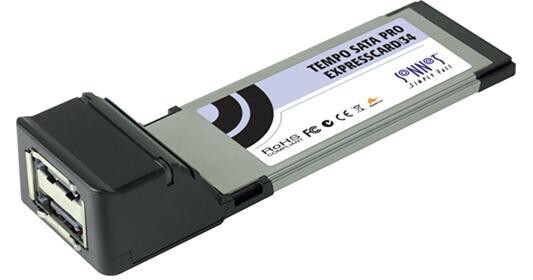
The Tempo SATA Pro ExpressCard/34 eSATA Controller from Sonnet adds two eSATA ports to your notebook computer. It installs in the ExpressCard/34 slot and is fully compatible with Mac OS X 10.4, Windows XP, and Windows Vista.
The eSATA interface supports bus transfer speeds of up to 300MB/sec, with sustained throughput of up to 200MB/sec. It is designed to meet the high standards required in professional environments.
| Interface Protocol | eSATA 3Gb/s |
| Host Connection Type | ExpressCard/34 |
| Data Transfer Rate | Up to 300MB/s per port |
| Cache Memory | None |
| Channels | 2 |
| Device Support | Serial ATA 1.5Gb/s and 3Gb/s, Port-Multiplier Awareness |
| Hot Swap Support | Yes |
| Connectors | 2x eSATA |
| Maximum Cable Length | Not Specified by Manufacturer |
| Raid | |
|---|---|
| Supported | None |
| Included | None |
| System Requirements | |
|---|---|
| Mac |
Mac OS X 10.4-10.5.5 10.5.6 temporarily not recommended |
| Windows | Windows XP SP2, Vista |
| Hardware | ExpressCard/34 slot |
| Power | Bus-powered |
REVIEW SNAPSHOT®
by PowerReviewsPros
Cons
Best Uses
Most Liked Positive Review
Excellent Pro card
There is a big difference in speed with the Pro model versus the standard model, noticeably in speed. The speed tests I ran on a set of 2-drive RAID-0 externals were faster ...Read complete review
There is a big difference in speed with the Pro model versus the standard model, noticeably in speed. The speed tests I ran on a set of 2-drive RAID-0 externals were faster on my Macbook Pro i7 than on my Mac Pro! My specific application was downloading RED Drives onto a pair of hard drives, and the card reader cut my transfer times in half; 100 GB transfered in under a half-hour. When the drives were clean, AJA reported over 150 MB/s read and write. (that's capital MB).
There are complaints about installing drivers for the card to work completely; honestly, you'll never notice it. With these types of ExpressCards on Mac's, you do have to turn off the card before removing the card itself (via a drop-down menu on the top bar near the clock), but the driver itself is invisible. The card may work without the drivers, but I went the safe route and did as the instructions said. There have been no issues with the card or drivers crashing the system.
The port expansion is also invisible, although you'll need a drive carrier that supports port-multiplying or get a standalone add-on device. The card has eSATA 2.0 (or 3 Gbs), so each eSATA port on the card will completely saturate if writing to 3 drives per port. So with a JBOD-like scheme, the card can add 6 individual drives simultaneously reading/writing before any performance is lost. That being said, the card actually supports 5 drives per port on the card for a total of 10 drives.
Those looking for hardware RAID need to get an enclosure that has built-in hardware RAID. Simpler solutions like the Burly enclosures will also work, but that will require a software RAID solution (which is compatible).
VS
Most Liked Negative Review
Tempo SATA Not quite perfect
The Tempo SATA Pro is being used to drive a two part raid 0 RAID. I'm using a MacBook Pro 2.8Mhz i7 with 8G of memory and a 500G 7200 RPM drive. I have ...Read complete review
The Tempo SATA Pro is being used to drive a two part raid 0 RAID. I'm using a MacBook Pro 2.8Mhz i7 with 8G of memory and a 500G 7200 RPM drive. I have encountered 4 kernel panics while using the card and I think we have traced it down to the driver not playing well while another drive is being used at the same time (Firewire 800). When it's just the RAID, I've had a few freezes but nothing as bad as a kernel panic.
Card gets warm but not a problem.
Reviewed by 26 customers
Sort by
Displaying reviews 1-20
Previous | Next »
Pros
Cons
Best Uses
Comments about Sonnet Tempo SATA Pro ExpressCard/34 eSATA Controller:
I use it with to OWC HDD, both with esata, and it works great!
It works now with thunderbolt adapter.
Comments about Sonnet Tempo SATA Pro ExpressCard/34 eSATA Controller:
Much better performance than I've gotten from some other similar cards. Everything has been functioning fine on snow leopard.
Pros
Cons
Best Uses
Comments about Sonnet Tempo SATA Pro ExpressCard/34 eSATA Controller:
It works with 10.7 Lion... none of the other eSATA expresscards I have can make that claim.
In earlier iterations of OSX, it also works faster and more reliably. Incomparable joy ensues.
Pros
Cons
Best Uses
Comments about Sonnet Tempo SATA Pro ExpressCard/34 eSATA Controller:
Simple driver download and boom connect your esata raid case for terrabytes of storage. solid throughput and reliable. I cant say anymore than that
Pros
Cons
Best Uses
Comments about Sonnet Tempo SATA Pro ExpressCard/34 eSATA Controller:
Works great. I use it to transfer raw HD data to drives including RED r3d files. The performance blew away anything else that I've tried to speed up work flow. A must have tool for those who download large files in short periods of time. The only drawback is there are not enough expresscard slots on Macs!
Pros
Cons
Best Uses
Comments about Sonnet Tempo SATA Pro ExpressCard/34 eSATA Controller:
Although a little pricey, you definitely get what you pay for. Brings much needed eSata connectivity to my Macbook Pro 17' (min 2010). My 2TB Caldigit VR Mini gets around write 120MB/s write and 176MB/s read (using AJA System Test 6).
Pros
Cons
Best Uses
Comments about Sonnet Tempo SATA Pro ExpressCard/34 eSATA Controller:
everything i have expected from the product.
With the updated january 2011 driver things are working fairly smooth. I had one kernel panic! Yes those are not good as the machine needs to be rebooted. but what can you do?
That is the biggest con.
Pros
Cons
Best Uses
Comments about Sonnet Tempo SATA Pro ExpressCard/34 eSATA Controller:
I got this do do data transfer from card/hard drive based cameras on set through my laptop. First day I used it I called customer service because the drives i connected were showing up as internal, more of a cosmetic issue than anything. I could still do what I needed but, I was just used to drives or card readers showing up on my desktop as external. After walking through my concern and question with customer service and nothing changing unless I chose to display hard drives on my desktop, which put up the mac HD too, the agent suggested I return it and buy a different manufacturer's product. The product is good, Sonnet's customer service leaves something to be desired.
Pros
Cons
Best Uses
Comments about Sonnet Tempo SATA Pro ExpressCard/34 eSATA Controller:
I use this to connect external drives to my MacBook Pro. It seems to be "fussy" about connecting, for reasons presently unknown. Sometimes requires several tries to get it working, but when connected it makes firewire seem pokey. After using it for a few days, I rolled up the firewire cables and put them away.
Pros
Cons
Best Uses
Comments about Sonnet Tempo SATA Pro ExpressCard/34 eSATA Controller:
The Tempo SATA Pro is being used to drive a two part raid 0 RAID. I'm using a MacBook Pro 2.8Mhz i7 with 8G of memory and a 500G 7200 RPM drive. I have encountered 4 kernel panics while using the card and I think we have traced it down to the driver not playing well while another drive is being used at the same time (Firewire 800). When it's just the RAID, I've had a few freezes but nothing as bad as a kernel panic.
Card gets warm but not a problem.
Pros
Cons
Best Uses
Comments about Sonnet Tempo SATA Pro ExpressCard/34 eSATA Controller:
There is a big difference in speed with the Pro model versus the standard model, noticeably in speed. The speed tests I ran on a set of 2-drive RAID-0 externals were faster on my Macbook Pro i7 than on my Mac Pro! My specific application was downloading RED Drives onto a pair of hard drives, and the card reader cut my transfer times in half; 100 GB transfered in under a half-hour. When the drives were clean, AJA reported over 150 MB/s read and write. (that's capital MB).
There are complaints about installing drivers for the card to work completely; honestly, you'll never notice it. With these types of ExpressCards on Mac's, you do have to turn off the card before removing the card itself (via a drop-down menu on the top bar near the clock), but the driver itself is invisible. The card may work without the drivers, but I went the safe route and did as the instructions said. There have been no issues with the card or drivers crashing the system.
The port expansion is also invisible, although you'll need a drive carrier that supports port-multiplying or get a standalone add-on device. The card has eSATA 2.0 (or 3 Gbs), so each eSATA port on the card will completely saturate if writing to 3 drives per port. So with a JBOD-like scheme, the card can add 6 individual drives simultaneously reading/writing before any performance is lost. That being said, the card actually supports 5 drives per port on the card for a total of 10 drives.
Those looking for hardware RAID need to get an enclosure that has built-in hardware RAID. Simpler solutions like the Burly enclosures will also work, but that will require a software RAID solution (which is compatible).
Pros
Cons
Best Uses
Comments about Sonnet Tempo SATA Pro ExpressCard/34 eSATA Controller:
I have a MBP late 2008 , 2,8ghz, solid state HD and express slot.I am into video editing.Using a G-raid gen 2 2TB ext harddisc with fw800 and sata. The 800 runs nicely. Since I am greedy I bought the sonnet sata express to double speeds, at least according to specs from sonnet. I read in advance that some people have had problems with this scenario but I thought not me. Unfortunately, the sata connection did not work. I think the problem is getting the sonnet software properly installed into my MBP. Maybe my MBP lacks something in the "sata" department. I have given up on it and is back with fw800. [...] My only hope is that there will be a software fix in the near future..If someone has a solution feel free to advice on [@] J.Strom
Pros
Cons
Best Uses
Comments about Sonnet Tempo SATA Pro ExpressCard/34 eSATA Controller:
I have several 2TB SATA WD drives to store HD field footage that I edit using an Apple MAC Pro laptop with Final Cut Pro. This SATA card and cable allow for fast, seamless editing of HD footage on the laptop.
Pros
Cons
Best Uses
Comments about Sonnet Tempo SATA Pro ExpressCard/34 eSATA Controller:
This card was easy to install and use, the connectors are strong and the card is fast.
Pros
Cons
Best Uses
Comments about Sonnet Tempo SATA Pro ExpressCard/34 eSATA Controller:
works as it should. ejects too easily.
Pros
Cons
Best Uses
Comments about Sonnet Tempo SATA Pro ExpressCard/34 eSATA Controller:
Installed it last week, and so far so good. Happy with the data transfer. I'm a little worried about the fact that it protrudes from the side of my macbook, which may get somewhat precarious in the rugged environment that I work in. However, this is not a design flaw, I just need to be extra careful.
Pros
Cons
Best Uses
Comments about Sonnet Tempo SATA Pro ExpressCard/34 eSATA Controller:
I use this card to connect my GTech drives to my MacBook Pro. The transfer speeds are definitely better than firewire 800. Never had any problems while editing video.
Works great. Would highly recommend it.
Pros
Cons
Best Uses
Comments about Sonnet Tempo SATA Pro ExpressCard/34 eSATA Controller:
Super fast and compatible with Snow Leopard 10.6.4 on 64 bit media application and latest hard drive partitions using easy software download
Full eSATA speed finally arrives for laptops
WRITE at 195 mb/s with a fast drive
Excellent function LEDs
Pros
Cons
Best Uses
Comments about Sonnet Tempo SATA Pro ExpressCard/34 eSATA Controller:
This adaptor is responsible for several crashes of Mac OS 10. Once you receive it, make sure to download the new driver as the one provided with it is a crash monster.
I had high hope of making video editing faster on my macbook pro, but this adaptor has made my system lagging with a one second lag when pressing the playback button. Maybe it's because I'm running mirror drives on it.
It's great to free up other ports on the computer.
Pros
Cons
Best Uses
Comments about Sonnet Tempo SATA Pro ExpressCard/34 eSATA Controller:
I use this for video editing with Final Cut Pro on my MacBook Pro. I have it connected to a GRAID 1TB Quad Interface and have also used it simultaneously with my G-DRIVE 500GB Quad Interface. It's noticeably faster than Firewire 800. I used to use that all the time for my primary editing interface with external drives. Renders are faster, not mind-blowing, but you can see and feel the difference. Scrubbing thru the timeline is also snappier especially when working with standard definition video. Dropped frames aren't as frequent as video plays back smooth the majority of the time but part of that might be due to my computer and what I have running. I got this item because I felt I needed to maximize my editing solution once I started working more with HD material and felt Firewire 800 wouldn't suffice. On my MacBook Pro I felt this was the most affordable solution all around from pre-production, production, to post and it's been working great.
Displaying reviews 1-20
Previous | Next »