
The Professional's Source 866.276.1435 / 212.502.6357

Holiday Closing

We are not accepting orders at this time. Online ordering will resume Monday, May 28th at 9:45PM EDT. Our SuperStore and offices are currently closed and will reopen on Tuesday, May 29th at 9:00AM EDT.
We apologize for any inconvenience and appreciate your patronage.

Please note: Online ordering is unavailable until Monday 9:45 PM EDT. Feel free to browse our site and add items to your cart or wishlist. We apologize for the inconvenience and appreciate your patronage.

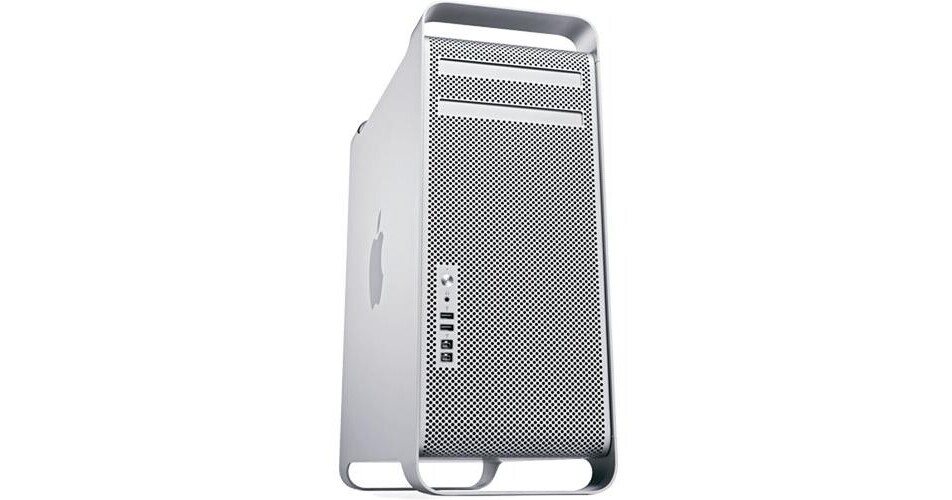
Apple Mac Pro Desktop Computer Workstation (Early 2009)

  • No Longer Available
  • B&H # APMP226QC
  • Mfr# MB535LL/A

Product Highlights

  • 2.26GHz 8-Core System
  • 6GB (6x1GB) RAM
  • 640GB SATA Hard Drive
  • Dual-Layer SuperDrive
  • nVIDIA GeForce GT 120 512MB Graphics
  • Bluetooth 2.1+EDR
  • Mac OS X 10.6 Snow Leopard

Protect Your Purchase

International Pricing Disclaimer
 

What item is right for you?

Ask our Experts!

866.276.1435
Live Chat

The Mac Pro 8-Core Desktop Computer Workstation from Apple is the company's premiere desktop workstation. The system is built with performance in mind, and is an ideal computer for use with demanding applications. The computer is housed in a striking tower form factor, highlighted by a silver front grille which provides easy access to USB 2.0 and FireWire-800 ports, as well as a headphone jack. Sturdy handles are present to aid in transporting the system when necessary.

Designed with expansion in mind, the computer features four 3.5" SATA drive bays, four PCI Express 2.0 expansion slots, and 8x RAM slots which can support a total 32GB memory capacity. The back of the system features a plethora of ports, including USB 2.0, FireWire-800, dual Gigabit Ethernet, and optical and analog audio.

The system is powered by 2 quad-core Intel Xeon 5500 "Nehalem" CPUs running at a clockspeed of 2.26GHz. This "8-Core" configuration gives you up to 8 times the processing power of a single CPU, making it an ideal solution for mission critical applications. The system also boasts 6GB of RAM, 640GB hard drive capacity, Apple's SuperDrive DVD burner with dual-layer disc support, Bluetooth 2.1+EDR for wireless device connectivity, and nVIDIA GeForce GT 120 graphics with 512MB of memory.

All this hardware runs on Apple's Mac OS X 10.6 Snow Leopard operating system. The 64-bit OS features Time Machine backup, which automatically backs up system data to an external hard drive. It also features intuitive Cover Flow navigation, the powerful Spotlight search tool, and Quick Look document preview. You'll be able to use Boot Camp to run Windows on your Mac, or Front Row to turn your Mac into an impressive media player.

iLife '11, a complete suite of digital creativity applications, is installed on the system. Easy enough for anyone to use, iLife will help you edit your home movies, organize digital photos, and compose original music. The system is also powerful enough to run Apple's professional-level applications, perfect for those who are ready to move up to the next level of creative software.

Processor

The "Nehalem" Advantage
Many quad-core processors are composed of two separate dies, which means some cached data has to travel outside the processor to get from core to core. That's an inefficient way to access information. Enter the Quad-Core Intel Xeon "Nehalem" processor. Its single-die, 64-bit architecture makes 8MB of fully shared L3 cache readily available to each of the four processor cores. The result is fast access to cache data and greater application performance. Combine that with the other technological advances and you get a Mac Pro that's up to 1.9x faster than the previous generation
Memory Bottlenecks Begone
System memory is often connected to a processor through a separate I/O controller. But each Intel Xeon "Nehalem" processor features an integrated memory controller -- another leap forward for workstation system architecture. By connecting memory directly to the processor, the new Mac Pro processors have faster access to data stored in memory, and memory latency is reduced by up to 40 percent.

The integrated memory controller, along with fast 1066MHz DDR3 ECC SDRAM, also gives Mac Pro up to a 2.4x increase in memory bandwidth over previous generations. More bandwidth allows for more data to be fed to the processor faster, helping each core spend its time processing data, not waiting for information to arrive. And Error Correction Code (ECC) corrects single-bit errors and detects multiple-bit errors automatically. That's especially important in mission-critical and compute-intensive environments
Power When (and Where) You Need It
The new Mac Pro introduces Turbo Boost: a dynamic performance technology that automatically boosts the processor clock speed based on workload. If you're using an application that doesn't need every core, Turbo Boost increases the speed of the active ones, up to 3.3GHz on this 8-core Mac Pro
The Virtue of Virtual Cores
The new Intel Xeon "Nehalem" processors support Hyper-Threading, which allows two threads to run simultaneously on each core. So this 8-core Mac Pro presents 16 virtual cores that are recognized by Mac OS X. Performance is enhanced because Hyper-Threading enables the processor to take better advantage of the execution resources available in each core
Path of Least Resistance
A new bidirectional, point-to-point connection -- called QuickPath Interconnect -- gives the Intel Xeon "Nehalem" processor quick access to the disk, I/O, and other Mac Pro subsystems. In the new 8-core Mac Pro, there's a QuickPath Interconnect between the two quad-core processors as well. This connection acts as a direct pipeline, so processor-to-processor data doesn't need to travel to the I/O hub first. It's another way the new Mac Pro boosts performance across the board
Powerfully Efficient
Based on an industry-leading 45nm process technology and combined with improved power management capabilities, the new Intel Xeon "Nehalem" processors are more energy efficient than before. So the Mac Pro is faster than ever, while using less energy when idle

Graphics

Don't Keep Those Pixels Waiting
If you're a pro who wants a desktop computer that keeps pace with your imagination, the Mac Pro delivers with faster graphics application performance across the board. Whether you're decoding H.264 content in Final Cut Pro, creating 3D graphics in Motion, processing massive RAW images in Aperture, or playing the latest games, the graphics hardware in the new Mac Pro makes graphics applications faster.

The foundation of this new graphics architecture is the latest generation of GPUs connected to the system via a fast and wide PCI Express 2.0 16-lane bus. Couple that with Core Animation, Core Image, and Core Video technologies in Mac OS X Snow Leopard. The result is a graphics platform for applications to seamlessly tap into a teraflop of graphics power
Performance. It's in the Cards
An all-new high-performance graphics card from nVIDIA makes the Mac Pro graphics technology faster than before. Perfect for motion graphics, 3D modeling, rendering, or animation, the nVIDIA GeForce GT 120 with 512MB of GDDR3 memory comes standard -- and provides up to 2.9x the performance of previous Mac Pro standard graphics card
Graphics on Display
Every new Mac Pro graphics card features two display ports for maximum workspace flexibility. A Mini DisplayPort connects the new 24-inch Apple LED Cinema Display with ease. A dual-link DVI port connects a 30-inch Apple Cinema HD Display or any other DVI display. And with support for up to four nVIDIA GeForce GT 120 cards, you can connect more displays -- up to eight total

Storage and RAID

Massive storage
The Mac Pro comes with four 3.5-inch internal hard drive bays for an enormous amount of internal storage -- up to 8TB when you install four 2TB Serial ATA 3Gbps drives. Each bay provides its own independent 3Gbps channel for fast access to data. And thanks to the cable-free, direct-attach installation system, adding (or replacing) hard drives is a surprisingly simple process
Ready to RAID -- with a New Card
For the ultimate in data protection and enhanced performance, add the new Mac Pro RAID Card with 512MB of RAID cache, a 72-hour cache-protecting battery, and hardware RAID levels 0, 1, 5, and 0+1. A new cableless connection and intuitive Apple software make it a snap to install this optional card. Once installed, high-performance 15,000rpm SAS drives may be used. It's the perfect solution for workgroup servers, video pros working with high-bit-rate assets, or anyone who wants to protect critical data.

Even without a RAID card, Mac OS X lets you stripe two, three, or all four hard drives in a RAID 0 array to increase performance and create a massive volume for tasks such as video editing; or create a RAID 1 mirror to protect digital media assets from a drive failure 1
Double-Layer Burner Times Two
The Mac Pro features an open optical drive bay, which can be used to add a second SuperDrive. Adding a second DVD burner allows you to back up data to two double-layer DVDs at once. Or burn an Aperture project to one DVD, while importing music from a CD into your iTunes library. The open optical drive bay allows you to add a SuperDrive to do exactly that

Mac OS X

UNIX Compliant
What makes Mac OS X a powerful operating system is the technology behind it: a fully certified UNIX foundation. With a rock-solid UNIX infrastructure, it's one of the most secure and stable operating systems on any platform. As a developer, you'll appreciate Mac OS X even more because it's fully UNIX compliant. That means it compiles and runs all your existing UNIX code, so you can deploy it in environments that demand full conformance. The result: Software performs exactly as it's meant to. And because the powerful tools built into Mac OS X improve application performance on multicore processors, the new Mac Pro is the ideal workstation
64-bit Power
Mac OS X is to the new Mac Pro what a skilled driver is to a car with a powerful engine — a perfect match. Since the entire operating system is 64-bit ready, you can take full advantage of the 64-bit architecture of the Quad-Core Intel Xeon "Nehalem" processors inside the new Mac Pro. Add to that the 32GB of memory available for the Mac Pro, and the performance of Mac OS X is even better than before. Mac OS X also enables developers to build complete 64-bit applications using the Cocoa, Quartz, OpenGL, and X11 GUI frameworks. And because Mac OS X supports 64-bit and 32-bit applications, you don't need a new set of devices or drivers
Multicore. Multitask
At the heart of the new Mac Pro are two Quad-Core Intel Xeon "Nehalem" processors with an incredible amount of processing power. Optimized for multicore technology, Mac OS X provides powerful tools that make it easy to reap the benefits of the Mac Pro. The scheduler in Mac OS X, for instance, is very efficient at allocating tasks across multiple cores and processors. So Mac OS X spends less time managing tasks and more time performing computations. As a developer, you can build applications that execute the same efficiency, thanks to NSOperation, a breakthrough API that optimizes applications for multicore processing
Core Animation
From the cascading windows of Time Machine to the smooth animation of the reflective 3D Dock, stunning visual effects truly set Mac OS X apart. Behind all that beauty is a technology built into Mac OS X called Core Animation. The performance of Core Animation benefits from the multicore processors and advanced graphics hardware in the new Mac Pro. For developers, Core Animation easily opens up the power of Apple's graphics technologies. You can create animated user interfaces and visualizations that simultaneously layer different media types, such as text, 2D graphics, OpenGL rendering, and QuickTime video, all in real time
Xcode Developer Tools
Xcode is the graphical development environment that comes with every Mac. It's the same software used by Apple to produce Mac OS X, and it's packed with tools and features, including a powerful graphical debugger, a code editor supporting dozens of languages, and the amazing Instruments tool to visualize your application's performance. Xcode is optimized to take advantage of the multicore Intel Xeon "Nehalem" processors and system memory in the Mac Pro. It performs 20 percent faster than before, supports multiple languages (both computer and human), and offers programmers everything they need to make stunning Mac OS X applications
Voilà. Instant Server
The multitalented Mac Pro can also act as a powerful small-workgroup server. Just add Mac OS X Server. The resulting solution combines Mac ease of use with flexible configuration options and server-class hardware. With 8-core Intel Xeon "Nehalem" processing power, up to 32GB of ECC memory, a new optional RAID card, and dual Gigabit Ethernet ports, a Mac Pro workgroup server has everything you need — and then some

The Mac Experience

Every Day Use
Every Mac is designed to make your life easier, not more difficult. The system ships with Mac OS X "Snow Leopard," which gives you all the tools you need for e-mail, personal organization, Internet browsing, watching movies, and more. Its software and hardware are designed work to together seamlessly, eliminating the compatibility nightmares that often plague PC users. What's more, the iMac can run Windows via Boot Camp, perfect for users who have a Windows-only application that they absolutely need to use
iLife '11
The included iLife '11 suite is a suite of applications that help you organize your digital life. It includes iPhoto for photo management and editing, iMovie for HD video editing, iDVD to burn your movies to disc, GarageBand for music production, and iWeb for web publishing
Secure and Reliable
Worried about viruses and malware? Don't be. The iMac isn't plagued by constant attacks from the outside world. It is designed to be secure out of the box, eliminating the need for additional software to protect your system from danger. OS X will warn you if a downloaded file is potentially dangerous, ensuring that you don't accidentally open a malicious application. Apple responds quickly to any security threats, prompting you to download updates that keep your Mac up to date and safe
Tech Support
Have a problem with your Mac? Get support and advice at the Genius Bar, located at every Apple Retail Store. Apple also provides online tutorials, troubleshooting forums, and 90 days of phone support for users who aren't able to make it to an Apple store
Optional AppleCare
Apple provides 90 days of free phone support and a 1-year limited hardware warranty on the computer. You can opt to add an AppleCare Protection Plan, at additional cost, which covers support and repairs for 3 years from the date of purchase. AppleCare can be purchased at any time within the first year of ownership of the computer
Performance
Processor 2x 2.26GHz Quad Core Intel Xeon 5500 "Nehalem" Series
Cache L3: 16MB (8MB per processor)
System Bus None
Hardware Platforms Slots: 8x DIMM Slots
Type: 1066MHz PC3-8500 DDR3 ECC DIMM
Installed: 6GB (6x1GB) RAM
Capacity: 32GB
Configuration: 1GB, 2GB, or 4GB DIMMs
Graphics Display Interface: Double-wide 16-lane PCI Express 2.0 graphics slot
Installed: nVIDIA GeForce GT 120 with 512MB of GDDR3 SDRAM, 1x Mini DisplayPort, 1x Dual-Link DVI Port

Supported Resolutions
Digital: 2560 x 1600
Analog: 2048 x 1536

Dual Display Support: Dual-display support for extended desktop and video mirroring modes
Storage and Expansion
Hard Drive Fixed Bays: 4x Independent 3Gb/s Serial ATA cable-free, direct attach hard drive bays; 4x internal hard drive carriers included
Hot-Swappable Bays: None
Installed: 1x 640GB 7200rpm with 16MB Buffer
Supported: 4x SATA Hard Drives
Type: Serial ATA, supports up to 300MB/sec data throughput per hard drive
Optical Drive 18x SuperDrive with double-layer support

Reads
CD: 32x
DVD: 18x

Writes
CD-R: 32x
CD-RW: 32x
DVD-R: 18x

DVD-RW: 6x
DVD-R DL: 8x
DVD+R: 18x
DVD+RW: 8x
DVD+R DL: 8x
Bay Expansion 3.5" Internal Direct Attach Hard Drive Bays
Bays: 4
Occupied: 1

5.25" Optical Drive
Bays: 2
Occupied: 1
PCI Expansion 3x open full-length PCI Express 2.0 expansion slots
1x PCI Express 2.0 x16 slot
2x PCI Express 2.0 x4 slots
All slots provide mechanical support for 16-lane cards
300W combined max for all PCI Express slots
Input/Output
Ports 4x FireWire-800 (2x Front, 2x Back)
5x USB 2.0 (2x Front, 3x Back)
Display 1x Mini DisplayPort
1x Dual-Link DVI 1
Please Note:

Dual-Link DVI port is capable of driving one display up to 2560 x 1600 in resolution

close
Storage 4x SATA Drives Supported (1x Installed, 3x Available)
Audio 1x Built-In Speaker
1x 1/8" (3.5mm) Headphone (1x Front)
1x 1/8" (3.5mm) Line-Out (1x Back)
1x 1/8" (3.5mm) Line-In (1x Back)
1x Toslink Optical Input (1x Back)
1x Toslink Optical Output (1x Back)
Video None
Communications
Wired 2x independent 10/100/1000BASE-T Ethernet (RJ-45) interfaces with support for jumbo frames
Wireless Wi-Fi: None
Bluetooth: 2.0+EDR
General
Operating System Mac OS X 10.6 Snow Leopard
Internet Access Not Included
Electrical Requirements Meets ENERGY STAR requirements
AC: 100-120VAC or 200-240VAC
Frequency: 50-60Hz, single phase
Current: 12A (low-voltage range), 6A (high-voltage range)
Environmental Requirements Operating
Temperature: 50-95°F (10-35°C)
Humidity: 5-95%, non-condensing
Altitude: 10,000' (3048 m)

Storage
Temperature: -40-116°F (-40-47°C)
Humidity: 5-95%, non-condensing
Altitude: 10,000' (3048 m)
Dimensions (WxHxD) 8.1 x 20.1 x 18.7" (20.6 x 51.1 x 47.5cm)
Weight 41.2 lb (18.7kg)

REVIEW SNAPSHOT®

by PowerReviews
AppleMac Pro Desktop Computer Workstation (Early 2009)
 
5.0

(based on 21 reviews)

Ratings Distribution

  • 5 Stars


    (21)

  • 4 Stars


    (0)

  • 3 Stars


    (0)

  • 2 Stars


    (0)

  • 1 Stars


    (0)

100%

of respondents would recommend this to a friend.

Pros

  • Good power output (17)
  • Quiet (17)
  • Easy to set up (16)
  • Versatile (12)
  • Never freezes (11)

Cons

    Best Uses

    • Multimedia (9)
    • Office (6)
    • Home (5)
      • Reviewer Profile:
      • Tech savvy (11), Multimedia professional (10)

    Reviewed by 21 customers

    Sort by

    Displaying reviews 1-20

    Back to top

    Previous | Next »

     
    5.0

    Efficient and Professional

    By Dan the Man

    from Dallas Area

    About Me Tech Savvy

    Verified Buyer

    Pros

    • Powerful

    Cons

      Best Uses

      • Office

      Comments about Apple Mac Pro Desktop Computer Workstation (Early 2009):

      I am still getting my new Mac Pro set up; however, all things seem
      like they are going to be great.

      Share this review

       
      5.0

      Great System

      By Jeff

      from Nashviille, TN

      About Me Multimedia Professional, Tech Savvy

      Verified Buyer

      Pros

      • Easy To Set Up
      • Never Freezes
      • Powerful
      • Quiet
      • Versatile

      Cons

      • Doesn't come with wifi

      Best Uses

      • Home
      • Multimedia
      • Office

      Comments about Apple Mac Pro Desktop Computer Workstation (Early 2009):

      I bought this Mac, for use as a video editing computer. I knew there was a newer model out there, but considering I was going to upgrade some of the system pieces, it wasn't worth spending $1000 for the newer one, and only getting a little bit of performance increase. This is my 1st Mac, and I love it, its fast, reliable. Took me a couple days to figure out Snow Leopard. I'm not a gamer, so I can't comment on its use for that. I have it setup just how I want it, and hopefully will give me many years of service.

      Share this review

       
      5.0

      Great Mac for a great price

      By N

      from Southern Illinois

      About Me Software Engineer

      Verified Buyer

      Pros

      • Aesthetically Pleasing
      • Expandable
      • Fast

      Cons

        Best Uses

        • Media
        • Software Development

        Comments about Apple Mac Pro Desktop Computer Workstation (Early 2009):

        This is a seriously powerful and expandable workstation-class Mac. It easily powers through any task. No more to say.[...]

        Share this review

         
        5.0

        Wow!!

        By cpfotografos

        from San Juan, PR

        About Me Photographer

        Verified Buyer

        Pros

        • Easy To Set Up
        • Never Freezes
        • Powerful
        • Quiet
        • Versatile

        Cons

        • Expensive
        • Loud

        Best Uses

        • For Work

        Comments about Apple Mac Pro Desktop Computer Workstation (Early 2009):

        This computer is definitely for work. Its target is graphic designers, video editors, sound technicians, 3D editors and photographers with great work flow.

        I honestly thought it would not surprise me, but I'm definitely surprised.

        I bought more memory for a total of 20gb. and... well, working with this computer is a breeze.

        Speed, security, multitasking, upgrade capability are its principal virtues.

        The machine is loud, over 24 lbs. but it's a desktop computer.

        Share this review

         
        5.0

        Monstrous performance for Audio & Video

        By C. Holford

        from Brooklyn, NY

        About Me Multimedia Professional, Tech Savvy

        Verified Buyer

        Pros

        • Powerful
        • Quiet
        • Versatile

        Cons

          Best Uses

          • Audio Production
          • Home
          • Multimedia
          • Office
          • Video Production

          Comments about Apple Mac Pro Desktop Computer Workstation (Early 2009):

          So far this Mac Pro has really outdone itself. I should say that I was upgrading from a G4 Powermac dual processor, so basically any modern Mac would have been a significant improvement, but if you check out Geekbench you'll find that this Mac Pro is among the top ten overall performers from any Mac model ever. It trounces any other computer I've ever used, and while I'm sure the new Westmere 8 or 12-cores could take me to even more dizzying heights, I have not performed any operation on this 8-core where I've seen the processors top 25% capacity, and I'm running Final Cut, Pro Tools, Soundtrack Pro, heavy batch movie file conversions, etc. on a daily basis. Once I cram some more RAM in there it'll be even smoother. In short, I'm quite satisfied with my purchase and would recommend this machine to any media professional! Get them before they're gone.

          Share this review

           
          5.0

          Excellent Power to Price Ratio

          By Michael

          from Northern New Jersey

          About Me Tech Savvy

          Verified Buyer

          Pros

          • Easy To Set Up
          • Never Freezes
          • Powerful
          • Quiet
          • Versatile

          Cons

            Best Uses

            • Home
            • Multimedia
            • Office

            Comments about Apple Mac Pro Desktop Computer Workstation (Early 2009):

            At the current B&H price this computer is an excellent value. I am especially impressed with the silence of this computer which is an important consideration when doing audio processing. (my previous G5 Quad was excessively noisy at times.) The internal design is super: very easy installation of memory and hard drives — significant improvement over the G5. Works fine with Adobe CS4 products. [...]

            Share this review

             
            5.0

            2.26GHz Mac Pro 8-Cores (Early 2009)

            By MacMike1000

            from Madison, AL

            About Me Multimedia Professional, Tech Savvy

            Verified Buyer

            Pros

            • Easy To Set Up
            • Powerful
            • Quiet
            • Versatile

            Cons

              Best Uses

              • Home
              • Multimedia

              Comments about Apple Mac Pro Desktop Computer Workstation (Early 2009):

              Pro: Super Fast, a pleasant to use it when it come to video editing and photography (Photoshop). A beautiful machine and work quietly. Also it fully customizable quiet no wires to mess Con: Heavy, pricey, no AirPort Extreme WIFI card built-in.

              Share this review

               
              5.0

              At [$] off it's hard to beat

              By Dave

              from Chino, CA

              Verified Buyer

              Pros

              • Quiet

              Cons

                Best Uses

                  Comments about Apple Mac Pro Desktop Computer Workstation (Early 2009):

                  I am really glad i found this deal. I am using it for photoshop, HD video editing, and multi-track music recording. On my 2.4ghz pentium 4 w/ 1 gig RAM to render a 15 minute 1080HD video took 8 hours. This machine took 6 minutes for a 2.5 minute 1080HD video and I could still surf the web, what does that tell you?

                  Share this review

                   
                  5.0

                  Amazing power for AV professionals

                  By Jeremy A.

                  from Arlington, TX

                  About Me Multimedia Professional

                  Verified Buyer

                  Pros

                  • Easy To Set Up
                  • Powerful
                  • Quiet

                  Cons

                    Best Uses

                    • Multimedia
                    • Video capture

                    Comments about Apple Mac Pro Desktop Computer Workstation (Early 2009):

                    I use Final Cut and Logic Pro for DVD and podcast creation. This is a ridiculously fast machine, capable of producing great media in a short time.

                    Share this review

                     
                    5.0

                    Best deal on a MacPro.

                    By Cobber

                    from Indiana

                    About Me Tech Savvy

                    Verified Buyer

                    Pros

                    • Easy To Set Up

                    Cons

                      Best Uses

                      • Home

                      Comments about Apple Mac Pro Desktop Computer Workstation (Early 2009):

                      This is the 11th Mac that I have purchased and I saved $200 more than if I had purchased a refurbed unit from Apple. [...] This is a great machine for video and photo use. My rendering time has been cut in half from what it took on my 5 year old PowerMac G5 2.0 dual processor unit. B&H is the best place to purchase whatever you need that they might handle.

                      Share this review

                       
                      5.0

                      Great powerful audio computer...

                      By Juanito2u

                      from Brentwood, CA

                      About Me Multimedia Professional

                      Verified Buyer

                      Pros

                      • Easy To Set Up
                      • Never Freezes
                      • Powerful
                      • Quiet
                      • Versatile

                      Cons

                        Best Uses

                        • Multimedia
                        • Office

                        Comments about Apple Mac Pro Desktop Computer Workstation (Early 2009):

                        Right out of the box this thing is blazing fast. In true Mac fashion it was easy to set up and a monster on audio applications.

                        Share this review

                        (1 of 1 customers found this review helpful)

                         
                        5.0

                        The best price for Mac Pro

                        By Eratos

                        from Miami, Fl

                        Verified Buyer

                        Comments about Apple Mac Pro Desktop Computer Workstation (Early 2009):

                        Thanks for this great offer, this is the best price of the market, [...]

                        Share this review

                        (1 of 1 customers found this review helpful)

                         
                        5.0

                        Great Computer

                        By Photo Phreak

                        from Bowie, MD

                        About Me Almost Tech Savvy

                        Verified Buyer

                        Pros

                        • Easy To Set Up
                        • Never Freezes
                        • Powerful
                        • Quiet
                        • Versatile

                        Cons

                          Best Uses

                          • High quality photography

                          Comments about Apple Mac Pro Desktop Computer Workstation (Early 2009):

                          I use it primarily for Photoshop CS5. I got tired of the instability of Windows, including Win7.

                          Things Great: Stability, ease of adding internal hardware. I added RAM (48GB) and a pair of 2TB hard drives for data only, and it was QUICK & EASY!

                          Things Not So Great: Haven't found any yet.

                          Share this review

                           
                          5.0

                          that's what I was looking for

                          By pb

                          from nj

                          Verified Buyer

                          Pros

                          • Easy To Set Up
                          • Powerful
                          • Quiet

                          Cons

                            Best Uses

                              Comments about Apple Mac Pro Desktop Computer Workstation (Early 2009):

                              Up to expectations: simple, clean, powerful.
                              Smooth transition from the old troublesome PC

                              Share this review

                               
                              5.0

                              A professional piece of equipment!

                              By Rick

                              from Atlanta, GA.

                              About Me Multimedia Professional, Tech Savvy

                              Verified Buyer

                              Pros

                              • Easy To Set Up
                              • Never Freezes
                              • Powerful
                              • Quiet
                              • Versatile

                              Cons

                                Best Uses

                                • Multimedia
                                • Office

                                Comments about Apple Mac Pro Desktop Computer Workstation (Early 2009):

                                I use my new Mac Pro for both Video Editing, as well as software support on the web, (using Parallels and Windows). The pure power of this 8 core unit makes everything a breeze. I love it. I used an older G5 for years, but it's day had finally come, (and gone). Love my new Mac Pro.

                                Share this review

                                 
                                5.0

                                HAL 9000 Territory

                                By dblazer

                                from Vancouver, WA

                                About Me Multimedia Professional

                                Verified Buyer

                                Pros

                                • Easy To Set Up
                                • Never Freezes
                                • Powerful
                                • Quiet
                                • Versatile

                                Cons

                                  Best Uses

                                    Comments about Apple Mac Pro Desktop Computer Workstation (Early 2009):

                                    I haven't had a new computer for a few years, and a new Mac for 15. This is an amazing machine, truly a "pro" level design and function. It's faster than any personal computer I've ever seen, Photoshop opens nearly instantaneously, and the case itself is an engineering marvel.

                                    We've come a long way, for sure. Great machine.

                                    Share this review

                                    (3 of 3 customers found this review helpful)

                                     
                                    5.0

                                    Great Computer!

                                    By Dave

                                    from Maple Valley, WA

                                    About Me Serious Amateur Photog, Tech Savvy

                                    Verified Buyer

                                    Pros

                                    • Easy To Set Up
                                    • Never Freezes
                                    • Powerful
                                    • Quiet

                                    Cons

                                      Best Uses

                                        Comments about Apple Mac Pro Desktop Computer Workstation (Early 2009):

                                        After 12 years away from the Mac I'm glad to be back. I left because I felt that Macs were too expensive, but you get what you pay for and I often longed for the robustness and clean interface of the Mac.

                                        After moving my other data form my old XP system I installed Lightroom and moved all of my photos over I fired up Lightroom. Wow it was fast, really snappy, it never bogged down!

                                        A great machine!

                                        Share this review

                                        (1 of 1 customers found this review helpful)

                                         
                                        5.0

                                        The Grrreat Nehalem

                                        By Green Mantis

                                        from Los Angeles

                                        About Me Multimedia Professional, Tech Savvy

                                        Verified Buyer

                                        Pros

                                        • Easy To Set Up
                                        • Powerful
                                        • Quiet

                                        Cons

                                        • Freezes

                                        Best Uses

                                        • Multimedia

                                        Comments about Apple Mac Pro Desktop Computer Workstation (Early 2009):

                                        This thing is strong! Even though it's the 2.26 8core version, it's amazingly fast and extremely QUIET! Seriously! How nice is that, a machine so beastly, yet it you barely hear it purr. This machine is soley used as a DAW with Protools8 and Logic.

                                        Share this review

                                        (3 of 3 customers found this review helpful)

                                         
                                        5.0

                                        AMAZING!!!

                                        By Chaviro Villa

                                        from Texas

                                        About Me Tech Savvy

                                        Verified Buyer

                                        Pros

                                        • Easy To Set Up
                                        • Never Freezes
                                        • Powerful
                                        • Quiet
                                        • Versatile

                                        Cons

                                        • Heavy

                                        Best Uses

                                        • Animation
                                        • Video editing

                                        Comments about Apple Mac Pro Desktop Computer Workstation (Early 2009):

                                        This is my first Mac, and it is a beast at Avid editing. The Play/Rewind/Forward buttons on video editing are instant! The render times are incredible, though they can be better since Media Composer is still a 32bit app, but I am prepared for the future of 8 core rendering!
                                        Thanks apple (& B&H)!

                                        Share this review

                                        (0 of 1 customers found this review helpful)

                                         
                                        5.0

                                        Love My New Toy

                                        By none

                                        from Visalia,CA

                                        About Me Multimedia Professional, Tech Savvy

                                        Verified Buyer

                                        Pros

                                        • Easy To Set Up
                                        • Never Freezes
                                        • Powerful
                                        • Quiet
                                        • Versatile

                                        Cons

                                          Best Uses

                                          • Multimedia

                                          Comments about Apple Mac Pro Desktop Computer Workstation (Early 2009):

                                          Video and Photography editing, You cannot beat this Apple Workstation.

                                          Share this review

                                          Displaying reviews 1-20

                                          Back to top

                                          Previous | Next »

                                          Monitors

                                          Apple -  27" LED Cinema Display
                                          • Price: $929.00
                                          • GBP 593.14
                                           

                                          This display can only be used with computers that feature a Mini DisplayPort connector.

                                          Software

                                          Microsoft -  Office for Mac Home and Student Edition 2011 (Family Pack)
                                          • Price: $92.99
                                          • Limited supply at this price
                                           
                                          Add installation service for an additional $29.99 ">More information
                                          Microsoft -  Office for Mac Home and Business Edition 2011 (2 Computer License)
                                          • Price: $164.99
                                          • Limited supply at this price
                                           
                                          Add installation service for an additional $29.99 ">More information

                                          External Storage

                                          G-Technology -  4TB G-RAID External Hard Drive Array
                                          • Price: $379.99
                                          • GBP 242.61
                                           

                                          The G-RAID 4TB model is not supported by Windows XP or older 32-bit operating systems which limit maximum volume size to 2TB. G-RAID 4TB is compatible with systems running Mac OS X, Windows Vista, or other 64-bit operating systems.

                                          Speakers & Headsets

                                          Altec Lansing -  VS2620 Stereo Computer Speakers
                                          • Price: $27.99
                                          • GBP 17.87
                                           

                                          Cables & Adapters

                                          Comprehensive -  FireWire 6-pin to 4-pin Cable - 6' (1.83 m)
                                          • Price: $7.95
                                          • GBP 5.08
                                           

                                          Care & Cleaning

                                          Pearstone -  Microfiber Cleaning Cloth, 18% Gray (7 x 7.9")
                                            • Original: $4.99
                                            • Save: $0.50
                                          • Price: $4.49
                                          • GBP 2.87
                                           

                                          Media

                                          Back-up your favorite music, movies, or other important documents.

                                          Verbatim -  CD-R 700MB DataLifePlus Disc (50)
                                          • Price: $13.95
                                          • GBP 8.91
                                           
                                          View all Accessories

                                          What's in the Box

                                          Apple Mac Pro Desktop Computer Workstation (Early 2009)
                                          • Apple Keyboard with Numeric Keypad (Slimline Aluminum)
                                          • Apple Mouse
                                          • USB Keyboard Extension Cable
                                          • Software Bundle
                                            • Mac OS X 10.6 Snow Leopard
                                            • iLife '11 (includes iTunes, iPhoto, iMovie HD, iDVD, iWeb, GarageBand)
                                          • Install/Restore DVD Set
                                          • Printed and Electronic Documentation
                                          • 1-Year Limited Warranty
                                           
                                           
                                          See any errors on this page? Let us know.

                                          Close

                                          Close