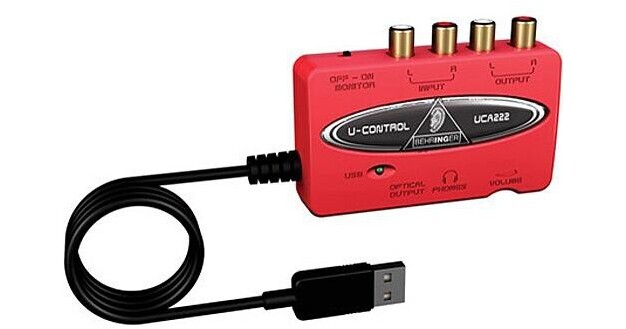
The U-CONTROL UCA222 from Behringer is a low cost solution for getting audio in and out of a computer. The USB 1.1 interface is USB bus powered and features 2 analog RCA phono inputs for connecting any line-level device, such as a mixer or tape deck, and 2 analog RCA phono outputs for connecting active speakers or studio monitors.
The interface also provides a stereo S/PDIF output on an optical connector. Headphone monitoring is via a stereo mini jack with a dedicated volume control. No special setup or additional drivers are required, and wide computer operating system compatibility is available for both the Mac and Windows platforms. The interface ships with a large selection of audio software.
| Converters | 16-bit |
| Sample Rates | 32, 44.1 and 48kHz |
| Analog Input | 2 x RCA phono |
| Analog Output |
2 x RCA phono 1 x 1/8" TRS stereo mini Headphone |
| Digital Input | No |
| Digital Output | 1 x TOSLink optical S/PDIF |
| MIDI In/Out | No |
| Sync In/Out | S/PDIF |
| Headphone Output | Yes |
| THD + N | 0.05% typical @ -10dBV, 1kHz |
| Dynamic Range | Not specified by manufacturer |
| Frequency Response | 10Hz to 20kHz, +/-1.0dB @ 44.1kHz |
| Power Requirements | USB bus |
| System Requirements |
Mac: G3 300MHz or higher OS 9.0.4 or higher, 10.x or higher Minimum 128MB RAM USB 1.1 port PC: |
| Dimensions (WxDxH) | 3.5 x 2.4 x 0.9" (88 x 60 x 22mm) |
| Weight | 4.2 oz (0.12kg) |
| Specialties | Bundled with Audacity, Podifier, Juice, Podnova and Golden Ear software |
REVIEW SNAPSHOT®
by PowerReviewsPros
Cons
Best Uses
Most Liked Positive Review
Behringer's UCA222 rules!
The Behringer UCA222 allows you to record signal from an analog source directly into your computer. I use mine for music recording and it's a winner. No installation is necessary. You plug your source...Read complete review
The Behringer UCA222 allows you to record signal from an analog source directly into your computer. I use mine for music recording and it's a winner. No installation is necessary. You plug your source and monitoring into the left and right in and left and right out stereo RCA jacks, plus the usb into your computer and you're done. The UCA222 also has a headphone jack and headphone volume control. No noise, no signal loss and such low latency as to be imperceptible make this device almost perfect. I would like to see a 1/4" headphone jack versus the 1/8" but that's my only complaint. This thing is killer.
VS
Most Liked Negative Review
Interesting piece of hardware
it has multiple uses but it is a little ticky to install it does not do it automaticly
Reviewed by 32 customers
Sort by
Displaying reviews 1-20
Previous | Next »
Pros
Cons
Best Uses
Comments about Behringer UCA222 - USB 1.1 Digital Audio Interface:
I bought the Behringer UCA222 because I was having noise and humming problems with my connection, between the mixer and the desktop computer. The built-in soundcard in my computer is poor quality. The UCA222 essentially acts as an external soundcard via the USB interface. The UCA222 has two channels: input and output. It also comes with a headphone jack for monitoring. With the UCA222, my mixer and computer setup is much more simpler now, using regular RCA cables. No more Y cables and converters. The only thing to watch out for is making sure you set the correct sound levels from the mixer when recording on your desktop with Audacity. It's an excellent buy. Worth every penny.
Pros
Cons
Best Uses
Comments about Behringer UCA222 - USB 1.1 Digital Audio Interface:
Needed a better way to get audio from my laptop into the mixer... and there it was. As usual, B&H had the right tool for the right project. These are my "go-to" people! PS the customer service people are every bit as good as the inventory!!
Pros
Cons
Best Uses
Comments about Behringer UCA222 - USB 1.1 Digital Audio Interface:
It worked right from the start. The only problem is the initial learning curve with Audacity and Garage Band. The hardware is stellar.
Pros
Cons
Best Uses
Comments about Behringer UCA222 - USB 1.1 Digital Audio Interface:
This audio interface is the best. Great audio quality for a low price. So simple to install and use. The perfect plug-and-play device.
Pros
Cons
Best Uses
Comments about Behringer UCA222 - USB 1.1 Digital Audio Interface:
I used along with a TASCAM. With the TASCAM as a master and the software, the possibilities are endless.
Comments about Behringer UCA222 - USB 1.1 Digital Audio Interface:
The devise works fine, but they include a software bundle,supposly free, and it doesn't have a registration number to istal it. I have tried to contact them via webmaster[@] with no results.
Pros
Cons
Best Uses
Comments about Behringer UCA222 - USB 1.1 Digital Audio Interface:
Easy hook ups. and work great as a music interface
Pros
Cons
Best Uses
Comments about Behringer UCA222 - USB 1.1 Digital Audio Interface:
This is one of my favorite products by Behringer. I'm currently using it to connect my CDJs/Mixer to my PC. I use it to record, as well as stream on several internet radio sites.
When I first set up the product, I failed to install the drivers so the sound quality was very poor. It took me awhile to realize that I needed the drivers because the instructions the product came with were not clear. The product came with two music production CDs, and no where did it say that there were drivers on it. Once I installed the ASIO drivers the Audio Interface was transferring perfect sound!
It's cheap, but a very solid product.
Pros
Cons
Best Uses
Comments about Behringer UCA222 - USB 1.1 Digital Audio Interface:
Its a friendly user device easy to navigate
Pros
Cons
Best Uses
Comments about Behringer UCA222 - USB 1.1 Digital Audio Interface:
Its a user friendly device.not too complicated to use and its easy to navigate the features.thanks to all b&h personnel.i received mine right away,just in time when i need it.i'll buy one more
Pros
Cons
Best Uses
Comments about Behringer UCA222 - USB 1.1 Digital Audio Interface:
This is perfect for us recording the council meeting thru the internal microphone system.
Pros
Cons
Best Uses
Comments about Behringer UCA222 - USB 1.1 Digital Audio Interface:
This thing works very well.Just know it is identical as a UCA202 it even still says it on the back.No matter It really didnt bother me with the value that B&H sells it for.I try to buy everything from B&H if I can.
Pros
Cons
Best Uses
Comments about Behringer UCA222 - USB 1.1 Digital Audio Interface:
I will be using the interface with my Laptop to record live performances of our band. Using an 8Gb usb stick gives me +6 hours of recording time. The included Audacity software works great for this application. Much cheaper than a field recorder. My friend plans on buying one to use with his DJ work. Simple as there are no drivers to install. I think this is a great way to make low cost field recordings. Nothing to complain about.
Pros
Cons
Best Uses
Comments about Behringer UCA222 - USB 1.1 Digital Audio Interface:
It's easy to spend a lot more on an audio interface like those from M-Audio, and I know a lot of people who have, when all they needed was an extra pair of ins and outs, preferably RCA. This is exactly what this does, and it works great. I have noticed no problems with latency at all.
Buy this if you're looking for one additional input/output, for instance, if you're doing software mixing and need to be able to cue and have an output.
However, If you're trying to plug into multiple channels of a traditional hardware mixer, you'll need a more expensive solution with 2 or more outputs, and so on.
Using Traktor (or any other DJ software) with software mixing and a USB midi-controller, this is all you need to mix, using the RCA as a master output and your built-in headphone jack as a monitor. The only hitch I ran into was that I had to create an "Aggregate Device" for Traktor to use both my sound card and the Behringer interface at the same time. This is easy through Apple's built-in "Audio/Midi Setup" Utility.
Sound quality was fine, everything installed easily, construction seems better than similarly priced stuff I've seen. It's honestly great considering it barely costs more than other USB sound cards that don't even have RCA ports.
One last warning: There is a "Monitor" headphone jack on it. Don't be deceived and believe this is another separate output port. It's just for plugging headphones in to monitor the input/output going through the RCA.
Pros
Cons
Best Uses
Comments about Behringer UCA222 - USB 1.1 Digital Audio Interface:
Had no problem with drivers - just followed directions and downloaded from website to get current versions.Effortless to use and does something that otherwise would cost much more money[...]so I have no complaints at all.
Pros
Cons
Best Uses
Comments about Behringer UCA222 - USB 1.1 Digital Audio Interface:
small and compact easy to use.
Pros
Cons
Best Uses
Comments about Behringer UCA222 - USB 1.1 Digital Audio Interface:
it has multiple uses but it is a little ticky to install it does not do it automaticly
Pros
Cons
Best Uses
Comments about Behringer UCA222 - USB 1.1 Digital Audio Interface:
I use the interface to hook up my iPhone to my laptop to control my Virtual DJ. It worked really well and was simple to use. Just plug n play.
Pros
Cons
Best Uses
Comments about Behringer UCA222 - USB 1.1 Digital Audio Interface:
Seems to work fine out of the box - I'm still checking out the "Massive Software Package" that came with it. USB 2.0 would make this a more competitive item.
Pros
Cons
Best Uses
Comments about Behringer UCA222 - USB 1.1 Digital Audio Interface:
Audacity users seem to find this a good, inexpensive solution for running stereo sound into a computer that lacks direct soundcard input. My laptop only has a mono mike input so I needed something like this for recording keyboard and electronic drums. Only problem initially was input volume was WAY too high and you can't control that from inside Audacity. On Windows 7 had to go through Control Panel, Hardware and Sound, Manage Audio Devices, Recording, USB Audio Codec, Properties and change the microphone level there. Reduced it from 100 to about 6! Otherwise, seems pretty solid. Haven't played much with the bundled EnergyXT software.
Displaying reviews 1-20
Previous | Next »