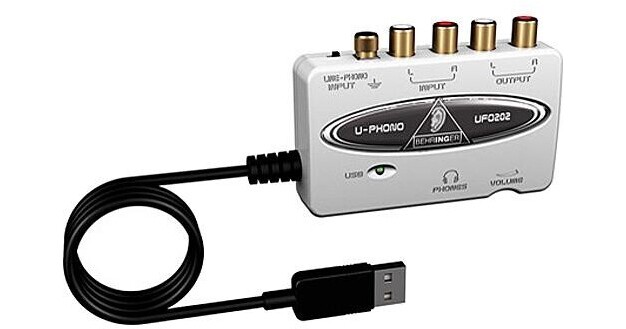
The U-CONTROL UFO202 from Behringer is a low cost solution for transferring vinyl records and tapes to and from a computer. The USB 1.1 interface is USB bus powered and features 2 analog RCA phono inputs that can be switched between a line source and the phono preamp, and 2 analog RCA phono outputs for connecting active speakers or studio monitors.
A turntable grounding lug is included and headphone monitoring is via a stereo mini jack with a dedicated volume control. No special setup or additional drivers are required and wide computer operating system compatibility is available for both the Mac and Windows platforms. The interface ships with a large selection of audio software.
| Converters | 16-bit |
| Sample Rates | 32, 44.1 and 48kHz |
| Analog Input | 2 x RCA phono |
| Analog Output |
2 x RCA phono 1 x 1/8" TRS stereo mini Headphone |
| Digital Input | No |
| Digital Output | No |
| MIDI In/Out | No |
| Sync In/Out | Not applicable |
| Headphone Output | Yes |
| THD + N | 0.05% typical @ -10dBV, 1kHz |
| Dynamic Range | Not specified by manufacturer |
| Frequency Response | 10Hz to 20kHz, +/-1.0dB @ 44.1kHz |
| Power Requirements | USB bus |
| System Requirements |
Mac: G3 300MHz or higher OS 9.0.4 or higher, 10.x or higher Minimum 128MB RAM USB 1.1 port PC: |
| Dimensions (WxDxH) | 3.5 x 2.4 x 0.9" (88 x 60 x 22mm) |
| Weight | 4.2 oz (0.12kg) |
| Specialties | Bundled with Audacity, Podifier, Juice, Podnova and Golden Ear software |
REVIEW SNAPSHOT®
by PowerReviewsPros
Cons
Best Uses
Most Liked Positive Review
Amazingly versatile, inexpensive product
This bargain priced product is a -
1. line level preamp;
2. phono preamp;
3. analog to digital converter (ADC);
4. digital to analog converter (DAC);
This bargain priced product is a -
1. line level preamp;
2. phono preamp;
3. analog to digital converter (ADC);
4. digital to analog converter (DAC);
5. headphone amplifier.
I bought the Behringer to digitize my old vinyl records, which were all bought used and are of varying quality. It works fine either in line mode (using the line out from my full function stereo preamp or Vestax Handy Trax portable turntable) or phono (connecting it directly to my Rega turntable). I have also used it as a DAC to export music files on my computer to my stereo.
This is a very simple, plug-and-play device and has no learning curve. However, it pays to invest some time learning the basics of the Audacity conversion software.
I am sure there are better ADCs out there than this little box. But you cannot go wrong with this for casual conversion of less than pristine records.
VS
Most Liked Negative Review
Where's the stereo separation?
I'm ripping my old LP's. Any sounds/voices that are distinctly left or right channel are virtually lost using the USB adapter; that sound is way in the background. The stereo sounds mixed and...Read complete review
I'm ripping my old LP's. Any sounds/voices that are distinctly left or right channel are virtually lost using the USB adapter; that sound is way in the background. The stereo sounds mixed and centered, not like the original.
In all fairness, I have the same problem using the StarTech capture cable that I bought previously. I bought this in the hope that it would work better, but ...
I ended up burning the LP's to CD on a CD recorder, then ripping the CD in my PC.
Reviewed by 28 customers
Sort by
Displaying reviews 1-20
Previous | Next »
Pros
Cons
Best Uses
Comments about Behringer UFO202 - USB 1.1 Digital Audio Interface:
Well thought out, intuitive design. Compact and easy to use. Exceptional quality. The bonus software is a big plus.
Pros
Cons
Best Uses
Comments about Behringer UFO202 - USB 1.1 Digital Audio Interface:
Used this product to digitize some old cassette tapes. Simple, quick setup. Just plugged the tape deck in with RCA cables, plugged the device into the computer using the USB cable and started recording.
Pros
Cons
Best Uses
Comments about Behringer UFO202 - USB 1.1 Digital Audio Interface:
After all the advice I got on what was Hot! and what was not!. I did my home work and found the UFO-202 was exactly what I was looking for! All I wanted to do is connect my Board to the computer! I didn't need any of the other gadgets that suppossedly made my life better!/I already have a nice studio. All I needed was something to put it all on disc and the 202 does it! Even the Audacity software included with the 202 is pretty user friendly.And believe me! I'm computer illiterate/ But if I can use it! Anybody can!
Thanks Guys! Just what the Musician ordered!
Comments about Behringer UFO202 - USB 1.1 Digital Audio Interface:
Does what it says it can do. As far as sound quality output, it doesn't make a real difference if you are trying to use it for that purpose.
Pros
Cons
Best Uses
Comments about Behringer UFO202 - USB 1.1 Digital Audio Interface:
The software that comes with it makes it very easy to clean up some of the gross stuff from old tapes.
Pros
Cons
Best Uses
Comments about Behringer UFO202 - USB 1.1 Digital Audio Interface:
I have a modest collection of music on vinyl and tape that I wanted to digitize. Since all of my computers are notebook or netbook sytle machines they lack the necessary audio ports to perform this task and the Behringer UFO202 looked like a good solution. I've had the UFO202 in possession for several weeks now and have yet to use it for my original intent. Instead I've had it running non-stop as an external DAC as it provides a vast improvement over the internal audio circuits in my notebook and netbook hardware. Playing high resolution and/or lossless music files reveals the value proposition the Behringer UFO202 bring mobile computing. I'll get around to ripping some vinyl albums someday, but for now I'm enjoying digital music as never before.
Pros
Cons
Best Uses
Comments about Behringer UFO202 - USB 1.1 Digital Audio Interface:
Anyone looking for an easy way to transfer vinyl to digital, here's the right product. It's simple to connect and you'll be up and recording in little or no time. The included software has a bit of a learning curve and is tedious, but with a little effort it can be mastered. I'm really happy I found and purchased this item. Highly recommended.
Pros
Cons
Best Uses
Comments about Behringer UFO202 - USB 1.1 Digital Audio Interface:
The device itself works fine and is very economically priced (I'm transferring my record albums onto my computer and then copying the WAV files onto CD's). The editing software is another story. There were two discs of free editing software that came with it. The simple one (U-control) works OK but there are no instructions on how to actually edit(cut out stuff, etc) so I'm still trying to figure that out. The second software disc (EnergyXT2.5) had a "serial number" on the package but that number didn't work when I tried to activate it so I've never even been able to use it. If you are a little tech challenged I'd say it might be hard using this. You can poke around and try to figure it out, ask someone young, try and call the Behringer support people or don't buy it.
Pros
Cons
Best Uses
Comments about Behringer UFO202 - USB 1.1 Digital Audio Interface:
I'm using it to transfer LPs and cassettes to digital files. I've only done a couple, but everything seems to work as advertised. It's simple and straight forward once you get the hang of it.
Pros
Cons
Best Uses
Comments about Behringer UFO202 - USB 1.1 Digital Audio Interface:
great product especially for the cost... simple to use and effective.
Pros
Cons
Best Uses
Comments about Behringer UFO202 - USB 1.1 Digital Audio Interface:
I can't ask more of this unit for digitizing my vinyl LPs! It includes everything needed to interface between the turntable and computer. The ground post and long USB cable (4-5') allow for handy placement of the turntable; headphone monitoring outlet has a volume control; audio output is clear and at a good level.
I have not loaded the software that comes with it, I've been using the included Audacity for a number of years, of which I am a fan. Looking forward to experimenting with the remaining software.
This unit works much better than a previously used (borrowed, same price range) interface, it was found lacking in all the above.
The only negative (common to both), it Hijacks the system audio; in System Preferences (Mac), input & output USB sources are required to be selected, this prevents working in parallel with other sound applications, adding a lot of time to the workflow.
Well made and designed, at a very reasonable cost. If your on the fence, I say, buy it. Bill S
Pros
Cons
Best Uses
Comments about Behringer UFO202 - USB 1.1 Digital Audio Interface:
I use this for recording at home so that I can plug my mixer/4 track straight into my computer. It works like a charm and I haven't noticed any latency between the instruments and computer. It has two settings - one for line and the other for turntables so it is versatile for such a simple device. Good product I recommend it.
Pros
Cons
Best Uses
Comments about Behringer UFO202 - USB 1.1 Digital Audio Interface:
I like the unit very much, and the price is unbeatable for this quality. The preamp is clean, but the gain is a little weak.
The included Audacity software has no capacity for increasing sensitivity, so I'm stuck with the levels that the preamp is putting out. What's worse is that the software keeps crashing OS-X.
Pros
Cons
Best Uses
Comments about Behringer UFO202 - USB 1.1 Digital Audio Interface:
I use all wekens
Pros
Cons
Best Uses
Comments about Behringer UFO202 - USB 1.1 Digital Audio Interface:
I record LP tapes to MP3
Pros
Cons
Best Uses
Comments about Behringer UFO202 - USB 1.1 Digital Audio Interface:
The Best way to transfer those old vinyl LP's and tapes to digital.. the sound quality is excellent
highly recommended
Pros
Cons
Best Uses
Comments about Behringer UFO202 - USB 1.1 Digital Audio Interface:
I can hear wonderful music from my computer now.
When I show it to my student and they love it and
order 2 more from BH.
Pros
Cons
Best Uses
Comments about Behringer UFO202 - USB 1.1 Digital Audio Interface:
This bargain priced product is a -
1. line level preamp;
2. phono preamp;
3. analog to digital converter (ADC);
4. digital to analog converter (DAC);
5. headphone amplifier.
I bought the Behringer to digitize my old vinyl records, which were all bought used and are of varying quality. It works fine either in line mode (using the line out from my full function stereo preamp or Vestax Handy Trax portable turntable) or phono (connecting it directly to my Rega turntable). I have also used it as a DAC to export music files on my computer to my stereo.
This is a very simple, plug-and-play device and has no learning curve. However, it pays to invest some time learning the basics of the Audacity conversion software.
I am sure there are better ADCs out there than this little box. But you cannot go wrong with this for casual conversion of less than pristine records.
Pros
Cons
Best Uses
Comments about Behringer UFO202 - USB 1.1 Digital Audio Interface:
I'm ripping my old LP's. Any sounds/voices that are distinctly left or right channel are virtually lost using the USB adapter; that sound is way in the background. The stereo sounds mixed and centered, not like the original.
In all fairness, I have the same problem using the StarTech capture cable that I bought previously. I bought this in the hope that it would work better, but ...
I ended up burning the LP's to CD on a CD recorder, then ripping the CD in my PC.
Pros
Cons
Best Uses
Comments about Behringer UFO202 - USB 1.1 Digital Audio Interface:
Plugged it into my late 60's era vintage turntable and was spinning records on my PC within minutes. Very easy and clean. Would highly reccommend!
Displaying reviews 1-20
Previous | Next »